VibeFree - Free AI Coding Agent for VS Code
A free, agentic AI coding assistant that lives in your editor - a no-cost alternative to GitHub Copilot, Cursor, and Cline. No API key, no subscription.


VibeFree is a free AI coding agent for Visual Studio Code. It's not autocomplete - it's an agentic assistant that reads and edits files, runs terminal commands, searches your workspace, and connects to your MCP servers, all from a chat panel next to your code. If you're looking for a free Copilot alternative, a free Cursor alternative, or a free Cline alternative that doesn't require your own API key, this is it.
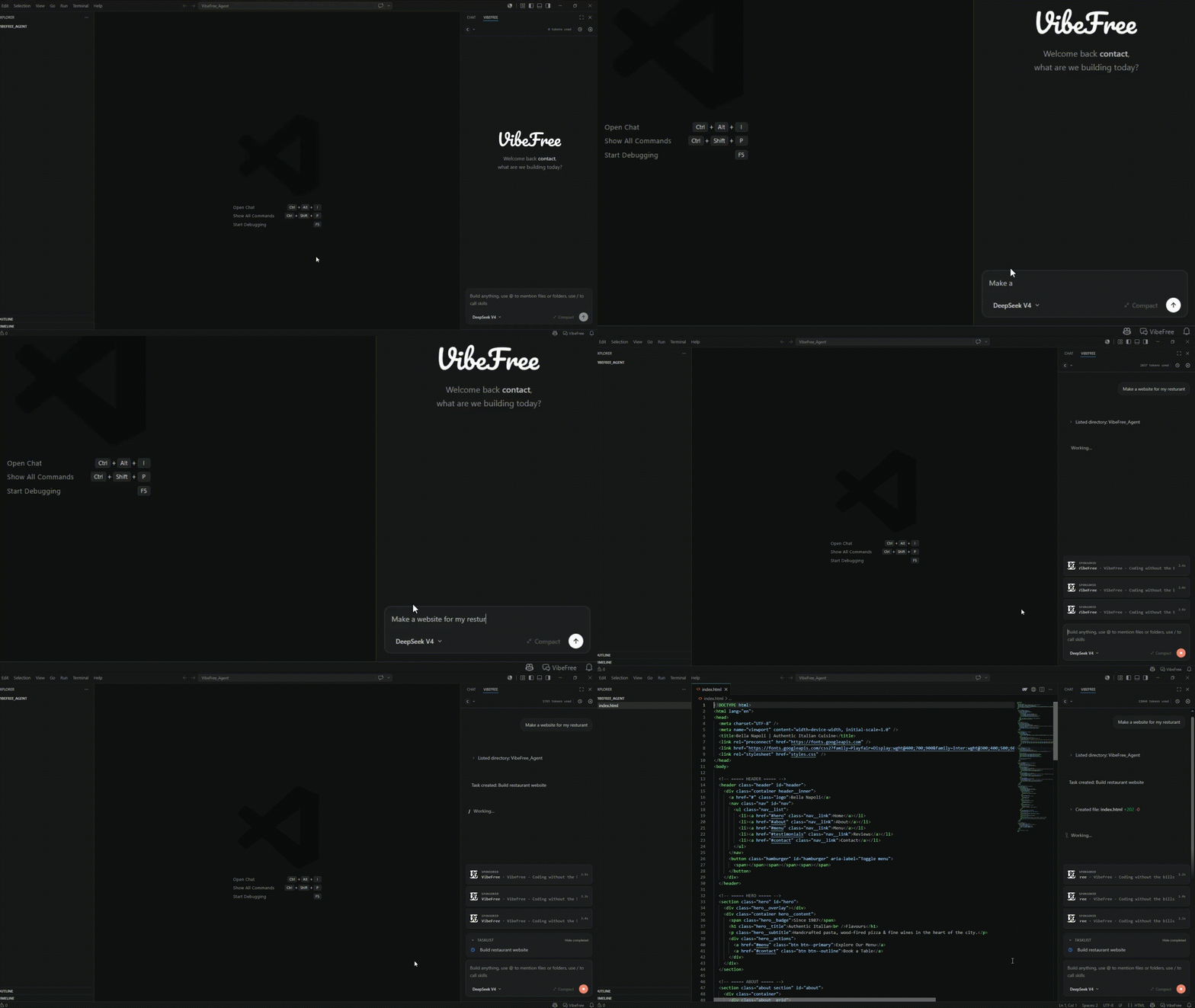
Why VibeFree
- Free AI coding assistant - ad-supported instead of subscription-gated. No OpenAI, Anthropic, or DeepSeek API key required.
- Agentic, not autocomplete - plans multi-step work, edits multiple files, and runs commands to verify its own changes.
- Works with your existing MCP servers - bring the Model Context Protocol tools you already use.
Features
- Chat panel, right next to your code - opens as a webview beside the active editor, so the conversation and the file you're discussing stay on screen together.
- Agentic file editing - creates files, applies single or multi-location edits, and opens the changed file for you automatically. Every edit shows an inline diff (added/removed line counts) before you move on.
- One-click rewind - every turn in the conversation is checkpointed. Roll back to an earlier point in the chat and VibeFree restores the files it touched to their prior state.
- Workspace-aware tools - list directories, glob for files, and run
git grep-backed searches scoped to your project.
- Terminal command execution - run commands in the background, poll their status, stream output, or send input to a still-running process, all from the chat.
- Scheduling - ask VibeFree to remind you or re-trigger a prompt after a delay, or on a cron schedule, without leaving the editor.
- MCP integration - connects to Model Context Protocol servers defined in your local config, so existing MCP tools and resources are available inside the chat.
- Built-in task tracking - the assistant can plan multi-step work as a visible task list in the panel, checked off as it progresses.
- Interactive clarifying questions - when the assistant needs a decision from you, it asks inline via a quick-pick UI instead of guessing.
- Path permission prompts - file and command access outside your workspace requires explicit approval (once, for the session, or always), so the assistant can't silently touch files elsewhere on disk.
- Chat history - recent conversations are saved and can be reopened from the panel; nothing is lost when you switch context.
- VibeBucks wallet - your VibeBucks pay for a turn when no advertiser does, on either model. A pill over the chat shows your balance and the running turn's cost, each paid turn is marked with what it cost, and one click opens the VibeBucks tab: your balance, pending rewards, activity and surveys to earn more.
- Ads you control - sponsored units sit in a strip above the input, never inside the answer. Every ad has a menu for "Why this ad?", hiding it (or that advertiser, or that kind of ad) and reporting it, and the account menu has switches for contextual and personalised ads.
- Code-mode templates - the welcome screen offers starter templates for new projects, and sponsored, PyPI and MCP installs are shown to you for confirmation before they run.
- Syntax-highlighted responses - code blocks render with language detection and a one-click copy button.
Getting started
- Install the extension.
- Run the VibeFree command (via the editor title bar icon or the Command Palette) to open the chat panel.
- Sign in when prompted to activate your account.
- Start chatting - ask VibeFree to explain code, make changes, run tests, or investigate an issue.
Requirements
- VS Code
1.74.0 or later.
- A VibeFree account (sign-in is handled from within the panel).
- Optional: an MCP configuration at
~/.vibefree/mcp_config.json if you want VibeFree to use your existing MCP servers. You can also customize this location with the vibefree.mcpConfigPath setting.
Privacy & permissions
VibeFree only operates inside your current workspace by default. If a tool call needs to read, write, or run something outside the workspace folder, you'll be asked to approve it - once, for the rest of the session, or permanently for that path.
The agent can also search the web and read a page when it needs current information - a library version, a release note, an unfamiliar error. Fetching a page from a host it hasn't already asked about prompts you for that host. Searches and fetches are performed by TinyFish (United States) via VibeFree's own servers, which means your IP address is never sent to them; the search query is written by the model out of your conversation, so it can repeat what you typed. Private and internal addresses are always refused. See the Privacy Policy section 1.5c for the full position.
Known limitations
This is an early release. The chat panel is the whole of the extension today - there is no inline completion, and no editor-side diff review beyond the inline diffs the panel draws.
Release Notes
1.3.0
Ads
- One auction for every turn. Instead of asking VibeFree's own advertisers first and the ad networks only when those ran out, each turn is now funded by a single auction in which all of them take part. Because the networks are now asked on every message you allow them for, the consent prompt asks again and describes the new arrangement.
- Ads live in a strip above the input. Up to two small units or one large one while a response runs, one after it. Each refreshes on its own timer, and only while the panel is visible, the unit is at least half on screen and you have been active in the last minute. An ad is only counted once it has actually been seen.
- New formats. Image and banner cards, video, carousels, polls and quizzes, sign-up and promo-code units, interactive embeds and playables, a sponsor's own assistant opened in a labelled chat, and option, tip and progress cards that fit the moment - after a task finishes, or after a command fails.
- Embeds and playables run sandboxed. They load only from VibeFree's ad server, can run scripts but nothing else, and the panel ignores any message they send, so an ad can never drive the editor.
- Sponsored follow-up chips. After an answer, at most one suggested next prompt from a sponsor may appear. It never shows in auto-allow mode or on a Remote Control turn, and while a turn it started is running, VibeFree asks before every command, even ones you had always allowed.
- Sponsored installs ask first. If a sponsor's package or MCP server would be installed, you see exactly what and confirm it; the installed package is checked after the turn.
- You decide what the ads see. Every VibeFree ad has a menu: "Why this ad?", hide this ad, this advertiser or this kind of ad, and report it. The account menu has switches for contextual ads and for personalised ads (personalised is off unless you turn it on).
- Sensitive conversations get untargeted ads. If a message looks like someone in crisis, that turn and the next three show only VibeFree's own ads, untargeted and with no network asked.
VibeBucks
- Sponsored rewards and offers. The VibeBucks tab lists sponsored rewards and offers alongside surveys; picking one opens it on vibefree.dev/earn, already signed in.
- The VibeBucks tab follows your theme's text colour instead of turning buttons and tabs blue.
Code mode
- Templates on the welcome screen to start a new project from.
- Install checks. PyPI and MCP installs are confirmed with you before they run.
1.2.0
VibeBucks
- A VibeBucks wallet in the panel. When no ad can pay for a turn, your VibeBucks balance can, on either model. A pill at the top left of the chat shows your balance and, while a turn is running, what it has cost so far; between turns it shows anything still pending.
- Every VibeBucks turn says what it cost. A "Paid with VibeBucks" line appears under the answer, the same as in the web app.
- A VibeBucks tab. Click the pill to see your balance, what is still pending, your activity, and the surveys you can take right now. Picking one opens it on vibefree.dev in your browser, already signed in.
- A way forward when nothing can pay. If no ad, VibeBucks or free allowance can fund a turn, the notice now carries an Earn VibeBucks button that opens the same tab.
Models
- The model picker comes from VibeFree's servers, so new models can appear without an extension update. The two built-in models stay as an offline fallback.
- Every model now runs on US hosts with zero data retention. DeepSeek V4.1 Flash and the free house model, now gpt-oss-20b, are both served that way; the model names in the picker match what actually answers.
Ads
- Better-matched ads on follow-ups. The ad networks now see the whole conversation rather than the last ten messages, so a follow-up like "make the button orange" still reads in the context the chat opened with. Because more is shared than before, the consent prompt asks again, and says what each network receives.
Security
- Sign-in is bound to the window that started it. The browser sign-in returns with a one-time code that only the requesting window accepts; signing in to a different account turns Remote Control off.
- Remote Control can no longer turn on auto-allow. From the browser it can switch auto-allow off, but never on.
- Paid-model turns are now tied to the ad that paid for them.
1.1.1
- The agent's instructions now come from VibeFree's servers instead of being built inside the extension. Nothing changes in how it behaves - the server builds the same prompt the panel used to - but the prompt is no longer shipped in the extension or sent from your editor, and replies that start reciting it are cut off with a short refusal.
- Context compaction asks for its summary the same way.
1.1.0
Models and the free tier
- Two models, switchable from the panel. DeepSeek V4.1 Flash is paid for by advertising; gpt-oss-20b runs on a free daily token allowance. A meter beside the picker shows what is left of the allowance and when it resets (midnight UTC).
- Turns fall back rather than fail. When no advertiser can pay for a DeepSeek turn, the chat moves to Llama and says so, instead of refusing to answer.
Ads
- A cascading funding waterfall. VibeFree's own advertiser campaigns pay first; an external ad network is asked only when those run out; below both sit VibeFree's own house ads and the free daily allowance.
- External ads are opt-in and explained before they are used. You are asked once, when the panel first opens, with the two networks named (Adgentek, LLC and Thrads Corp), what is sent to them, and what saying no costs you - which is the second funding tier, never a model. The answer can be changed or withdrawn at any time from Ad settings in the panel menu.
- Sponsor formats. A sponsored card, poll or product carousel can appear under an answer that advertising paid for, styled to match the web app's chat. An impression is only ever reported for something actually on screen.
- Adgentek's ad code runs inside the chat panel as of this release, which is what the consent prompt now asks about; everything else in the ad tier is still fetched by VibeFree's servers rather than by your editor.
Agent capabilities
- Web search and page fetch. The agent can search the web and read a page when it needs current information. Searches and fetches go through VibeFree's servers (performed by TinyFish), so your IP address is never sent to them, and a host it has not asked about before prompts you first.
- Attachments are parsed locally. PDF, DOCX and spreadsheet attachments are read inside the editor, with the parsers shipped in the extension - no upload and no network call to read a document.
- Remote Control. Pair a VS Code window to your VibeFree account and drive that window's chat from the browser: the transcript and activity mirror over, and prompts, answers and stop come back. Added as the VibeFree: Remote Control Status command.
- A leaner prompt on the free model. The house model gets a compact system prompt and tool set, which leaves more of its context for your actual conversation.
Accounts
- Refresh tokens. Signing in lasts; a session that expires now renews itself instead of dropping you back at the sign-in screen mid-task.
1.0.1
- Standardized metadata formatting and updated the demo GIF for the VS Code Marketplace.
1.0.0
Initial release of VibeFree.
| |


