Vestige
Understand this change and what it will break, so you can push it with confidence.
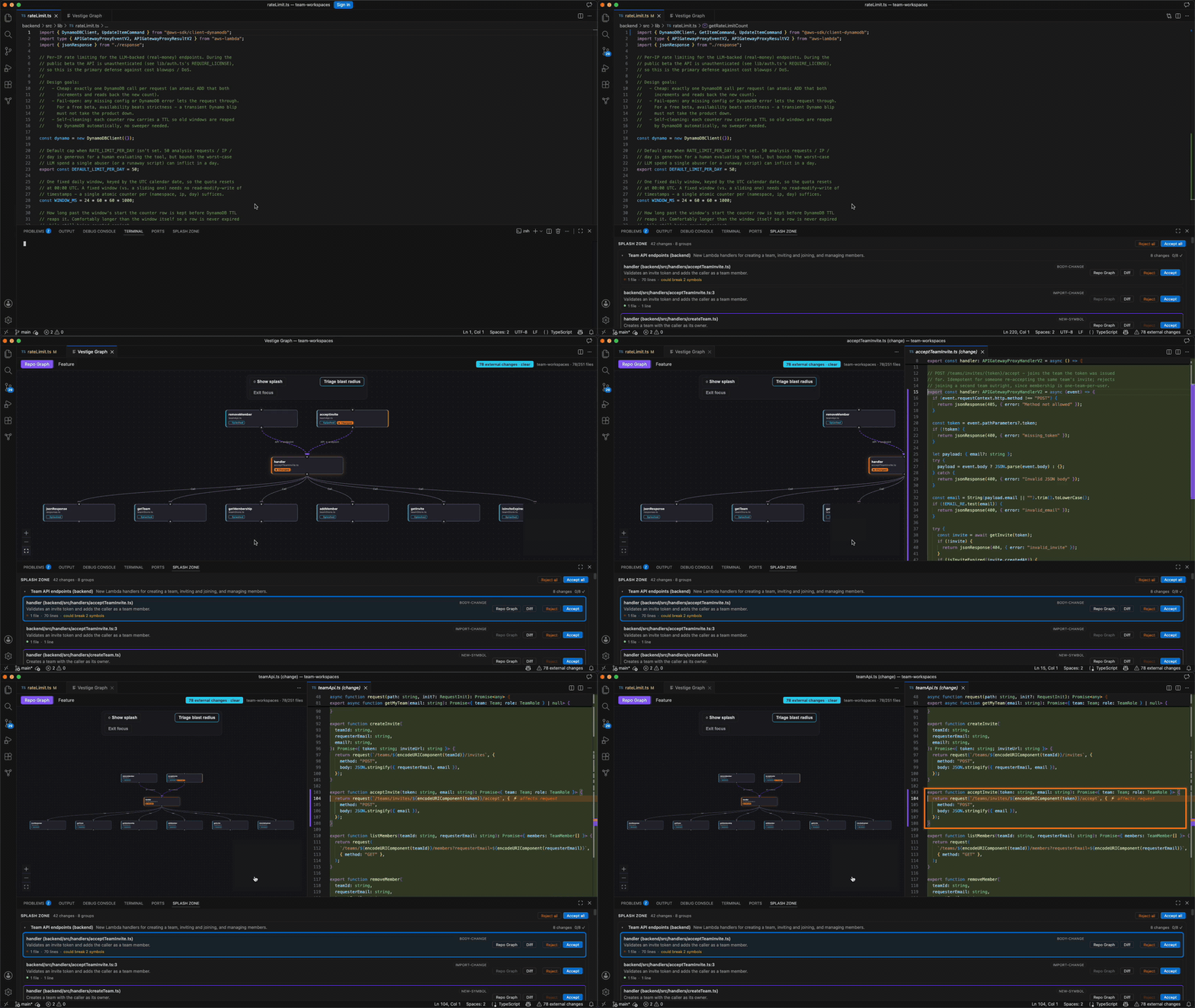
Vestige makes AI-generated diffs reviewable before they're pushed. When an LLM
changes a lot of code at once, Vestige answers three questions fast:
- Where do I start? — entry points and a guided reading order for the change.
- What could this affect? — the blast radius: everything the change can reach or break.
- What did this code do before? — the surrounding context, without re-deriving it.
How a review works
- Open a folder. Vestige scans and parses it locally — no LLM calls — to
build a call graph and a file-dependency graph.
- Read the graphs. Click the Vestige icon in the activity bar, or run
Vestige: Open Graph, for two tabs on one panel: Repo Graph (function
calls) and Feature (feature clusters). Click any node to jump to that
code.
- Get notified when something changes outside your own typing — an AI
agent, a
git pull, a bulk edit. Vestige detects it and offers to open the
Splash Zone, or opens it automatically if you've turned on
vestige.splashZone.autoOpen.
- Review in the Splash Zone. The change is broken into an ordered set of
review cards, each with its own blast radius, an inline or split diff, an
LLM-generated one-line summary, an Explain action for deeper context,
and accept/revert controls.
New to Vestige? Run Vestige: Getting Started for a six-step walkthrough
(map your project, choose your AI model, read the graphs, review a change,
judge the blast radius, explain & decide) that links straight to the relevant
commands.
Requirements & AI setup
Vestige's local parsing, graphs, and blast radius work the moment you open a
folder — no setup, no account. Its AI features (snippet explanations, change
summaries, feature-cluster names) need a language model, and there are two
ways to give it one:
| Pathway |
Setup |
Best for |
| GitHub Copilot |
None — Vestige uses VS Code's built-in Language Model API automatically. |
VS Code with an active Copilot subscription. |
| Your own API key |
Run Vestige: Set LLM API Key and paste an Anthropic, OpenAI, or Gemini key. |
Cursor (no vscode.lm), or VS Code without Copilot. |
vestige.llm.source controls which pathway is used: auto (default) prefers
Copilot and falls back to your key automatically once its quota runs out;
vscode or apiKey pin one pathway. Switch anytime with
Vestige: Choose LLM Source, or by clicking the LLM status-bar item. Keys are
stored per-provider in VS Code's SecretStorage, never in settings files.
Design principles
- Impact analysis is computed, not guessed. Blast radius comes from the
parsed call/dependency graph — deterministic and local, never an LLM
hallucinating what a change touches.
- The LLM only labels and summarizes. Snippet explanations, change-review
summaries, and feature-cluster names are generated text on top of the
analysis; they never decide what's affected.
- Analyses are cached. Re-opening a graph or a review doesn't re-run or
re-bill work that's already been done.
Data & privacy
Call-graph, dependency-graph, and blast-radius analysis run 100% locally —
nothing about your code's structure leaves your machine for these. There is no
Vestige backend or license key involved in any AI feature.
Three features send code to whichever LLM pathway you've configured (Copilot,
via VS Code, or your own Anthropic/OpenAI/Gemini key, sent directly to that
provider):
- Explain Selection sends the selected code snippet.
- Change-review summaries (the one-line summaries on Splash Zone cards)
send the changed-code snippets for that chunk.
- Feature-cluster analysis sends pre-computed summaries of your code, not
raw source.
Nothing is sent unless you use one of these features, and it only goes to the
provider you've chosen. There is no telemetry and no analytics.
Vestige: Send Feedback is the one exception: if you submit it, your
message (and any attachments you add) go to Vestige's feedback endpoint —
never your code.
Settings
| Setting |
Default |
Description |
vestige.llm.source |
auto |
auto prefers Copilot and falls back to your API key; vscode or apiKey pin one pathway. |
vestige.llm.provider |
anthropic |
Provider for the API-key pathway: anthropic, openai, or gemini. |
vestige.llm.model |
(empty) |
Model id override. Leave empty for the provider's default. |
vestige.splashZone.autoOpen |
false |
Automatically open the Splash Zone when an external change is detected, instead of showing a notification. |
vestige.ignore.folders |
[] |
Extra folder/file names to skip when scanning, on top of the built-in defaults. |
vestige.ignore.unignore |
[] |
Built-in default ignore names to scan anyway. |
First-launch limitations
- TypeScript/JavaScript, Python, Go, and Java are supported. The parsers
ship with the extension (tree-sitter compiled to WebAssembly), so nothing to
install — open a folder in any of these languages and the graphs, blast
radius, and reviews work the same. Other file types are treated as plain
dependency-graph nodes.
- Single-root workspaces only. Vestige scans the first folder in your
workspace.
- Re-parsing on file change isn't incremental at the AST level yet. Fine
for small/medium repos; large monorepos will feel the rescan.
- Feature View's feature map is a whole-repo analysis, generated on
demand and cached, not something that updates live.
- This is an early release. Expect rough edges, and remember the blast
radius is only as good as the static call graph — dynamic dispatch and
reflection can escape it.
Commands
| Command |
Description |
Vestige: Open Graph |
Open the graph panel (last-used tab). |
Vestige: New Graph Tab |
Open an additional graph panel tab. |
Vestige: Show Repo Graph |
Open the call-graph tab. |
Vestige: Show Feature View |
Open the feature-cluster tab. |
Vestige: Explain Selection |
Explain the selected code (sends the snippet to your configured LLM pathway). |
Vestige: Open Splash Zone |
Open the external-change review panel. |
Vestige: Rescan Workspace |
Force a fresh local scan/parse. |
Vestige: Clear Cache |
Clear cached analysis/explanations. |
Vestige: Getting Started |
Open the walkthrough. |
Vestige: Choose LLM Source |
Pick between Copilot, your API key, or auto. |
Vestige: Set LLM API Key |
Store an Anthropic/OpenAI/Gemini key for the API-key pathway. |
Vestige: Clear LLM API Key |
Remove a stored provider key. |
Vestige: Manage LLM API Keys |
View, change, or remove stored provider keys. |
Vestige: Send Feedback |
Send a bug report or feature request, with up to three attachments. |
Feedback
Run Vestige: Send Feedback to report a bug or request a feature, straight
from the editor — pick a type, write a message, optionally leave an email for
follow-up, and attach up to three screenshots or screen recordings. Nothing
about your code is included.
v0.2.0 — local-first AI: Copilot or your own API key, no Vestige backend or license required.

