
Vector arDSLSupport for the AUTOSAR DSL language Installation Launch VS Code Quick Open ( Ctrl+P), paste the following command, and press enter.Copied to clipboard |

AUTOSAR DSL for Visual Studio CodeThe AUTOSAR DSL (arDSL) is a simplified textual format to model system configurations and model descriptions for the AUTOSAR standard. This extension transforms Visual Studio Code into a powerful development environment for arDSL, bringing professional syntax highlighting, intelligent code completion, real-time error detection, and instant documentation access right to your fingertips. Development is faster and more enjoyable with features that help you write correct code the first time. FeaturesBeautiful Syntax HighlightingYour arDSL code now comes alive with carefully designed syntax highlighting that makes it easy to read and understand at a glance. Keywords, types, strings, comments, and other language elements are clearly distinguished with colors that adapt to your Visual Studio Code theme (both light and dark modes are supported). We recommend to set 'Dark+'/'Light+' or 'Dark Modern'/'Light Modern' as Visual Studio Color theme for your arDSL projects. 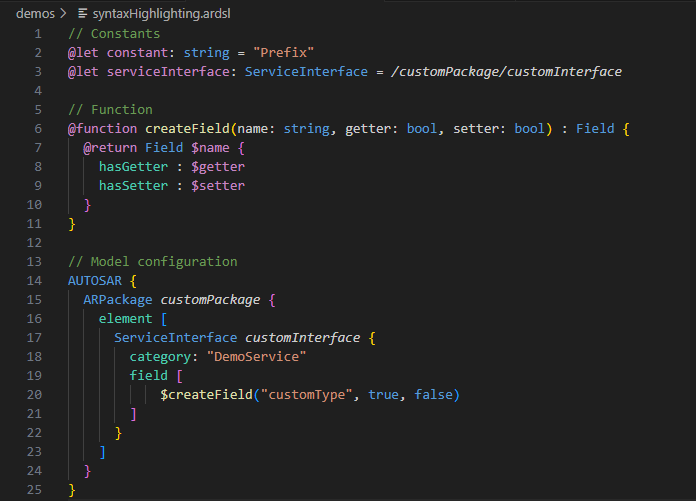
Intelligent Code CompletionStart typing and watch as the extension suggests exactly what you need. The code completion system understands the AUTOSAR meta-model and your code's structure to offer relevant suggestions: 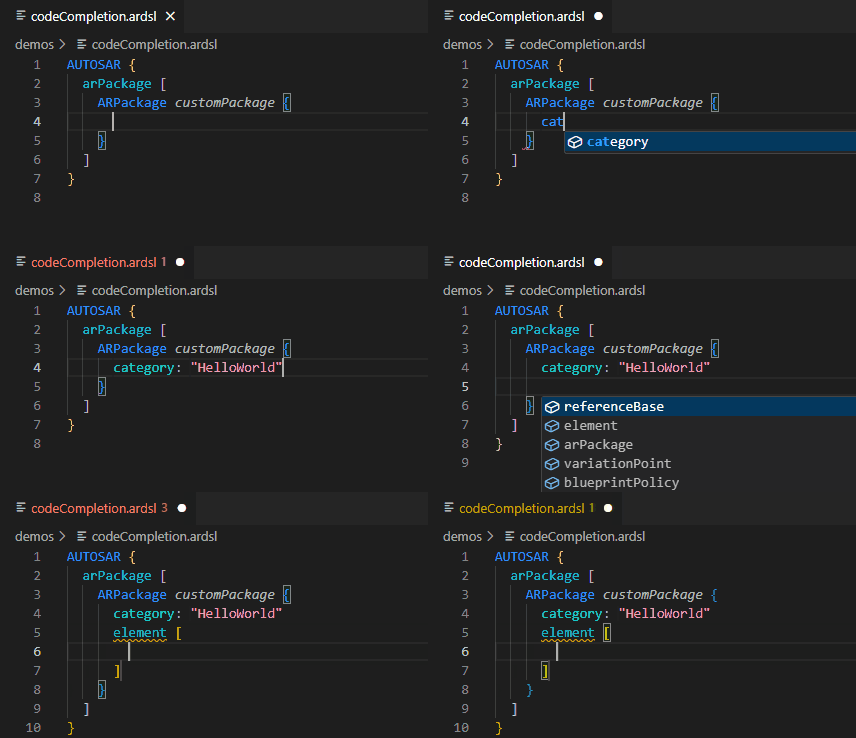
Real-Time Error DetectionStop waiting for manual compilation to find errors. The extension runs the arDSL compiler in the background as you type, showing errors and warnings immediately in your editor with familiar red squiggles. Click on any error to see a detailed explanation, and quickly navigate between issues to fix them efficiently. 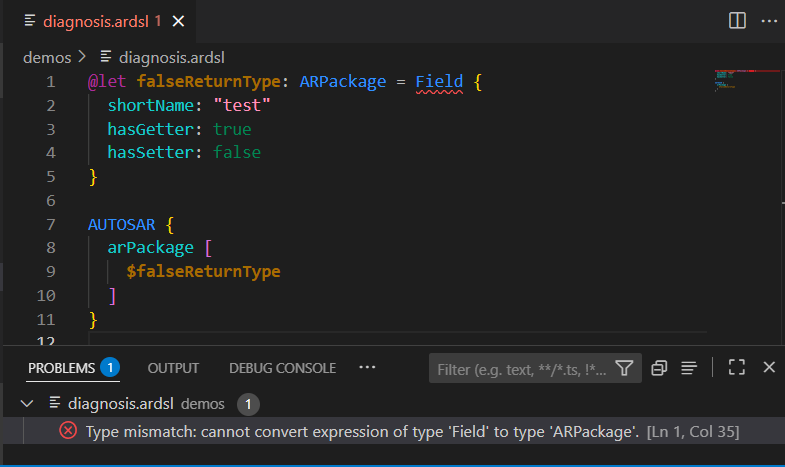
This instant feedback helps you catch mistakes early, understand what's wrong, and fix issues before they compound. Instant Documentation on HoverLearning the AUTOSAR meta-model is now effortless. Simply hover your mouse over any element to see:
No more switching to external documentation or guessing what a property means - the answers are right there when you need them. Quick Navigation with Go-to-DefinitionJump instantly to where things are defined with Go-to-Definition support. Ctrl+Left-Click on any symbol, reference, or model navigation expression to navigate directly to its definition:
This makes exploring and understanding large models effortless, helping you quickly understand code structure and dependencies. Show Type HierarchyYou can view the type hierarchy of any AUTOSAR type by selecting Show Type Hierarchy from the context menu, when the cursor is over an AUTOSAR type. Automatic Compiler DownloadsThe extension automatically downloads and manages the arDSL compiler for you. When you open an arDSL file, the extension checks for the latest compiler version and downloads it if needed - no manual setup required. The compiler runs in the background to power all the language features. InstallationInstall the extension from the Visual Studio Code Marketplace. When the extension is activated, e.g., by opening an
The compiler is deployed in the corresponding subdirectory Follow the simple installation progress visualized by a progress bar in Visual Studio Code. After installation, the language server is automatically started. Select another compiler versionYou can select another compiler version by running the command
Settings
arDSL DocumentationThe documentation is installed in the same directory as the compiler, and can be found in the
Compile to ARXML/arDSLYou will find the compiler executable in the Use the
Compile in Visual Studio CodeYou can compile the current arDSL file by pressing the compile button in the upper right corner of your file window. Status barThe status bar in the lower right corner shows the selected arDSL compiler version and AUTOSAR schema version next to the language mode, when an arDSL file is selected in the editor. In the status bar you can also change the arDSL compiler version and the AUTOSAR schema version. Meta-model DocumentationUse the More information about available commands and options can be explored via
|