Angular Files Navigator for Visual Studio Code
Jump instantly between the files that make up an Angular building block.
Put the caret in any file of a component or NgRx feature and press
Ctrl+Alt+A ("A" for Angular). A search bar recommends every related file
that exists; use the arrow keys or type a shortcut such as T, U, or
S, then press Enter to open the selected file.
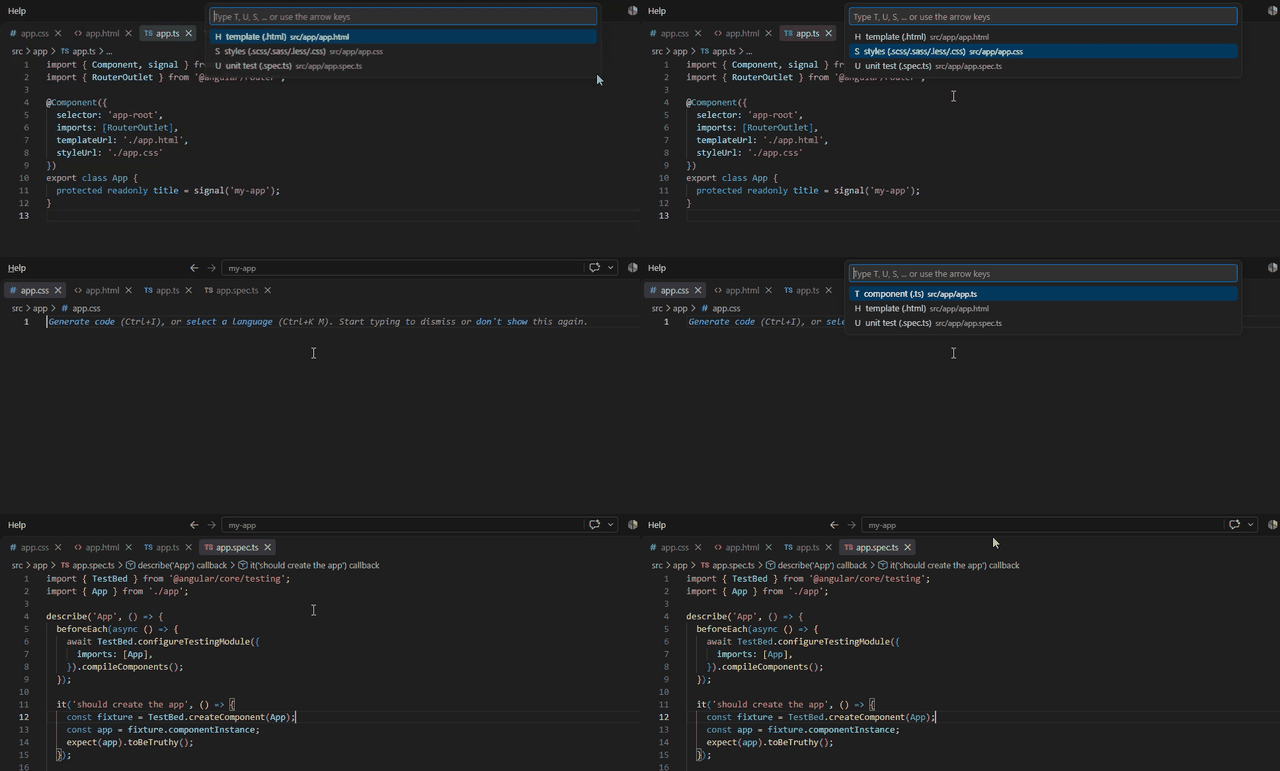
Features
- Navigate between Angular component TypeScript, template, styles, and tests.
- Navigate between NgRx reducers, effects, selectors, actions, and facades.
- Navigate to Angular modules.
- Support classic names such as
user.component.ts and flat names such as
user.ts, user.html, and user.css.
- Search the current directory first, then find the nearest matching file in
the workspace.
- Use the search-bar recommendations, arrow keys, shortcut letters, editor
context menu, or Command Palette.
| Key |
Opens |
T |
Component TypeScript (*.component.ts or *.ts) |
H |
Component template (*.component.html or *.html) |
S |
Styles (*.scss, *.sass, *.less, or *.css) |
U |
Unit test (*.spec.ts) |
R |
NgRx reducer |
E |
NgRx effects |
L |
NgRx selectors |
A |
NgRx actions |
F |
NgRx facade |
M |
Angular module |
T and U are context-aware. For example, user.selectors.spec.ts can
toggle between the test and user.selectors.ts.
Usage
Open an Angular file and press Ctrl+Alt+A, or right-click in the editor and
choose Angular Files Navigator: Related Files.... Select a related file
from the search bar. Use the arrow keys to move through the recommendations,
or type T, U, S, and the other shortcut letters to select a role, then
press Enter. The extension searches the current directory first and then
the workspace for the nearest matching file.
Compatibility
The extension supports Visual Studio Code 1.85.0 and newer.
Open source under the MIT License. Contributions are welcome at
github.com/vunguyen96/angular-files-navigator.
License
MIT

