Skip to content
| Marketplace
Sign in
Visual Studio Code>Other>Ultimate Project ManagerNew to Visual Studio Code? Get it now.
Ultimate Project Manager

Ultimate Project Manager

Undisconnected

| (0) | Free
Manage projects from a dedicated sidebar with local metadata and images. See your projects when opening Cursor or VSCode.
Installation
Launch VS Code Quick Open (Ctrl+P), paste the following command, and press enter.
Copied to clipboard
More Info

Ultimate Project Manager

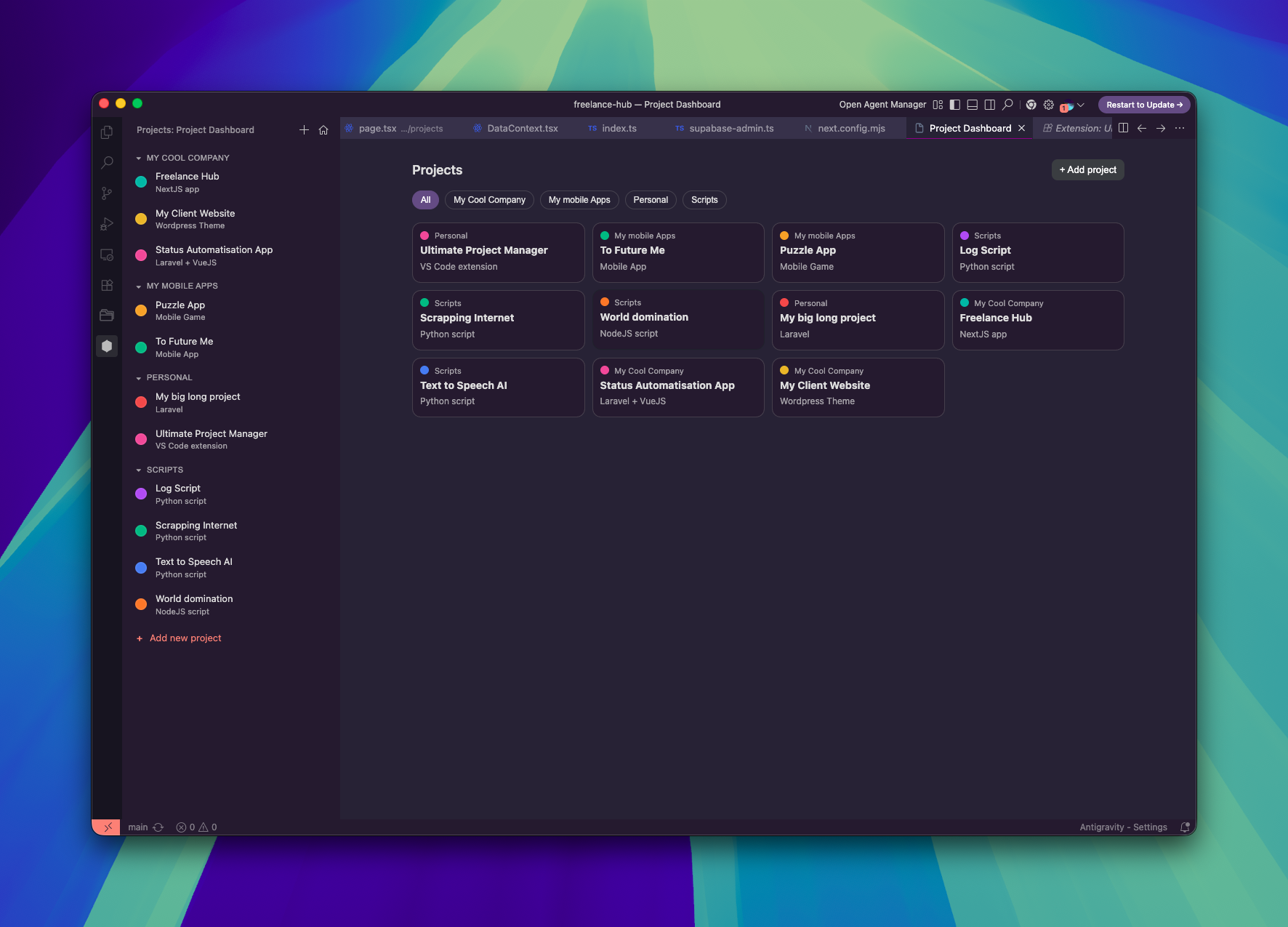
Ultimate Project Manager is a VS Code and Cursor extension that gives you a custom project home: a Projects sidebar plus a full Project Dashboard tab.

You save your own folders with metadata (name, description, color, category), then quickly open, edit, and organize them. Everything is stored locally in this extension.

Screenshot

Ultimate Project Manager Dashboard

What is new in the latest updates

  • Sidebar is now a custom webview view (not a basic tree), with grouped categories and better interaction.
  • Added full dashboard tab with project cards and category filter chips.
  • Added right-click context menu actions in both sidebar and dashboard: Open, Reveal in Finder, Edit, Delete.
  • Added project editing flow directly from UI and command palette.

  • Added category management commands: Create, Rename, Delete (delete moves projects to Uncategorized).
  • Added startup dashboard behavior so dashboard can open automatically when the window loads.
  • Added state persistence in webviews (collapsed categories and active dashboard filter are remembered).

Features

  • Personal project list saved by folder path.
  • Name, description, color, and category per project.
  • Category grouping with collapsible sections in the sidebar.
  • Dashboard grid with category-based filtering.
  • One-click add project from sidebar and dashboard.
  • Open project in current window or a new window (setting controlled).
  • Reveal project folder in Finder/Explorer.

Commands

Command prefix: Project Dashboard:

  • Open Webview
  • Add Project
  • Edit Project
  • Open Project
  • Remove Project
  • Reveal in Finder
  • Create Category
  • Rename Category
  • Delete Category

Settings

Setting Default Description
projectDashboard.openInNewWindow false Open selected projects in a new window
projectDashboard.showDashboardOnStartup true Open dashboard tab automatically after startup
projectDashboard.showDashboardOnlyWhenEmpty true Only auto-open startup dashboard when no folder is currently open

Data storage

Projects are stored as JSON in the extension global storage (projects.json), under your local user profile. No external service is required.

Install from VSIX

  1. Build the package: npm run package
  2. In VS Code / Cursor, open Extensions view.
  3. Use the menu ... -> Install from VSIX...
  4. Select ultimate-project-manager-*.vsix

Requirements

  • VS Code ^1.80.0 or compatible (Cursor supported)
  • Contact us
  • Jobs
  • Privacy
  • Manage cookies
  • Terms of use
  • Trademarks
© 2026 Microsoft