TypeMorph for VS Code
Convert JSON, YAML, OpenAPI, and JSON Schema to Zod, TypeScript, Go, Rust, Prisma, and 160+ formats — directly in your editor.
Press Ctrl+Shift+T on any JSON or YAML file. That's it.
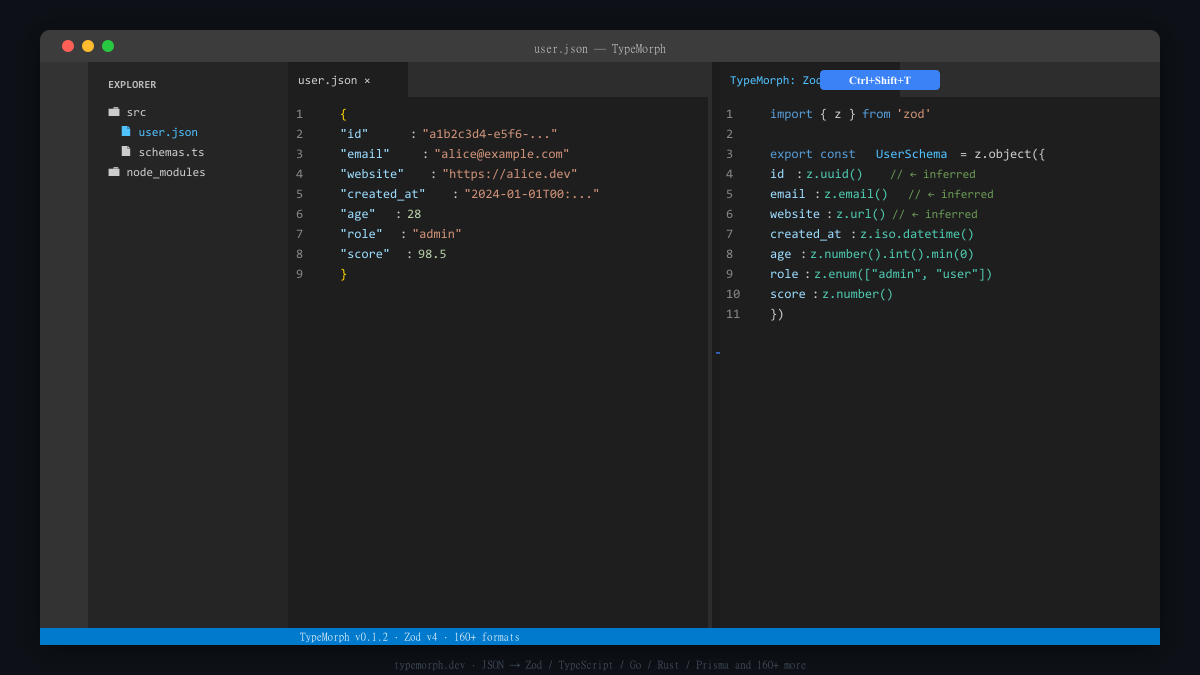
Why TypeMorph is different
Most converters output z.string() for every string field. TypeMorph reads the actual values:
Input JSON                 TypeMorph              Other tools
──────────────────────     ─────────────────────  ────────────
"id": "a1b2-c3d4..."   →  z.uuid()               z.string()
"email": "x@y.com"     →  z.email()              z.string()
"site": "https://…"    →  z.url()                z.string()
"ts": "2024-01-01T…"   →  z.iso.datetime()       z.string()
"age": 25              →  z.number().int().min(0) z.number()
"role": "admin"        →  z.enum(["admin","user"])z.string()
Features
- 160+ output formats — Zod v4, TypeScript, Go, Rust, Python (Pydantic), Java, C#, Swift, Kotlin, Dart, Prisma, Drizzle, SQL, GraphQL, Protobuf, MCP tool, OpenAI function calling, Vercel AI SDK, and more
- Real type inference — detects
uuid, email, url, datetime, int vs float, and enums from actual values
- Schema Quality Score — grades your schema A–F and lists field-level improvements
- Reverse mode — generate a JSON sample from a TypeScript interface
- OpenAPI & JSON Schema aware — auto-detects and parses multi-component specs
- 100% local — no network requests, no API keys, your data never leaves your machine
Usage
Convert a schema (Ctrl+Shift+T)
- Open any
.json or .yaml file
- Press
Ctrl+Shift+T (Mac: Cmd+Shift+T)
- Pick a target format from the quick-pick list
- Output appears instantly in a side panel with syntax highlighting
You can also select part of a file and convert just that selection.
Check schema quality
Right-click in the editor → TypeMorph: Check Schema Quality
Returns an A–F grade with a breakdown of issues:
- Fields typed as
any
- Missing format constraints (
uuid, email, datetime…)
- Mixed
camelCase / snake_case naming
- Overly deep nesting
Generate a JSON sample from TypeScript
Right-click in a .ts file → TypeMorph: Generate JSON Sample from Interfaces
Useful for seeding tests or mock data.
Commands
| Command |
Shortcut |
Description |
| TypeMorph: Convert Schema… |
Ctrl+Shift+T |
Convert current file or selection |
| TypeMorph: Check Schema Quality |
— |
Grade the schema (A–F) and list issues |
| TypeMorph: Generate JSON Sample |
— |
TypeScript interfaces → JSON sample |
| Format |
Notes |
| JSON |
Object, array, nested |
| YAML |
Standard YAML |
| OpenAPI 3.x |
Full spec, components/schemas auto-parsed |
| JSON Schema |
Draft 7 / Draft 2020-12 |
Fully tested
TypeScript · Zod v4 · Go · Rust · Python (Pydantic) · Java · C# · Swift · Kotlin · Dart · Prisma · GraphQL · Protobuf · JSON Schema · MySQL · PostgreSQL
AI tools
MCP tool definition · OpenAI function calling · Vercel AI SDK tool
More
Drizzle · Kysely · Mongoose · TypeORM · Sequelize · Yup · Joi · Valibot · React Props · Vue Props · OpenAPI · Postman · cURL · Mermaid · and 130+ more
Run npx typemorph-cli list for the full list.
CLI companion
For CI pipelines and scripting, install the CLI:
npm install -g typemorph-cli

# Convert
curl -s https://api.example.com/users/1 | npx typemorph-cli zod --root User

# Detect API schema drift (no OpenAPI spec needed)
curl -s https://api.example.com/users/1 | npx typemorph-cli check --baseline .typemorph/users.json
Web version
Need to share a conversion or use it without installing? typemorph.dev — same engine, 100% browser-based.
License
MIT — github.com/yhan86818-creator/typemorph

