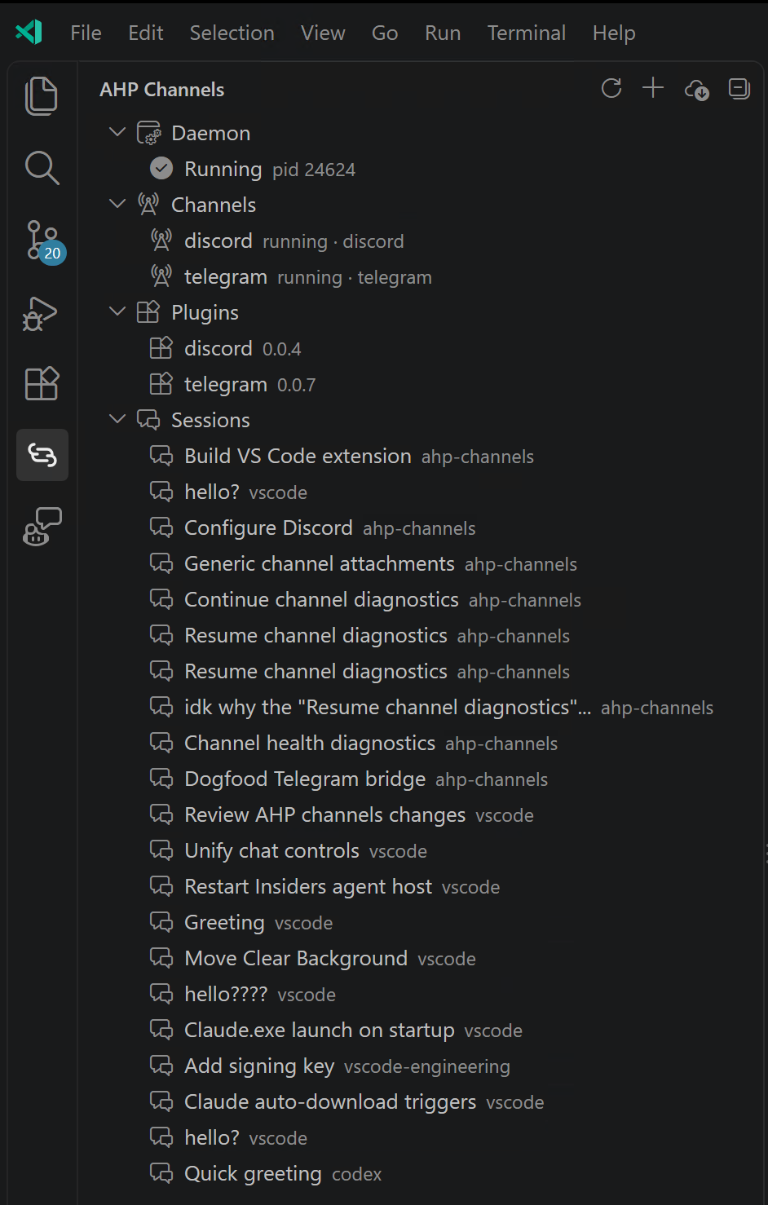
| AHP ChannelsManage AHP channel plugins, the background daemon, and session attachments. Installation Launch VS Code Quick Open ( Ctrl+P), paste the following command, and press enter.Copied to clipboard |

AHP ChannelsYour agent conversations, connected to your chat apps. Connect Claude Code channel plugins, including Discord and Telegram, to an existing Agent Host Protocol conversation. Install plugins, manage the background daemon, and choose where messages go without leaving VS Code. The runtime and daemon are bundled. No separate
One view for your channelsOpen AHP Channels in the Activity Bar.
Actions are available through hover buttons, right-click menus, and the Command Palette. Search for AHP Channels to see the commands. Before you start
The extension manages the channel daemon, not the Agent Host itself. It does not create conversations or sign you in to an agent provider. Connect your first channel
The setup and access commands are agent skills, not shell commands. Keep bot tokens private, follow the plugin's credential-storage guidance, and approve only the senders you want to reach your agent. Point a channel at another conversationIn the AHP Channels view, right-click a row under Sessions, choose Point Channel Here..., and select the channel to move. You can also right-click a channel and choose Select Session.... The chosen session receives subsequent messages; it does not have to be the conversation currently focused in the editor. Channels already attached for setup can move their setup skills to another session even when the messaging server still cannot start. You do not need to stop and restart the channel first. Working channels retain failed-handoff rollback protection, and handoffs never interrupt an active turn. Controls and troubleshootingStop Channel disables the channel and its automatic retries. Restart Channel retries it immediately when the conversation is idle. Both remain available for an enabled channel reporting an error. Stopping the daemon stops all its channels; closing the view does not stop it. Channel rows distinguish connected (messaging server running) from attached for setup (plugin skills available, messaging unavailable). An error without a setup-only attachment means the channel has no usable connection. Hover over a channel to see its health, failure reason and stage, recovery guidance, and scheduled or exhausted retries. A scheduled retry waits until the conversation is idle. Failed handoffs also show the requested session and error without changing the status of a restored healthy connection. Choose Refresh to read the latest daemon status after automatic recovery. No sessions are listedMake sure a supported local Agent Host is running and has an existing conversation, then choose Refresh. Check the AHP Channels output channel for connection or discovery errors. Local Unix-socket and Windows named-pipe connections preserve their endpoint under VS Code's HTTP proxy handling; you do not need to disable proxy support. An older configuration is unsupportedExtension updates also update its bundled bridge runtime; a separate npm CLI update is not required. Configuration schema versions are different from extension release versions. Version 2 configuration predates versioned plugin installations and is not migrated automatically. A v2 configuration upgrade action is not available yet; preserve the old configuration and do not change its version number by hand. A channel reports an error during setupA plugin may need credentials before its messaging server can start. A channel marked attached for setup still provides its setup skills in the selected session. Follow the recovery guidance in its tooltip; the daemon retries after the setup turn completes. Use Open Daemon Log for the plugin's diagnostic, such as a missing bot token
or Bun installation. A generic A required executable is missingThe MCP launch configuration declares the executable, such as Install the runtime and restart the daemon so it inherits an updated A token saved on Windows is reported as missingSome Telegram and Discord plugin versions cannot parse CRLF credential files. Save the plugin's credential file as UTF-8 with LF line endings, then retry the channel when idle. Do not share the file contents. The parser fix belongs in the plugin; this extension does not rewrite credential files or installed plugin snapshots. A setup skill is missingMake sure the channel is started and you are in its selected conversation. Use Select Session... to move a setup-only attachment to the conversation you want. If the host or session cannot be reached, the handoff fails and restores the source binding; inspect the channel tooltip for the failure. Settings and the CLI
The extension and the optional CLI share their daemon, configuration, and installed plugins when they use the same state directory. Plugin credentials and access policies remain plugin-managed. Use only one running bridge per bot account. |