TaskDev
One place for your dev tasks. One place for your logs. And your AI agent sees them too.






TaskDev is a small VS Code / Cursor / Windsurf extension that supervises your dev tasks - API, frontend, worker, watcher - and gives AI coding agents a real handle on those processes through MCP.
Why TaskDev
AI agents like Claude Code, Cursor, Codex, and Windsurf Cascade write code well and read terminal output. What they lack is a stable interface for starting, stopping, and tracking long-running processes. So they spawn duplicates, fight stuck ports, and burn tokens retrying.
TaskDev fixes that with one shared task list:
- A clean sidebar for you, with start/stop/log buttons.
- An MCP server for your agent, with the same view.
- Same processes. Same logs. No more "is the server already running?".
- Tasks live in
taskdev.json next to your code, so the whole team gets them.
Plain JSON. Local processes. Local logs. No telemetry. No network listener.
Install
- Search for TaskDev in your editor's extensions panel, or grab it from the Marketplace or Open VSX.
- Drop a
taskdev.json in your project root (the sidebar's Open task file button creates one for you).
- Run TaskDev: Install MCP config from the command palette to wire up your agent.
That's it. Hit play on any task and it runs in the background with file-backed logs the agent can read.
Quick Start
Create taskdev.json in your workspace root:
{
  "project": "My App",
  "tasks": [
    {
      "name": "api",
      "command": "dotnet run --project src/Api",
      "detail": "Starts the backend API"
    },
    {
      "name": "ui",
      "type": "npm",
      "command": "npm run dev",
      "cwd": "ui",
      "detail": "Starts the Vite dev server",
      "env": {
        "PORT": "5173"
      }
    }
  ]
}
Open the TaskDev view from the Activity Bar. See examples/taskdev.json
for a minimal example.
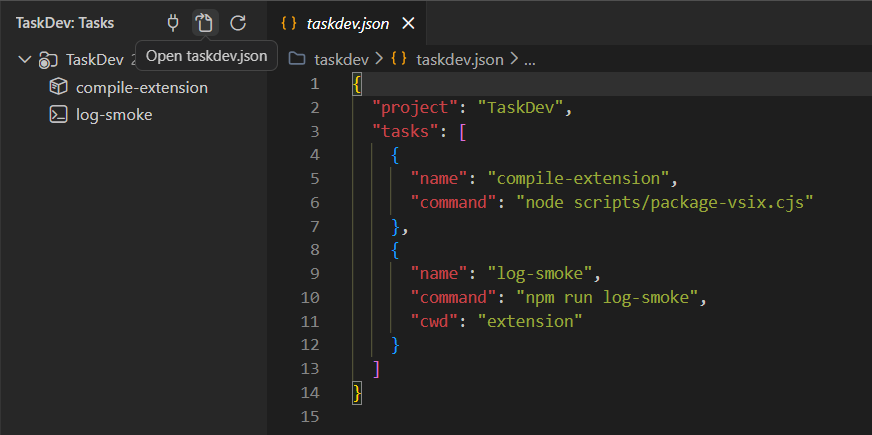
Each task row shows an inferred status icon and its name. Status, detail, command, working
directory, uptime, and log path remain available in the tooltip. Hover to
reveal play, stop, and log buttons. The view title gives you
Install MCP config, Open task file, and Refresh.
For array-shaped task lists, drag tasks with the mouse to reorder them. Drop on
another task to place it before that task, on a category to move it into that
group, or on the project to make it uncategorized. The new order and category
persist in taskdev.json.
Move task up and Move task down remain available from the context menu.
Use Add category… to create, replace, or remove a task's category.
The sidebar refreshes every 10 seconds while tasks are running, every 60
otherwise, and immediately on taskdev.json save. Multi-root workspaces show
one node per project.
Full reference on taskdev.dev/docs:
Usage Guide for practical setups,
Configuration for the schema and MCP tools,
and Security for the allow-list.
Daily Use
- Edit
taskdev.json. The sidebar updates on save.
- Hit play/stop to control tasks. The log button opens the current run in a
normal editor tab. Common ANSI colors and text styles are rendered with
editor decorations; unsupported cursor/control sequences are removed. The
raw log file remains unchanged.
- Historical logs live in
.taskdev/logs/<task>.<timestamp>.log (last 20 kept
per task).
- Stopping a task takes down its whole process tree
(
taskkill /T /F on Windows, SIGTERM to the process group elsewhere).
- Closing the editor stops all running tasks (no orphan dev servers).
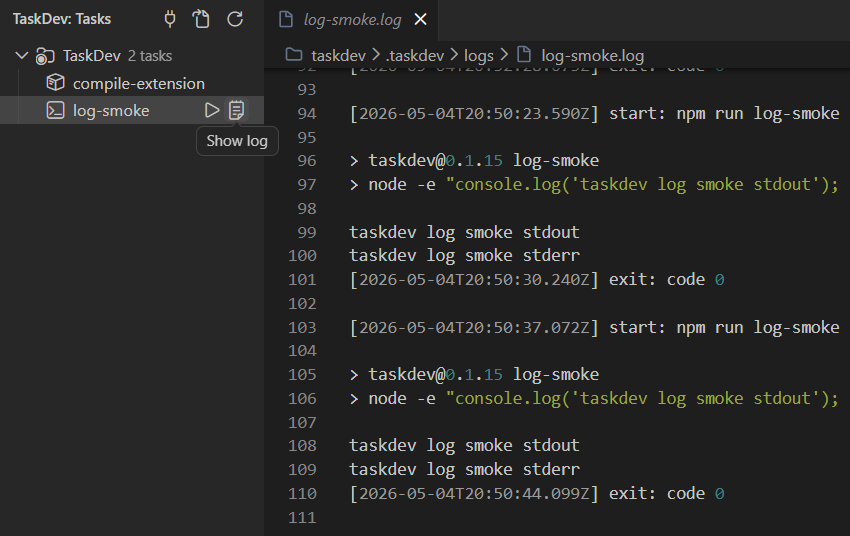
TaskDev writes runtime files under your workspace:
.taskdev/state.json
.taskdev/logs/<task-name>.log
Add .taskdev/ to .gitignore. It is local runtime data.
Task File
TaskDev looks for:
taskdev.json
.taskdev.json
Each folder in a multi-root workspace can have its own task file.
Fields:
| Field |
Required |
Notes |
project |
no |
Display name. Defaults to the workspace folder name. |
name |
yes |
Unique task name. Must match ^[A-Za-z0-9_.-]{1,64}$. |
command |
usually |
Shell command to run. May be omitted when openBrowser is a full http(s) URL. |
cwd |
no |
Relative to the task file directory, or absolute. |
env |
no |
Extra environment variables for the task process. |
type |
no |
Short category shown in tooltips, such as npm or dotnet. |
detail |
no |
Human-friendly description shown in the tree and tooltip. |
category |
no |
Group label shown as a collapsible folder in the sidebar (e.g. "Extension", "Web Site"). Tasks sharing the same label are grouped together; uncategorized tasks appear above the groups. |
openBrowser |
no |
Opens a URL when you start the task. A full http(s) URL can be used without command as a simple browser action. true and paths such as /admin are for command-backed server tasks. |
For compact config, tasks may also be an object keyed by category name. That
form avoids repeating category, but task editing commands require the array
form.
MCP For Agents
TaskDev includes an MCP server. Your agent sees the exact same task list you
see in the sidebar - same processes, same logs.
Run TaskDev: Install MCP config from the command palette and pick which
agents to wire up. Detected config files are pre-checked. TaskDev only writes
MCP config when you run this command.
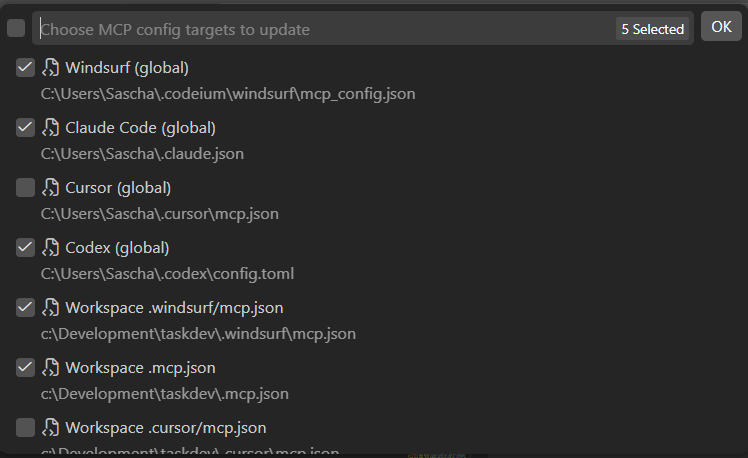
After each TaskDev update, re-run Install MCP config. The MCP config
stores the installed extension path, which changes on every version bump.
TaskDev will prompt you - nothing is rewritten until you confirm in the
picker.
A typical agent loop:
change code → taskdev_restart api → taskdev_logs api → read error → fix
No retry loops. No hung commands. No "is the dev server still running?".
The agent gets nine tools:
| Tool |
Purpose |
taskdev_projects |
list projects discovered across workspace folders |
taskdev_list |
list tasks with status, PID, command, cwd, log path |
taskdev_status |
status of one task or all |
taskdev_control |
start or stop a task |
taskdev_restart |
stop and start |
taskdev_logs |
read recent log lines (current run, or an older run by file) |
taskdev_logs_history |
list previous log files for a task |
taskdev_add |
add a task (with confirmation, sandboxed) |
taskdev_remove |
remove a stopped task (with confirmation) |
In a multi-root workspace, every tool accepts an optional project argument.
With one project it's inferred. With several, the agent calls
taskdev_projects first to pick the right one.
Trust And Safety
Commands in your own taskdev.json are shell commands. Treat task files like
code. Only run them in workspaces you trust.
Agent-added tasks (taskdev_add) are sandboxed:
- no shell chaining, redirects, variables, or subshells
- no path traversal or arguments outside the project
- no risky env overrides (
PATH, NODE_OPTIONS, dynamic-loader vars, ...)
- only known dev shapes:
npm / pnpm / yarn scripts, dotnet, cargo, go
- explicit confirmation before any add or remove
The agent can spin up dotnet test. It cannot invent curl ... | sh.
For the exact allow-list and env rules, see
security.md;
for the runtime layout, see
config.md.
TaskDev does not collect telemetry. It does not open a network listener. See
PRIVACY.md for local data notes.
Docs
Read the docs on taskdev.dev/docs or browse the
source in the repo:
Build From Source
From the repo root:
node scripts/package-vsix.cjs
windsurf --install-extension versions/taskdev-<version>.vsix
The extension package lives in extension/. Local task files, logs, MCP config
files, and VSIX outputs stay outside the package.

