Tokenyst
Track your GitHub Copilot Chat and Copilot CLI usage, estimate token costs, and watch your combined spend against a monthly budget — all from a VS Code sidebar and the status bar.
Tokenyst is strictly local. It reads Copilot's own session files on your machine, estimates costs from a pricing table baked into the extension, and stores everything in a single JSON file under your home directory. Nothing is sent to any Tokenyst server.
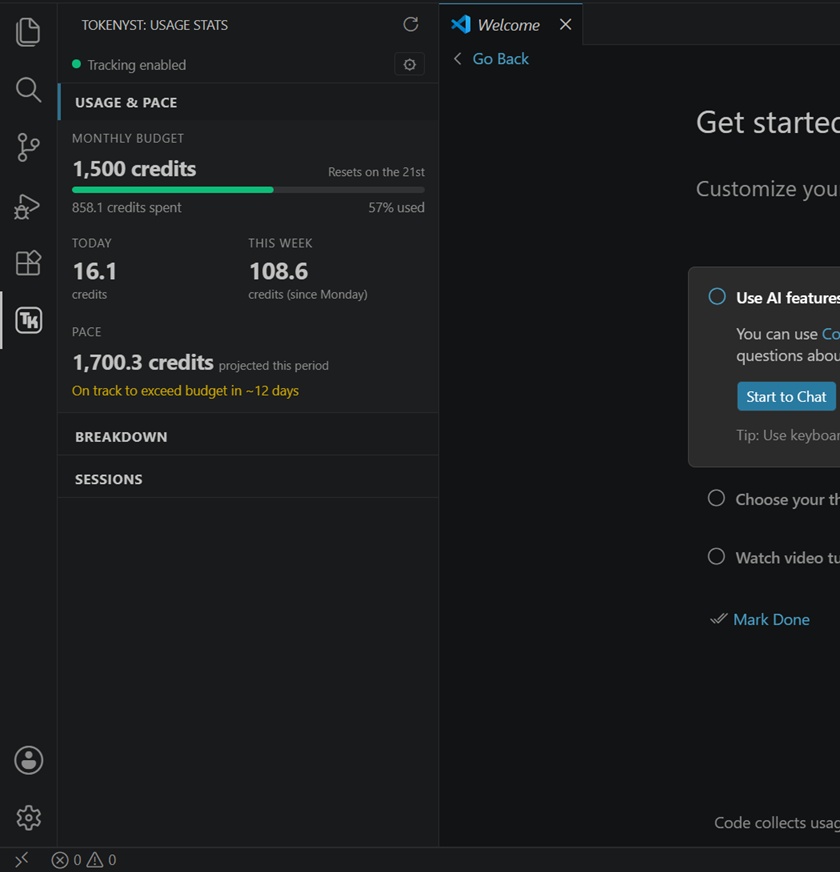
Usage Stats |
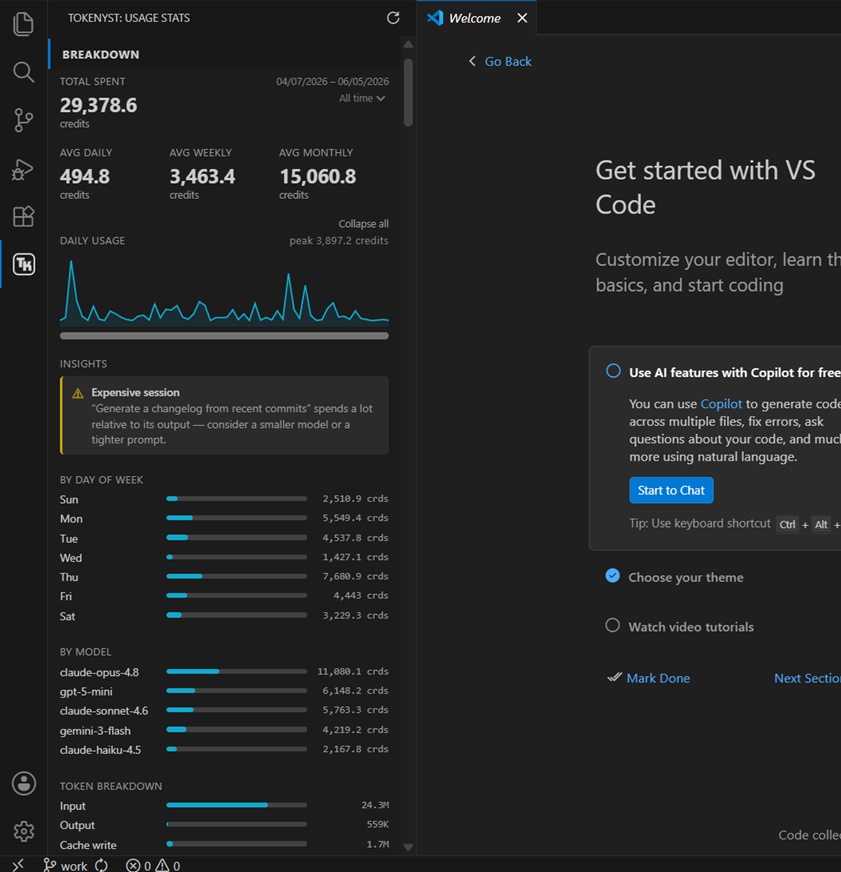
Breakdown |
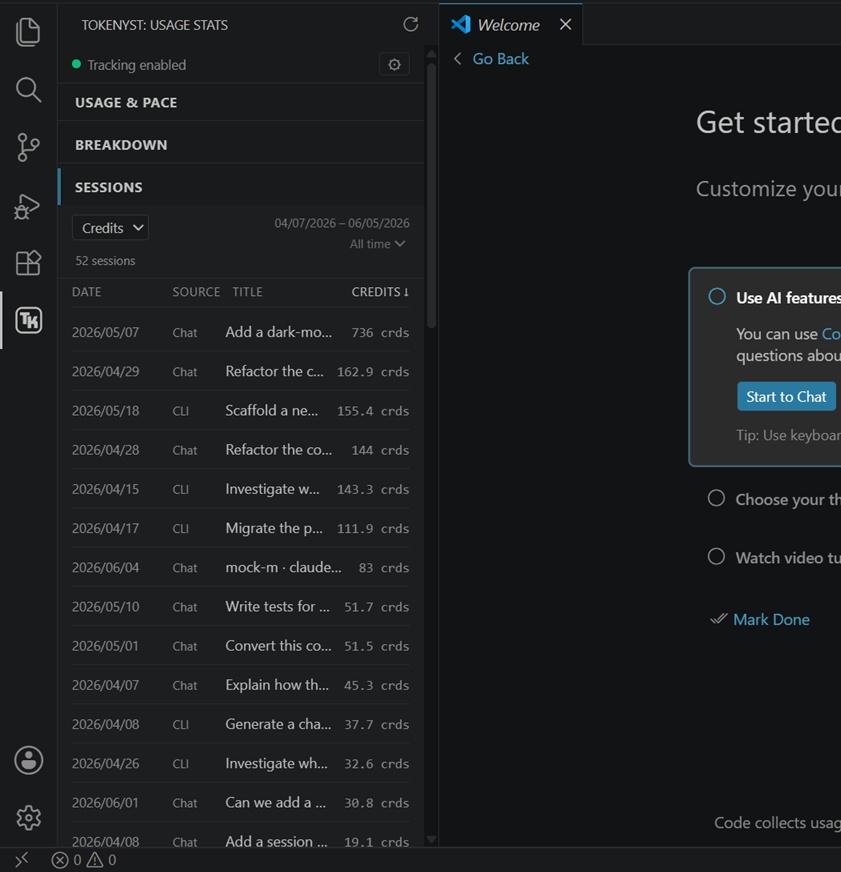
Sessions |
Features
- Usage Stats panel — a dedicated sidebar view with:
- A monthly budget card showing spend vs. your cap
- Today / This Week and Avg Daily / Weekly KPIs (with a period filter)
- A pace projection for the current billing period
- Collapsible breakdowns by day of week, model, token type (input / output / cache, with a cache-reuse %), source (Chat vs CLI), and repo — each foldable individually, with an Expand all / Collapse all toggle
- Session breakdown — a sortable list of your individual Chat and CLI sessions, each with a readable title (its first prompt), so you can pinpoint your most expensive sessions. Sort by date, source, title, or your chosen metric (credits, input, or output tokens); filter by an independent date range; and click any session to expand a detail view (tokens, cache, model, repo)
- Optimization insights — automatic, colour-coded tips based on your usage patterns: low cache reuse, model and repo hotspots, and expensive-but-low-output sessions
- Two sources, one budget — tracks both Copilot Chat and the Copilot CLI, combined into a single monthly total (matching GitHub's shared usage-based billing), with a By source breakdown so you can see how much came from each
- Status bar indicator — live
$(graph) N cr of credits spent this period
- Budget periods — calendar month by default, or anchored to your plan's renewal day
- Real costs — Tokenyst uses the actual credit cost GitHub records (per-request credits for Chat, the CLI's reported "AI Credits" for the CLI), and shows the underlying token counts for transparency; it only falls back to a token-based estimate when no credit value was recorded
- Historical import — backfill stats from your existing Copilot session history
- Manual allocations — add custom allocations directly from the UI with credit amount, model name, and optional repository tracking, and remove them again from a picker list
How it works
Tokenyst reads from two local sources and combines them into one budget:
Copilot Chat
- The VS Code Copilot Chat extension records each chat session under
<VS Code User>/workspaceStorage/<workspace>/chatSessions/.
- Tokenyst watches those files and aggregates usage per session and model, reading the real token counts (
promptTokens/completionTokens) that Copilot records on each completed request. Where GitHub records a real credit value for a request, Tokenyst uses it directly.
- The input counts are context-inclusive (system prompt, tool definitions, attached files, and conversation history), so they reflect what Copilot actually sends — not just your typed message.
Copilot CLI
- The GitHub Copilot CLI records each session under
~/.copilot/session-state/<session>/events.jsonl.
- Tokenyst watches those logs and reads the real AI-credit cost the CLI records for each model (the same "AI Credits" the CLI prints when it exits), so CLI spend matches GitHub exactly. Token counts are kept for transparency.
For Chat requests where no credit value is recorded — and for older CLI logs that predate the credit field — Tokenyst estimates the cost from a token pricing table baked into the extension (matching GitHub's usage-based billing). All usage is stored as allocations in ~/.tokenyst/config.json.
Requirements
- VS Code 1.85.0 or newer
- GitHub Copilot — the Copilot Chat extension and/or the GitHub Copilot CLI (the
copilot command, installed via npm install -g @github/copilot) must be installed and in use; that's what produces the session files Tokenyst reads. Either source alone is enough.
Remote development (dev containers, WSL, SSH, Codespaces)
Copilot's two data sources land on opposite sides of VS Code's client/remote split:
- Copilot Chat sessions are persisted on the host (client) side — even for a dev
container or other remote workspace. So Chat usage from your remote work is already in
your host's storage.
- Copilot CLI writes inside whatever environment it runs in — the container/remote
if you use it there.
A single extension instance can only read one side. By default Tokenyst runs host-side
(its extensionKind prefers ui), which tracks all your Copilot Chat — local and
remote — plus Copilot CLI run on the host. You don't need to install it in the container
for Chat tracking; it just works.
The one thing this default does not see is Copilot CLI run inside a container. If
that's your workflow, tell VS Code to run Tokenyst in the remote instead by adding this to
your User (or dev container) settings.json, then reload:
"remote.extensionKind": {
  "TokenystCopilot.tokenyst-copilot": ["workspace"]
}
VS Code will offer to install Tokenyst in the container; once it does, it tracks the
container's Copilot CLI usage (and its data lives in the container's ~/.tokenyst/).
Note this is one or the other per setup: a container-side instance only sees the
container's files, so in that window it tracks the container's Copilot CLI and none of
your host-side usage — neither Copilot Chat (which is stored host-side) nor any Copilot CLI
you run on the host. Each side keeps its own separate ~/.tokenyst/ data. In a dev
container, Tokenyst shows a one-time hint pointing here so you can choose.
Getting started
- Install Tokenyst from the VS Code Marketplace.
- Open the Tokenyst view from the activity bar (look for the Tokenyst icon).
- Run Tokenyst: Enable Copilot Tracking from the Command Palette. Tokenyst will check for Copilot Chat and Copilot CLI session files and offer to import any existing history. A single toggle covers both sources.
- Run Tokenyst: Set Monthly Budget to pick a Copilot tier preset (Pro, Business, Pro+/Enterprise) or enter a custom amount.
- (Optional) Run Tokenyst: Set Renewal Date if your plan renews on a day other than the 1st.
Commands
All commands are available from the Command Palette under the Tokenyst category.
| Command |
Description |
| Set Monthly Budget |
Choose a Copilot tier preset or enter a custom monthly cap |
| Set Renewal Date |
Day of month (1–31) your plan renews; blank uses the calendar month |
| Enable Copilot Tracking |
Start watching Copilot Chat and CLI session files; offers a historical import |
| Disable Copilot Tracking |
Stop tracking (both sources) |
| Add Manual Allocation |
Add a custom allocation with credit amount, model, and optional repository |
| Delete Manual Allocation |
Pick from a list of your manually-added allocations and remove one |
| Import Historical Usage |
Backfill allocations from the last 30 days of sessions |
| Force Sync |
Re-scan sessions and update usage immediately |
| Refresh |
Re-scan sessions and refresh the UI |
Settings
| Setting |
Default |
Description |
tokenyst.syncIntervalSeconds |
300 |
How often (in seconds) to scan Copilot session events in the background |
tokenyst.showStatusBar |
true |
Show active budget usage in the status bar |
Data & privacy
Tokenyst keeps everything on your machine:
~/.tokenyst/config.json — your budget, renewal day, and recorded usage allocations~/.tokenyst/copilot.log — debug log (only written when debug logging is enabled)- Reads your VS Code Copilot Chat session files under
workspaceStorage/*/chatSessions/ (written by the Copilot Chat extension)
- Reads your Copilot CLI session logs under
~/.copilot/session-state/*/events.jsonl (written by the Copilot CLI)
Tokenyst makes no network requests and has no external dependencies — it reads only local Copilot session files and writes only to ~/.tokenyst/. Pricing data is baked into the extension; no pricing or billing service is contacted.
Editing allocations by hand
Normally you remove a manual allocation with Tokenyst: Delete Manual Allocation (a picker lists every manually-added entry). If you'd rather edit the data directly — for example to fix a typo or bulk-remove entries — you can edit ~/.tokenyst/config.json yourself:
Close VS Code (or at least the Tokenyst view) so the file isn't rewritten under you.
Open ~/.tokenyst/config.json. On Windows this is C:\Users\<you>\.tokenyst\config.json; on macOS/Linux it's ~/.tokenyst/config.json.
Find the allocations array. Manually-added entries are the ones with "manual": true and/or an "externalId" starting with "manual-":
{
  "costUsd": 0.5,
  "model": "copilot-gpt-4",
  "inputTokens": null,
  "outputTokens": null,
  "cacheCreationTokens": null,
  "cacheReadTokens": null,
  "filesModified": [],
  "at": "2026-06-01T12:42:46.000Z",
  "provider": "copilot",
  "externalId": "manual-1717245766000-a1b2c",
  "manual": true
}
Older manual entries created before tagging existed may have neither marker — they're identifiable as "provider": "copilot" entries with all four token fields (inputTokens, outputTokens, cacheCreationTokens, cacheReadTokens) set to null. Tokenyst treats those as manual too.
Delete the entire object (including its surrounding { } and the trailing comma) from the array, then save. Make sure the file is still valid JSON.
Reopen VS Code; the Usage Stats panel will reflect the change on the next refresh.
Only delete entries you recognize as manual. Synced Copilot allocations always carry numeric token counts and a copilot-chat-… (Chat) or copilot-cli-… (CLI) externalId; removing those just makes them reappear on the next sync.
Note: Spend is shown in credits to match Copilot's usage-based billing (100 credits = $1). Where Copilot records a real credit value for a request, Tokenyst uses it directly; otherwise it estimates from token counts and a built-in pricing table (with a cache discount for the repeated system prompt and tool definitions), so those figures are approximate.
Please send any questions or comments to contact@tokenyst.dev
Note: Are you an engineering manager or team lead? I'm exploring a team dashboard and other QOL features, please contact if interested.
License
MIT

