Curve Editor
A visual curve editor for .curve.json files in VS Code. Define animation curves, parameter envelopes, and state timelines with bezier, linear, or constant interpolation — all in plain, version-controllable JSON.
Similar to Unreal Engine's curve editor, but file-based and portable. Author once, evaluate from anywhere: JavaScript, Python, or any runtime that can parse JSON.
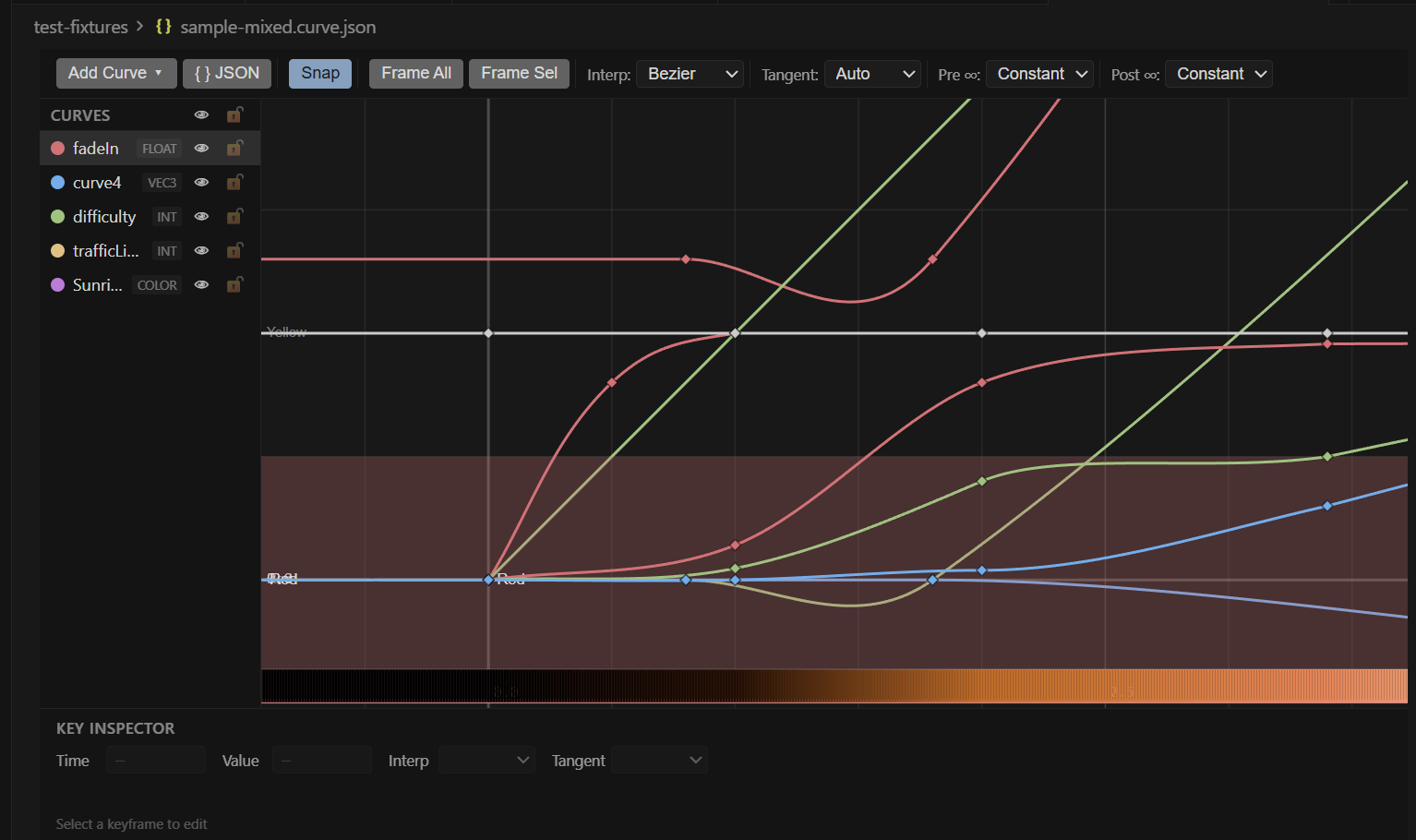
Features
- Visual curve editing — pan, zoom, drag keyframes, drag tangent handles
- Multiple curve types —
float, int, vec2, vec3, vec4, color
- Per-component control — on vec/color curves, each component can have its own interpolation and tangent mode
- Bezier, linear, constant interpolation with full tangent handle control (Auto, User, Break, Aligned)
- Infinity modes — Constant, Linear, Cycle, Oscillate extrapolation before and after the key range
- State curves — integer curves with named states rendered as Gantt-style colored bands (great for traffic-light-style state machines)
- Color curves with live gradient strip and native color picker per keyframe
- Native VS Code undo/redo — edits go through the TextDocument stack, so
Ctrl+Z just works
- Theme-aware — inherits the colors of your active VS Code theme
- JSON Schema validation — if you open
.curve.json as raw text, you get autocomplete and validation
- Visibility, lock, and color settings persist to the JSON so they survive file reloads and team sharing
- Runtime libraries for JS and Python to evaluate curves identically at runtime
Getting Started
- Install this extension.
- Create a new file with the
.curve.json extension (or run Curve Editor: New Curve File from the command palette).
- The custom editor opens automatically. Use Add Curve in the toolbar to start.
Open the raw JSON side-by-side any time with the { } JSON button in the toolbar, or right-click the tab → Reopen Editor With... > Text Editor.
{
  "version": 1,
  "curves": [
    {
      "name": "fadeIn",
      "type": "float",
      "preInfinity": "constant",
      "postInfinity": "constant",
      "keys": [
        { "time": 0.0, "value": 0.0, "interp": "bezier", "tangentMode": "auto" },
        { "time": 1.0, "value": 1.0, "interp": "bezier", "tangentMode": "auto" }
      ]
    }
  ]
}
See the full schema in the project README.
Keyboard Shortcuts
| Shortcut |
Action |
1 / 2 / 3 |
Set selected keys to Constant / Linear / Bezier |
S |
Toggle snap to grid |
T |
Toggle tangent handle display |
F |
Frame selected keys |
Home |
Frame all visible curves |
Delete / Backspace |
Delete selected keys |
Ctrl+D |
Duplicate selected keys |
Ctrl+A |
Select all keys on visible curves |
Ctrl+C / Ctrl+V |
Copy / Paste selected keys |
Ctrl+Z / Ctrl+Shift+Z |
Undo / Redo |
| Middle mouse drag |
Pan viewport |
| Scroll wheel |
Zoom (centered on cursor) |
| Shift + scroll |
Horizontal zoom only |
| Ctrl + scroll |
Vertical zoom only |
| Double-click on canvas |
Add key at clicked position |
Settings
Configure from Settings → Extensions → Curve Editor:
| Setting |
Default |
Description |
curveEditor.snapTimeInterval |
0.1 |
Time snap increment |
curveEditor.snapValueInterval |
0.1 |
Value snap increment |
curveEditor.defaultInterpolation |
bezier |
Default interp for new keys |
curveEditor.defaultTangentMode |
auto |
Default tangent mode for new keys |
curveEditor.showGridLabels |
true |
Show axis labels on the grid |
curveEditor.curveLineWidth |
2 |
Curve line thickness in pixels |
curveEditor.antiAlias |
true |
Canvas anti-aliasing |
Runtime Libraries
The editor produces plain JSON. To evaluate these curves in your game, tool, or server, install the companion runtime library for your language. Both are zero-dependency and produce identical results within 1e-6 tolerance.
JavaScript / TypeScript
npm install curve-eval
import { evaluate, evaluateAll, evaluateState } from 'curve-eval';
import fs from 'fs';

const file = JSON.parse(fs.readFileSync('anim.curve.json', 'utf8'));

const opacity = evaluate(file, 'fadeIn', 2.5);       // → 0.72
const color   = evaluate(file, 'tint', 1.0);          // → { r: 1, g: 0.5, b: 0, a: 1 }
const light   = evaluateState(file, 'trafficLight', 6.0); // → { index: 1, label: 'Yellow' }

// Everything at one time
const frame = evaluateAll(file, 3.0);
Ships ES modules, CommonJS, and TypeScript declarations. Node 14+, all modern browsers.
curve-eval on npm
Python
pip install curve-eval
from curve_eval import evaluate, evaluate_all, evaluate_state
import json

with open('anim.curve.json') as f:
    file = json.load(f)

opacity = evaluate(file, 'fadeIn', 2.5)
color   = evaluate(file, 'tint', 1.0)
light   = evaluate_state(file, 'trafficLight', 6.0)
frame   = evaluate_all(file, 3.0)
Zero dependencies, Python 3.9+, full type hints.
curve-eval on PyPI
Normalized Time
All evaluators accept an optional normalized: true flag that remaps 0–1 to the curve's first-key-to-last-key range. Useful for driving curves from a tween's t value without knowing the authored time range.
const midway = evaluate(file, 'fadeIn', 0.5, { normalized: true });
Commands
Available in the command palette (Ctrl+Shift+P):
- Curve Editor: New Curve File — creates an empty
.curve.json scaffold
- Curve Editor: Add Curve — adds a new curve to the open file
- Curve Editor: Frame All — fit all curves in viewport
- Curve Editor: Frame Selection — fit selected keys in viewport
- Curve Editor: Flatten Tangents — zero the
dy on selected tangent handles
Contributing & Feedback
Source code, issues, and feature requests: github.com/glenwrhodes/CurveEditor.
If you run into a bug or have a feature idea, please open an issue — happy to hear about workflows this doesn't yet cover.
License
MIT © Glen Rhodes / Tiny Moosh Games Inc.

