OWASP Security Helper





Catch security vulnerabilities as you write code — right inside VS Code. OWASP Security Helper flags insecure patterns inline, explains the risk, and with one click asks GitHub Copilot to fix it for you.
133 rules across 9 categories — OWASP Top 10, CSP, HTTP headers, PHP, JS/TS, Python, and CISA Secure-by-Design.
Getting started
- Install the extension from the VS Code Marketplace.
- Open any JavaScript, TypeScript, PHP, or Python file — findings appear immediately as squiggles.
- Hover a squiggle or click the lightbulb to see what was flagged and how to fix it.
- Run OWASP Helper: Scan Workspace (
Ctrl+Shift+P) to scan your entire project at once.
What it does
- Inline diagnostics — red, yellow, and blue squiggles highlight insecure patterns as you type or on save.
- Quick Fixes — suppress a finding with a justification comment, jump to the OWASP docs, or ask Copilot to fix it — all from the lightbulb menu.
- Ask Copilot to fix — opens GitHub Copilot Chat pre-loaded with the rule, severity, flagged code, and risk description so you can go from finding to fix in one click.
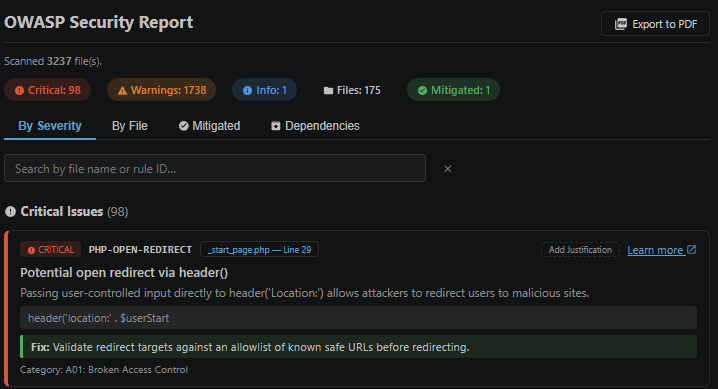
- Security Report panel — a full summary of all findings across the project, filterable by severity and grouped by file.
- Workspace scan — scan every supported file at once and get a consolidated report.
- Export to PDF or Markdown — share the report with your team or commit it alongside your code.
- Dependency vulnerability check — flags known-vulnerable npm, Composer, pip, and Poetry packages.
- End-of-life & deprecated dependency detection — identifies packages that no longer receive security patches, a gap that standard vulnerability scanners miss.
- Local CVE database — download the full CVE catalogue for offline use; the report panel shows how current it is and alerts you when it needs updating.
- Justification / suppression — mark accepted risks with a note; they stay visible but are clearly marked as mitigated.
- Rule update checker — notifies you when a newer ruleset is available.
Supported languages
JavaScript, TypeScript, JSX/TSX, PHP, Python, Apache config / .htaccess, IIS web.config, and nginx.
Commands
Open the Command Palette (Ctrl+Shift+P / Cmd+Shift+P) and search for OWASP Helper:
| Command |
What it does |
| Show Security Report |
Open the report panel for all currently open files |
| Scan Workspace |
Scan every supported file in the project |
| Full Scan Workspace |
Same as above, including large files and running a dependency check |
| Check Dependencies |
Check installed packages against known vulnerability lists and EOL status |
| Open CVE Database |
Open the CVE database manager panel |
| Download CVE Baseline |
Download the full CVE catalogue for offline use |
| Update CVE Database (Delta) |
Apply the latest incremental updates to the local CVE database |
| Check for Rule Updates |
See whether a newer ruleset is available |
| Show Rules Status |
Quick summary of the current rule version and coverage |
Ask Copilot to fix is available from the lightbulb Quick Fix menu on any finding — not the Command Palette.
GitHub Copilot integration
OWASP Security Helper is designed to work alongside GitHub Copilot to make fixing security issues as fast as possible.
Ask Copilot to fix — one click from the lightbulb
Every diagnostic squiggle includes an Ask Copilot to fix: <RULE-ID> option in the Quick Fix menu. Clicking it opens Copilot Chat pre-loaded with the rule name, severity, a description of the risk, the exact flagged line, and a request for a corrected version. No copy-pasting or context switching required.
Workspace instructions
The extension ships a .github/copilot-instructions.md file that teaches Copilot about every OWASP rule enforced in this project. When you ask Copilot to generate new code, it will automatically avoid the patterns the extension would flag.
Reusable security prompts
Three ready-made prompt files are included in .github/prompts/ and can be invoked from the Copilot Chat prompt picker:
- analyze-finding — explain a specific finding, walk through the exploit scenario, and provide a corrected version
- security-review-file — request a full OWASP review of the current file with an overall risk rating
- fix-vulnerability — generate a secure replacement for a flagged code block
Configuration
| Setting |
Default |
Description |
owaspHelper.enableOnSave |
true |
Re-scan the file on every save |
owaspHelper.severity |
"all" |
Minimum severity to show: all, critical, warning, info |
owaspHelper.ignoredRules |
[] |
Rule IDs to silence workspace-wide |
owaspHelper.fastScanExclude |
node_modules, out, dist, .venv, *.min.js |
Paths skipped during the fast workspace scan |
owaspHelper.fullScanExclude |
node_modules, out, dist, .venv |
Paths skipped during the full workspace scan |
owaspHelper.autoCheckForUpdates |
true |
Check for new rules once per day on startup |
owaspHelper.cveStalenessDays |
7 |
Days before the CVE database is considered out of date |
Rule coverage
| Category |
Rules |
Languages |
| OWASP Top 10 (2021) A01–A10 |
27 |
JS/TS, PHP, Python |
| Content Security Policy |
8 |
JS/TS, Apache, IIS, nginx |
| General secure coding |
8 |
All languages |
| PHP security |
19 |
PHP |
| PHP input validation |
18 |
PHP |
| JavaScript / TypeScript |
12 |
JS/TS |
| HTTP security headers |
12 |
Apache, IIS, nginx |
| Input validation & file upload |
15 |
JS/TS, Python |
| CISA Secure-by-Design |
14 |
JS/TS, PHP, Python |
Suppressing a finding
Add a suppression comment on the line above the flagged code (or use the Quick Fix action):
// owasp-ignore: A03-XSS-INNERHTML -- output is sanitised by upstream middleware
element.innerHTML = safeContent;
To silence a rule across the whole workspace, add it to owaspHelper.ignoredRules in your VS Code settings.
References
License
MIT
View full changelog
What it does
- Inline diagnostics — red/yellow/blue squiggles appear as you type or on save, directly in the editor.
- Quick Fixes — one-click actions to suppress a finding with a justification comment, or jump straight to the relevant OWASP documentation.
- Ask Copilot to fix — every finding includes an "Ask Copilot to fix" action that opens GitHub Copilot Chat pre-loaded with the full context of the vulnerability — rule, severity, flagged code, and a plain-English description of the risk — so you can go from finding to fix without any copy-pasting.
- Security Report panel — a full summary of all findings, filterable by severity, grouped by file or severity, with click-to-navigate to each issue.
- Workspace scan — scan every file in the project at once and get a consolidated report.
- Export to Markdown — save the report as a portable
.md file you can commit alongside your code or share with your team.
- Export to PDF — save the report as a PDF via Chrome/Edge (requires a Chromium browser).
- Dependency vulnerability check — flags known-vulnerable npm, Composer, pip, and Poetry packages against live vulnerability feeds.
- End-of-life & deprecated dependency detection — identifies packages that have reached end-of-life or been officially deprecated. These are a hidden security risk: they stop receiving CVE patches even when new vulnerabilities are discovered, a gap that standard vulnerability scanners miss.
- Local CVE database — download and maintain an offline copy of the full CVE catalogue directly inside VS Code. The dependency scanner automatically cross-references it alongside live feeds, so you get broader coverage without relying solely on internet lookups.
- CVE database status — the Security Report panel shows whether your local CVE database is downloaded and how recently it was updated. A banner alerts you when the database is missing or more than a week out of date, with a one-click link to the CVE manager.
- Justification / suppression — mark a finding as intentionally accepted with a note; it stays visible but clearly marked as mitigated.
- Rule update checker — notifies you when a newer ruleset is available.
Supported languages
JavaScript, TypeScript, JSX/TSX, PHP, Python, Apache config / .htaccess, IIS web.config, and nginx.
Commands
Open the Command Palette (Ctrl+Shift+P / Cmd+Shift+P) and search for OWASP Helper:
| Command |
What it does |
| Show Security Report |
Open the report panel for all currently open files |
| Scan Workspace |
Scan every supported file in the project |
| Full Scan Workspace |
Same as above, including large files and running a dependency check |
| Check Dependencies |
Check installed packages against known vulnerability lists and EOL status |
| Open CVE Database |
Open the CVE database manager panel |
| Download CVE Baseline |
Download the full CVE catalogue for offline use |
| Update CVE Database (Delta) |
Apply the latest incremental updates to the local CVE database |
| Check for Rule Updates |
See whether a newer ruleset is available |
| Show Rules Status |
Quick summary of the current rule version and coverage |
| Ask Copilot to Fix |
Opens Copilot Chat with full context for the selected finding (lightbulb) |
GitHub Copilot integration
OWASP Security Helper is designed to work alongside GitHub Copilot to make fixing security issues as fast as possible.
Ask Copilot to fix — one click from the lightbulb
Every diagnostic squiggle includes an "Ask Copilot to fix: <RULE-ID>" option in the Quick Fix menu. Clicking it opens Copilot Chat pre-loaded with the rule name, severity, a description of the risk, the exact flagged line, and a plain-English prompt asking for a corrected version. No copy-pasting or context switching required.
Workspace instructions
The extension ships a .github/copilot-instructions.md file that teaches Copilot about every OWASP rule enforced in this project. When you ask Copilot to generate new code, it will automatically avoid the patterns the extension would flag.
Reusable security prompts
Three ready-made prompt files are included in .github/prompts/:
- analyze-finding — explain a specific finding, the exploit scenario, and how to fix it
- security-review-file — request a full OWASP review of the current file with an overall risk rating
- fix-vulnerability — generate a secure replacement for a flagged code block
Invoke any of these from the Copilot Chat prompt picker.
Configuration
| Setting |
Default |
Description |
owaspHelper.enableOnSave |
true |
Re-scan the file on every save |
owaspHelper.severity |
"all" |
Minimum severity to show: all, critical, warning, info |
owaspHelper.ignoredRules |
[] |
Rule IDs to silence workspace-wide |
owaspHelper.fastScanExclude |
node_modules, out, dist, .venv, *.min.js |
Paths skipped during the fast workspace scan |
owaspHelper.fullScanExclude |
node_modules, out, dist, .venv |
Paths skipped during the full workspace scan |
owaspHelper.autoCheckForUpdates |
true |
Check for new rules once per day on startup |
owaspHelper.cveStalenessDays |
7 |
Days before the CVE database is considered out of date |
Rule coverage
| Category |
Rules |
Languages |
| OWASP Top 10 (2021) A01–A10 |
27 |
JS/TS, PHP, Python |
| Content Security Policy |
8 |
JS/TS, Apache, IIS, nginx |
| General secure coding |
8 |
All languages |
| PHP security |
19 |
PHP |
| PHP input validation |
18 |
PHP |
| JavaScript / TypeScript |
12 |
JS/TS |
| HTTP security headers |
12 |
Apache, IIS, nginx |
| Input validation & file upload |
15 |
JS/TS, Python |
| CISA Secure-by-Design |
14 |
JS/TS, PHP, Python |
Covers injection, broken access control, cryptographic failures, insecure deserialization, misconfigured security headers, dangerous language APIs, and more.
Suppressing a finding
Add a suppression comment on the line above the flagged code (or use the Quick Fix action):
// owasp-ignore: A03-XSS-INNERHTML -- output is sanitised by upstream middleware
element.innerHTML = safeContent;
To silence a rule across the whole workspace, add it to owaspHelper.ignoredRules in your VS Code settings.
References
License
MIT
View full changelog

