Overview
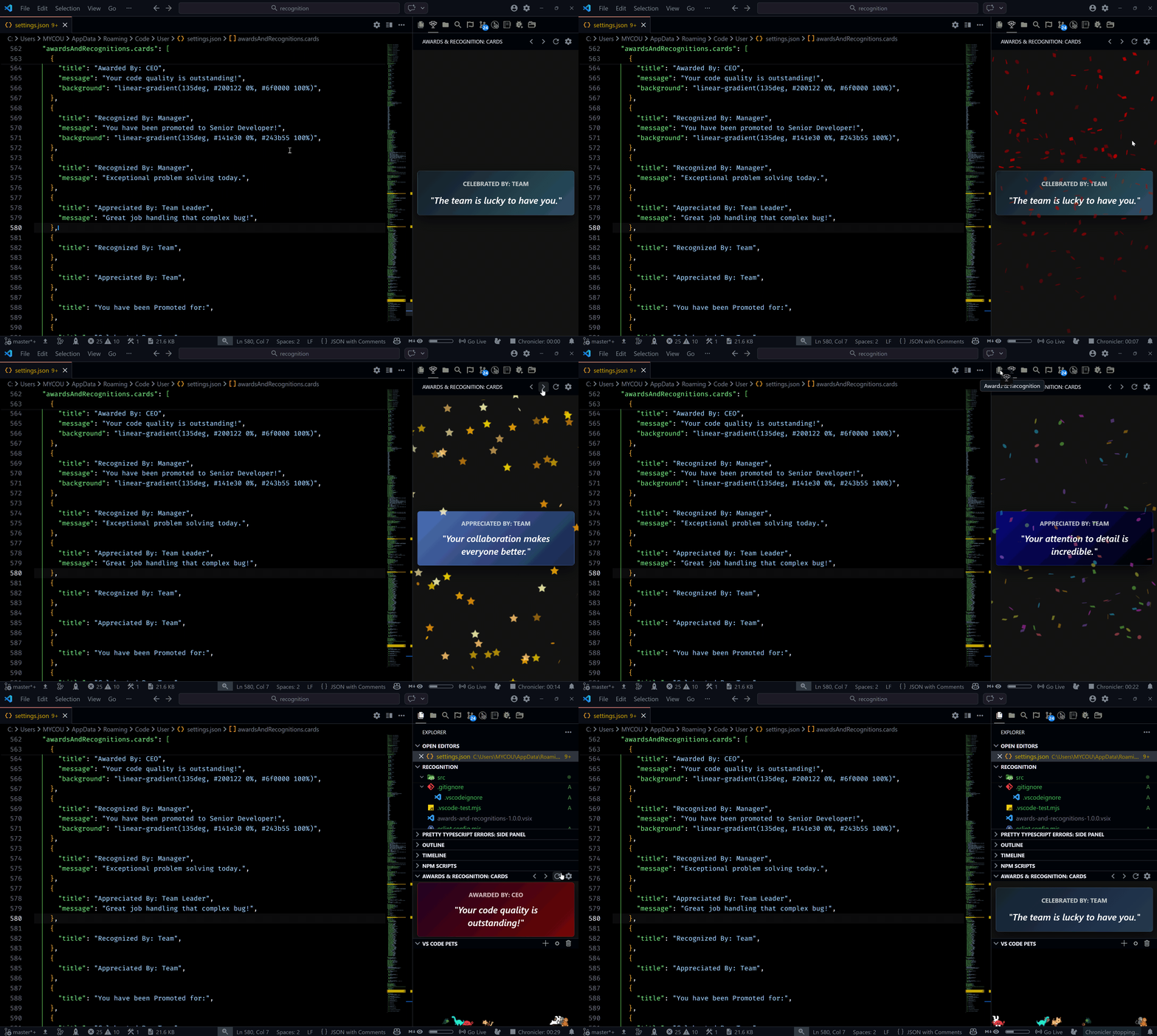
Awards and Recognitions adds a dedicated Activity Bar view that continuously surfaces appreciation cards while you work. You can provide your own card content, style each card with custom CSS-like styles (for example, custom background values), and tune confetti behavior to match your flow.
The goal is simple: keep morale visible in the same place where you ship code.
[!TIP]
Add team-specific cards in workspace settings so everyone in the repository sees the same recognition messages.

Preview
Features
- Dedicated
Awards & Recognitions view in the Activity Bar
- Previous, Next, Refresh, and Settings actions in the view title bar
- Automatic card cycling with configurable interval
- Custom cards (
title, message, background) via VS Code settings
- Built-in fallback messages and gradient styles when card fields are missing
- Custom cards (
title, message, styles) via VS Code settings (use styles: { background: "..." })
- Built-in fallback messages and gradient styles when card fields are missing
- Pointer-based confetti click origin for more accurate click-triggered celebrations
- Click-to-celebrate card interactions with optional confetti
- Multiple confetti modes:
random, cannon, realistic, fireworks, stars, emoji, snow, schoolPride
Install
From VS Code
- Open Extensions (
Ctrl+Shift+X).
- Search for
Awards and Recognitions.
- Select the extension published by
Thinker.
- Click Install.
From source
git clone https://github.com/R35007/awards-and-recognitions-vscode-extension
cd awards-and-recognitions-vscode-extension
npm install
npm run compile
Then press F5 in VS Code to launch an Extension Development Host.
Usage
- Open the
Awards & Recognitions icon in the Activity Bar.
- Use the title bar controls to move between cards or refresh the current moment.
- Click the card to trigger confetti (unless disabled).
- Open settings from the view title bar and customize cards, timing, and confetti.
[!NOTE]
If awardsAndRecognitions.cards is empty, the extension still renders a motivational fallback card with random styling.
Commands
The extension contributes these commands:
awardsAndRecognitions.previousCard - Show the previous cardawardsAndRecognitions.nextCard - Show the next cardawardsAndRecognitions.refresh - Pick and show a fresh random cardawardsAndRecognitions.openSettings - Open extension settings
Configuration
All settings live under awardsAndRecognitions.
| Setting |
Type |
Default |
Description |
awardsAndRecognitions.cards |
array |
[] |
Custom recognition cards. Each card supports title, message, and styles (e.g., { "background": "..." }). |
awardsAndRecognitions.cardsInterval |
number |
15000 |
Auto-cycle interval in milliseconds. Set 0 to disable auto-cycling. |
awardsAndRecognitions.disableConfettiOnNavigation |
boolean |
false |
Disable confetti on next/previous navigation and auto-refresh transitions. |
awardsAndRecognitions.disableConfettiOnRefresh |
boolean |
false |
Disable confetti when using refresh. |
awardsAndRecognitions.disableConfettiOnClick |
boolean |
false |
Disable confetti when clicking the card. |
awardsAndRecognitions.confettiStyle |
string |
random |
Choose random, cannon, realistic, fireworks, stars, emoji, snow, or schoolPride. |
awardsAndRecognitions.confettiCount |
number |
150 |
Number of confetti particles used in effects. |
Example settings
{
  "awardsAndRecognitions.cards": [
    {
      "title": "Awarded By: Team Lead",
      "message": "You turned a tough review into a great release.",
      "styles": {
        "background": "linear-gradient(135deg, #141e30 0%, #243b55 100%)"
      }
    },
    {
      "title": "Recognized By: Team",
      "message": "Your focus and consistency lifted everyone this sprint."
    }
  ],
  "awardsAndRecognitions.cardsInterval": 20000,
  "awardsAndRecognitions.confettiStyle": "stars",
  "awardsAndRecognitions.confettiCount": 180
}

