Go Struct to JSON
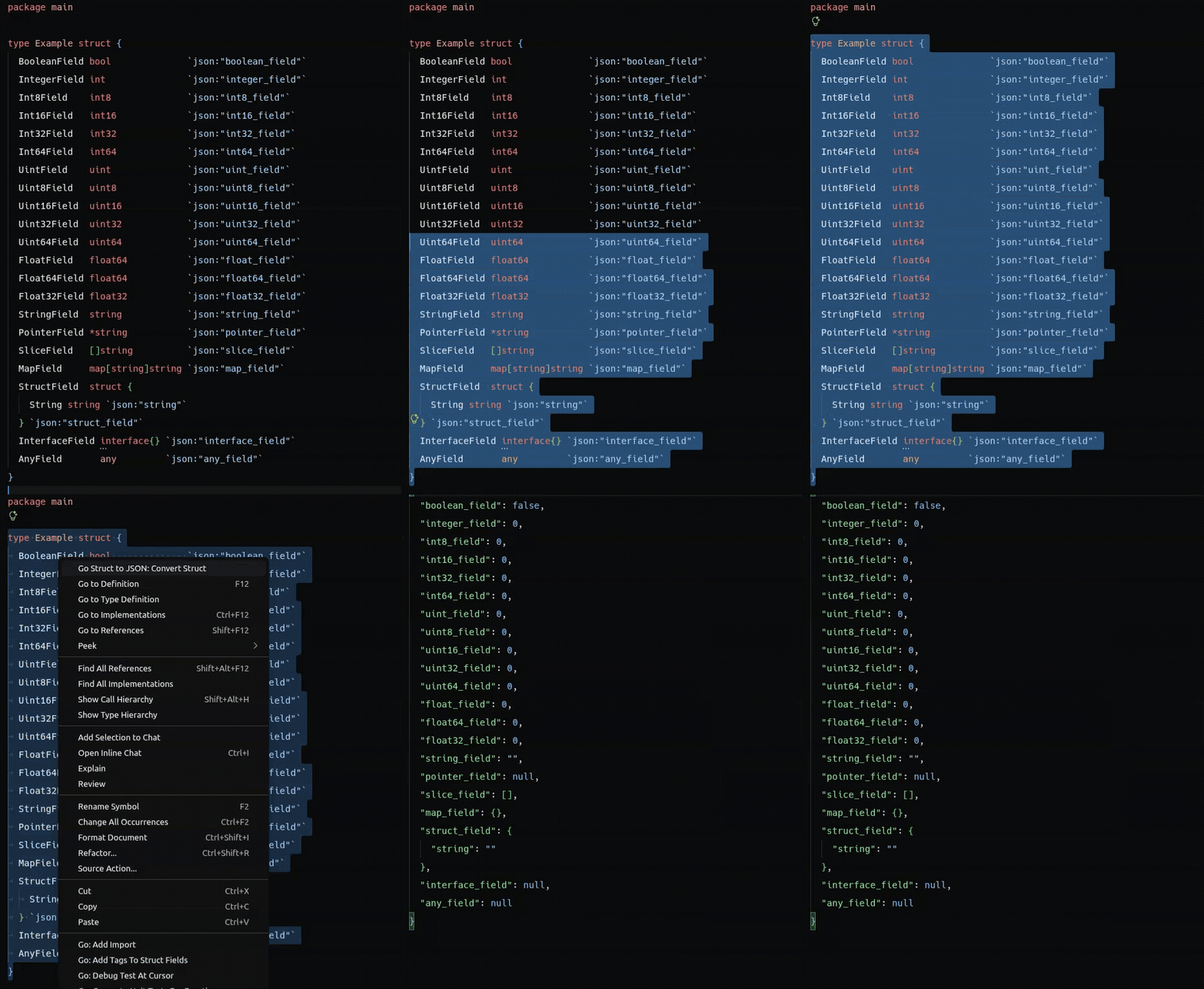
Go Struct to JSON is a Visual Studio Code extension that converts a selected Go
struct declaration into a readable JSON sample. It is useful for creating
request examples, fixtures, mock payloads, and test data without changing the
source file.
Requirements
- Visual Studio Code
1.85.0 or later.
- A Go source file open in the editor. Go itself is not required at runtime;
conversion is performed from the selected source text.
Usage
- Open a
.go file.
- Select one complete declaration, including
type Name struct { ... }.
- Right-click the selection and choose Go Struct to JSON: Convert Struct,
or run the same command from the Command Palette.
- Review the generated JSON in a new untitled JSON editor. The Go source is
never overwritten.
The generated document is also retained by the extension for the
Go Struct to JSON: Copy JSON to Clipboard command. After a successful
conversion, the conversion notification provides a copy action as well.
Example
Input:
type User struct {
		ID       int    `json:"id"`
		Name     string `json:"name"`
		Email    string `json:"email,omitempty"`
		Password string `json:"-"`
		Tags     []string `json:"tags"`
		Profile  struct {
				Active bool `json:"active"`
		} `json:"profile"`
}
Output with the default settings:
{
	"id": 0,
	"name": "",
	"email": "",
	"tags": [],
	"profile": {
		"active": false
	}
}
Supported syntax and values
The parser supports one selected type Name struct { ... } declaration,
including comments, blank lines, multiple field names, and nested anonymous
structs. Supported field types include:
bool, string, signed and unsigned integer types, and floating-point types;- pointers such as
*string;
- slices and arrays such as
[]string and [3]int;
- maps such as
map[string]string;
- anonymous structs;
interface{} and any;- qualified common types such as
time.Time;
- unresolved named types, which produce a diagnostic and a configurable
fallback value.
Generated defaults are deterministic: strings are "", booleans are false,
numbers are 0, slices and arrays are [], maps and nested structs are JSON
objects, interfaces are null, and time.Time is null.
JSON tags are handled as follows:
- the tag name is used when
useJsonTags is enabled;
- options such as
omitempty are removed from the output property name;
json:"-" excludes the field;- a missing or unusable tag falls back to the Go field name;
- source field order is preserved;
- duplicate output names are retained using the last value and reported as a
conversion diagnostic.
This extension creates examples from source declarations. It does not execute
Go code, resolve arbitrary type definitions from a package, or infer runtime
values. Recursive named types are stopped to prevent infinite expansion.
Configuration
Settings are available under the goStructToJson namespace. Invalid values are
validated at runtime and fall back to the documented defaults.
| Setting |
Default |
Description |
goStructToJson.indentSize |
2 |
Number of spaces used for generated JSON indentation. Valid values are 0 through 16. |
goStructToJson.useJsonTags |
true |
Use json struct tags for property names and ignored fields. When disabled, Go field names are used. |
goStructToJson.includeUnexportedFields |
true |
Include fields whose names begin with a lowercase letter. |
goStructToJson.pointerValue |
null |
Use null, or underlying to generate the sample value of the pointed-to type. |
goStructToJson.unknownTypeValue |
null |
Use null, or empty-object for unresolved named types. |
goStructToJson.locale |
auto |
Message language: auto, en, pt, or es. |
Use the Settings editor or add values to settings.json, for example:
{
	"goStructToJson.indentSize": 4,
	"goStructToJson.pointerValue": "underlying",
	"goStructToJson.locale": "en"
}
Localization
User-facing extension messages are available in English, Portuguese, and
Spanish. With locale set to auto, the extension follows the VS Code display
language and falls back to English for unsupported languages. Set en, pt,
or es to force a language. Command titles and configuration descriptions use
VS Code package localization resources.
Troubleshooting
- No active editor: open a Go file before running the command.
- No output: select the complete declaration, not only the fields.
- Wrong language: the command requires the active document language ID to
be
go.
- Parse error: check that the declaration has a name, a
struct keyword,
and a closing brace. Select only one struct declaration.
- Unexpected
null values: named types cannot be resolved from the
selection alone, pointers default to null, and interfaces are represented
by null. Adjust pointerValue or unknownTypeValue when appropriate.
- Missing fields: check
useJsonTags, includeUnexportedFields, and
whether a field is tagged json:"-".
- Diagnostics after conversion: the JSON is still shown, but unresolved,
recursive, or duplicate fields are reported in the notification.
The extension reports validation and conversion errors without modifying the
original Go document.
Limitations
- Only the selected struct declaration is parsed; package-wide Go type
resolution is not performed.
- Arbitrary named types cannot be expanded without their definitions.
- Complex Go syntax outside the supported type expressions may be reported as
unsupported.
- Generated values are examples, not serialized runtime values.
- The extension currently provides English, Portuguese, and Spanish messages.
License
This project is licensed under the MIT License. See LICENSE.
Support
If you find this extension useful, consider supporting its development by buying me a coffee! Your support helps me continue improving and maintaining the extension.


