Codebud
Codebud pairs with you inside VS Code or Cursor during a technical interview—giving you space to write, test, and refactor code naturally while checking in with grounded questions and peer observations about your work.
Starting Your Interview
Open only the assignment folder (File > Open Folder). If VS Code shows Restricted Mode, review the folder and use Manage Workspace Trust before starting. The idle Codebud sidebar provides one-click access to Start Interview, Try Practice (Unscored) to familiarize yourself with the controls, and Check Setup (Preflight) to verify workspace trust, network connectivity, and keychain access.
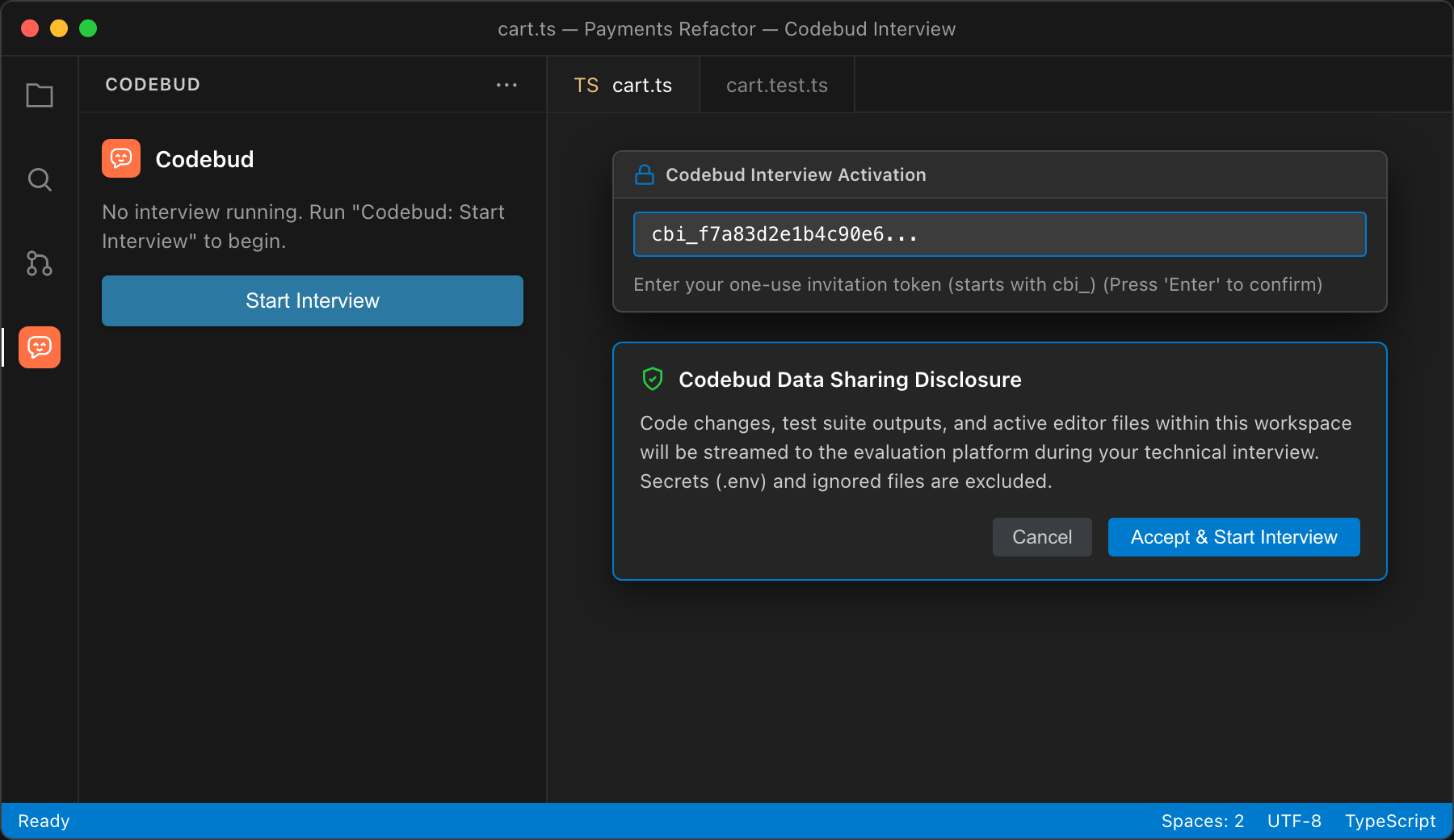
Enter your single-use invitation token (cbi_...) first. Then review the sharing disclosure and begin your session.
Working Together
- Grounded Pacing: Automatic questions wait for at least three meaningful uploaded edit batches (at least 240 characters combined, or one substantial edit of 400+ characters), with at least three minutes since the previous question or response. A large paste does not bypass this interval.
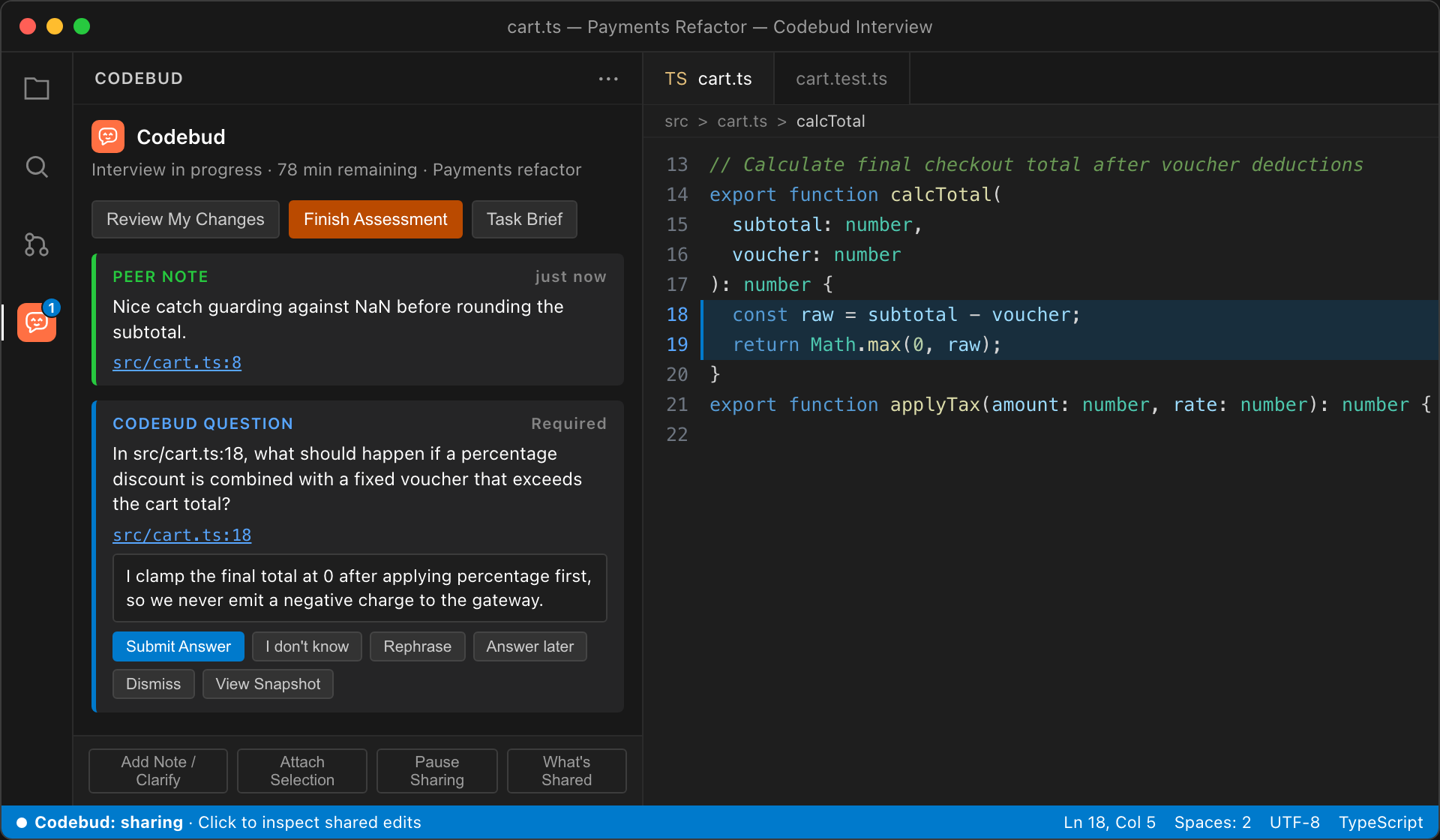
- One Question at a Time: Only one required question is open at a time. Questions badge the Activity Bar icon and stay in the sidebar without stealing editor cursor focus.
- Peer Observations: Alongside questions, Codebud can leave green peer notes on clean catches or edge-case guards—no reply needed.
- Flexible Responses: Answering (
Submit Answer or Enter), choosing Rephrase, Answer later, I don't know, Dismiss Question, or Flag Question for Review records your action and lets you get back to coding without starting a forced chain of follow-ups.
- Code Snapshots & Selection Attachments: Click any file/line link (
src/cart.ts:18) to jump to that range in the editor, or click View Snapshot if the file changed. Use Attach Selection to reference highlighted lines in your explanations or clarifications.
- Review My Changes & Complete Interview: Choose Review My Changes (
Cmd+Alt+R / Ctrl+Alt+R) when a piece of work or your solution is ready for a check-in without ending the interview. Choose Finish Assessment (Codebud: Submit / Complete Interview) to trigger the evidence barrier (flushBarrier), which joins active in-flight uploads and drains the offline queue before sealing. If delivery fails or times out, you can retry or choose Submit With Missing Evidence to complete and record the gap without losing work.
- AI Collaboration & Honest Disclosure: When permitted by the hiring team, consult Codebud's in-IDE assistant directly from the sidebar or declare external AI assistance (ChatGPT, Claude, Gemini, Copilot) with your prompt and notes. All interactions are preserved in the ledger as evidence of problem-solving style.
Commands
Open the Command Palette (Cmd+Shift+P / Ctrl+Shift+P) to run any command:
| Command |
ID |
Shortcut |
Purpose |
| Codebud: Start Interview |
codebud.startInterview |
— |
Enter your token and start or resume. |
| Codebud: Review My Changes |
codebud.reviewChanges |
Cmd+Alt+R / Ctrl+Alt+R |
Request a review at a natural stopping point. |
| Codebud: Submit / Complete Interview |
codebud.completeInterview |
— |
Confirm completion and seal the evidence against later changes. |
| Codebud: Pause/Resume Sharing |
codebud.togglePause |
— |
Stop or resume sharing code changes; the timer continues. |
| Codebud: Show What's Shared |
codebud.showShared |
— |
Inspect recent uploads, queue status, and exclusions. |
| Codebud: Focus Codebud Sidebar |
codebud.showSidebar |
Cmd+Shift+Y / Ctrl+Shift+B |
Open and focus the Codebud conversation sidebar. |
| Codebud: Check My Setup (Preflight) |
codebud.checkSetup |
— |
Verify Workspace Trust, folder scope, network, and keychain before starting. |
| Codebud: Try Practice Conversation (Unscored) |
codebud.tryPractice |
— |
Try answering, rephrasing, and attaching code before redeeming a token. |
| Codebud: Attach Active Selection |
codebud.attachSelection |
Editor context menu |
Attach the highlighted editor lines to the sidebar composer. |
Privacy & Recovery
Also recorded, as advisory context for reviewers: answer timing, typing pace, the character count of text pasted into answers (not your clipboard contents), and editor focus while a question is open. There is no webcam, microphone or screen capture.
Never shared: .env*, private keys (.pem, .key, .pfx), ignored files (.gitignore, .git/info/exclude), node_modules, build output (dist, build, target, out), binary or oversized files, and files or symlinks pointing outside the assignment folder. Before any code diff leaves your machine, local multi-pass sanitization redacts API tokens, private keys, authorization headers, database credentials, and secrets split across upload batches. Use Show What's Shared (or click the status bar item) at any time to inspect recent code uploads.
If a network request fails, Codebud buffers edits locally in a bounded offline queue and explains the cause and next step. A failed completion barrier keeps the interview open so you can retry safely or submit with recorded missing evidence.
Codebud is developed and operated by The Only Software Hub (Pty) Ltd (trading as TOSH), a private company incorporated in the Republic of South Africa.

