To test jade requires burning for three full days; to discern timber takes seven years.
This plugin is the VSCode client extension for the TestJade (试玉) automated testing system.
Function Description
System Overview
TestJade is an enterprise-level testing tool suite with complete test execution, management, and report generation capabilities. The system adopts a distributed architecture design and supports testing scenarios across multiple protocols and data sources.
Core Features
🚀 Multi-Protocol Testing Support
- HTTP/HTTPS Interface Testing – Supports RESTful API, GraphQL, and other interface testing.
- Database Testing – Supports connections and SQL execution with multiple databases such as MySQL, SQLite, and InfluxDB.
- Middleware Testing – Supports read/write operations on middleware like Kafka and Redis.
- Browser Automation – Integrates Playwright for Web UI automated testing.
📊 Comprehensive Test Reporting
- Real-Time Monitoring – The system tray program provides real-time service status monitoring.
- Detailed Reports – Automatically generates test reports containing request-response information, assertion results, execution time, and other detailed data.
- Multi-Dimensional Statistics – Provides key performance indicators such as success rate, response time, and throughput.
🔐 Security Authentication Mechanism
- API Signature Verification – Request signature authentication based on HMAC-SHA256.
- User Permission Management – Supports user permission control.
- Encrypted Data Transmission – Sensitive information is stored and transmitted with AES encryption.
🌐 Distributed Architecture
- Server-Client Mode – Supports remote test execution and centralized management.
- Socket Communication – Real-time bidirectional communication supports test process monitoring.
- Multi-Threaded Execution – Supports concurrent test execution to improve testing efficiency.
Application Scenarios
Suitable for various testing scenarios such as API interface testing, automated regression testing, performance testing, database validation, and file operation testing. Supports extending functionality and is particularly suitable for enterprise-level application testing requiring complex business logic verification.
Interface Description
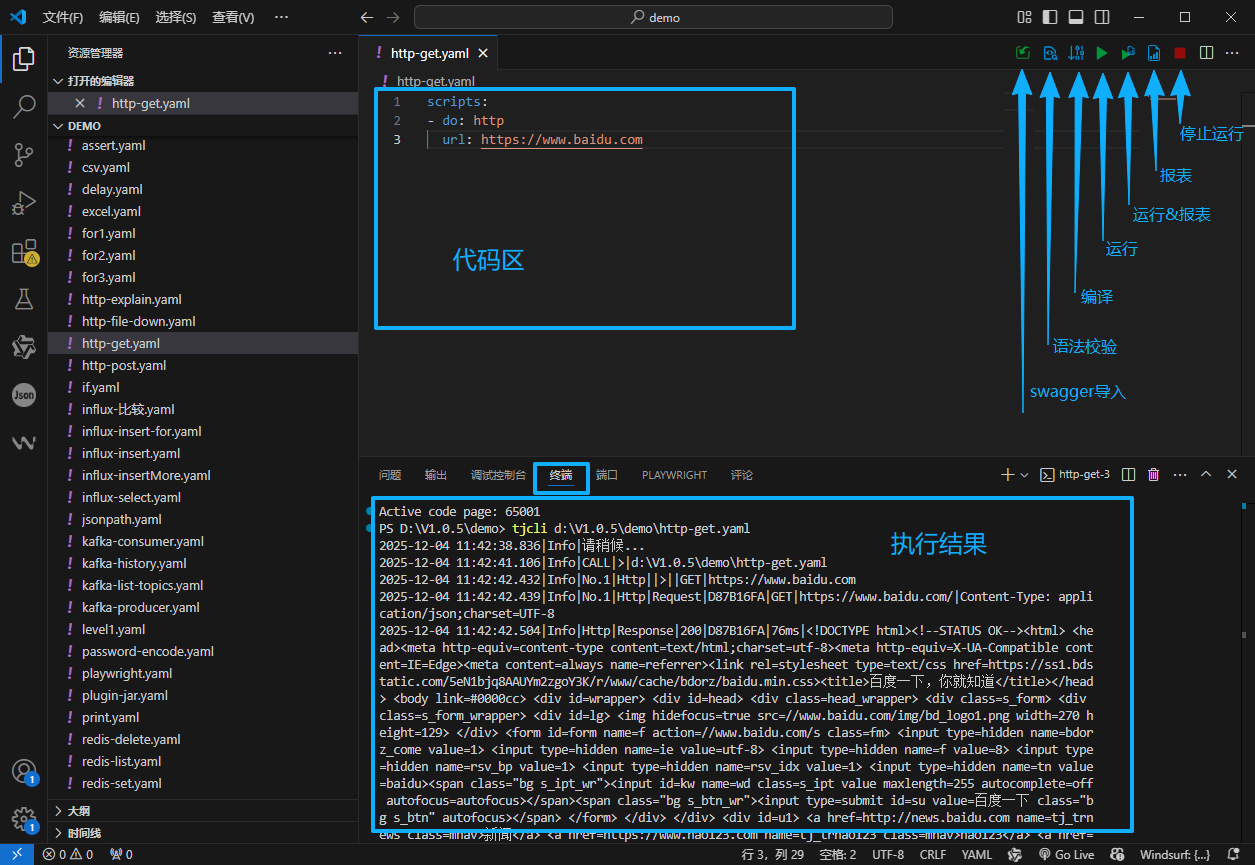
Examples
HTTP GET Interface
Code
scripts:
- do: http
  url: https://www.baidu.com
Execution Result
PS D:\V1.0.5\demo> tjcli d:\V1.0.5\demo\http-get.yaml
2025-12-03 17:04:50.161|Info|Please wait...
2025-12-03 17:04:51.146|Info|CALL|>|d:\V1.0.5\demo\http-get.yaml
2025-12-03 17:04:52.319|Info|No.1|Http||>||GET|https://www.baidu.com
2025-12-03 17:04:52.655|Info|No.1|Http|Request|F1E666FE|GET|https://www.baidu.com/|Content-Type: application/json;charset=UTF-8
2025-12-03 17:04:52.820|Info|Http|Response|200|F1E666FE|512ms|<!DOCTYPE html><!--STATUS OK--><html> <head><meta http-equiv=content-type content=text/html;charset=utf-8><meta http-equiv=X-UA-Compatible content=IE=Edge><meta content=always name=referrer><link rel=stylesheet type=text/css href=https://ss1.bdstatic.com/5eN1bjq8AAUYm2zgoY3K/r/www/cache/bdorz/baidu.min.css><title>Baidu</title></head> <body link=#0000cc> <div id=wrapper> <div id=head> <div class=head_wrapper> <div class=s_form> <div class=s_form_wrapper> <div id=lg> <img hidefocus=true src=//www.baidu.com/img/bd_logo1.png width=270 height=129> </div> <form id=form name=f action=//www.baidu.com/s class=fm> <input type=hidden name=bdorz_come value=1> <input type=hidden name=ie value=utf-8> <input type=hidden name=f value=8> <input type=hidden name=rsv_bp value=1> <input type=hidden name=rsv_idx value=1> <input type=hidden name=tn value=baidu><span class="bg s_ipt_wr"><input id=kw name=wd class=s_ipt value maxlength=255 autocomplete=off autofocus=autofocus></span><span class="bg s_btn_wr"><input type=submit id=su value="Baidu Search" class="bg s_btn" autofocus></span> </form> </div> </div> <div id=u1> <a href=http://news.baidu.com name=tj_trnews class=mnav>News</a> <a href=https://www.hao123.com name=tj_trhao123 class=mnav>hao123</a> <a href=http://map.baidu.com name=tj_trmap class=mnav>Maps</a> <a href=http://v.baidu.com name=tj_trvideo class=mnav>Video</a> <a href=http://tieba.baidu.com name=tj_trtieba class=mnav>Tieba</a> <noscript> <a href=http://www.baidu.com/bdorz/login.gif?login&tpl=mn&u=http%3A%2f%2fwww.baidu.com%2f%3fbdorz_come%3d1 name=tj_login class=lb>Login</a> </noscript> <script>document.write('<a href="http://www.baidu.com/bdorz/login.gif?login&tpl=mn&u='+
encodeURIComponent(window.location.href+ (window.location.search === "" ? "?" : "&")+ "bdorz_come=1")+ '" name="tj_login" class="lb">Login</a>');                </script> <a href=//www.baidu.com/more/ name=tj_briicon class=bri style="display: block;">More Products</a> </div> </div> </div> <div id=ftCon> <div id=ftConw> <p id=lh> <a href=http://home.baidu.com>About Baidu</a> <a href=http://ir.baidu.com>About Baidu</a> </p> <p id=cp>©2017 Baidu <a href=http://www.baidu.com/duty/>Terms of Use</a>  <a href=http://jianyi.baidu.com/ class=cp-feedback>Feedback</a> ICP License No. 030173  <img src=//www.baidu.com/img/gs.gif> </p> </div> </div> </div> </body> </html>
2025-12-03 17:04:52.883|Info|Assert|✅ Assertion 【http1.status().toString() [regular] ^(20[0-6])】 succeeded, value 【200】
2025-12-03 17:04:52.886|Info|Summary|Total executed: 1, Success: 1, Failed: 0, Assertion failed: 0
2025-12-03 17:04:52.886|Info|Summary|Total returned: 1, Success: 1, Failed: 0, No response: 0
2025-12-03 17:04:52.886|Info|Summary|Start time: 2025-12-03 17:04:52 164, End time: 2025-12-03 17:04:52 885, Total duration: 0.72 s (721.0 ms)
2025-12-03 17:04:52.886|Info|Summary|Execution efficiency: 1.39 tasks/sec, Fastest response: 512 ms, Slowest response: 512 ms, Average response: 512.00 ms
2025-12-03 17:04:52.887|Info|CALL|□|d:\V1.0.5\demo\http-get.yaml
PS D:\V1.0.5\demo>
HTTP POST Interface
Code
scripts:
- do: http
  url: https://ug.baidu.com/mcp/pc/pcsearch
  method: post
  content: |
    {"invoke_info":{"pos_1":[{}],"pos_2":[{}],"pos_3":[{}]}}
  headers:
    Content-type: application/json; charset=UTF-8
Detailed Explanation of HTTP Interface
Code
# Content displayed in the [Case] column of the report
note: Baidu Test Case
scripts:
- do: http
  # Request URL
  url: https://www.baidu.com
  # Request content output character limit
  requestLimit: 1000
  # Response content output character limit; set as needed for multi-threaded stress testing
  responseLimit: 1000
  # Script ID, used for variable referencing
  id: baidu
  # Content displayed in the [Script] column of the report
  note: Baidu Request Script
  # Request method: get\post\put\delete, etc.
  method: get
  # Request headers
  headers:
        Connection: keep-alive
        Cache-Control: no-cache

- do: print
  values:
  - Response status value: ${baidu.status()}
  - Response body: ${baidu.body()}
  - Response body (alternative): ${baidu.body0()}
  - Request body: ${baidu.body1()}
  - Request header Connection: ${baidu.header1("Connection")}
  - Response header Content-Type: ${baidu.header0("Content-Type")}
Multi-threading: threads
Code
note: Multi-threaded Testing
scripts:
- do: threads
  # Number of threads
  workers: 5
  scripts:
  - do: for
    range: int k=1; k<10; k++
    scripts:
    - do: http
      note: Loop Request
      url: https://www.hqgq.com/index.php?m=comment&c=index&a=lists&commentid=content_2-5764${k}&num=10&page=1
Test Report
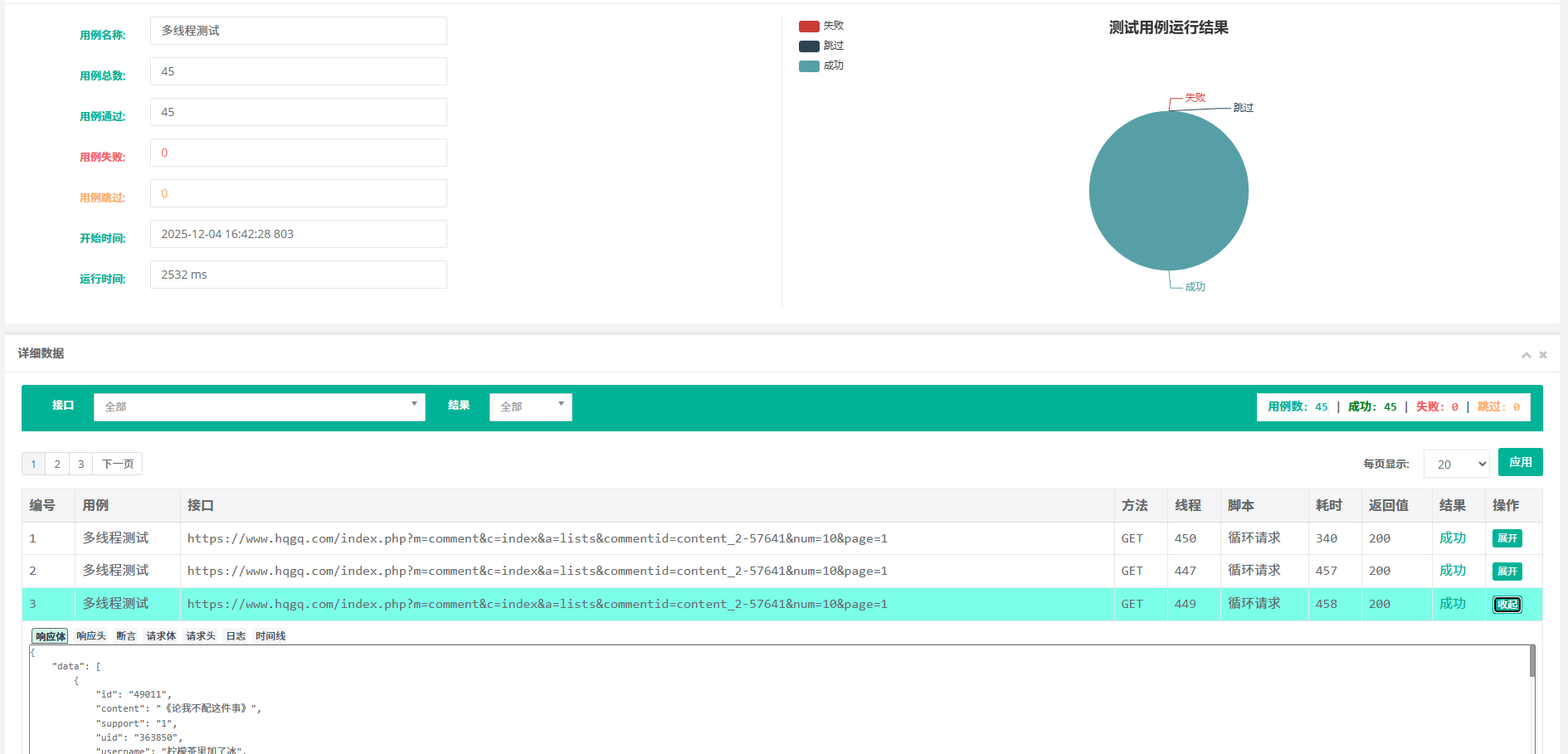
Multi-threading: tfor
Code
scripts:
- do: tfor
  # Number of loops
  round: 10
  # Number of threads
  workers: 3
  # Loop variable, usable in subsequent scripts
  loopvar: tj
  scripts:
    - do: http
      url: https://www.hqgq.com/index.php?m=comment&c=index&a=lists&commentid=content_2-5764${tj}&num=10&page=1
More Examples
Please visit the official website TestJade Official Site or refer to the demo included with the TestJade software package.

