Skip to content
| Marketplace
Sign in
Visual Studio Code>Other>Daily CalendarNew to Visual Studio Code? Get it now.
Daily Calendar

Daily Calendar

Tanaka Mikihisa

|
1 install
| (0) | Free
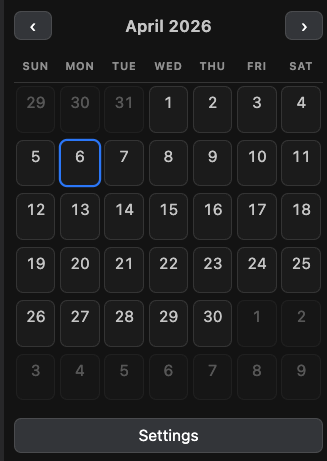
Shows a month calendar in the sidebar; open or create a daily note per date. Days with a note are marked with a dot.
Installation
Launch VS Code Quick Open (Ctrl+P), paste the following command, and press enter.
Copied to clipboard
More Info

Calendar

🇬🇧EN / 🇯🇵JP

An extension that displays a calendar for VS Code and Cursor. Click a date on the calendar to write that day's diary.

Calendar

Features

  • Month grid in the activity bar (calendar icon)
  • Open an existing diary from a date cell, or create a new one
  • Settings at the bottom of the view (or via the Command Palette) to change display language, first day of week, daily folder, template, and accent color

Links

  • Repository
  • License: MIT
  • Contact us
  • Jobs
  • Privacy
  • Manage cookies
  • Terms of use
  • Trademarks
© 2026 Microsoft