
VZORO
Visual Database Schema Designer & Architect for VS Code
Supported RDBMS: PostgreSQL (MySQL & MariaDB coming soon)
PostgreDB • PostgreSQL • Database Architect • Schema Visualizer • ERD • DDL Migrations
Features •
Quick Start •
Docs Generator •
Export •
Shortcuts •
Support
[!IMPORTANT]
🚀 Active Development & Preview Notice
- Rapid Weekly Releases: VZORO is under highly active development, with continuous updates, enhancements, and optimizations shipped every week.
- Stable Offline Core: Fully stable and production-ready for offline database schema design, interactive visual modeling, and comprehensive SQL DDL / documentation generation.
- Live DB Sync & Migrations (Active Preview): Features related to live database synchronization, introspection, and direct migration execution are currently under active refinement. Please test against staging or development environments first. Share your feedback, questions, or issues on our GitHub Community & Issue Tracker—user-reported issues and requests are treated with our highest priority!
- Free Access During Preview: VZORO is completely free to use throughout this active release phase until the final production launch.
What is VZORO?
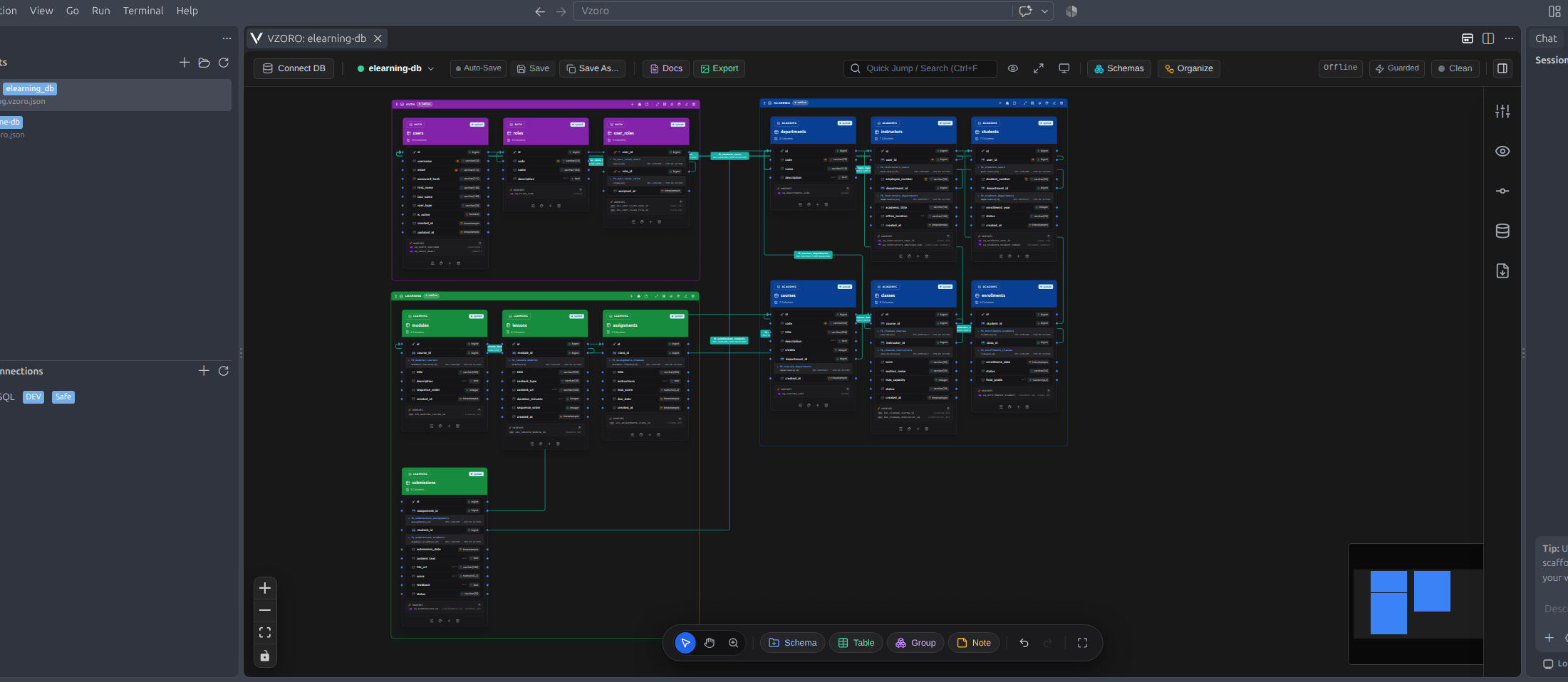
VZORO transforms Visual Studio Code into a high-performance, developer-first Database Schema Designer & Architect. Whether you are architecting a new database from scratch, exploring an existing production schema, creating documentation, or staging safe DDL migrations, VZORO provides an intuitive, high-speed visual modeling experience directly inside your code editor.
Supported RDBMS: PostgreSQL (MySQL, MariaDB, and SQLite coming soon).
No more switching between separate heavyweight database GUIs, web diagramming tools, and your IDE. VZORO keeps your schema design, DDL files, and documentation tightly integrated with your codebase.
Key Highlights
🎨 1. VZORO Studio Canvas
- Dual Layout Themes: Seamlessly switch between Dark Theme (
#181818, #121212, Blueprint Navy) and Light Theme (Clean White, Soft Alabaster, Cool Gray) with dynamic high-contrast typography and dot grid.
- Pure Vibrant Accent Colors: Apply vivid custom color swatches to table headers with zero muddy overlay layers, backed by intelligent brightness-adaptive typography (dark text on bright swatches, white text on deep swatches).
- Figma-Style Spatial Navigation: Fluid 2D mouse wheel/trackpad navigation,
Ctrl/Cmd + Wheel cursor zoom, temporary Spacebar hand tool, dynamic Z magnifier, and middle-mouse button panning.
- Interactive Column Reordering: Drag and drop column rows directly within visual table cards or reorder via
Alt+↑ / Alt+↓ inside the Table Structure modal.
- Full History Engine: Time-traveling multi-level Undo (
Ctrl+Z) and Redo (Ctrl+Y) for table moves, column changes, column reordering, color tweaks, and layout adjustments.
- Focus & Zen Mode: Maximize your workspace real estate with Zen Mode (
Ctrl+K Z) or Full Screen (F11).
⚡ 2. Visual Schema & Relationship Modeling
- Deep Column & Dimension Support: Full PostgreSQL data type catalog including length/precision, scale (e.g.
varchar(255), numeric(12,2)), array types (uuid[], text[]), and range types.
- Smart Foreign Key Connections: Drag-and-drop relationship handles with custom routing paths (Smooth, Step, Curve, Straight), custom edge colors, and configurable constraint naming patterns (
[table], [column], [FK_Name], [ref_table], [ref_column]).
- Automated Index Generation: Define index constraint naming patterns (
idx_[table]_[column]) and enable automatic indexing on foreign key columns.
- Schema & Group Containers: Automatically organizes tables by schema (e.g.
auth, public, billing) with collapsible headers and 1-click color propagation to all enclosed tables.
- Architecture Sticky Notes: Add rich post-it notes in 7 vibrant pastel themes to document architecture decisions, SQL hints, and business logic.
- Universal Draggable Modals: Every dialog and modal editor is movable and repositionable (
cursor-grab), keeping your canvas view unblocked.
📄 3. Automated Database Documentation Generator
- Comprehensive Markdown Data Dictionaries: Generate full-fledged
.md documentation in one click from the Top Bar (Docs button). Includes table of contents, column properties, nullability, default expressions, descriptions, primary keys, foreign keys, and indexes.
- Multi-Format Table Support:
- Aligned Markdown: Space-padded columns for pristine vertical alignment in raw text editors and git diffs.
- ASCII Box Grid (
+---+---+): Traditional plain-text ASCII grid tables ready for technical documentation and terminal display.
- Tab-Delimited (TSV): Tab-separated values ready for instant copy-pasting into Google Sheets or Microsoft Excel.
- Embedded Mermaid ER Diagrams: Automatically embeds interactive Mermaid ERDs directly inside the exported documentation for automated CI/CD and GitHub wiki pipelines.
🖼️ 4. High-Resolution Diagram Export (PNG & PDF)
- Zero-Blur Export Engine: Special foreignObject rasterization fixes ensure crystal-clear text and borders on both dark and light canvases.
- Multi-Scale Rendering: Export at 1x Standard, 2x Retina, or 3x Print Quality in PNG or vector-embedded PDF.
- Architectural Metadata Header Banner: Composites a sleek top banner displaying database badge (
[POSTGRESQL]), Layout Name, timestamp, schema count, table count, and relationship count.
- VZORO Signature: Includes an elegant watermark footer (
"Designed with VZORO · PostgreSQL Schema Architect").
- Flexible Destination: Copy image directly to clipboard or save to your project workspace.
🛡️ 5. Git-Style Staged Migrations & Safe DDL
- Real-Time Visual Diffs: Automatically tracks changes made on the canvas (added, modified, or dropped tables, columns, constraints, foreign keys, and indexes).
- Topologically Sorted DDL: Generates clean, production-ready PostgreSQL DDL with dependency resolution (parent tables created before dependent child tables).
- Safety Modes:
- Guarded Mode: Enforces confirmation dialogs, dry-run simulation, and atomic transaction execution.
- Read-Only Mode: Locks canvas against accidental database writes.
- Prototyping Mode: Rapid local diagramming without live database constraints.
- SQL Import: Import existing PostgreSQL
.sql DDL scripts to reconstruct visual schemas completely offline.
📁 6. File-First Architecture & Multi-Extension Support (*.vzr, *.vzoro, *.vzr.json, *.vzoro.json)
- VS Code Explorer Context Menu: Right-click any folder or directory in VS Code File Explorer and select New VZORO Layout... to create and open a diagram immediately (defaults to
*.vzr).
- Zero-Byte Template Auto-Initialization: Create a new file directly in the file tree (e.g.
billing.vzr, auth.vzr.json, or schema.vzoro.json) — VZORO detects blank or 0-byte layout files and auto-populates them with the clean v2 layout specification template upon opening.
- Native Custom Graphical Editor: Double-clicking any
*.vzr, *.vzoro, *.vzr.json, or *.vzoro.json file opens the interactive canvas designer directly as a native custom editor.
- Workspace Auto-Discovery & Real-Time Sync: The VZORO: Layouts sidebar automatically scans, indexes, and monitors (
FileSystemWatcher) all layout files across your project with instant reveal actions in File Explorer.
- Multi-Tab & Split Editor Support: Open multiple database layouts side by side in VS Code split editors.
- Git-Friendly JSON Schema (v2.0.0): Clean, portable format backed by JSON Schema validation and IntelliSense (
schemas/vzoro-layout-v2.schema.json), perfectly suited for team collaboration and version control.
Quick Start
1. Create or Open a Layout (Fastest Ways)
- From File Explorer (Context Menu): Right-click any project folder in the VS Code File Explorer $\rightarrow$ select "New VZORO Layout...", enter a layout name, and your diagram canvas opens instantly as a
.vzr file.
- From File Explorer (Direct File Creation): Create any file ending with
.vzr, .vzoro, .vzr.json, or .vzoro.json (e.g. ecommerce.vzr). Double-click it, and VZORO auto-initializes the layout.
- From VZORO Activity Bar: Click the VZORO icon in the Activity Bar. In the VZORO: Layouts sidebar, click + (Create Layout) or click any auto-discovered layout in your workspace.
- From Command Palette: Press
Ctrl+Shift+P / Cmd+Shift+P and type VZORO: Open Visualizer Canvas or New VZORO Layout....
2. Design Offline or Connect Live
- 100% Offline Prototyping: Start designing immediately with zero configuration. Use the bottom floating dock to add tables, schemas, and architecture sticky notes, or click Import SQL to reconstruct schemas directly from
.sql DDL scripts.
- Live PostgreSQL Database: Click Add Connection in the VZORO: DB Connections sidebar (or click Connect on the canvas) to securely link PostgreSQL (Supabase, Neon, AWS RDS, Localhost, etc.) and introspect live tables.
3. Model Relationships & Organize
- Foreign Keys: Drag connector handles between table columns to establish relationships. Configure routing (Smooth, Step, Curve, Straight), colors, and constraint naming rules.
- Schema Containers & Auto-Layout: Group tables into collapsible schema containers. Click Auto-Organize on the schema dock to align tables via Hierarchical Flow (DAG) or Matrix Grid, or run canvas-wide auto-layout (
Dagre).
- Interactive Editing: Reorder columns directly within visual table cards or via
Alt+↑ / Alt+↓ inside the modal. Enjoy multi-level Undo (Ctrl+Z) and Redo (Ctrl+Y).
4. Export, Document & Migrate
- Automated Data Dictionaries: Click Docs on the Top Bar to generate comprehensive Markdown documentation with Aligned Markdown, ASCII Box Grid, TSV, and embedded Mermaid ER diagrams.
- High-Res Visual Export: Click Export on the Top Bar to produce crystal-clear PNG (1x, 2x, 3x Print Quality) or vector-embedded PDF diagrams with architectural metadata headers.
- Safe DDL Migrations: Review canvas schema diffs and export topologically sorted PostgreSQL DDL scripts.
Keyboard Shortcuts & Gestures
🧭 Canvas Navigation & Spatial Controls (Figma-Style)
| Shortcut / Gesture |
Action |
Space (Hold) + Drag |
Temporary Hand pan mode; release to return to previous tool |
Middle Click & Drag |
Instant canvas panning anytime without modifier keys |
Ctrl / Cmd + Mouse Wheel |
Smooth zoom in / out centered directly at mouse cursor |
| Mouse Wheel Up / Down |
Pan canvas vertically |
Shift + Mouse Wheel |
Pan canvas horizontally |
| Trackpad Pinch / 2-Finger Swipe |
Native pinch-to-zoom and fluid 2D canvas panning |
Z (Hold) + Left Click |
Dynamic Zoom In tool (cursor: zoom-in) |
Z + Alt (Hold) + Left Click |
Dynamic Zoom Out tool (cursor: zoom-out) |
Ctrl + = / Ctrl + + |
Zoom in step (+20%) |
Ctrl + - |
Zoom out step (-20%) |
Ctrl + 0 / Shift + 1 |
Fit View (zoom and center entire diagram into viewport) |
| Shortcut |
Action |
V / A / Escape |
Switch to Select & Move tool (default mode) |
H |
Switch to Hand tool (persistent pan mode) |
✏️ Editing & History Engine
| Shortcut |
Action |
Ctrl+Z / Cmd+Z |
Multi-level Undo (moves, columns, styles, reordering) |
Ctrl+Y / Cmd+Shift+Z |
Multi-level Redo |
Ctrl+S / Cmd+S |
Save active layout to sidebar and file |
Ctrl+F / Cmd+F |
Quick Search & Jump to table/column |
Ctrl+G / Cmd+G |
Group selected tables into a new visual container |
Alt + ↑ / Alt + ↓ |
Reorder selected column up/down (in Table Structure modal) |
🖥️ View & Workspace
| Shortcut |
Action |
Ctrl+K Z |
Toggle Zen Mode (maximizes diagram canvas area) |
F11 |
Toggle Full Screen mode |
🖱️ Direct Canvas Interactions
| Interaction |
Action |
Double-Click Table Card |
Open detailed Table Structure & Column Editor modal |
Double-Click FK Edge |
Open Foreign Key Constraint Configuration modal |
Right-Click Empty Canvas |
Open Canvas Context Menu (themes, grid, add elements) |
Right-Click FK Edge |
Open Foreign Key Context Menu (routing, labels, colors) |
Hover Column + Drag |
Reorder columns directly within visual table card |
Hover Column + ▲ / ▼ |
Move column up/down by one position in table card |
Requirements & Compatibility
- Visual Studio Code:
v1.85.0 or newer.
- PostgreSQL: Versions
12.x, 13.x, 14.x, 15.x, 16.x, and 17.x.
- Fully cross-platform: Windows, macOS, and Linux.
License & Support
| |

