
TadaKey 2FA
Local digital vault for code editors with two-factor authentication


You can find my extensions on the VS Code Marketplace or the Open VSX
Preview
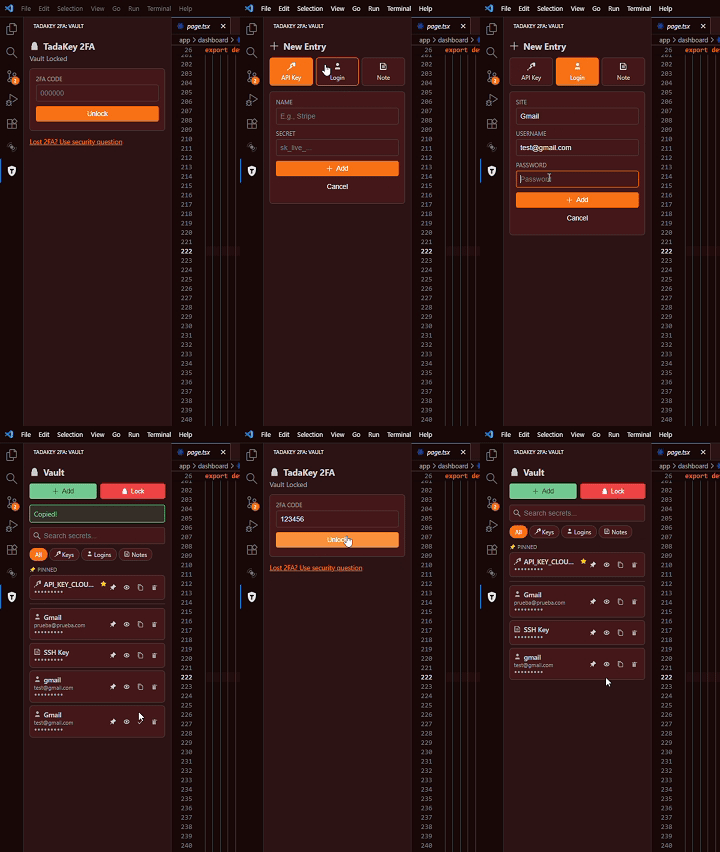
Features
- 🔐 2FA Protected Vault - TOTP authentication required to unlock
- 🔑 API Keys - Store tokens and secrets securely
- 👤 Logins - Save site, username, and password combinations
- 📝 Secure Notes - Store SSH keys, JSON configs, recovery codes
- 🔍 Search & Filter - Quickly find entries by name or username
- ⭐ Pin Favorites - Keep frequently used items at the top
- 🎨 Theme Support - Adapts to VS Code light/dark themes
- 📋 One-Click Copy - Copy secrets to clipboard instantly
- ⏱️ Auto-Hide - Revealed secrets hide after 15 seconds
Installation
- Open VS Code
- Go to Extensions (
Ctrl+Shift+X)
- Search for "TadaKey 2FA"
- Click Install
🐧 Linux Security Requirements (Click to expand)
If you encounter the error "An OS keyring couldn't be identified" or extension secrets are not saving, follow these steps:
1. Install Dependencies
Choose the command for your distribution:
| Distribution |
Command |
| Arch Linux / Manjaro |
sudo pacman -S gnome-keyring libsecret seahorse |
| Debian / Ubuntu / Mint |
sudo apt install gnome-keyring libsecret-1-0 seahorse |
| Fedora |
sudo dnf install gnome-keyring libsecret seahorse |
2. Setup the Keyring (GUI)
- Open Seahorse (search for "Passwords and Keys" in your menu)
- Click the + button and select "Password Keyring"
- Name it exactly:
Login
- Right-click on the new "Login" keyring and select "Set as default"
- Ensure the padlock icon is open (Unlocked)
You must tell the editor to use the system keyring:
- Open the Command Palette (
Ctrl+Shift+P)
- Type:
Preferences: Configure Runtime Arguments
- This will open
argv.json
- Add the following line (ensure correct JSON commas):
"password-store": "gnome"
- Restart your editor completely
🛠️ Fix: "InvalidStateError: Failed to register a ServiceWorker"
If after configuring the keyring the extension shows a "Service Worker" or "Invalid State" error, the interface cache is corrupted. Clear it manually:
- Close the editor completely
- Delete the Service Worker cache (choose your editor):
# For VS Code
rm -rf ~/.config/Code/"Service Worker"

# For VSCodium
rm -rf ~/.config/VSCodium/"Service Worker"

# For Antigravity
rm -rf ~/.config/Antigravity/"Service Worker"
- Optional verification - Find the folder before deleting:
find ~/.config -name "Service Worker" -type d 2>/dev/null
- Restart your editor - The interface will regenerate cleanly
Getting Started
- Click the TadaKey icon in the Activity Bar
- Set up your security question and answer
- Scan the QR code with your authenticator app (Google Authenticator, Authy, etc.)
- Enter the 6-digit code to activate your vault
- Start adding your secrets!
Security
- AES-256 Encryption - All secrets are encrypted locally
- TOTP Authentication - Standard 2FA protocol
- No Cloud Storage - Everything stays on your machine
- VS Code SecretStorage - Uses VS Code's secure storage API
Entry Types
| Type |
Fields |
Use Case |
| 🔑 API Key |
Name, Secret |
API tokens, environment variables |
| 👤 Login |
Site, Username, Password |
Website credentials |
| 📝 Note |
Title, Content |
SSH keys, JSON, multi-line text |
Recovery
Lost your 2FA device? Use your security question to recover access and set up a new authenticator.
💬 Feedback & Support
If you find this extension useful, please consider:
⭐ Leave a star - Help others discover this extension!
💬 Write a review - Your feedback helps us improve
If you have any theme requests or issues, please open an issue.
📄 License
MIT © TadashiDevs
| |

