Skip to content
| Marketplace
Sign in
Visual Studio Code>Programming Languages>Topcoder FullstackNew to Visual Studio Code? Get it now.
Topcoder Fullstack

Topcoder Fullstack

TOPCODER FULLSTACK

|
3 installs
| (0) | Free
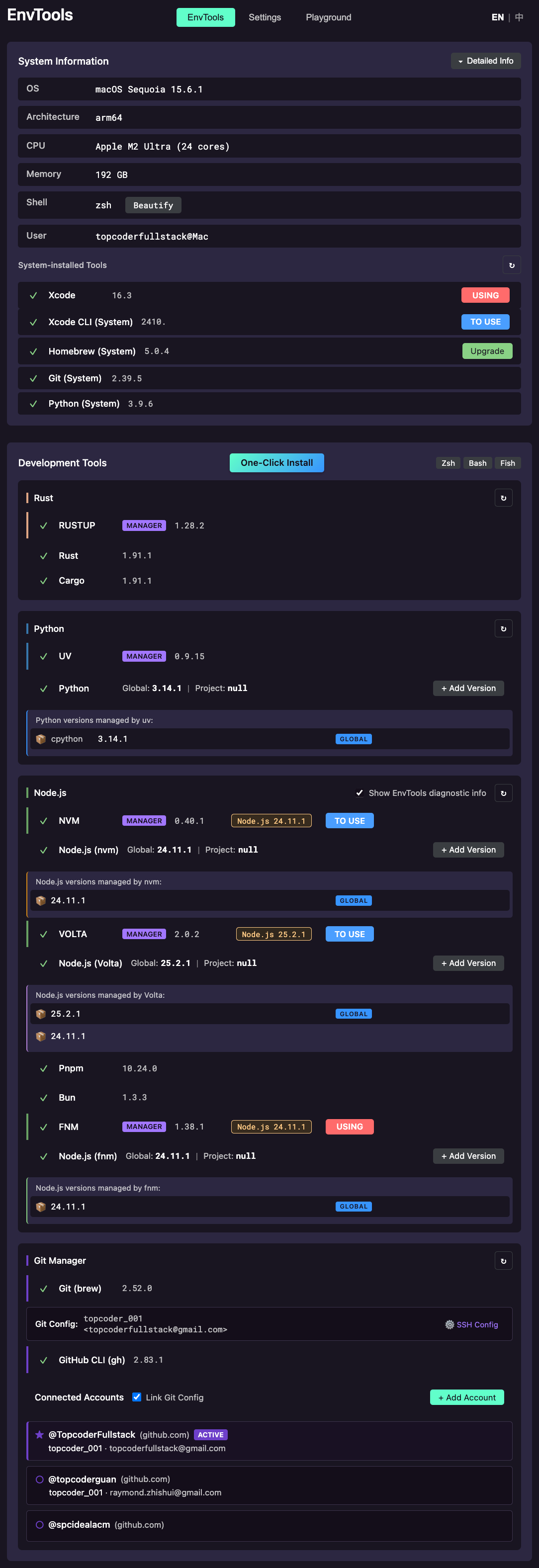
All-in-one development environment manager for fullstack developers. Manage Rust (rustup), Python (uv), Node.js (Volta/fnm/nvm), Git, GitHub CLI with multi-account support, SSH keys, PATH configuration, and VSCode settings - all from a beautiful webview panel.
Installation
Launch VS Code Quick Open (Ctrl+P), paste the following command, and press enter.
Copied to clipboard
More Info

Topcoder Fullstack

All-in-one development environment manager for fullstack developers.

Getting Started

  1. Press Cmd+Shift+P (macOS) or Ctrl+Shift+P (Windows/Linux)
  2. Type Open Topcoder Fullstack
  3. The panel will open with all your development tools

Features

Node.js Management

Manage Node.js versions with your preferred package manager:

  • Volta - Install, switch versions, pin to project
  • fnm - Fast Node Manager support
  • nvm - Node Version Manager support

One-click install LTS or specific versions, set global defaults, or pin versions to your project.

Python Management

  • uv - Ultra-fast Python package manager
  • Install and manage multiple Python versions
  • Pin Python version globally or per-project (.python-version)

Rust Management

  • rustup - Official Rust toolchain manager
  • Switch between stable, beta, and nightly
  • Manage installed toolchains and components

GitHub CLI & Multi-Account Support

  • Install and manage GitHub CLI (gh)
  • Multiple GitHub accounts - Add, switch, and manage multiple accounts
  • SSH Key Management - Generate and upload SSH keys to GitHub
  • Git Config - Auto-configure user.name and user.email per account
  • Take Control - Set gh as the only Git credential helper

System Information

  • View OS details, hardware info
  • Check installed tool versions
  • Detect available upgrades

PATH Configuration (Windows)

  • View and manage PATH entries
  • Detect duplicate or missing paths
  • Fix common PATH issues

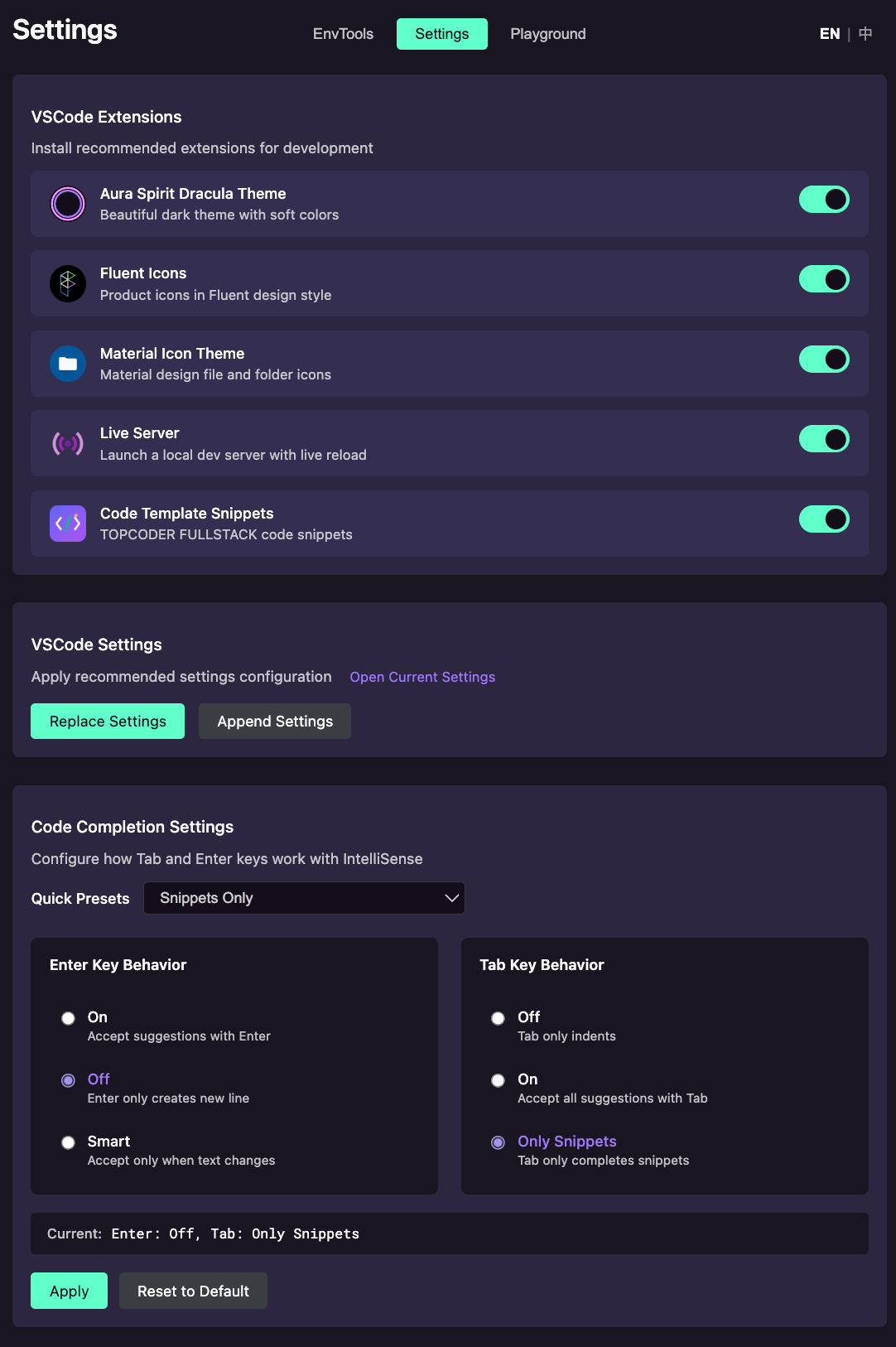
VSCode Settings & Plugins

  • Apply recommended settings
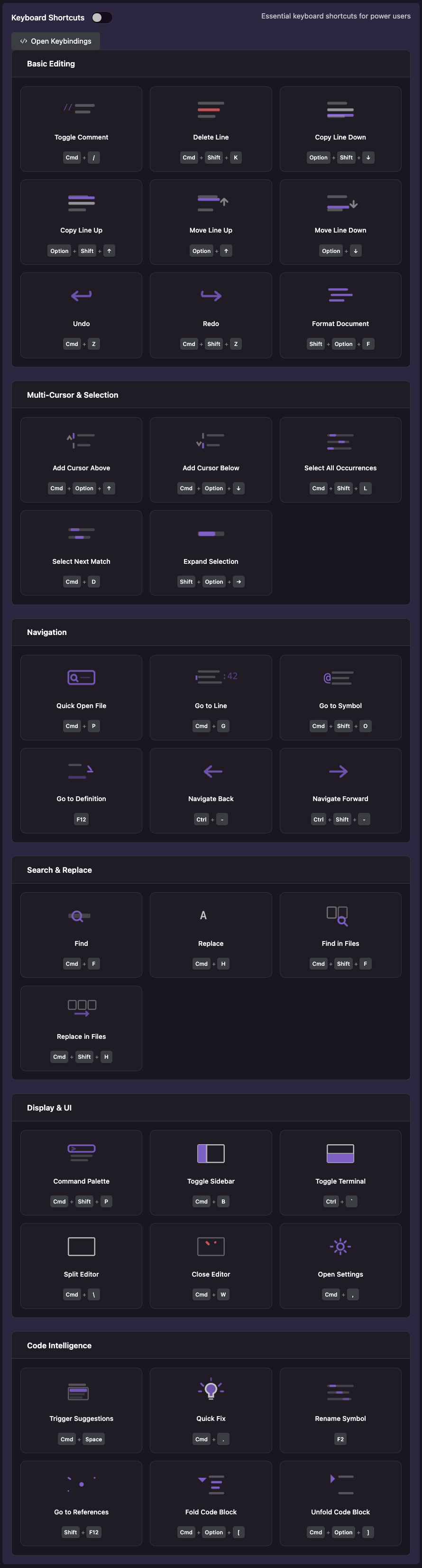
  • Configure keyboard shortcuts
  • Manage code completion plugins (Copilot, Codeium, etc.)

Supported Platforms

  • macOS (Apple Silicon & Intel)
  • Windows 10/11
  • Linux (Debian/Ubuntu)

Language Support

  • English
  • 简体中文 (Simplified Chinese)

The interface automatically detects your VSCode language setting.

Tips

Keep Terminal Open

Check the "Keep Terminal" checkbox to keep the output terminal visible after operations complete.

One-Click Install

Use the one-click buttons to quickly install tools without manual commands.

GitHub Multi-Account

  1. Click "Add Account" to login with OAuth
  2. Switch between accounts with one click
  3. Check "Link Git Config" to auto-configure Git when switching

License

Proprietary License - See LICENSE.md

Copyright (c) 2024-2025 Topcoder Fullstack. All Rights Reserved.

  • Contact us
  • Jobs
  • Privacy
  • Manage cookies
  • Terms of use
  • Trademarks
© 2025 Microsoft