Kubectl Confirm is a VS Code extension focused on safer Kubernetes operations.
Instead of executing kubectl commands immediately from the editor, the extension adds validation, context visibility, confirmation prompts, and delayed execution safeguards to help prevent mistakes against the wrong cluster or namespace.
Core Functionality
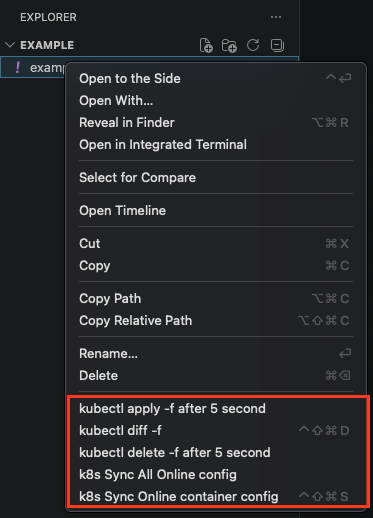
Execute Kubernetes operations directly from VS Code explorer context menus.
Display the active Kubernetes context before running destructive commands.
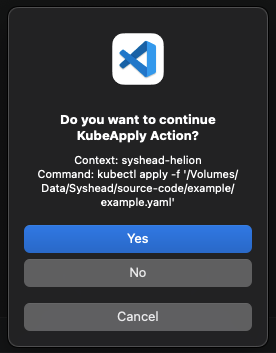
Show the exact kubectl command before execution.
Require explicit user confirmation for apply and delete actions.
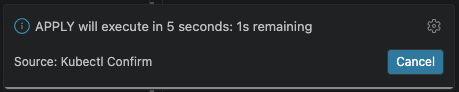
Add a cancellable 5 second safety countdown before execution.
Validate selected resource types before running commands.
Sync local manifests from live Kubernetes resources.
Support both standard manifests and Kustomize workflows.
Available Commands
Command
Description
Shortcut
K8S: Apply
Confirm context and execute kubectl apply -f after a safety countdown
K8S: Delete
Confirm context and execute kubectl delete -f after a safety countdown
K8S: Diff
Run kubectl diff -f against a file or directory
ctrl+shift+alt+d / ctrl+shift+cmd+d
K8S: Apply kustomize
Confirm context and execute kubectl apply -k after a safety countdown
K8S: Diff kustomize
Run kubectl diff -k against a directory
K8S: Sync Container
Update only the container section from the live Kubernetes resource
ctrl+shift+alt+s / ctrl+shift+cmd+s
K8S: Sync
Update the selected local manifest from the live Kubernetes resource
DIR: cd
Open a terminal in the selected directory
Safety Features
The extension was built around preventing accidental Kubernetes changes during daily operations.
For apply and delete actions, the extension:
Detects and displays the active Kubernetes context.
Shows the exact command that will be executed.
Requires manual confirmation inside VS Code.
Starts a visible 5 second cancellable countdown.
Sends the command to the currently active terminal only after confirmation.