Skip to content
| Marketplace
Sign in
Visual Studio Code>Visualization>SyntroperNew to Visual Studio Code? Get it now.
Syntroper

Syntroper

Syntroper AI

|
8 installs
| (0) | Free
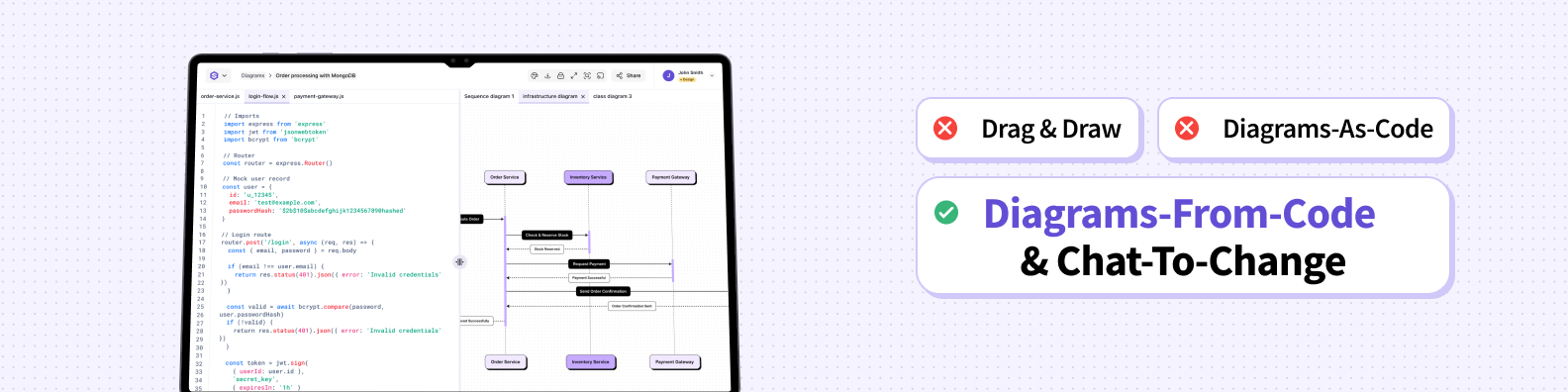
Automated architecture diagrams directly in VSCode. Generate and modify diagrams from code, cloud configurations and chat promopts.
Installation
Launch VS Code Quick Open (Ctrl+P), paste the following command, and press enter.
Copied to clipboard
More Info

Syntroper - Automated Architecture Diagrams in VSCode

Save time from manual creation and maintainence of architecture diagrams. With Syntroper, put your diagrams on autopilot.

Syntroper is an AI-powered architecture platform that automatically generates and keeps system diagrams updated from your code, cloud, and chat prompts. View, search, and manage your architecture diagrams directly in VSCode.

Alt text

Follow us on LinkedIn or X

Features

Supported Diagrams

  • Sequence Diagram
  • Flow Chart Diagram
  • Context Diagram
  • Container Diagram
  • Component Diagram
  • Infrastructure Diagram
  • Activity Diagram
  • more coming soon

Modern Intuitive Experience

  • Modern, responsive, consistent and interactive diagrams
  • Smooth animations and transitions
  • Dark/Light theme support
  • Pagination for large diagram collections

Secure Authentication

  • OAuth 2.0 with PKCE for secure login
  • Automatic token refresh
  • Secure credential storage

Diagram Management

  • Browse Diagrams: List all your diagrams in a sidebar
  • Generate Or Modify Diagrams: Generate and modify diagrams within vscode from code or chat prompts
  • Diagram Versioning: Diagram changes are versioned with the ability to undo/redo changes
  • Smart Search: Find diagrams instantly with real-time search
  • Filter Diagrams: Filter by the type of diagram or when diagrams were last edited
  • Open In Canvas: Click any diagram to open Syntroper canvas in a new VSCode tab

Getting Started

  1. Install the extension from the VSCode Marketplace
  2. Click the Syntroper icon in the Activity Bar (sidebar)
  3. Login with your Syntroper account
  4. Browse and access your diagrams in VS Code

Requirements

  • VSCode 1.104.0 or higher
  • A Syntroper account at www.syntroper.ai

Configuration

Configure the extension in VSCode Settings (Cmd+, or Ctrl+,):

  • API Base URL: Your Syntroper API endpoint (default: https://api.syntroper.ai/)
  • UI Base URL: Your Syntroper UI endpoint (default: https://app.syntroper.ai/)
  • OAuth Client ID: Your OAuth client ID
  • Debug Mode: Enable verbose logging for troubleshooting

Security

  • OAuth 2.0 with PKCE flow for maximum security
  • Tokens stored in VSCode's encrypted SecretStorage
  • Automatic token refresh with no user intervention
  • No passwords stored locally

License

This extension is proprietary software maintained by Syntroper AI.
A single closed-source codebase enables consistent behavior, faster iteration, and long-term support by avoiding ecosystem fragmentation and unsupported forks.

Release Notes

2.0.0

  • Generate a new diagram from within VS Code from chat prompt or code.
  • Modify existing diagrams with chat prompts within VS Code.
  • Versioning with Undo/Redo.

1.0.0

  • Sigin to Syntroper using OAuth 2.0 with PKCE flow.
  • View, Search and Refresh diagrams from your Syntroper account.
  • Diagram Viewer with interactive zooming, paning and link to edit diagram in Syntroper.

  • Contact us
  • Jobs
  • Privacy
  • Manage cookies
  • Terms of use
  • Trademarks
© 2026 Microsoft