DOCX Editor SDK - Syncfusion®Project templates for creating Blazor apps using Syncfusion® Blazor components. |

The Syncfusion® Essential Studio® DOCX Editor SDK extensions for Visual Studio allows you to create a Syncfusion application based on the platform selection such as Blazor and WPF using Syncfusion® DOCX Editor SDK components.This extension is specifically engineered to enhance productivity and streamline the process to create, edit and write DOCX file formats applications without dependencies. Furthermore, the extension include a code generator that allows you to add Syncfusion® DOCX Editor SDK component code to blazor application quickly at the required place in the Razor file, ready-to-use Syncfusion® DOCX Editor SDK template studio, serving as a convenient starting point for your development work and helps to create Syncfusion® application with the sample code of required Syncfusion® DOCX Editor SDK controls and features. The Syncfusion® DOCX Editor SDK extension offer numerous benefits, making them the ideal choice for anyone seeking to integrate preconfigured WPF components and also add the necessary references through reference manager into their projects. Highlights:
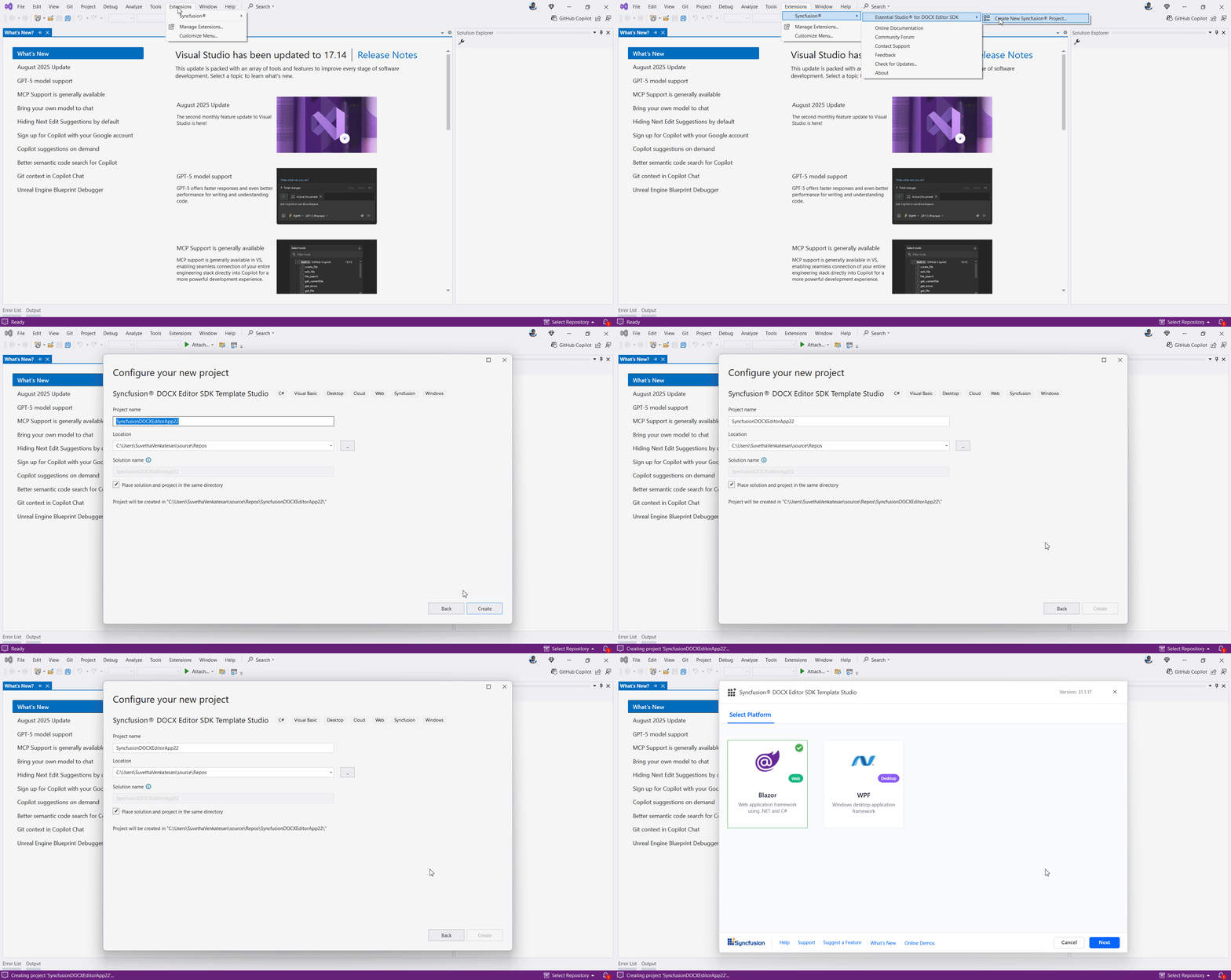
Create a new Syncfusion® DOCX Editor SDK Application in Visual StudioThe Syncfusion® DOCX Editor SDK template studio is a Visual Studio extension that uses a wizard to speed up the creation of DOCX Editor SDK applications. The subsequent project is framed, integrating Syncfusion DOCX Editor SDK components and features. Once you've installed the Syncfusion® DOCX Editor SDK Visual Studio extensions, you'll find the template studio under Extensions > Syncfusion > Essential Studio® for DOCX Editor SDK, click Create New Syncfusion Project. You can also access the wizard from the project menu, where you'll find the Syncfusion® DOCX Editor SDK Template Studio. Specify the name and location of the project, then click Create.
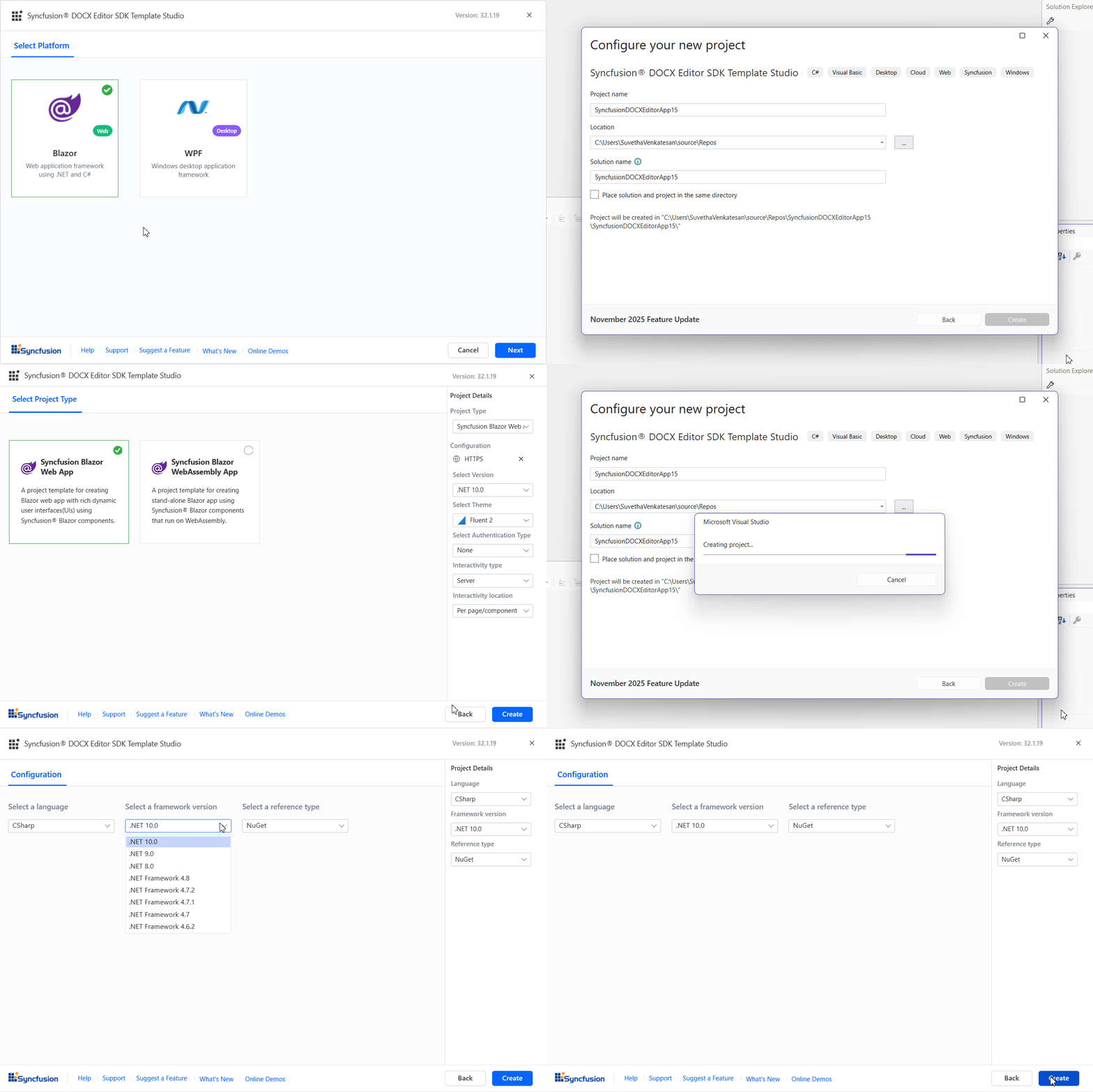
The template wizard is launched where you can select the platform and corresponding configurations to create the Syncfusion® DOCX Editor SDK application.
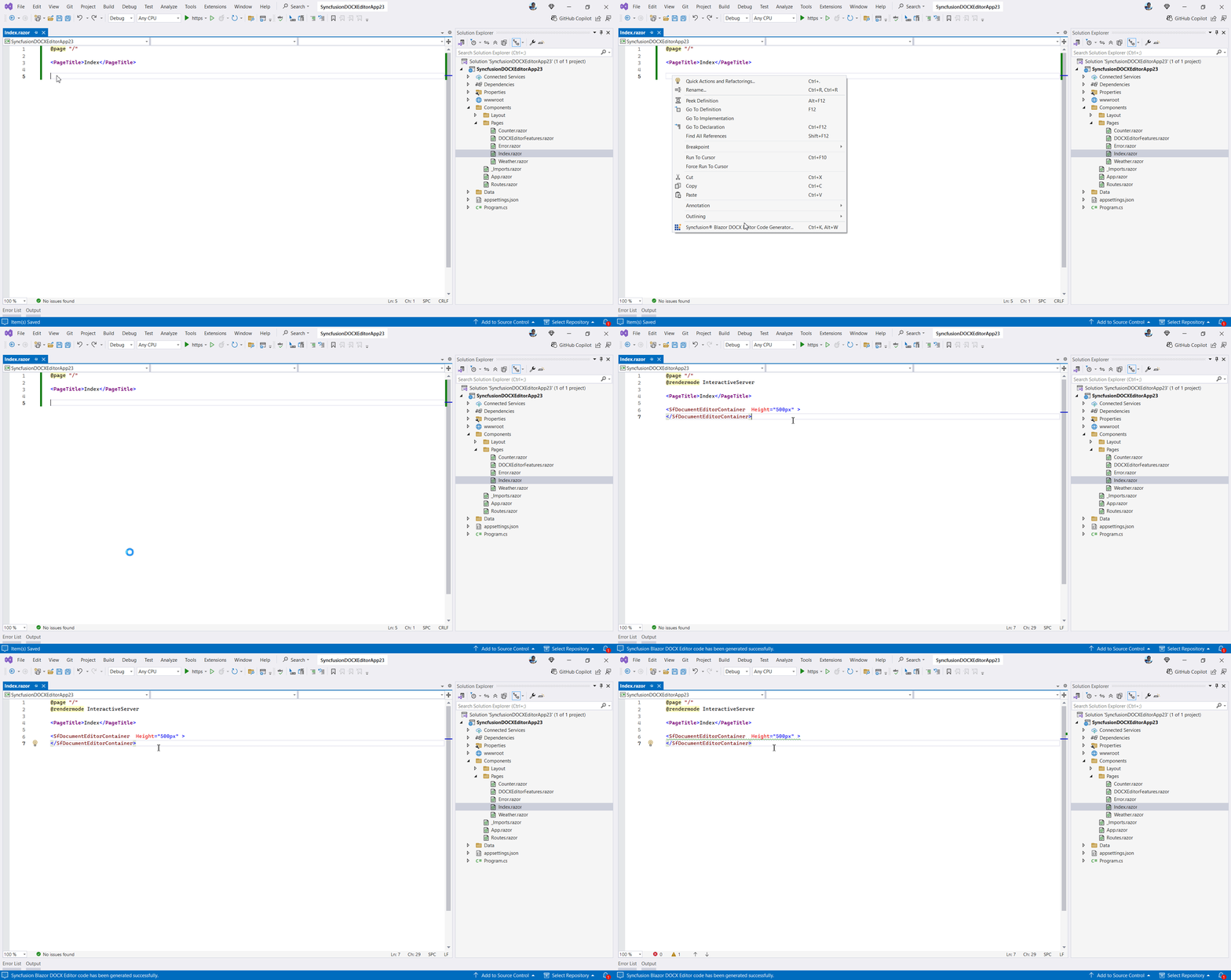
To learn more about the DOCX Editor SDK template studio, refer to this documentation. Add Syncfusion® Blazor DOCX Editor SDK Component CodeIf you have a Blazor application, incorporate the Syncfusion DOCX Editor SDK code generator to add a Syncfusion® DOCX Editor SDK component effortlessly at the appropriate place in the Razor file. After installing the Syncfusion® DOCX Editor SDK Visual Studio extension, right-click in the Razor file to launch the Syncfusion® Blazor DOCX Editor SDK Code Generator then Syncfusion® Blazor DOCX Editor SDK Code Generator wizard will be launched and you can select Syncfusion® DOCX Editor SDK controls and features for your Blazor project which auto-configures namespaces, styles, and NuGet references, lets you select features, and inserts the render code at your cursor position.
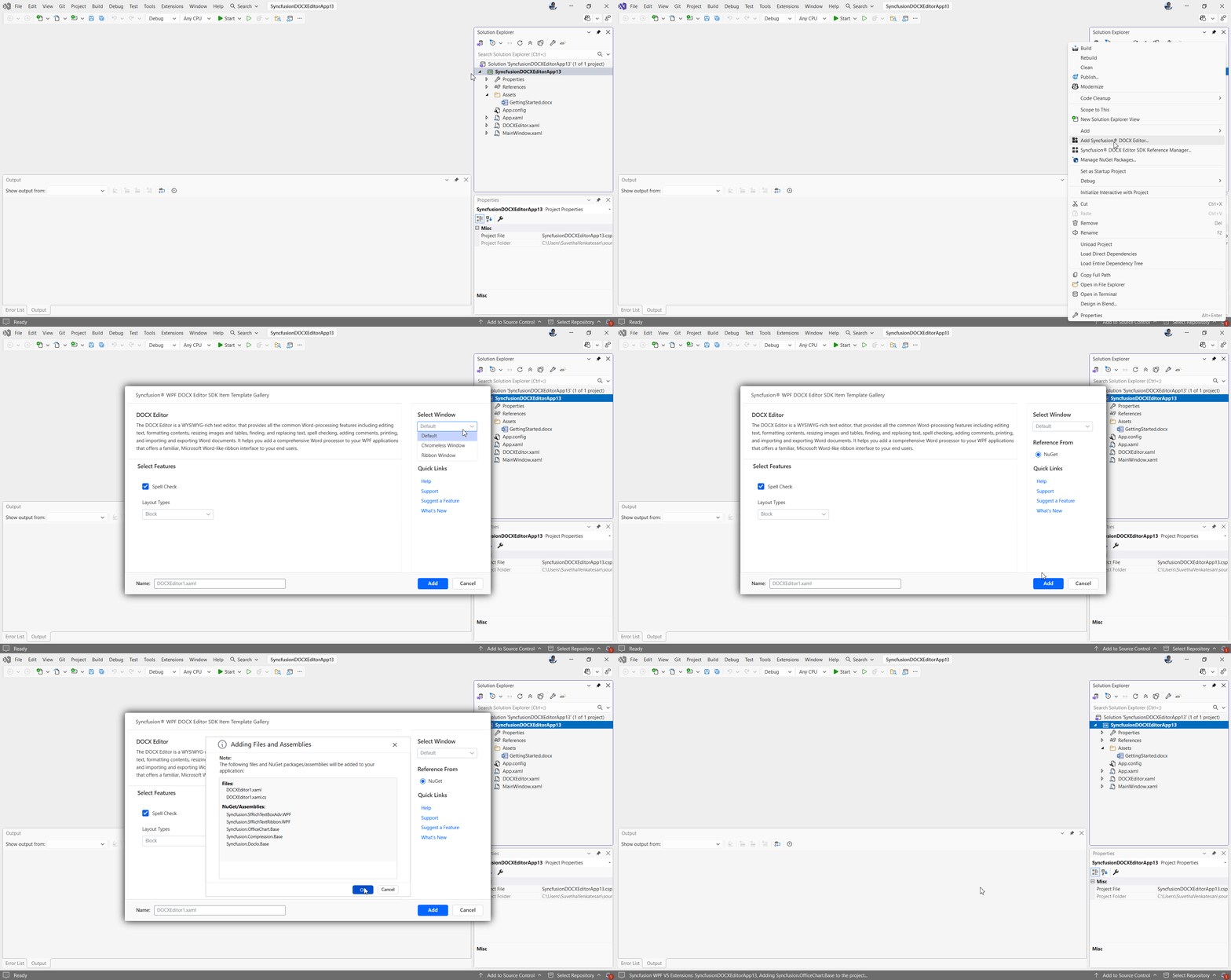
To learn more about the code generator, refer to this documentation Add Syncfusion® WPF Item TemplateOpen your existing Winforms or WPF Application, you can either right-click the project in Solution Explorer and select Add Syncfusion® DOCX Editor.. or use the Extensions menu under Essential Studio® for DOCX Editor SDK > Add Syncfusion® DOCX Editor.. This launches a wizard that displays available components of the selected platform to integrate the selected Syncfusion® DOCX Editor components and assemblies into your application.
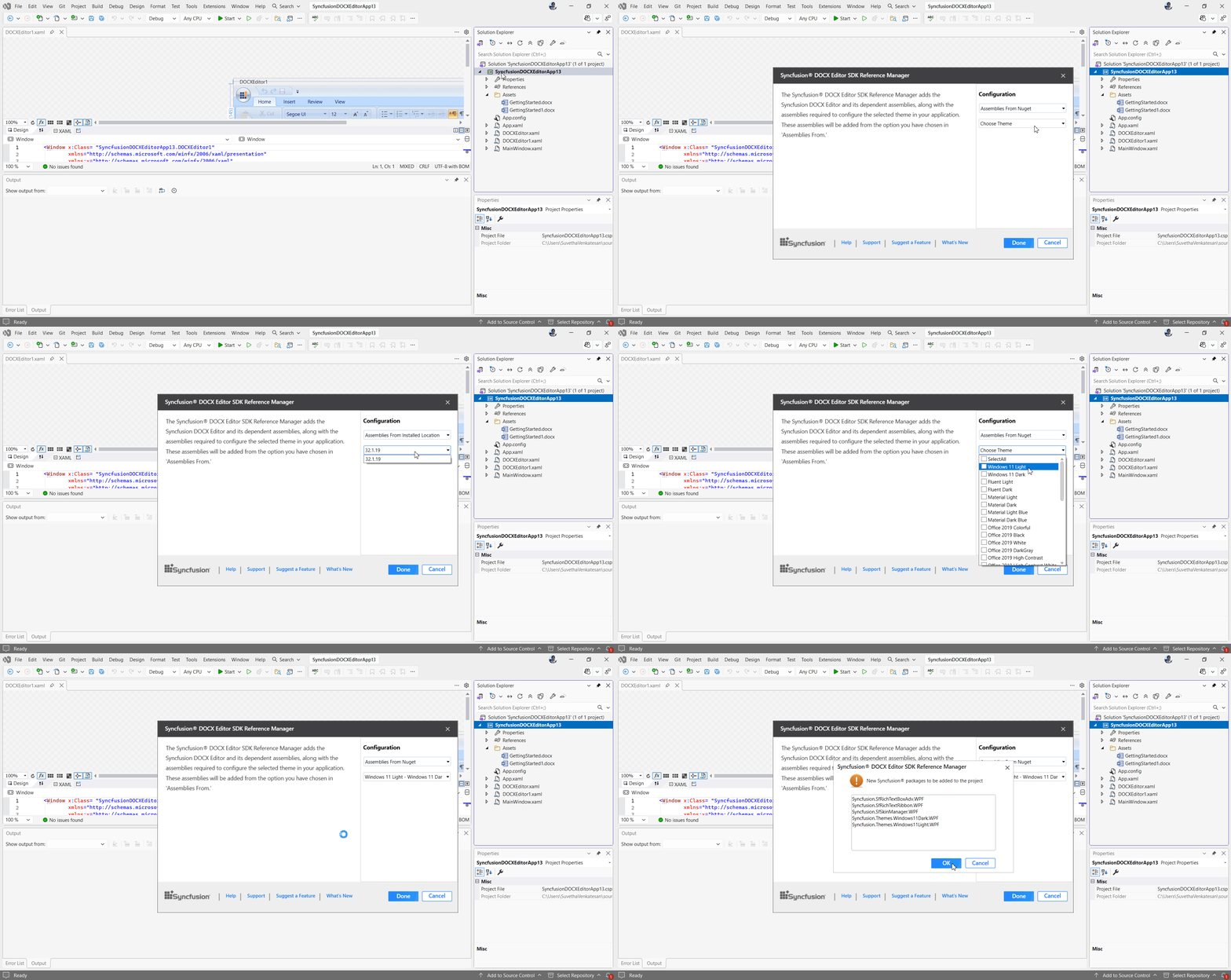
To learn more about the item template, refer to this documentation Add Syncfusion® DOCX Editor SDK Reference for WPF ApplicationSyncfusion® DOCX Editor SDK Reference Manager is an Add-In for WPF application. It adds the Syncfusion® assembly reference to the project, either from the GAC location or Essential Studio® installed location. After installing the Syncfusion® DOCX Editor SDK Visual Studio extensions, you'll find the reference manager by right-clicking on the project in the solution explorer and navigate to Add Syncfusion DOCX Editor SDK Reference Manager... The wizard allows you to select platform-specific components, choose themes (for WPF), and specify assembly sources such as NuGet, installed location, or GAC and build version and then the required assemblies are added to your project.
To learn more about the reference manager, refer to this documentation. Related linksLearn more about DOCX Editor SDK components About Syncfusion®Founded in 2001 and headquartered in Research Triangle Park, N.C., Syncfusion® has more than 38,000 customers and more than 1 million users, including large financial institutions, Fortune 500 companies, and global IT consultancies. Today, we provide 1700+ controls and frameworks for web (Blazor, Flutter, ASP.NET Core, ASP.NET MVC, JavaScript, Angular, React, Vue, and mobile (.NET MAUI, Flutter, UWP, and JavaScript), and desktop development (WinForms, WPF, WinUI, .NET MAUI, Flutter, and UWP). We provide ready-to-deploy enterprise software for dashboards, reports, data integration, and big data processing. Many customers have saved millions in licensing fees by deploying our software. sales@syncfusion.com | Toll Free: 1-888-9 DOTNET |