Blazor Extensions - Syncfusion®Project templates for creating Blazor apps using Syncfusion® Blazor components. |


The Syncfusion Essential Studio Blazor extension for Visual Studio accelerates Blazor development with project templates, code-generation tools, and a comprehensive set of UI components. It is designed for teams building enterprise-grade Blazor applications (Server and WebAssembly). Key benefits:
Supported .NET SDKsThe extension supports current .NET SDK versions and generates modern Blazor application architectures.
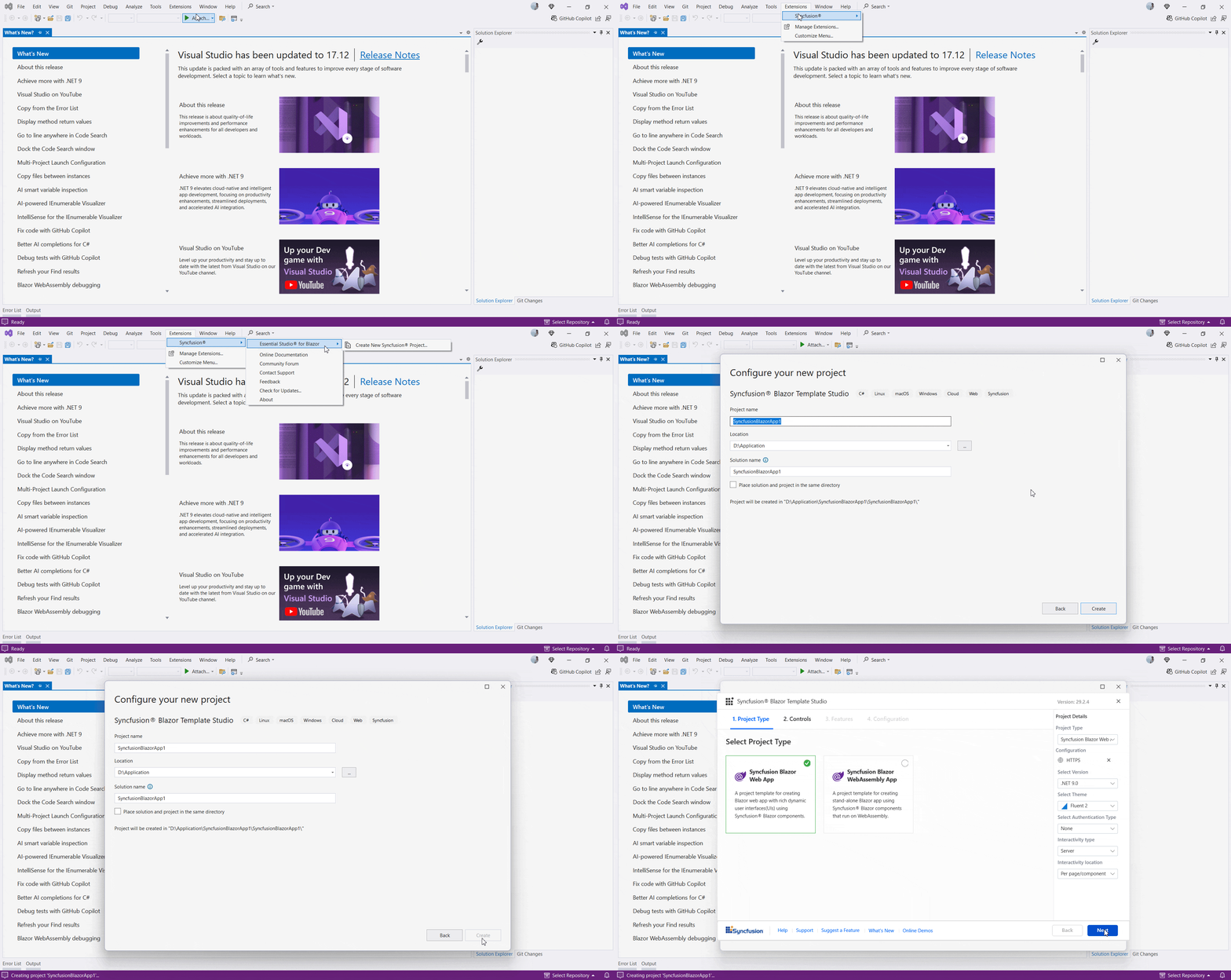
Template Studio lets you configure render modes (Server, WebAssembly, Auto) and interactivity scope (global or per-page). WebAssembly projects can optionally enable Progressive Web Application (PWA) support. Quick start — Create a new Syncfusion Blazor app
The wizard optionally configures authentication (Individual Accounts, Microsoft Identity, or Windows) and wiring for interactivity modes and per-page/per-app settings.
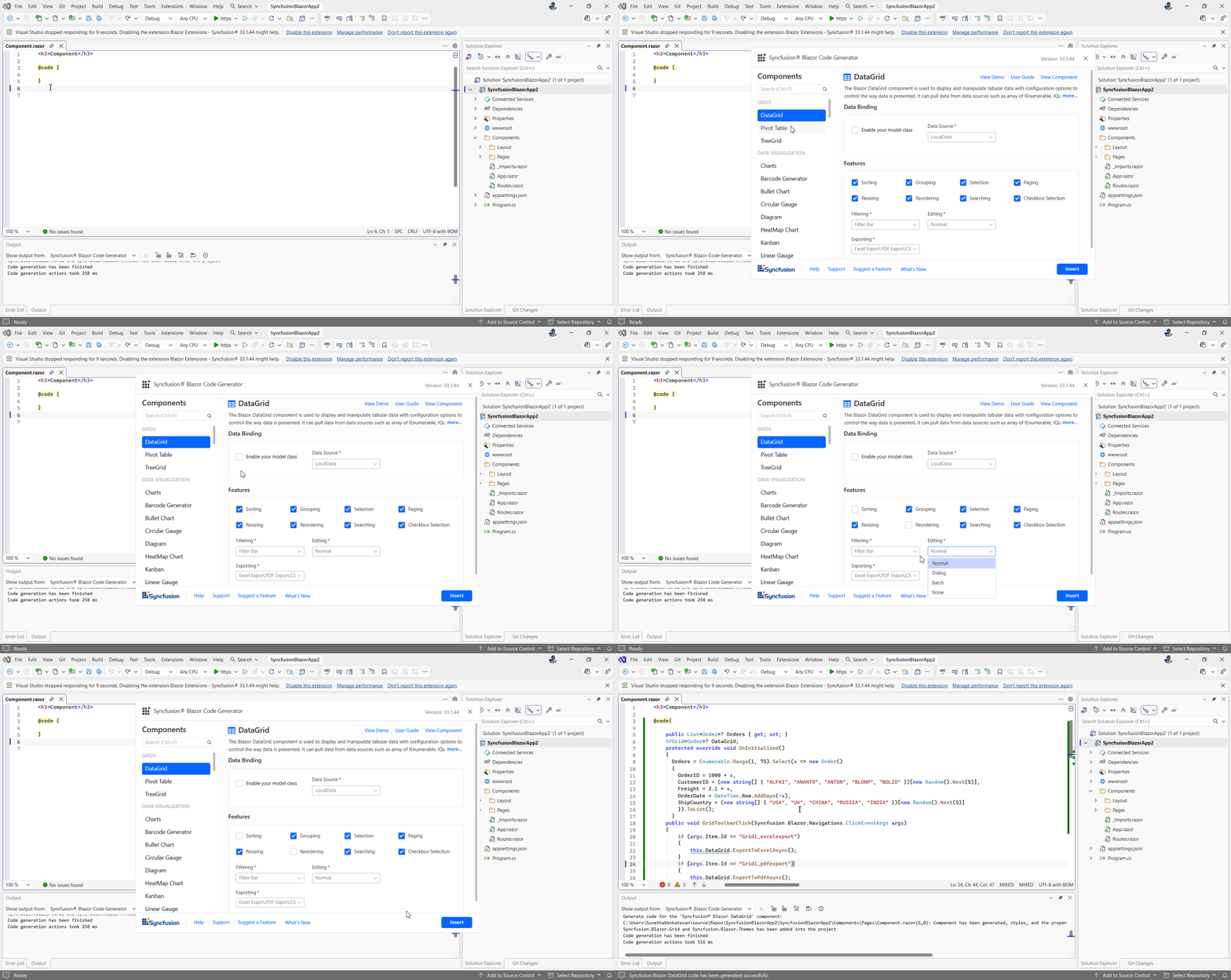
To learn more, see the Template Studio documentation: https://blazor.syncfusion.com/documentation/visual-studio-integration/visual-studio-extensions/template-studio/ Add Syncfusion® Blazor Component CodeFor existing Blazor applications, the Syncfusion® Blazor Code Generator lets you quickly add Syncfusion® components to Razor files and automatically configures namespaces, styles, and NuGet references. Its intuitive UI allows you to select components, features, and data fields, reducing manual work and development time. After installing the extension, right‑click at the required line in a Razor file, select Code Generator, and choose the components and features to add.
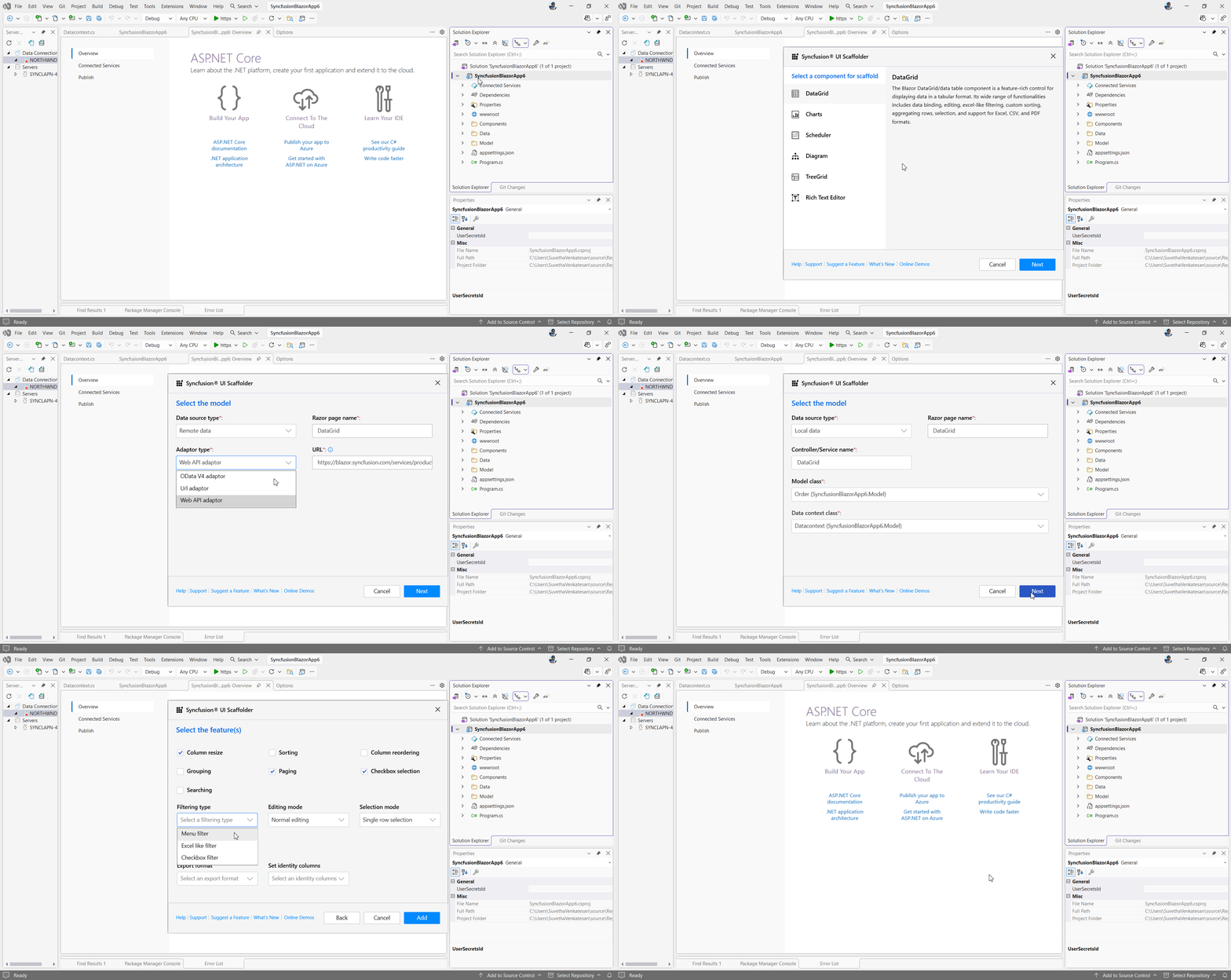
Blazor ScaffoldingScaffolding simplifies adding views and controller action methods for Syncfusion® Blazor components such as DataGrid, Charts, Scheduler, Diagram, Tree Grid, and Rich Text Editor. The scaffolding UI lets you choose data binding types, component features, and fields, significantly reducing development time. Access scaffolding by right‑clicking the project in Solution Explorer > Add > New Scaffolded Item, then select Syncfusion Blazor Scaffolder to configure the required components and features.
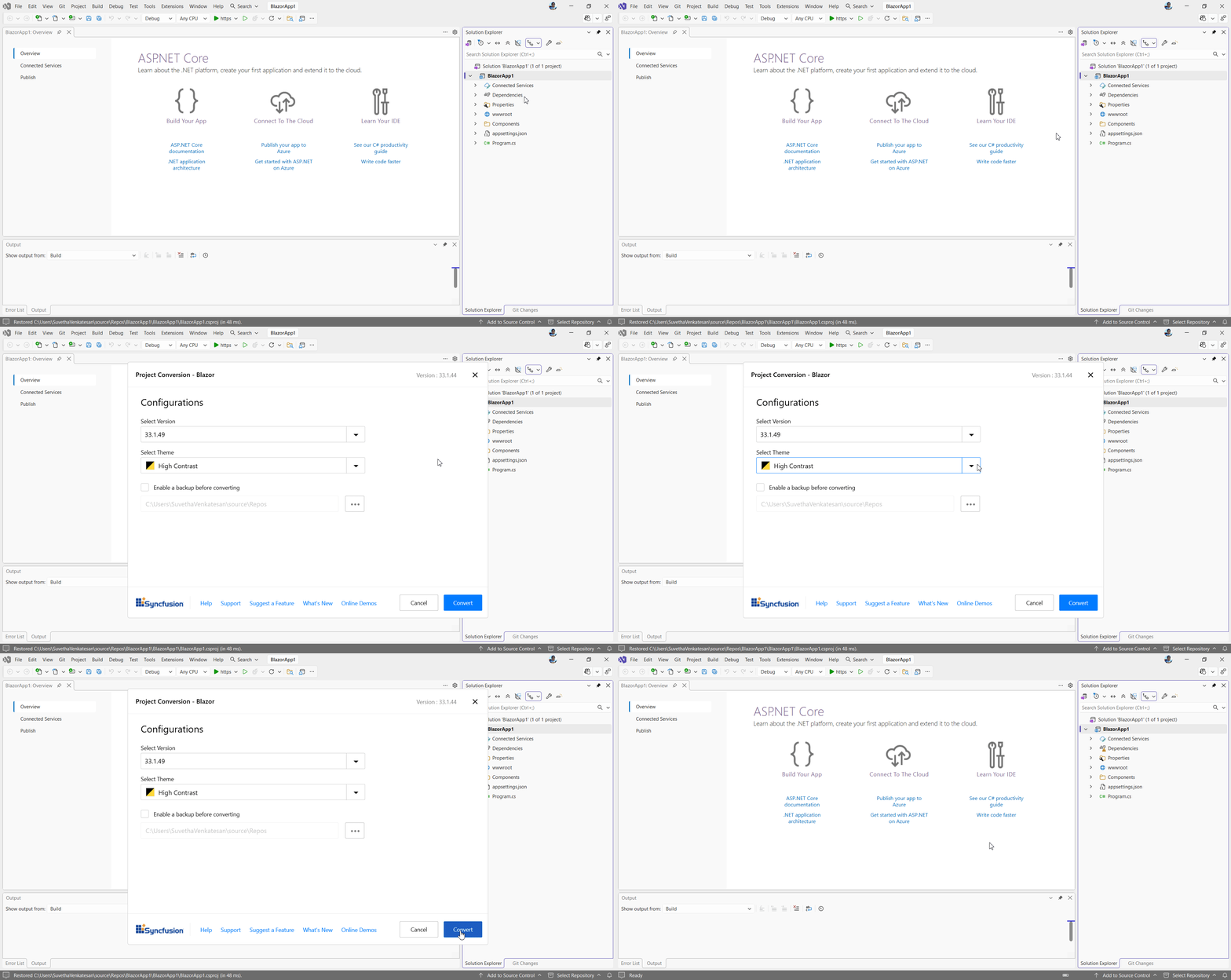
Convert to Syncfusion® Blazor ApplicationIf you have a Blazor application that needs to be enhanced with Syncfusion® Blazor components, the Syncfusion® Blazor Conversion Wizard lets you convert a non‑Syncfusion Blazor app into a Syncfusion® Blazor app in just a few clicks by adding all the required NuGet packages, namespaces, and CSS references, eliminating the need for manual configuration. You can access the wizard by right‑clicking your project in Solution Explorer and selecting Syncfusion Blazor → Convert to Syncfusion Blazor app.
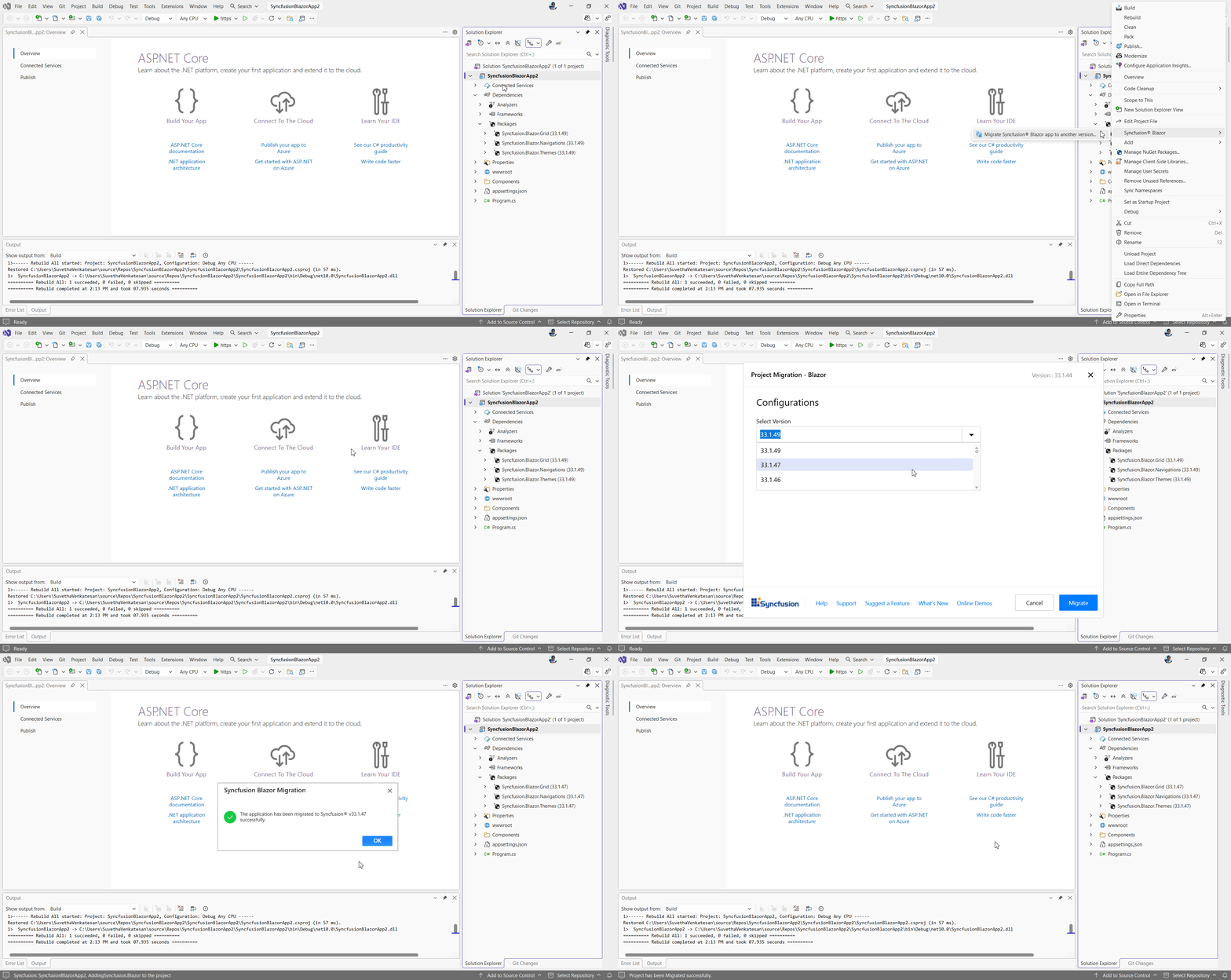
Conversion → Non‑Syncfusion → Syncfusion app. (Clarifying note: "Conversion" performs project conversion from a non‑Syncfusion app to a Syncfusion‑enabled app.) Upgrading Apps to the Latest Syncfusion® Blazor VersionIf you have an existing Syncfusion® Blazor application that needs to be upgraded, the Syncfusion® Blazor Migration Wizard enables seamless migration between versions with minimal effort by automatically updating package references and configurations. Access the wizard by right‑clicking your project in the Solution Explorer and selecting Syncfusion Blazor → Migrate Syncfusion Blazor app to another version.
Migration → Syncfusion version → newer Syncfusion version. (Clarifying note: "Migration" upgrades an existing Syncfusion app from one Syncfusion release to a newer release.) Related linksLearn more about Blazor UI components About Syncfusion®Founded in 2001 and headquartered in Research Triangle Park, N.C., Syncfusion® has more than 38,000 customers and over 1 million users, including large financial institutions, Fortune 500 companies, and global IT consultancies. Today, we provide 1700+ controls and frameworks for web (Blazor, Flutter, ASP.NET Core, ASP.NET MVC, JavaScript, Angular, React, Vue, and mobile (.NET MAUI, Flutter, UWP, and JavaScript), and desktop development (WinForms, WPF, WinUI, .NET MAUI, Flutter, and UWP). We provide ready-to-deploy enterprise software for dashboards, reports, data integration, and big data processing. Many customers have saved millions in licensing fees by deploying our software. sales@syncfusion.com | Toll-free: 1-888-9DOTNET |