Git Spotlight
A VS Code extension that visualizes Git blame information with intelligent line highlighting. Compare branches, spot changes by age, author, commit, or heatmap with ease.
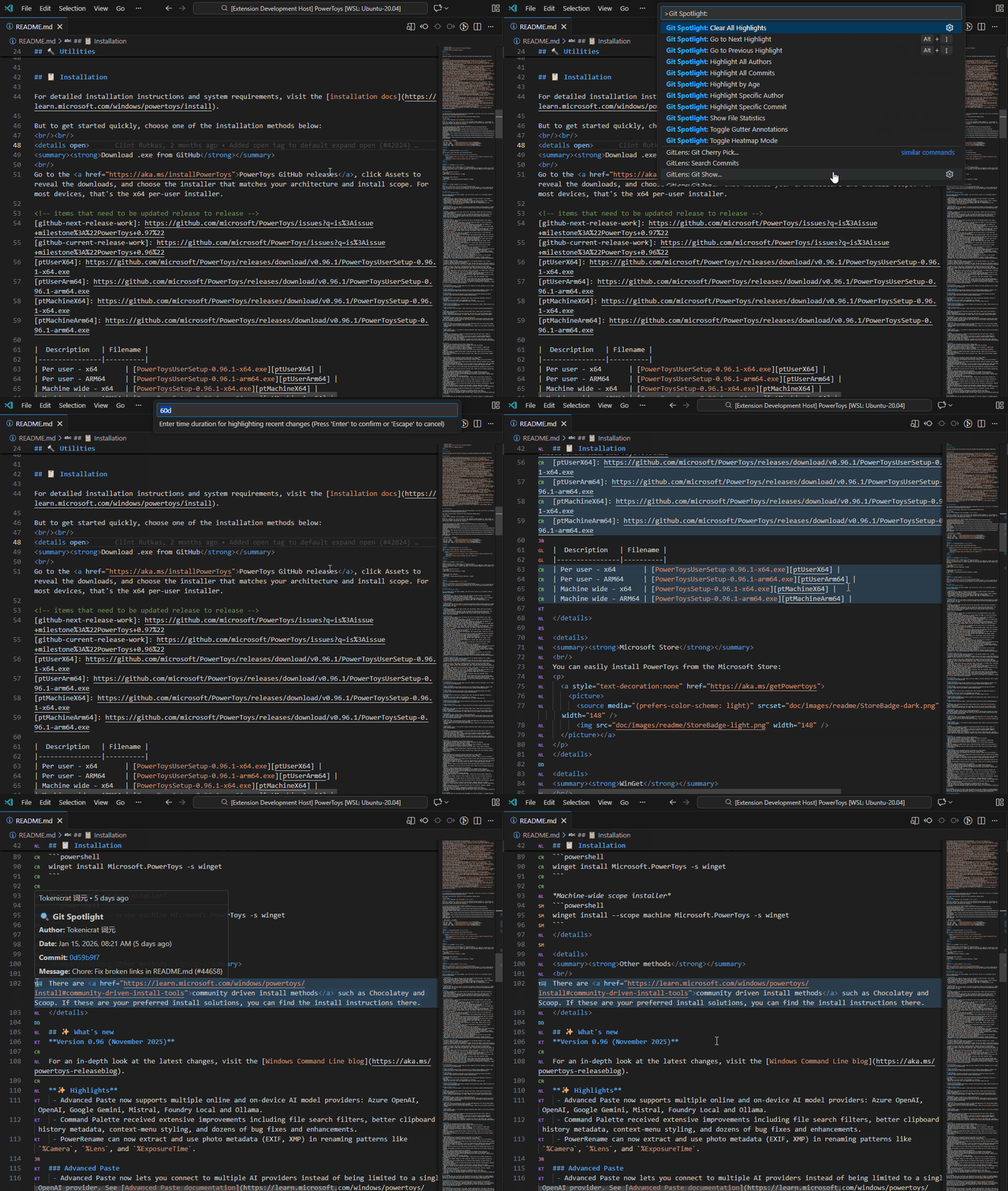
Features
🔀 Highlight Branch Differences
Compare your current branch with another branch and highlight all lines that differ.
- Command:
Git Spotlight: Highlight Branch Differences
- Shows lines changed since branches diverged
- Great for code reviews and understanding PR changes
🔥 Heatmap Mode
Visualize code age with a gradient heatmap - newer code appears in warmer colors, older code in cooler colors.
- Command:
Git Spotlight: Heatmap Mode
- 20-level color gradient from blue (oldest) to teal (newest)
- Great for identifying recently modified vs. stable code
🕐 Highlight by Age
Highlight lines modified within a specified time duration.
- Command:
Git Spotlight: Highlight by Age
- Enter duration:
7d, 30d, 3m, 1y, or ISO date
🔍 Highlight Specific Commit
Select and highlight only a specific commit's changes.
- Command:
Git Spotlight: Highlight Specific Commit
🎯 Highlight Specific Author
Select and highlight only a specific author's changes.
- Command:
Git Spotlight: Highlight Specific Author
📝 Highlight by Commit
Color-code lines by commit - each commit gets a unique color.
- Command:
Git Spotlight: Highlight All Commits
👤 Highlight by Author
Color-code lines by author - each author gets a unique, consistent color.
- Command:
Git Spotlight: Highlight All Authors
📊 File Statistics
View detailed statistics about file contributors, commits, and activity.
- Command:
Git Spotlight: Show File Statistics
- Author contribution breakdown with percentages
- Recent commits list
- Activity timeline for the last 30 days
🔤 Gutter Annotations
Show author initials or indicators in the editor gutter alongside highlighting.
- Command:
Git Spotlight: Toggle Gutter Annotations
- Modes: Author initials, colored dots, or age indicators
- Works alongside any highlight mode
🧭 Navigation
Navigate between highlighted lines with keyboard shortcuts.
Alt+] - Go to next highlightAlt+[ - Go to previous highlight- Status bar buttons available when highlights are active
✨ Additional Features
- Uncommitted Changes: Optionally highlight uncommitted lines with a red underline
- Hover Information: View author, date, and commit message on hover
- Status Bar: Shows current mode, click to clear
- Auto Refresh: Updates on file save and branch switch
- Overview Ruler: See highlights in the scrollbar/minimap area
- Performance Optimized: Debounced execution, caching, file size limits
Installation
From VSIX
code --install-extension git-spotlight-3.0.0.vsix
From Source
cd GitAgeHighlighter
npm install
npm run compile
# Press F5 in VS Code to debug
Usage
- Open a file that's tracked by Git
- Open Command Palette (
Ctrl+Shift+P / Cmd+Shift+P)
- Type "Git Spotlight" to see available commands
- Select a highlighting mode
- Click the status bar item or run
Git Spotlight: Clear All Highlights to clear
Commands
| Command |
Description |
Shortcut |
Git Spotlight: Highlight Branch Differences |
Compare with another branch |
|
Git Spotlight: Heatmap Mode |
Gradient by code age |
|
Git Spotlight: Highlight by Age |
Highlight recently modified lines |
|
Git Spotlight: Highlight Specific Commit |
Highlight one commit's changes |
|
Git Spotlight: Highlight Specific Author |
Highlight one author's changes |
|
Git Spotlight: Highlight All Commits |
Color-code by commit |
|
Git Spotlight: Highlight All Authors |
Color-code by author |
|
Git Spotlight: Show File Statistics |
Show contributor stats panel |
|
Git Spotlight: Toggle Gutter Annotations |
Toggle gutter initials/dots |
|
Git Spotlight: Go to Next Highlight |
Navigate to next highlight |
Alt+] |
Git Spotlight: Go to Previous Highlight |
Navigate to previous highlight |
Alt+[ |
Git Spotlight: Clear All Highlights |
Remove all highlights |
|
Configuration
| Setting |
Type |
Default |
Description |
gitSpotlight.duration |
string |
"30d" |
Default duration for age highlighting |
gitSpotlight.enableUncommittedHighlight |
boolean |
true |
Show uncommitted lines |
gitSpotlight.enableGutterAnnotations |
boolean |
true |
Show author initials in gutter |
gitSpotlight.gutterDisplayMode |
string |
"initials" |
Gutter mode: initials, dot, or age |
gitSpotlight.enhancedMinimapColors |
boolean |
true |
Enhanced overview ruler visibility |
gitSpotlight.maxFileSizeKB |
number |
1024 |
Max file size to process |
gitSpotlight.ageHighlightColor |
string |
"rgba(70,130,180,0.3)" |
Age highlight color |
gitSpotlight.uncommittedHighlightColor |
string |
"rgba(180,80,80,0.25)" |
Uncommitted background |
gitSpotlight.uncommittedUnderlineColor |
string |
"rgba(180,80,80,0.6)" |
Uncommitted underline |
gitSpotlight.selectedHighlightColor |
string |
"rgba(64,224,208,0.3)" |
Selected author/commit color |
gitSpotlight.colorSaturation |
number |
55 |
Auto color saturation (0-100) |
gitSpotlight.colorLightness |
number |
45 |
Auto color lightness (0-100) |
gitSpotlight.colorOpacity |
number |
0.28 |
Auto color opacity (0-1) |
gitSpotlight.gitTimeout |
number |
5000 |
Git command timeout (ms) |
gitSpotlight.debounceDelay |
number |
300 |
Debounce delay (ms) |
7d - 7 days2w - 2 weeks3m - 3 months (30 days each)1y - 1 year2024-01-15 - ISO date2024-01-15T10:30:00Z - ISO datetime
Architecture
src/
├── extension.ts          # Main entry, commands, state management
├── blame/
│   ├── gitRunner.ts      # Safe git command execution
│   ├── blameParser.ts    # Parses git blame output
│   └── blameCache.ts     # Caches blame by (file, HEAD)
├── highlight/
│   ├── decorator.ts      # Multi-mode decoration manager
│   ├── gutterDecorator.ts # Gutter annotation manager
│   ├── heatmap.ts        # Heatmap color calculations
│   └── styles.ts         # Decoration style definitions
├── views/
│   └── fileStatistics.ts # Statistics webview panel
├── config/
│   └── settings.ts       # Type-safe configuration
└── utils/
    ├── colorGenerator.ts # Consistent color generation
    ├── debounce.ts       # Debounce utility
    ├── fileUtils.ts      # File validation
    └── timeParser.ts     # Duration parsing
Requirements
- VS Code 1.85.0+
- Git installed and in PATH
- File must be tracked by Git
License
MIT
Contributing
Contributions welcome! Please open issues and pull requests on GitHub.

