Skip to content
| Marketplace
Sign in
Visual Studio Code>Other>Context MergerNew to Visual Studio Code? Get it now.
Context Merger

Context Merger

Syed Abdullah

|
8 installs
| (3) | Free
Merge multiple files and folders into a single, structured text file for LLMs, code reviews, or documentation.
Installation
Launch VS Code Quick Open (Ctrl+P), paste the following command, and press enter.
Copied to clipboard
More Info

Context Merger

Context Merger is a Visual Studio Code extension that helps you quickly merge multiple files and folders into a single, well-structured text file. It's perfect for:

  • Sharing project context with LLMs (ChatGPT, Claude, Gemini, Copilot)
  • Code reviews
  • Documentation
  • Debugging sessions

Instead of manually opening, copying, and pasting files, Context Merger lets you right-click any selection in the VS Code Explorer and instantly generate a unified file containing all relevant source code, organized and ready to use.

Features

  • Merge multiple files and folders into a single Markdown file
  • Automatically adds file headers and preserves folder structure
  • Ignores common unwanted directories: node_modules, .git, dist, build, .next, out
  • Shows total files, character count, and estimated tokens (useful for LLM input limits)
  • Supports any file type

Demo

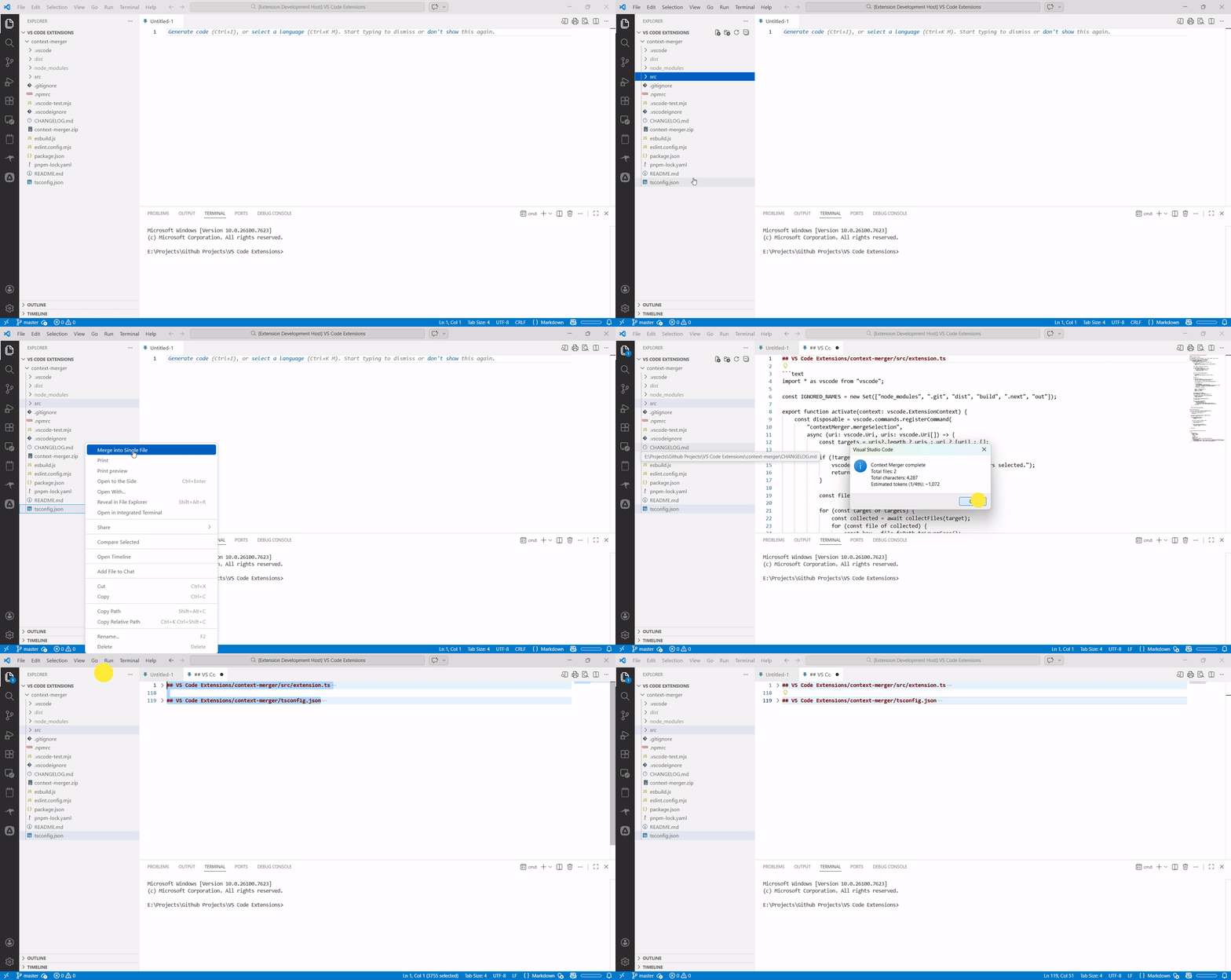
Context Merger Demo

Usage

  1. Select one or more files/folders in the VS Code Explorer.
  2. Right-click and choose Merge into Single File.
  3. A new Markdown file opens with all selected content merged.
  4. A summary shows total files, total characters, and estimated token count.

Example Output

## myProject/src/index.ts
```text
console.log("Hello World");
```

## myProject/src/utils/helpers.ts

```text
export function add(a, b) {
  return a + b;
}
```

  • Contact us
  • Jobs
  • Privacy
  • Manage cookies
  • Terms of use
  • Trademarks
© 2026 Microsoft