Animoria — Visual Asset Governance for VS Code
Discover ✦ Audit ✦ Trace ✦ Clean Up
The complete visual asset memory and governance engine for your workspace — directly inside VS Code.
Stop Shipping Hidden Design Debt
Visual assets — animated (Lottie, dotLottie, Rive, GIF, APNG, Animated SVG) and static (SVG, PNG, JPEG, WebP, AVIF) — silently accumulate in modern codebases:
- Bundle Bloat: Duplicate files get checked into multiple directories under different names, inflating release packages.
- Orphaned Exports: Redesigned animations linger forever because developers aren't sure if another team or screen is still referencing them.
- Zero Traceability: Searching for asset usages with plain text grep frequently yields false positives or misses dynamic imports entirely.
Animoria solves this automatically. Open your workspace, click the Animoria icon, and instantly see every visual asset, its exact code references, byte-identical duplicates, and cleanup opportunities with 100% offline privacy.
Why Choose Animoria?
| Capability |
Animoria |
Generic File Explorer |
LottieFiles Extension |
| All Visual Formats (Lottie, dotLottie, Rive, GIF, APNG, SVG, PNG, WebP) |
Yes |
⚠️ Generic icons only |
❌ Lottie only |
| Multi-Syntax Code Usage Tracing (TS, JSX, Vue, Svelte, Dart, Swift, etc.) |
Yes |
❌ No |
❌ No |
| SHA-256 Byte-Identical Duplicate Detection |
Yes |
❌ No |
❌ No |
| Automated Governance & Repository Health Score |
Yes |
❌ No |
❌ No |
| Safe Reversible Deletions (Staged trash with manifest rollback) |
Yes |
❌ Permanent delete |
❌ No |
| 100% Offline & Private (Zero telemetry, no external servers) |
Yes |
Yes |
❌ Cloud-dependent |
| Zero Configuration Required |
Yes |
Yes |
⚠️ Requires account |
Key Features
1. Unified Visual Asset Gallery
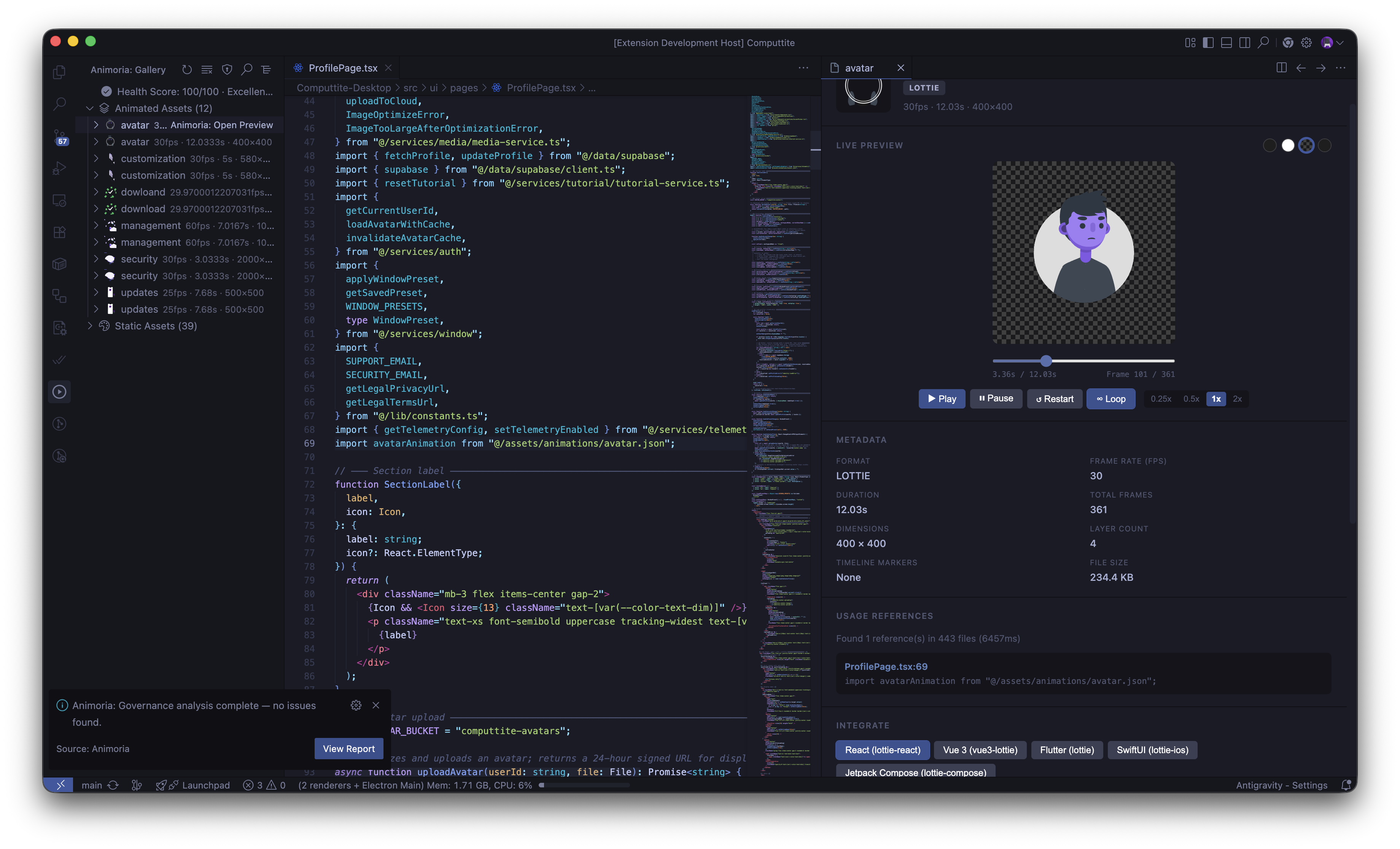
- Instant Discovery: Automatically finds and indexes animated and static assets across monorepo packages.
- Native Inline Thumbnails: Generates vector preview frames directly within the editor — no Chromium installation needed.
- Interactive Player: Inspect FPS, total frames, layer counts, dimensions, and timeline markers with full playback controls.
2. Multi-Syntax Usage Tracing
- Never wonder "Where is this icon used?" again.
- Traces asset references across 20+ file extensions (
.ts, .tsx, .vue, .svelte, .astro, .md, .css, .dart, .swift, .kt, etc.).
- Click any reference in the sidebar to jump directly to the exact file and line in your code.
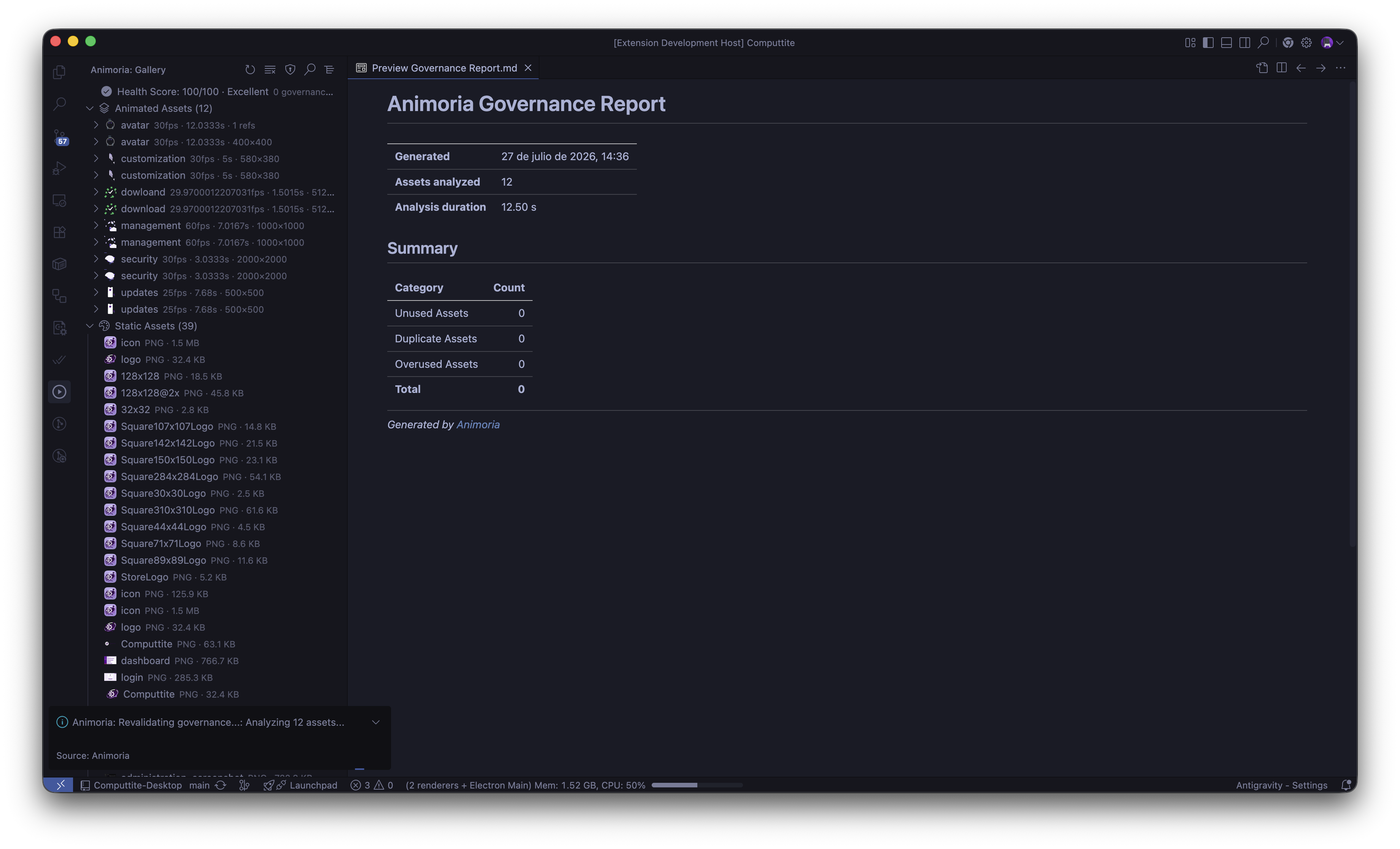
3. Automated Governance & Health Score
- Evaluates your repository against customizable rules (
no-unreferenced-assets, no-duplicate-content, max-file-size-kb, no-gif, allowed-formats).
- Generates a 0–100% Workspace Health Score.
- Findings are published directly to the native VS Code Problems Panel (
F8 to cycle through them) and exportable as Markdown/JSON.
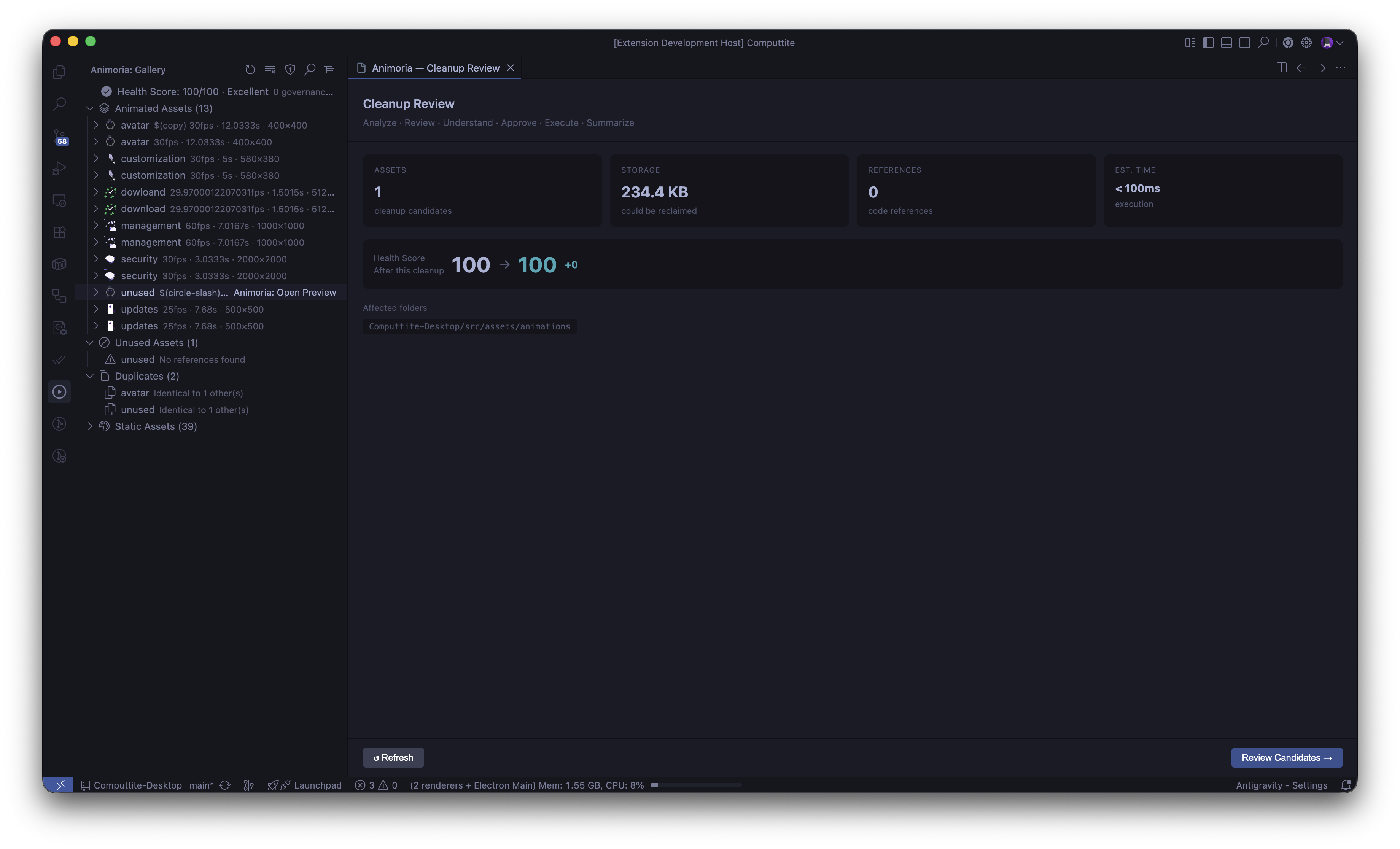
4. Safe Duplicate Resolution & One-Click Cleanup
- Review candidate files in an interactive preview dialog before removing anything.
- Resolve duplicate groups by choosing a canonical copy to preserve — Animoria automatically updates referencing imports across your codebase.
- All removals move to
.animoria/trash/ with a session manifest for safe rollback.
5. Instant Framework Code Snippets
- Generate one-click, production-ready integration boilerplate for:
- React / Next.js (
@dotlottie/react-player, lottie-react)
- Vue / Nuxt
- Flutter (
lottie, rive)
- SwiftUI / iOS
- Jetpack Compose / Android
Screenshots
| Visual Asset Gallery |
Governance & Problems Panel |
Duplicate Resolution |
 |
 |
 |
- Lottie (
.json)
- dotLottie (
.lottie V2 binary archives)
- Rive (
.riv)
- GIF (
.gif)
- APNG (
.apng)
- Animated SVG (
.svg)
- Vector: SVG (
.svg)
- Raster: PNG (
.png), JPEG (.jpg, .jpeg), WebP (.webp), AVIF (.avif)
Keyboard Shortcuts
| Shortcut (macOS) |
Shortcut (Windows/Linux) |
Action |
| Cmd + Alt + R |
Ctrl + Alt + R |
Refresh Asset Gallery |
| Cmd + Alt + F |
Ctrl + Alt + F |
Search Assets by Name |
| Cmd + Alt + G |
Ctrl + Alt + G |
Run Governance Audit |
Configuration (Optional)
Animoria is zero-config by default. If your team wants to enforce specific policies across the repository, add a .animoriarc.json at the root:
{
  "rules": {
    "no-gif": "warning",
    "max-file-size-kb": ["warning", 512],
    "no-duplicate-content": "error",
    "no-unreferenced-assets": "warning",
    "allowed-formats": ["error", ["lottie", "dotlottie", "rive", "animated-svg"]]
  }
}
To exclude specific paths (e.g. test fixtures), create an .animoriaignore file.
Privacy & Security
Animoria is 100% offline-first:
- Scans, parses, and audits execute entirely on your local machine.
- Zero analytics, zero telemetry, and zero network requests.
- Your proprietary design files and source code never leave your computer.
Animoria — A Sxnnyside Project Tool
© 2026 Sxnnyside Project. Distributed under the MIT License.
| |

