
Claude Mission ControlUnofficial companion for Claude Code. Review, accept & undo file changes with its own tracking (no git needed), see what your work would cost at API rates, watch your plan limits, put subagents on a cheaper model, get pinged when Claude needs you, and monitor background agents & workflows. Installation Launch VS Code Quick Open ( Ctrl+P), paste the following command, and press enter.Copied to clipboard |

Claude Mission ControlMission control for Claude Code, right inside your editor. Claude edits fast. You end up with changes you never read, in files you never opened. Mission Control puts a sidebar next to it. Review, accept and undo every change, without git. Watch your 5-hour and weekly limits. Put subagents on a cheaper model. Read the plans Claude wrote, and keep an eye on background agents. Local by default: no servers, no telemetry, one optional API call. Details ↓ 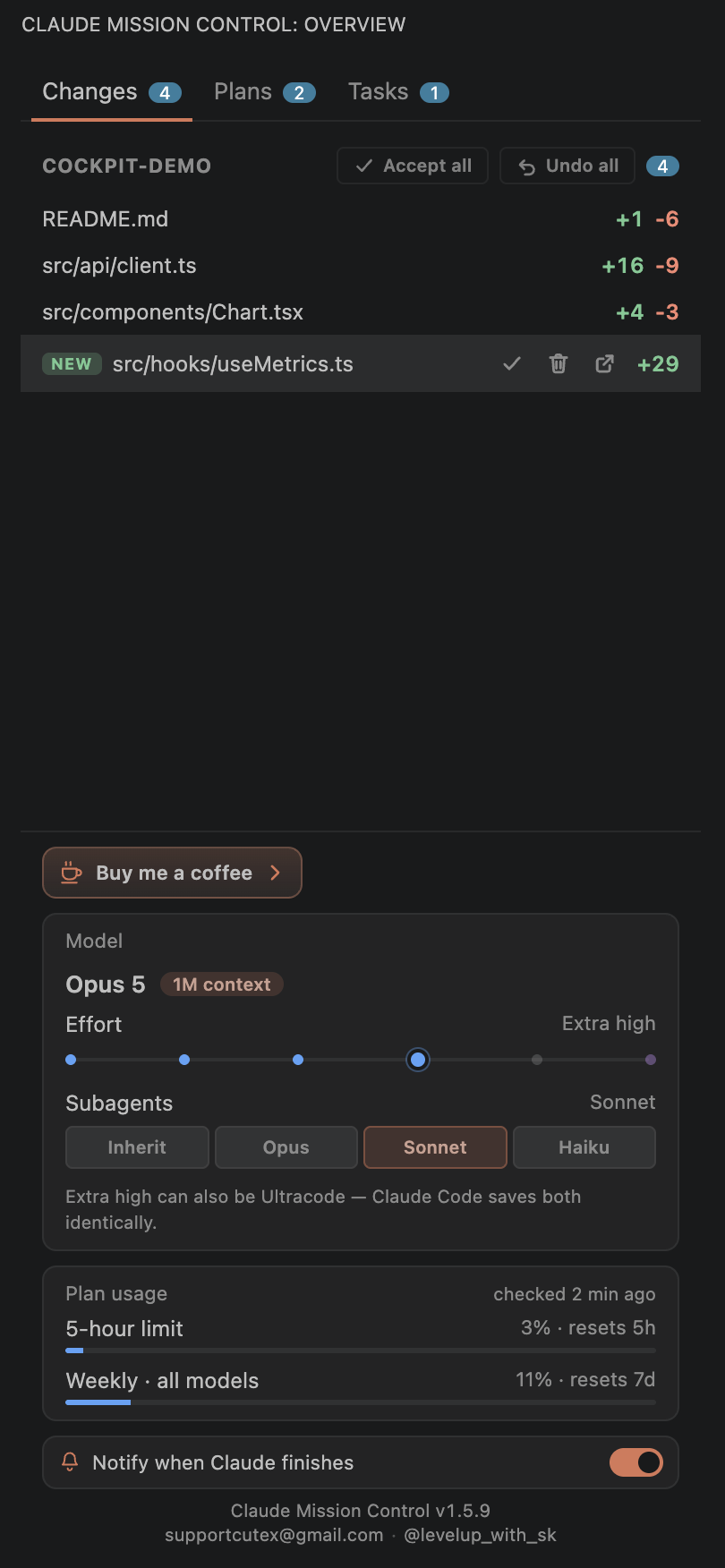
Why
Features🗂 ChangesMission Control's own change tracking — no git involved. Like Copilot's edit review: the first open snapshots your workspace as the baseline; from then on every change to a recognized developer file (by you, Claude, or a script) shows up with +/- stats. Click a row for a diff vs the last accepted version, Accept to approve it (the baseline moves forward), Undo to restore the last accepted version (new files are deleted, deleted files come back). Accept all and Undo all sit in the header. Works in any folder — git repo or not. Signal only, by design. Tracking is allowlist-based: ~140 source, markup, config and project
file extensions plus ~65 exact names ( Moved a folder and everything looks NEW? Mission Control matches moved files by content automatically, and if a baseline really has gone stale it offers a one-click Re-baseline — also available any time from the Command Palette. Re-baselining never touches your files, only Mission Control's record of what you've accepted. Mission Control tracks the first folder of your workspace. How this differs from Claude Code's own review. Claude Code offers Accept / Reject per edit before it lands, and Rewind per turn — and its own dialog says "Rewinding does not affect files edited manually or via bash." Mission Control's Changes tab is cumulative: every on-disk change by anyone, per file, since the state you last accepted, with or without git. 📋 PlansBrowse the plans Claude produced in plan mode — expand inline as rendered markdown, or hit ↗
to open a plan in a styled, read-only plan view tab (like Claude Code's own plan review). Scope
it to this project or to every saved plan with Plans are read from Claude Code's global folder and, when a project sets 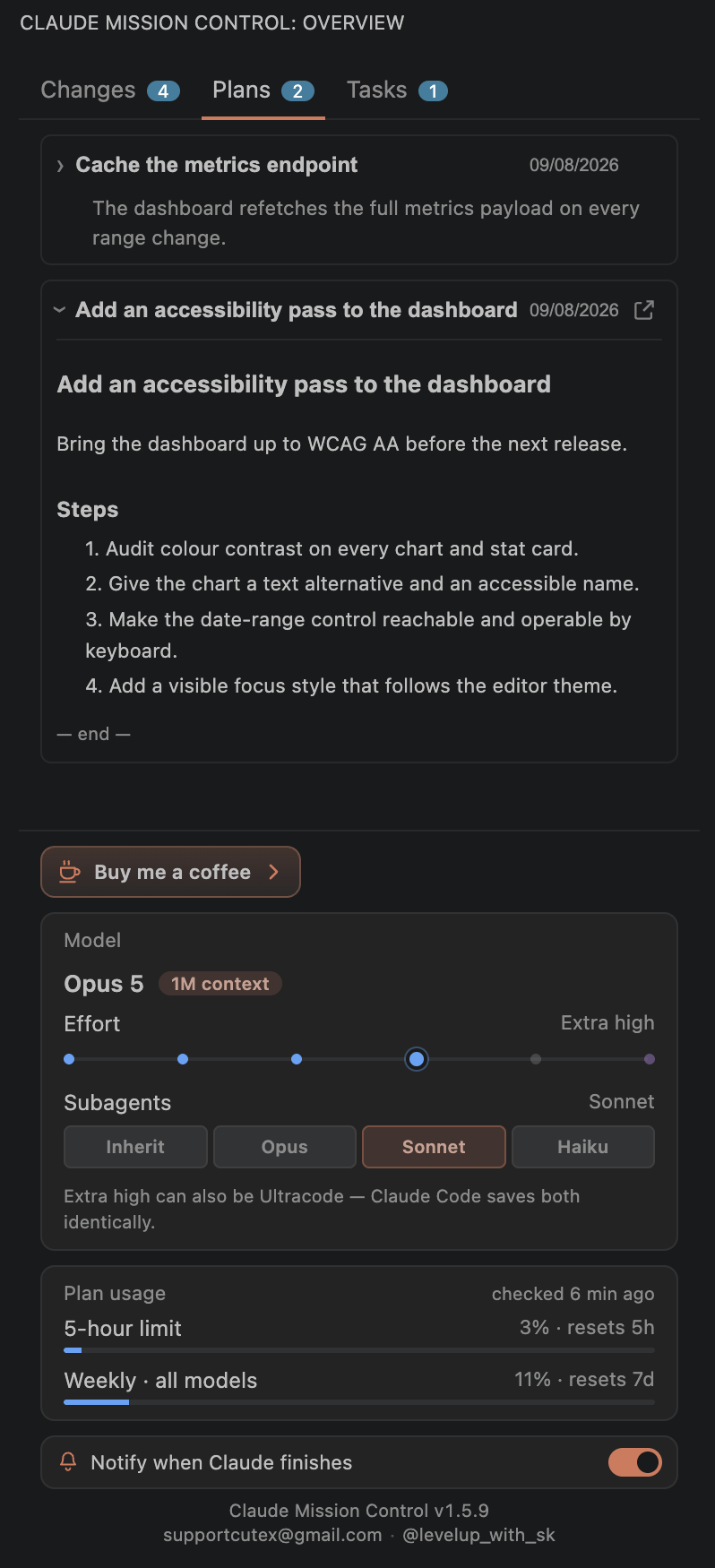
📊 Plan usageAt the top of the panel, on every tab: live 5-hour and weekly limits — including any per-model weekly limit your plan has, such as Weekly Fable — with percentage, reset countdown and last-checked time, read using Claude Code's own local credential — shown next to what the work would have cost, and flagged when a reading's reset time has already passed. Optional and fully disableable — this is the only part of Mission Control that touches the network. ⚙️ SubagentsThe control that saves money. Four buttons under Subagents — Inherit · Opus · Sonnet · Haiku — set the model your subagents, agent teams and workflow agents run on while you stay on your main model. Agent-heavy work is where tokens actually go, so this is the single biggest saving available, and it's one click instead of hand-editing settings.
Nothing here is about the main agent. Claude Code's own composer shows the main model and effort,
and that is where you change them ( 💸 What it would have costMission Control prices this project's work at Anthropic's published API rates — today and over the last 7 days, and per agent in the Tasks tab. On a subscription no money moved, so it is shown as a comparison and never as a bill: the useful reading is what a flat plan is covering. Every figure is computed on your machine from the token counts Claude Code already writes to its own logs — nothing is sent anywhere to produce it. Each response is priced by the rates that apply to that response (fast mode's premium, a model's own cache-read rate), sub-agent and workflow transcripts are counted as well as the main session, and a response split across several log records is charged once rather than three times. Where a model has no published rate — a local model behind a custom backend, or a model released after this version — its tokens are counted but its dollars are not, and the card says so: the last request shows a dash rather than an older priced one, and every figure missing it says it is incomplete. Those figures survive a tidy-up. Claude Code's logs get cleaned — by its own retention sweep, by a
cleanup script, or by hand — and until 1.10.0 the spend they recorded went with them, which on this
machine was 37% of a week. Mission Control keeps its own small record of what each piece of work
cost, outside those logs. It holds amounts and token counts only, never any part of a conversation,
and runs to a few megabytes a year; It can read a little higher than Claude Code's own 🧹 StorageWhat Claude Code is keeping on this Mac, and what can go. Sizes in plain words, a sentence saying what each thing is, and beside it the list of everything that is never touched — your chats, anything a running chat owns, your memory and skills and settings, and the record of what your work cost. Cleaning moves things to a trash rather than deleting them; anything cleaned can be put back for seven
days, or you can empty it yourself. A chat is never removed by age — only one you archived in the session
list, and if that list can't be read, none are considered at all. An archived chat leaves with its
own notes, and the panel says what that costs first: you can't reopen it, and a plan saved from it
drops off that project's list. What it cost stays. Whether a chat is running is read
from the running process, never from how quiet its files look, so a long tool call or a background
loop is never mistaken for finished. 🤖 Background tasksA live view of background work with accurate statuses (running / completed / stopped), read from Claude Code's own task lifecycle records. Active and Cleared are separate panes, so clearing something files it away rather than destroying it — anything cleared can be put back. Workflow runs group their agents under one expandable card with a progress bar over them: tokens, cost, tool calls, and an inline transcript per agent. A running agent shows the tool it is in right now and how long it has been going, and opening a transcript pins the agent's answer at the top instead of leaving it behind several clicks of "Load more". 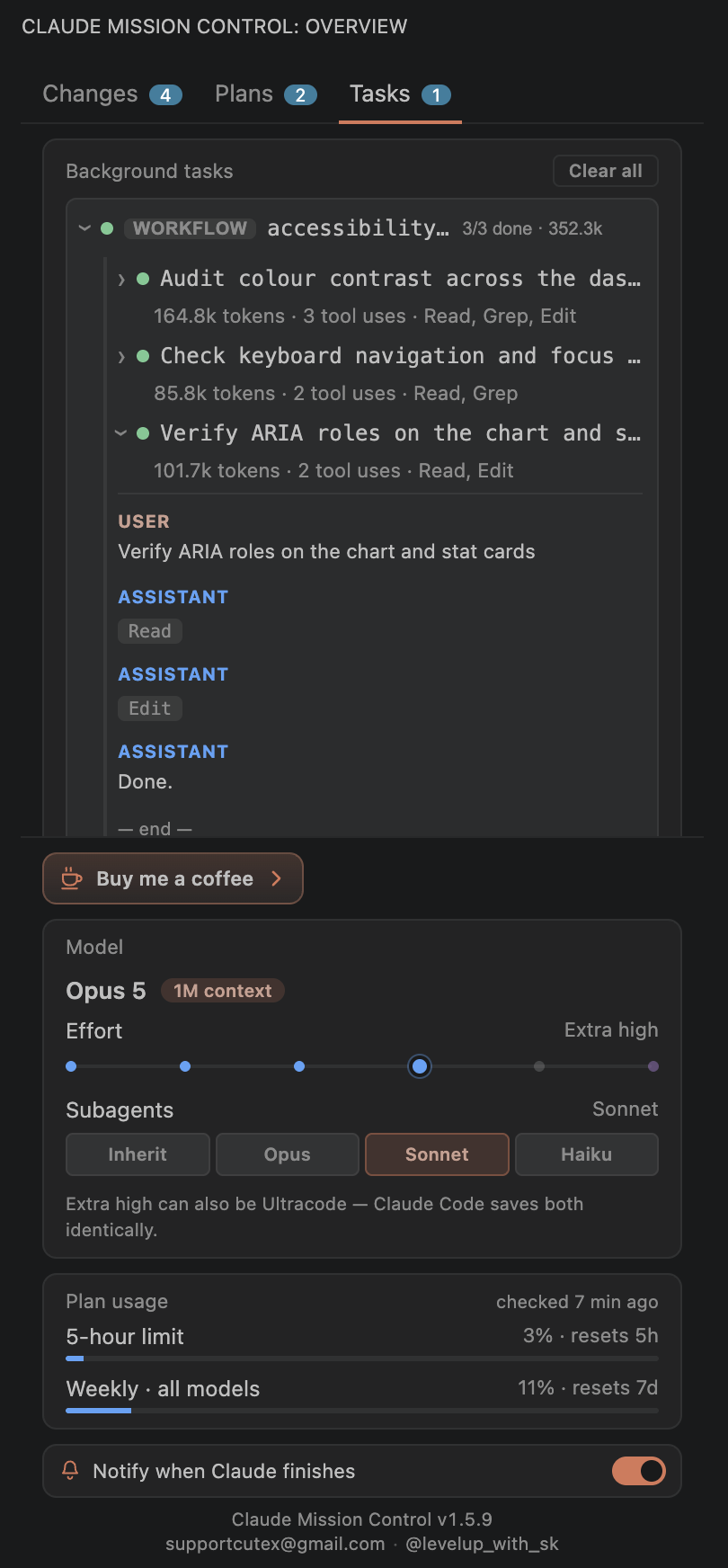
🔔 Ping me when Claude needs youStep away while Claude works. When its turn ends — or when it's blocked on a question or a plan awaiting approval — Mission Control fires a native OS notification with sound that reaches you even over a fullscreen app. It only fires when that window isn't focused, and each window checks its own focus, so a finish in a background window pings you while you keep working in another. Every chat in the folder is followed separately, so a busy session can't swallow another one's ping, and two windows open on the same project won't both announce the same turn. On macOS (Apple Silicon) and Windows, clicking the notification focuses the exact VS Code
window that workspace is open in — macOS uses a bundled signed + notarized helper so the click still
works on current macOS. Intel Macs fall back to a non-clickable banner; Linux uses Off by default — flip the bell switch in the controls row at the top of the panel, or set
It stays quiet for the chat you're sitting in: if the window is focused and you've touched the
keyboard or mouse in the last few minutes, an answer you're already reading doesn't ping. Step away
and it does, however long the run — that's the whole reason to be told. To be pinged for every
completion regardless, turn off CommandsAll from the Command Palette (
Your own model and effort are Claude Code's business: change them in its composer, or with Privacy — what Mission Control touchesEverything happens on your machine. Mission Control runs no servers, collects no telemetry or analytics, and makes exactly one network request — described at the end. What it reads
What it writes
The one network call: the Plan usage card sends Claude Code's own local OAuth token to
Anthropic's usage endpoint ( Don't take my word for any of it. The source is on
GitHub, so you can read exactly what it does
before you trust it with your Requirements
Settings
SupportMission Control is free and unofficial. If it saves you time, there's a Buy me a coffee cup in the panel's controls row, visible on every tab, which opens my GitHub Sponsors page. Entirely optional, and there's no tracking either way. Questions or a bug? Email supportcutex@gmail.com (also linked inside the panel's controls row), or open an issue on GitHub. Built by Suraj Kumavat. @levelupwithsk on Instagram. LicenseProprietary © Suraj Kumavat. Free to install and use. The source is published so you can read it, but
publishing it doesn't make it open source: you may view, clone, fork and modify it for yourself, not
redistribute or sell it. Full terms in LICENSE, which also ships with the extension as
|