JAR Cart 🛒 (SA)
The sovereign dependency manager for no-build Java projects.
Search, select, and sync JAR dependencies directly into your project's lib/ folder — without Maven, Gradle, or heavyweight build tooling.
Designed for:
- No-build Java workflows
- Student assignments
- Rapid prototyping
- Lightweight desktop apps
- Legacy Java projects
- Developers who want direct control over their classpath
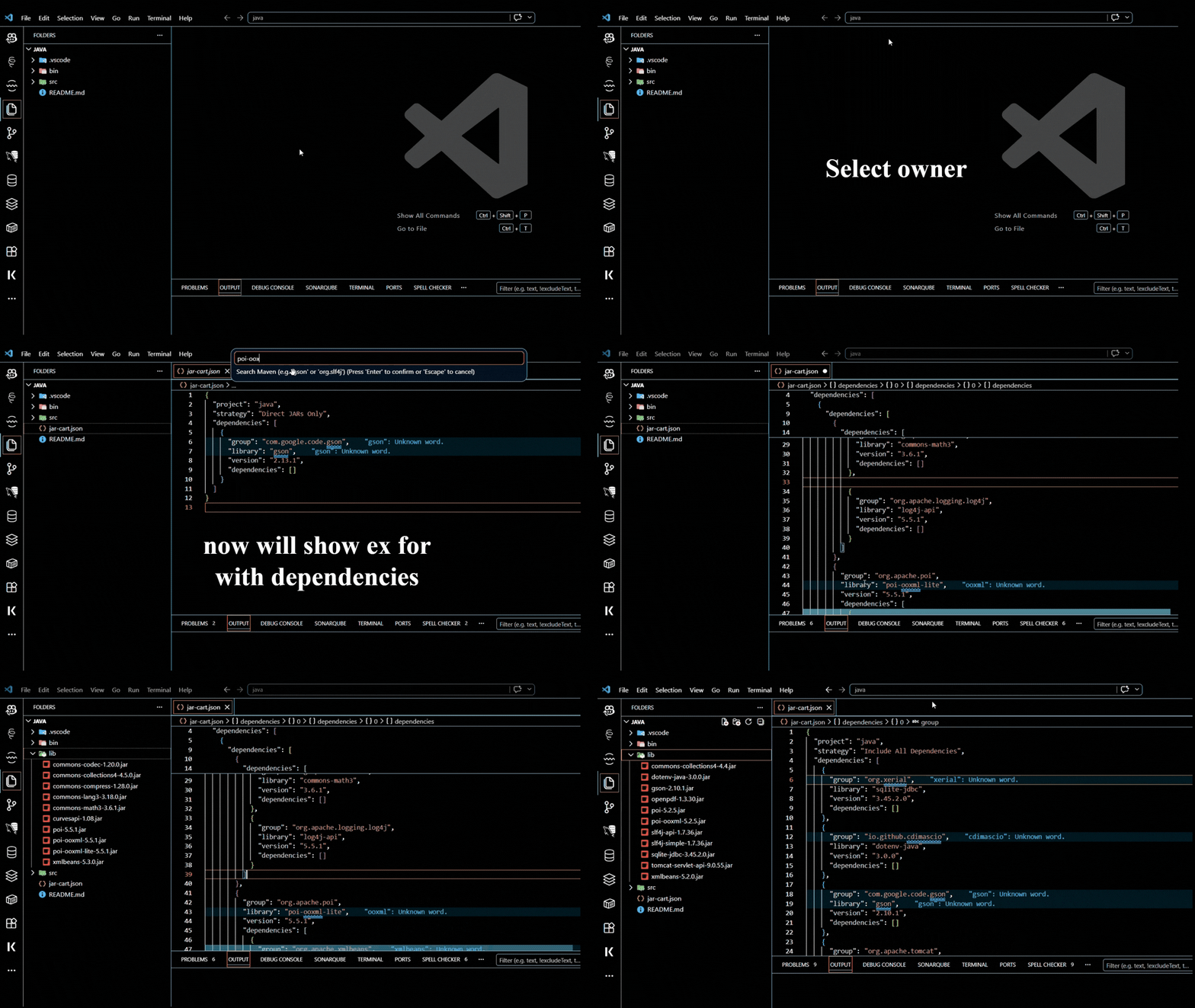
🎥 Tutorial
Quick walkthrough:
✨ Features
📦 Dependency Management
- Search libraries directly from Maven Central
- Select exact versions or latest releases
- Download dependencies directly into
lib/
- Supports recursive transitive dependency resolution
🔄 Dual Manifest Support
Choose between:
jar-cart.jsonjar-cart.xml
Convert between formats anytime using:
JAR Cart: Switch Manifest Format
🌳 Recursive Dependency Trees
Use:
Include All Dependencies
to automatically resolve and store the full dependency graph from Maven POM metadata.
✂️ Selective Dependency Pruning
Edit your manifest manually to remove unwanted sub-dependencies before syncing.
This allows tighter control over:
- JAR size
- Duplicate libraries
- Logging frameworks
- Legacy transitive dependencies
🧹 Auto-Clean Sync
Sync ensures your lib/ folder mirrors your manifest exactly.
Unused JARs are automatically removed to prevent:
- stale dependencies
- duplicate versions
- classpath pollution
⚡ Lightweight Workflow
No:
- Gradle
- Maven wrappers
- daemon processes
- hidden caches
- generated build folders
Just:
manifest -> sync -> lib/
🚀 Getting Started
1. Install the Extension
From VS Code Marketplace:
JAR Cart SA
⚡ Looking for more power?
While this extension simplifies dependency management inside VS Code, you can also use the standalone jar-cart CLI for advanced build automation, project-locked JDKs, and CI/CD pipelines.
2. Add Dependencies
Press:
Windows / Linux / macOS
Ctrl + Shift + J
Search for a library and select a version.
3. Choose Resolution Strategy
Direct JARs Only
Downloads only the selected dependency.
Include All Dependencies
Resolves and downloads the full transitive dependency tree.
4. Review Manifest
Example:
JSON
{
  "project": "Backend-Stress-Test",
  "strategy": "Include All Dependencies",
  "dependencies": [
    {
      "group": "org.slf4j",
      "library": "slf4j-api",
      "version": "2.0.9",
      "dependencies": []
    }
  ]
}
XML
<?xml version="1.0" encoding="UTF-8"?>

<jarCart>
  <project>Backend-Stress-Test</project>

  <strategy>Include All Dependencies</strategy>

  <dependencies>
    <dependency>
      <group>org.slf4j</group>
      <library>slf4j-api</library>
      <version>2.0.9</version>
    </dependency>
  </dependencies>

</jarCart>
5. Sync Dependencies
Run:
JAR Cart: Sync Dependencies (lib/)
This downloads all required JARs into:
/lib
⚙️ Extension Settings
Choose the default manifest format.
Supported values: json/xml
📁 Example Project Structure
project/
├── lib/
│   ├── slf4j-api-2.0.9.jar
│   └── ...
│
├── src/
│   └── Main.java
│
├── jar-cart.json
└── jar-cart.xml
🛠️ Development Setup
Clone Repository
git clone https://github.com/Sudhanshu-Ambastha/java-no-build-tools.git
Install Dependencies
npm install
Dependencies used:
- axios
- fs-extra
- xml2js
- vscode API
Launch Extension
- Open project in VS Code
- Press:
F5
This opens the Extension Development Host.
Package Extension
Install VSCE:
npm install -g @vscode/vsce
Build extension:
vsce package
🧠 Design Philosophy
JAR Cart focuses on:
- simplicity
- reproducibility
- direct dependency control
- no hidden build systems
- transparent classpaths
The goal is to make Java dependency management lightweight and understandable again.
⚖️ License
Licensed under the Apache License 2.0.
See:
LICENSE
🌟 Support
If JAR Cart helps your workflow, consider supporting development:

You can also help by:
- Starring the repository
- Reporting issues
- Suggesting features
- Contributing improvements
Built with 💻 for the Java community.

