
Forest PhosphorA semantic dark theme built for reading code in the age of AI agents — phosphor CRT aesthetic, role-based coloring, and three-tier visual hierarchy across TypeScript, Python, Rust, Svelte, and more. Installation Launch VS Code Quick Open ( Ctrl+P), paste the following command, and press enter.Copied to clipboard |

Forest PhosphorA dark VS Code color theme built for reading code in an era where agents write it.
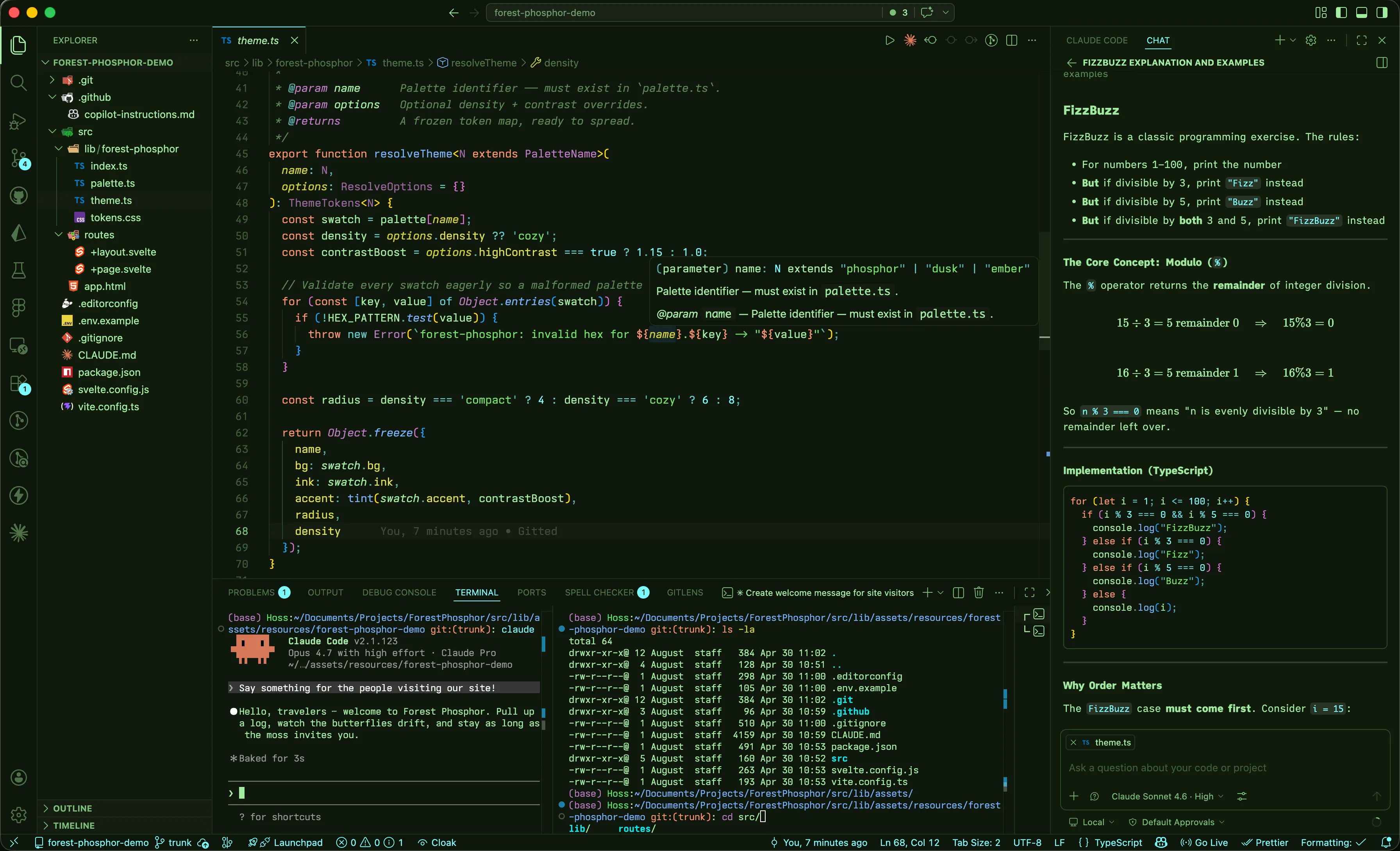
When your agent opens a 400-line PR, you're not writing — you're auditing. When you're reviewing generated logic for correctness, onboarding to an unfamiliar codebase, or scanning a diff at the end of the day, the bottleneck isn't how fast you can type. It's how fast you can read. Forest Phosphor is built around that reality. Enough contrast to read clearly, enough separation between roles to parse at a glance, and enough restraint to work in low-light or bright conditions over long sessions. It's built around what tokens do, not what category they belong to. Cyan is a variable, Blue is a property, Yellow is callable. Purple is a concrete shape - class, struct, enum - and Pink is an abstract one: interface, type, generic. Amber marks structure: The aesthetic borrows from old phosphor CRT monitors: mint prose on forest-green, low-contrast backgrounds for long sessions, and saturated phosphorescent accents used sparingly. Part of the Forest Phosphor family - a coordinated palette across VSCode, Obsidian, and iTerm2. Design philosophyMost themes were designed for writing code - you knew what you were about to type, so token categories were enough. Reading someone else's code (or your agent's code) is different. You need to extract intent fast, from an unfamiliar structure, under real cognitive load. Conventional themes assign color by token type - keyword gets one color, identifier gets another, and the visual hierarchy ends up tracking the grammar instead of the meaning. Forest Phosphor assigns color by semantic role: what a token does in the code. The grammar is incidental; the role is what you're actually reading for. The palette is built around three tiers of visual weight. Tier 1 - Foreground green
|


| Color | Role | Examples |
|---|---|---|
 Cyan Cyan #7AF8FF |
Variables - what is this thing? | userId, response, items |
 Blue Blue #77B0FF |
Properties and fields - what's on it? | .displayName, .length, object keys |
 Yellow Yellow #D1CF32 |
Functions and methods - what does it do? | fetchUser(), .map(), groupBy() |
Reading user.profile.fetch() becomes a sentence: cyan thing → blue attribute → yellow action.
The type system - a purple gradient
Two colors split the difference between types you instantiate and types you describe.
| Color | Role | Examples |
|---|---|---|
 Purple Purple #C07AC8 |
Concrete shapes - things you instantiate | class UserService, enum Direction, decorators |
 Pink Pink #FFB4E2 |
Abstract shapes - contracts and descriptions | interface User, type ApiResponse, <T>, string, number |
If you can new it, it's purple. If you write a contract for it, it's pink. Primitives like string and number are pink because they describe what something must be, not a thing you construct.
Literal values
Near-white 
#E8F0E8 is reserved for values that are the data - numbers (42, 3.14), booleans (true, false), null, undefined. Also used for structural delimiters that sit outside normal expression flow: Rust lifetimes ('a), template/interpolation braces (${}), Svelte's reactive $:, labels.
Strings
Strings get their own bright green 
#73e165 - close to the foreground hue but saturated and brighter. They sit in the same family as prose but are clearly distinguished as quoted content.
Comments
Comments are 
#5C8656 - a muted, mid-forest green rendered in italic. They recede into the background without disappearing entirely. JSDoc/TSDoc tags get a slightly brighter 
#7CBF78 so doc-comment metadata stays scannable.
Reference: nesting depth rotation
Bracket pair colorization and JSON/object key colors follow the same depth rotation, so closing brackets and their corresponding key always share a color:
| Depth | Swatch | Color |
|---|---|---|
| 1 | |
Blue #77B0FF |
| 2 | |
Yellow #D1CF32 |
| 3 | |
Pink #FFB4E2 |
| 4 | |
Purple #C07AC8 |
| 5 | |
Cyan #7AF8FF |
| 6 | |
Near-white #E8F0E8 |
Brackets start at near-white at the outermost scope and work inward (white → blue → yellow → pink → purple → cyan), so the outermost level is always the most neutral and deeper nesting gets warmer.
Language coverage
Verified most thoroughly for TypeScript / JavaScript / JSX / TSX - that's where most of the fine-tuning has happened. The rest is covered with hand-tuned scope rules:
- Svelte - template blocks (
{#if},{#each}), directives, component tags, reactive declarations ($:) - Python -
self/cls(coral), decorators (purple), f-string interpolation, kwargs (blue), typing builtins (Optional,Union- pink), magic methods - Rust - lifetimes (white), traits (pink), structs/enums (purple), macros (cyan),
unsafe(coral), attributes/derives (purple), primitive types (pink) - HTML / CSS / Markdown - tags (amber), attributes (blue), pseudo-classes (pink), at-rules (amber), CSS class/ID selectors (yellow)
- JSON / YAML / TOML - depth-aware key coloring
- Shell / Bash - variables (cyan), builtins (amber), functions (yellow)
- GraphQL - types (pink), fields (blue)
- Go, C/C++, C#, Java - structural keywords and type distinctions
If you find a token in any language that doesn't read right, that's a real bug - open an issue.
Palette reference
| Swatch | Hex | Role |
|---|---|---|
 |
#A2EBA1 |
Foreground - flow keywords, operators, punctuation, parameters |
 |
#73e165 |
Strings |
 |
#7AF8FF |
Variables, macros, enum members |
 |
#77B0FF |
Properties, fields, object keys |
 |
#D1CF32 |
Functions and methods |
 |
#C07AC8 |
Classes, enums, structs, decorators |
 |
#FFB4E2 |
Interfaces, type aliases, generics, primitives |
 |
#E8A030 |
Structural keywords - function, class, return, import |
 |
#EA9575 |
Attention - this, throw, unsafe, errors |
 |
#E8F0E8 |
Literal values - numbers, booleans, null |
 |
#5C8656 |
Comments |
 |
#5AE66A |
Git additions, terminal green, test pass |
 |
#D4A24A |
Warnings, git modifications |
Install
- Open Extensions in VS Code (
Ctrl+Shift+X/Cmd+Shift+X) - Search for Forest Phosphor
- Click Install
- Open the Command Palette (
Ctrl+Shift+P/Cmd+Shift+P) and select Preferences: Color Theme - Choose Forest Phosphor
Screenshots
Diff view
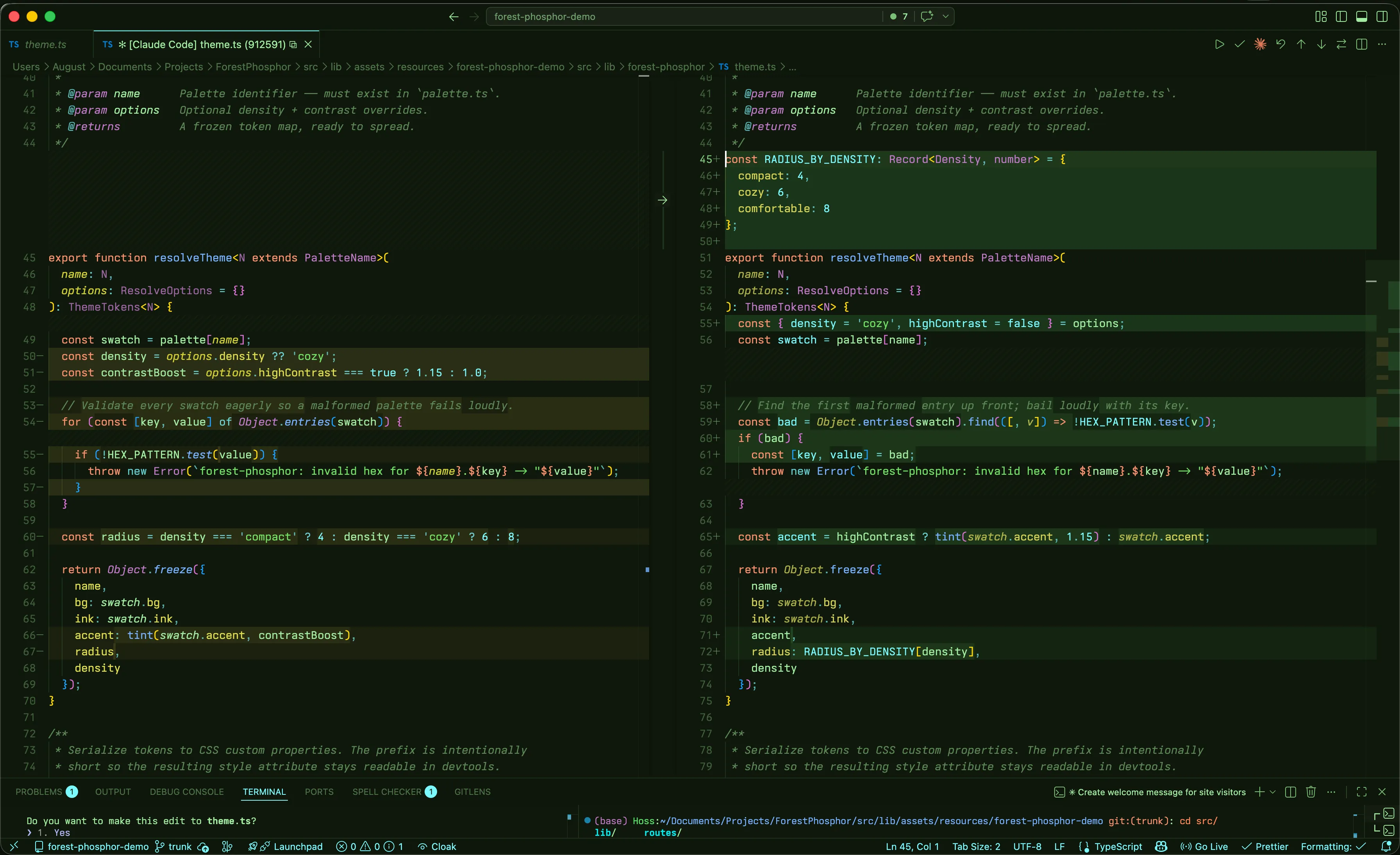
Forest Phosphor's git colors share the same role logic as the syntax palette - additions in saturated phosphor green, modifications in warm amber, deletions in coral.
Integrated terminal
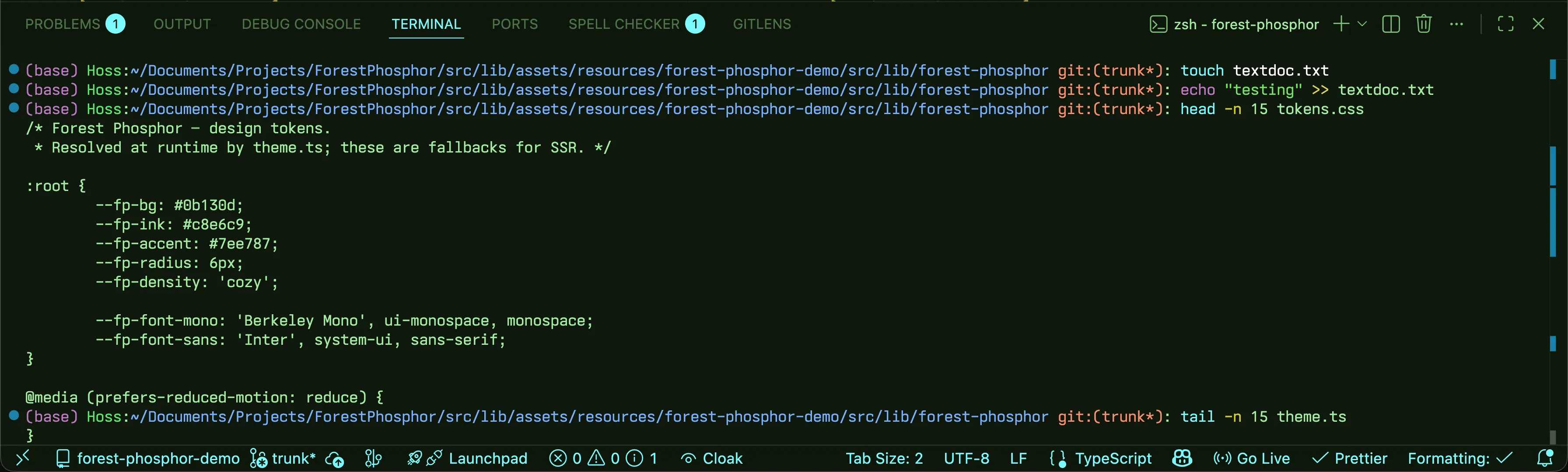
The terminal screenshot pairs Forest Phosphor with the matching iTerm2 preset. Grab it at forestphosphor.dev.
Family
- VSCode - this theme
- Obsidian - forest-phosphor-obsidian
- iTerm2 - forest-phosphor-iterm2
All three share the same hex values; switch between apps without losing the look.
Reporting issues
If you find an unstyled element or a token that doesn't read right, open an issue with a screenshot and the language being highlighted. Themes have long tails - user reports are how the gaps get found.
About
Built by Steven Theuerl (@Steven-Theuerl). The full design system lives at forestphosphor.dev.
License
MIT - see LICENSE.