A Visual Studio Code extension that parses Business Central AL source files and compiled .app symbol packages to render an interactive ER-style diagram of table relationships.
Screenshots
Interactive ER diagram showing all table relationships in the workspace
Focus the diagram on the table in the active editor
Sortable Related Tables list panel with By Table / By Relation toggle and hop distance badges
Browse and visualize relationships including standard Business Central base app tables
Features
Diagram
ER diagram — entity boxes with field names and data types, crow's foot notation on relation edges
Focus mode — double-click any table to expand its neighbourhood; the depth slider controls how many hops to show (max configurable to 10)
Filter by name — type in the search box to narrow the diagram to matching tables
Project filter — choose a workspace folder from the Project dropdown to restrict the default view to tables from that project only; useful when multiple AL apps share a workspace
App Package filter — choose an app package (e.g. Microsoft / Base Application 25.0.0.0) from the App Package dropdown to browse its tables and see which source tables reference them
Namespace mode — choose a namespace prefix from the Namespace dropdown to see all tables in that namespace and their neighbours
Direction toggle — switch between Out (following FKs that leave the focused table), In (FKs that arrive at it), or Both directions
Back / Forward navigation — use the ‹/› buttons to move through the focus history within a session
BFS-ranked node cap — when the diagram exceeds the configured node limit the closest tables survive; a notice shows the total count and how to raise the limit
Colour themes — switch between Dark, Light, High Contrast and Solarized palettes; the choice is persisted to settings
Export
PNG / SVG — export the current diagram view as an image
Mermaid — copy a Mermaid ER diagram definition to the clipboard; collision-safe identifier names are generated automatically
CSV — export the Related Tables list as a CSV file
Related Tables list panel
Opens alongside the diagram via the 🔗 Related button or Find Related Tables command
By Table view — one row per reachable table with minimum hop distance, total relation count, and a direct annotation
By Relation view — field-level detail showing every source/target field pair
Direction badge — shows whether the current list covers Out, In, or Both directions
Sort — click any column header to sort; click again to reverse
Filter — type to filter by table or field name within the current view
Pagination — large result sets are shown in pages of 100 rows
Click to navigate — clicking a table name focuses the diagram and opens the source file
Source & packages
Open source — right-click a diagram node or click a name in the list to jump to its .al declaration; works for both local files and tables from .app packages
Base-app coverage — reads compiled .app symbol packages so relations to standard BC tables resolve correctly; publisher/name/version identity is read from app.json inside the ZIP
Deduplication across projects — when multiple workspace folders each have the same .app in their .alpackages/ folder, the scanner detects identical content (SHA-256) and parses it only once; shared packages are also stored as a single cache entry
Incremental rescan — when an .al file changes only that file is re-parsed; the rest of the graph is preserved
Enum field labels — fields declared as Enum "Name" show the enum type name rather than a numeric ID
CASE/WHEN relations — multi-branch TableRelation values using CASE … OF … WHEN are fully parsed
Workspace integration
Live refresh — diagram updates automatically when .al files are saved
Manual re-scan — run AL Table Viz: Re-scan Workspace to force a full rescan and clear all caches
Commands
Command
Keyboard / Menu
Description
AL Table Viz: Show All Table Relations
Command Palette
Opens the diagram with all tables in the workspace
AL Table Viz: Show Relations for Current Table
Right-click .al file · Command Palette
Opens the diagram focused on the table in the active editor
AL Table Viz: Find Related Tables
Command Palette
Pick a table by name and open its Related Tables list alongside the diagram
AL Table Viz: Re-scan Workspace
Command Palette
Force a full re-parse of all source files and .app packages, clearing all caches
Configuration
Setting
Default
Description
alTableViz.defaultDepth
2
Number of relation hops shown when focusing on a table (1–10)
alTableViz.maxDiagramNodes
60
Maximum table nodes rendered in the diagram at once. Raise this for larger diagrams (10–500; may slow layout above ~150)
alTableViz.showExternalTables
true
Include tables from .app symbol packages
alTableViz.excludedAppPackages
[]
Filename substrings of .app files to skip during scanning, e.g. ["ThirdParty.app"]. Comparison is case-insensitive
alTableViz.colorTheme
"dark"
Diagram colour theme: dark, light, highContrast, or solarized
Requirements
VS Code 1.85+
An AL workspace with .al source files (AL Language extension recommended)
Compiled .app symbol packages for base-app table coverage (place them anywhere in the workspace)
Development
npm install
npm run compile    # single build
npm run watch      # rebuild on change
npm test           # run unit tests (parser + graph, no VS Code host required)
Press F5 in VS Code to launch the Extension Development Host.
Architecture
File
Purpose
src/extension.ts
Activation, command registration
src/model/types.ts
Shared JSON-safe data model (extension host ↔ webview)
src/model/tableGraph.ts
In-memory graph with BFS subgraph, adjacency indexes, filter helpers


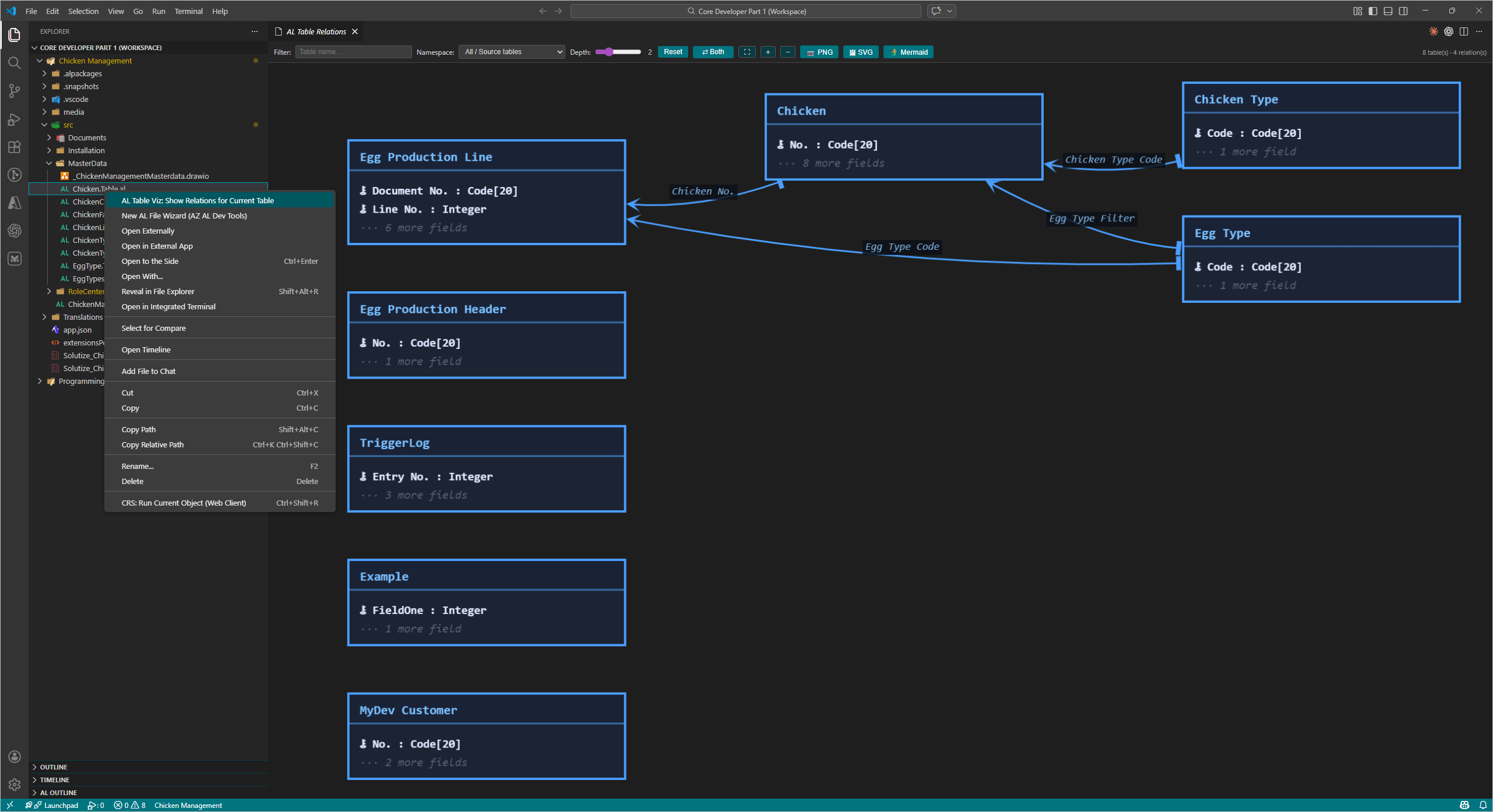 Interactive ER diagram showing all table relationships in the workspace
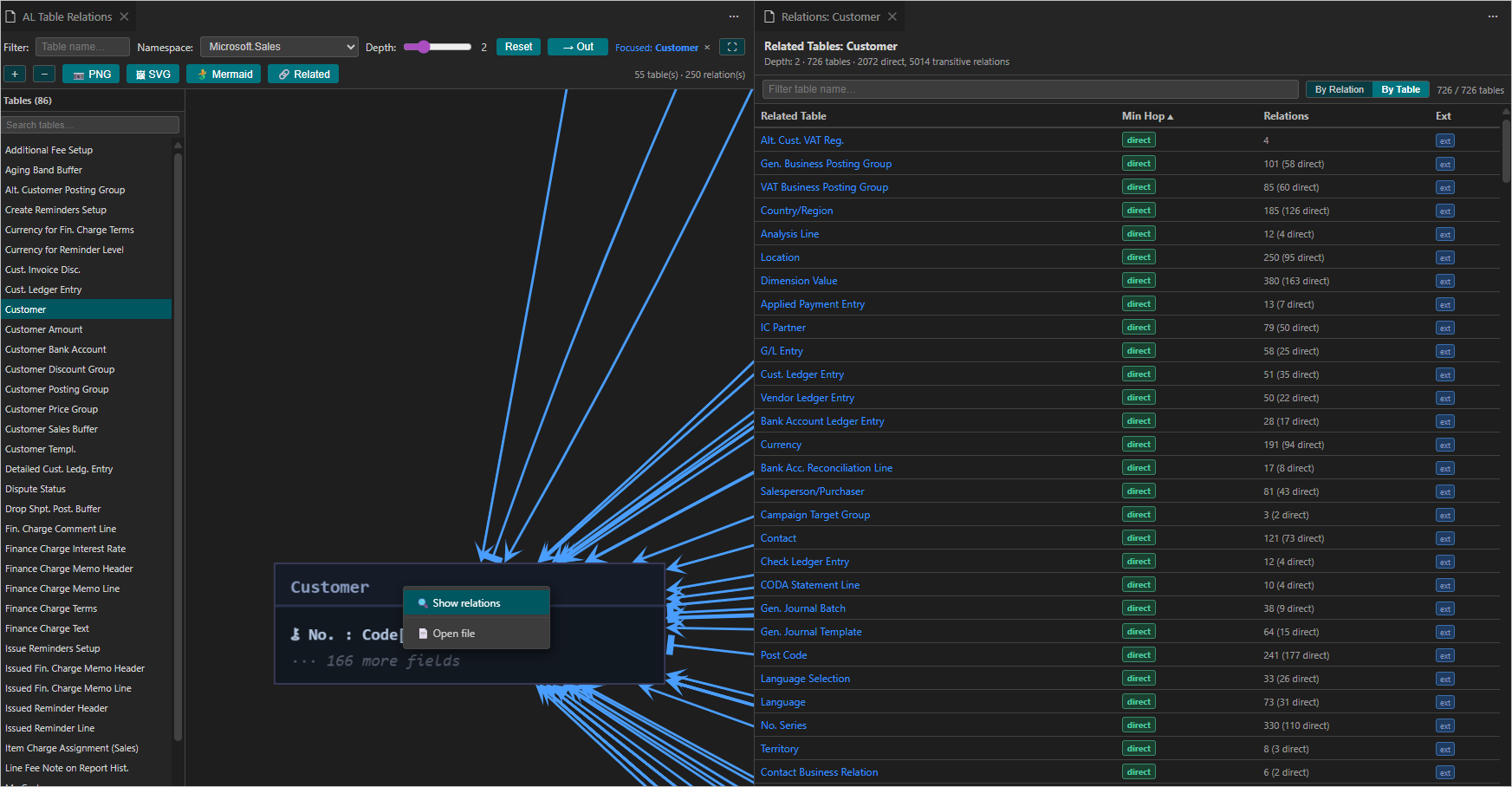 Focus the diagram on the table in the active editor
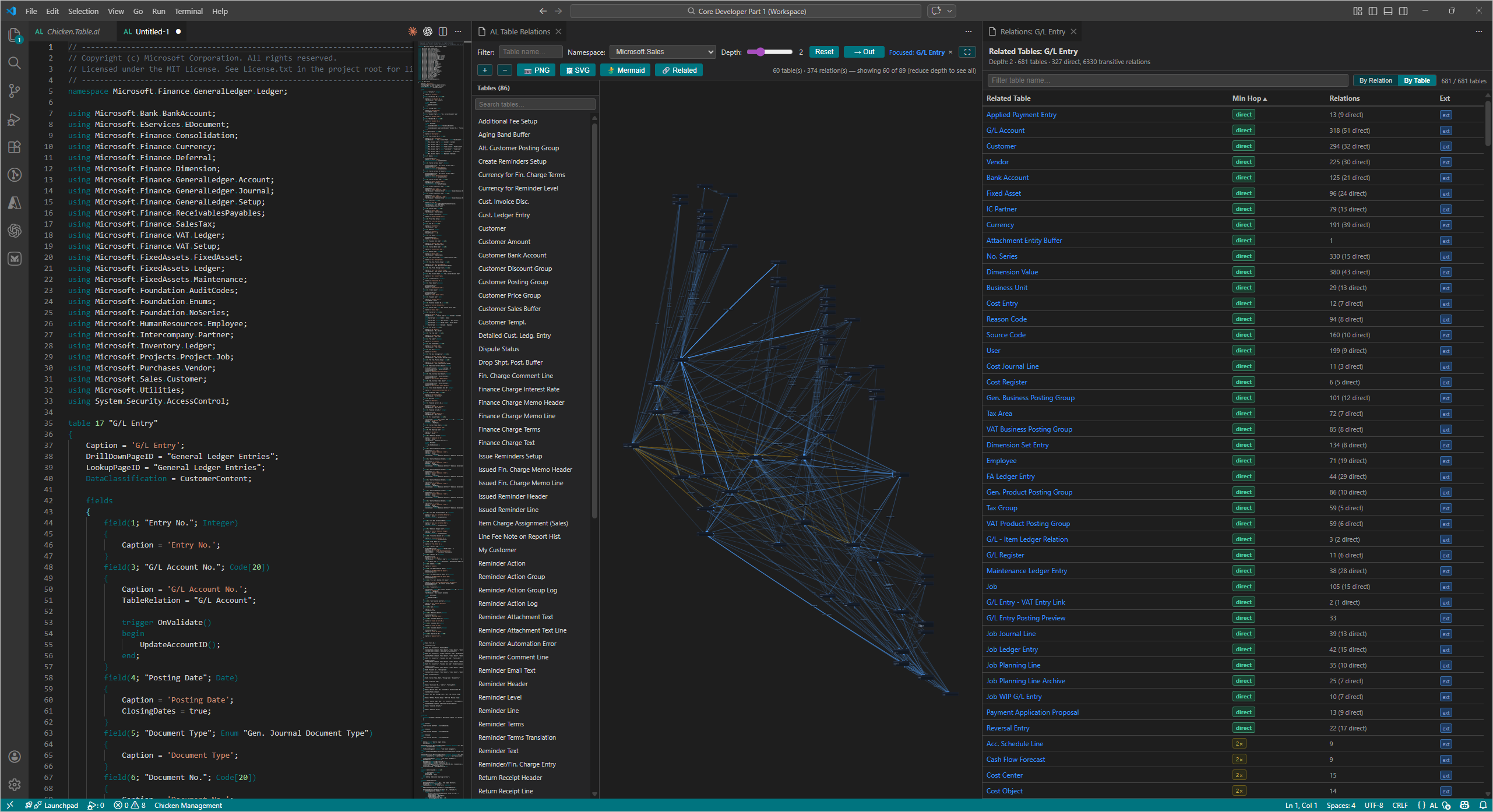 Sortable Related Tables list panel with By Table / By Relation toggle and hop distance badges
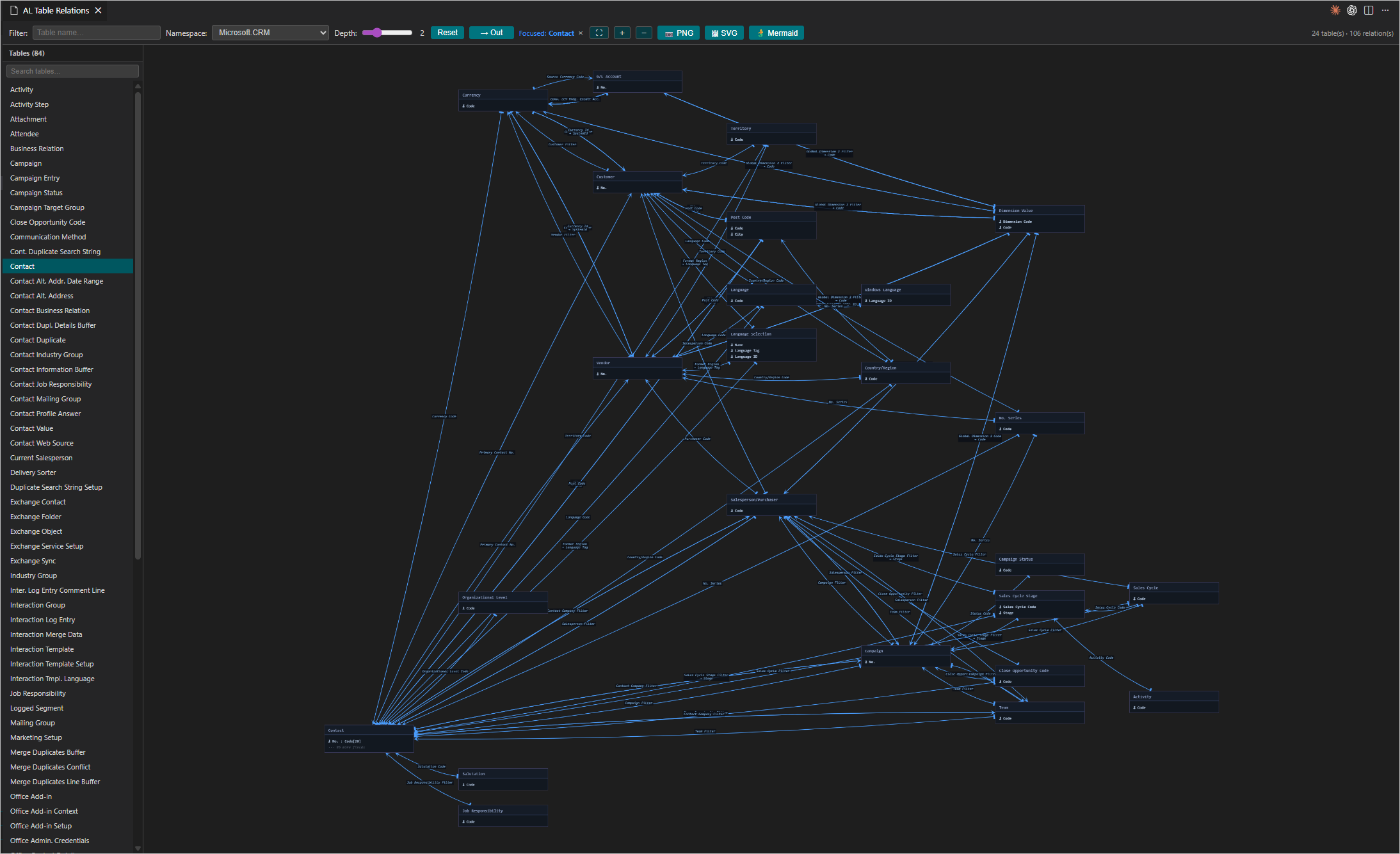 Browse and visualize relationships including standard Business Central base app tables