Stac — Server-Driven UI for Flutter
Build and preview Server-Driven UI screens with the Stac framework — directly inside VS Code.
✨ Features
🔴 Live Preview
Open a side-by-side preview of any @StacScreen — updates on save, supports theme selection, and renders with Android/iOS/Web platform simulation.
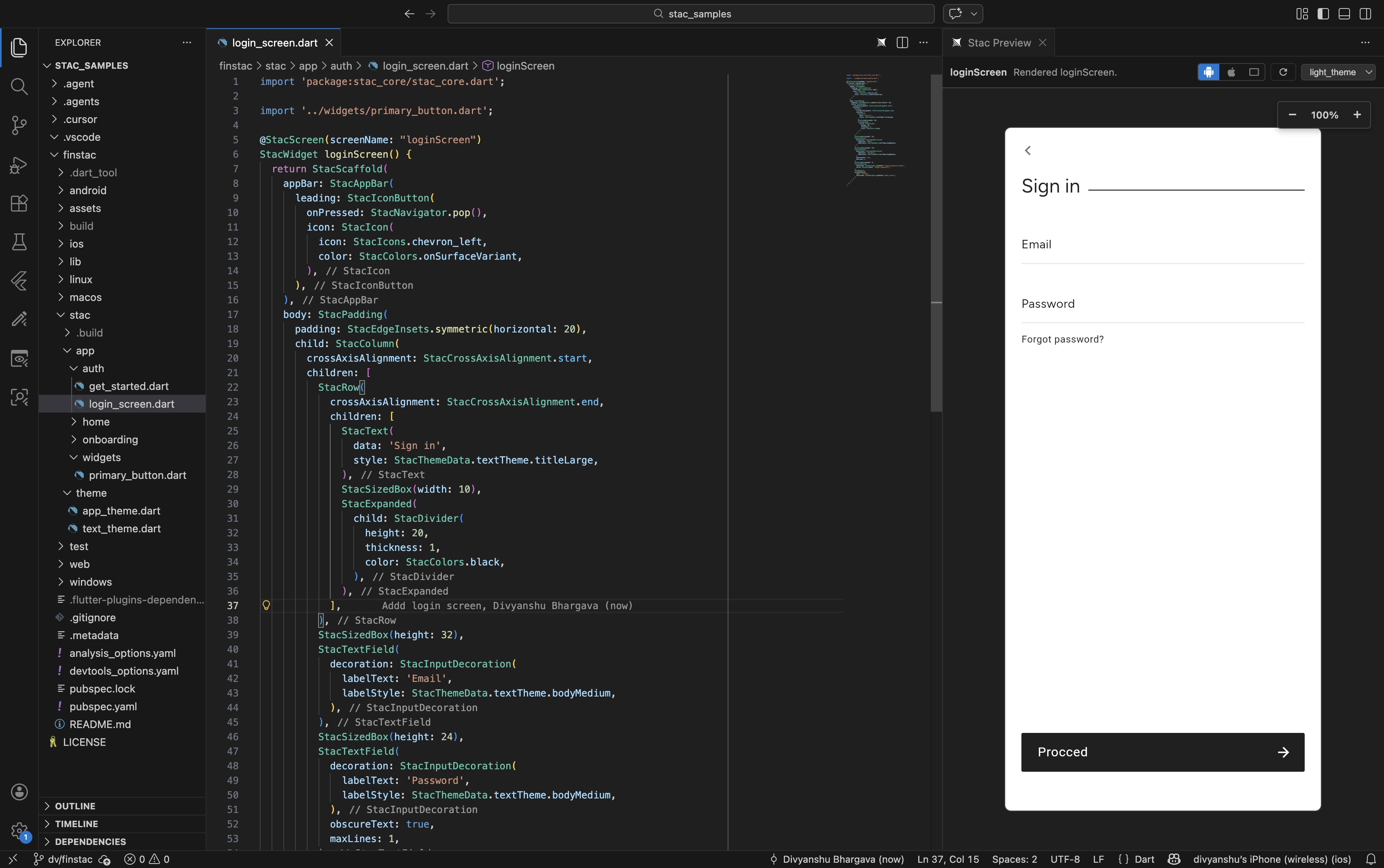
Stac: Open Preview — launch the preview panel for the active screen- Device toggles — switch between Android, iOS, and Web viewports
- Theme picker — select any
@StacThemeRef theme to preview with
🔧 Wrap Quick Fixes
Place your cursor on any Stac widget expression and press Cmd+. to wrap it:
StacContainer, StacPadding, StacCenter, StacAlign, StacSizedBox, StacExpanded- Wrap with Stac widget… — type any Stac widget class name
📝 Snippets
Type in a Stac DSL context (files containing @StacScreen, @StacThemeRef, or package:stac_core):
stac screen — new screen templatestac theme — new theme template
⚙️ Extension Settings
| Setting |
Default |
Description |
stacVscode.enableWrapQuickFix |
true |
Enable wrap quick-fix actions |
stacVscode.wrapPresets |
All presets |
Preset wrappers in quick-fix menu |
stacVscode.enableSnippets |
true |
Enable stac screen/stac theme snippets |
stacVscode.preview.enable |
true |
Enable preview commands |
stacVscode.preview.autoRefreshOnSave |
true |
Refresh preview on save |
stacVscode.preview.jsonStrategy |
runnerThenBuild |
JSON generation strategy |
stacVscode.preview.hostPort |
47841 |
Local preview host port |
stacVscode.preview.startupTimeoutMs |
120000 |
Host startup timeout |
Requirements
- Flutter SDK with Dart
3.9.2+
- A Flutter project using the Stac framework
Commands
| Command |
Description |
Stac: Open Preview |
Open live preview panel |
Stac: Select Preview Screen |
Switch to a different screen in the current file |
Stac: Stop Preview |
Stop the preview host |
Stac: Regenerate Catalog |
Rebuild widget catalog from stac_core |
Troubleshooting
If the preview doesn't start, open Output → Stac Preview for detailed logs.
Links
License
MIT
| |

