
Stop wrestling with OpenAPI specs — SpecLynx OpenAPI Toolkit delivers an effective way to author and manage API specs, bringing ease, accuracy, and power directly to your VS Code workflow.




📖 Documentation: speclynx.com/openapi-toolkit
🛍️ Install: VS Code Marketplace · Open VSX (for VS Code–compatible editors like VSCodium/Cursor)
🚀 Releases: GitHub releases
🧾 Changelog: VS Code Marketplace changelog
What it does
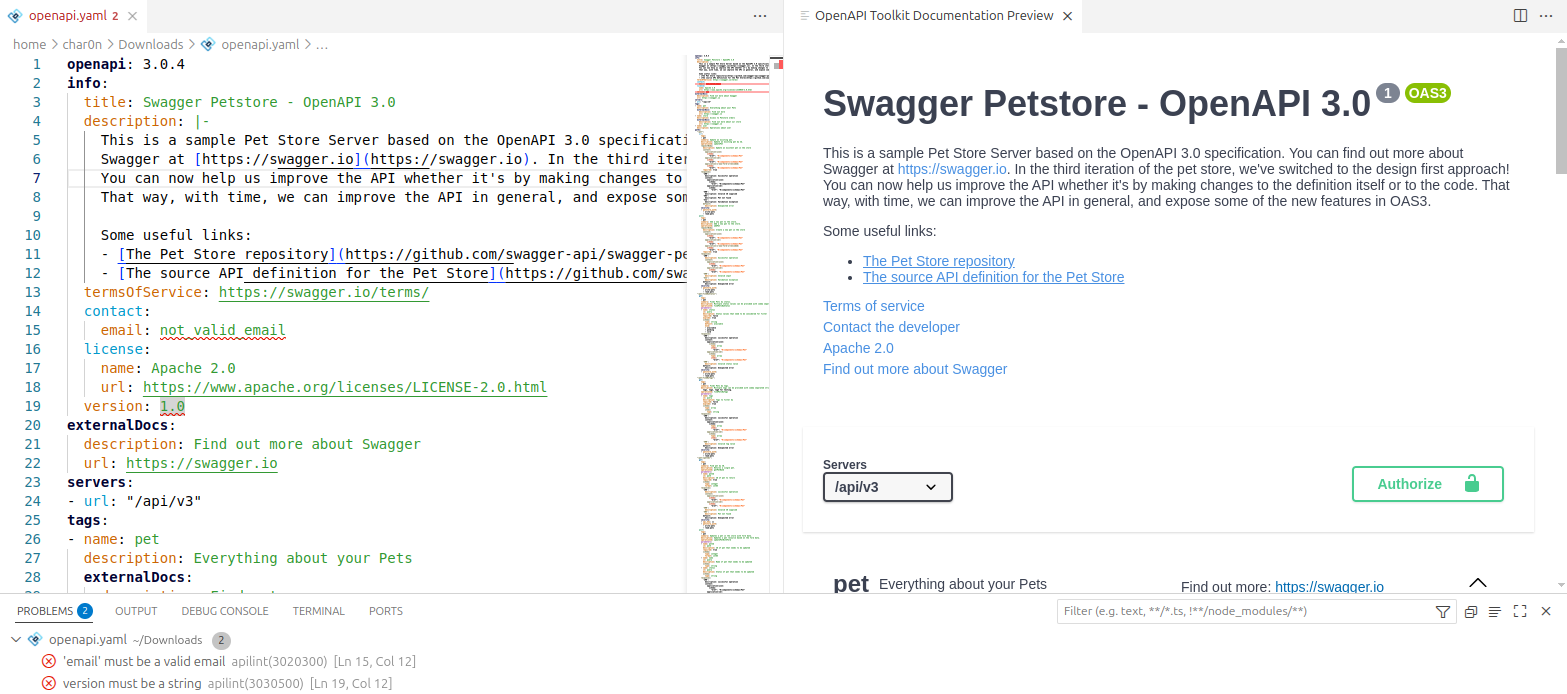
SpecLynx OpenAPI Toolkit adds semantic editing, validation/linting, preview, and utility commands for OpenAPI in VS Code — on desktop and on the web (vscode.dev / github.dev / Codespaces).
Requirements
- VS Code 1.75.0+
- Node.js 16.14.2+ (VS Code desktop only)
Preview
Quick start
Works with OpenAPI specs in YAML (.yaml, .yml) and JSON (.json).
- Install the extension from the VS Code Marketplace (or Open VSX).
- Open an OpenAPI file.
- Open the Command Palette (
Ctrl+Shift+P) and run:
- OpenAPI Toolkit: Show API Document Preview
- OpenAPI Toolkit: Format Document
- OpenAPI Toolkit: Convert to YAML / OpenAPI Toolkit: Convert to JSON
Choose the preview renderer in settings (Scalar or Swagger UI). See the documentation for configuration details: speclynx.com/openapi-toolkit.
Features
Editor
- Hover documentation for OpenAPI keywords and schema elements (incl.
$ref targets)
- Semantic autocompletion with inline docs and context-aware suggestions
$ref support: completion + preview + navigation across files- Navigation & outline: Go to Definition / Find References + Document Symbols
Preview
- Live API docs preview inside VS Code
- Renderers: Scalar API Reference (default) or Swagger UI
- Interactive experience (auth, server selection, try-it / execute requests where supported)
- Format Document for OpenAPI YAML/JSON (respects VS Code formatting settings)
- Convert JSON ↔ YAML (creates a new file with the target extension)
Validation & linting
- OpenAPI validation with editor diagnostics
- Modes (can be combined):
- JSON Schema validation
- Spectral validation/linting (custom rulesets)
- Semantic validation (deep checks beyond schema)
- Semantic linting (custom rules targeting semantic elements / JSONPath)
Rulesets
- Configure Spectral rulesets via workspace files or settings
- Configure SpecLynx semantic rules via workspace files or settings
- Optional command to select a ruleset file (see docs)
Supported OpenAPI versions
This extension supports the following OpenAPI versions:
Documentation
Complete documentation (configuration, settings, commands, rulesets, troubleshooting, and examples) is available at
speclynx.com/openapi-toolkit.
Privacy
This extension does not collect telemetry.
Support / feedback
Report bugs or request features on GitHub Issues.
License
Licensed under the Apache License 2.0. See LICENSE.
Language server and Claude Code
The same language features are available to other editors through the standalone
@speclynx/api-language-server. Its speclynx-lsp --stdio
command speaks the Language Server Protocol and does not require VS Code.
See the server README for npm installation and
CONTRIBUTING.md for local builds.
The SpecLynx LSP plugin integrates the server with
Claude Code. Installation requires a verified release entry for speclynx-lsp in the
marketplace catalog.
Once that entry is present, install it with:
/plugin marketplace add speclynx/vscode-openapi-toolkit
/plugin install speclynx-lsp@speclynx
See CONTRIBUTING.md for development, testing and local plugin use,
and RELEASE.md for the release process.

