"I don't prompt Claude anymore. I have loops running that prompt Claude and figure out what to do. My job is to write loops."
— Boris Cherny, creator of Claude Code at Anthropic
LoopBoard turns a .loopboard/ folder of markdown into a board in VS Code. Claude Code loops
groom, build and deliver the tasks. You decide what starts, what ships and what goes back.
The whole loop in 17 seconds
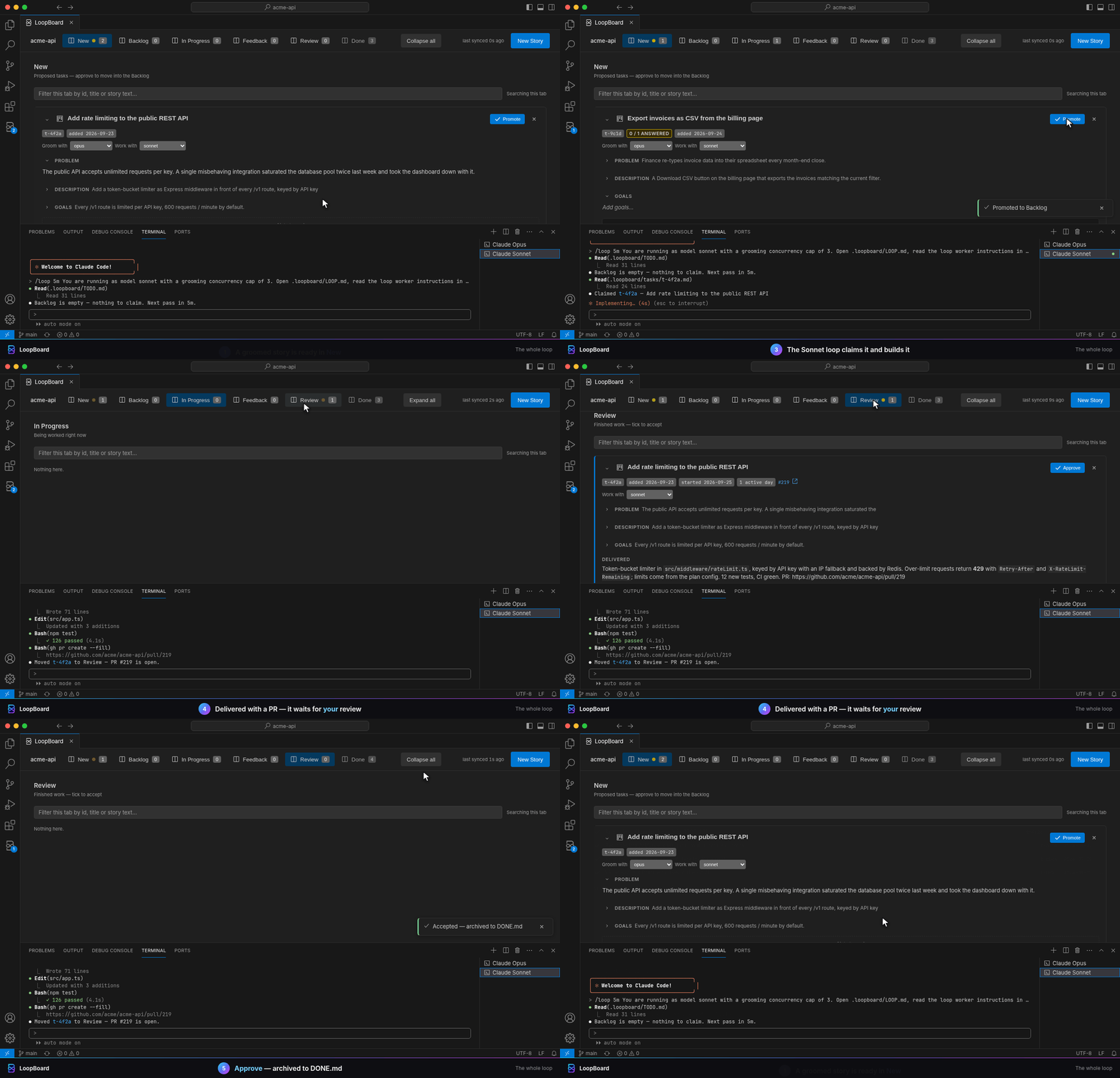
You promote a groomed story. The Sonnet loop claims it, builds it on a task/** branch and
delivers it to Review. You approve it into DONE.md. Two clicks; the loop does the rest.
Prompting by hand vs. LoopBoard
|
Prompting by hand |
With LoopBoard |
| Starting work |
Open a session, explain the task |
Click Promote |
| Context |
Re-explained every session |
Lives in tasks/<id>.md |
| When it's unsure |
Guesses, or waits for "continue" |
Parks in Feedback with a question |
| Quality check |
You review everything |
Delivery reports on every Goal; a review agent can check them first |
| Keeping track |
Chat history |
A board over plain markdown |
| Your job |
Typing prompts |
Promote · Approve · Send back |
Features
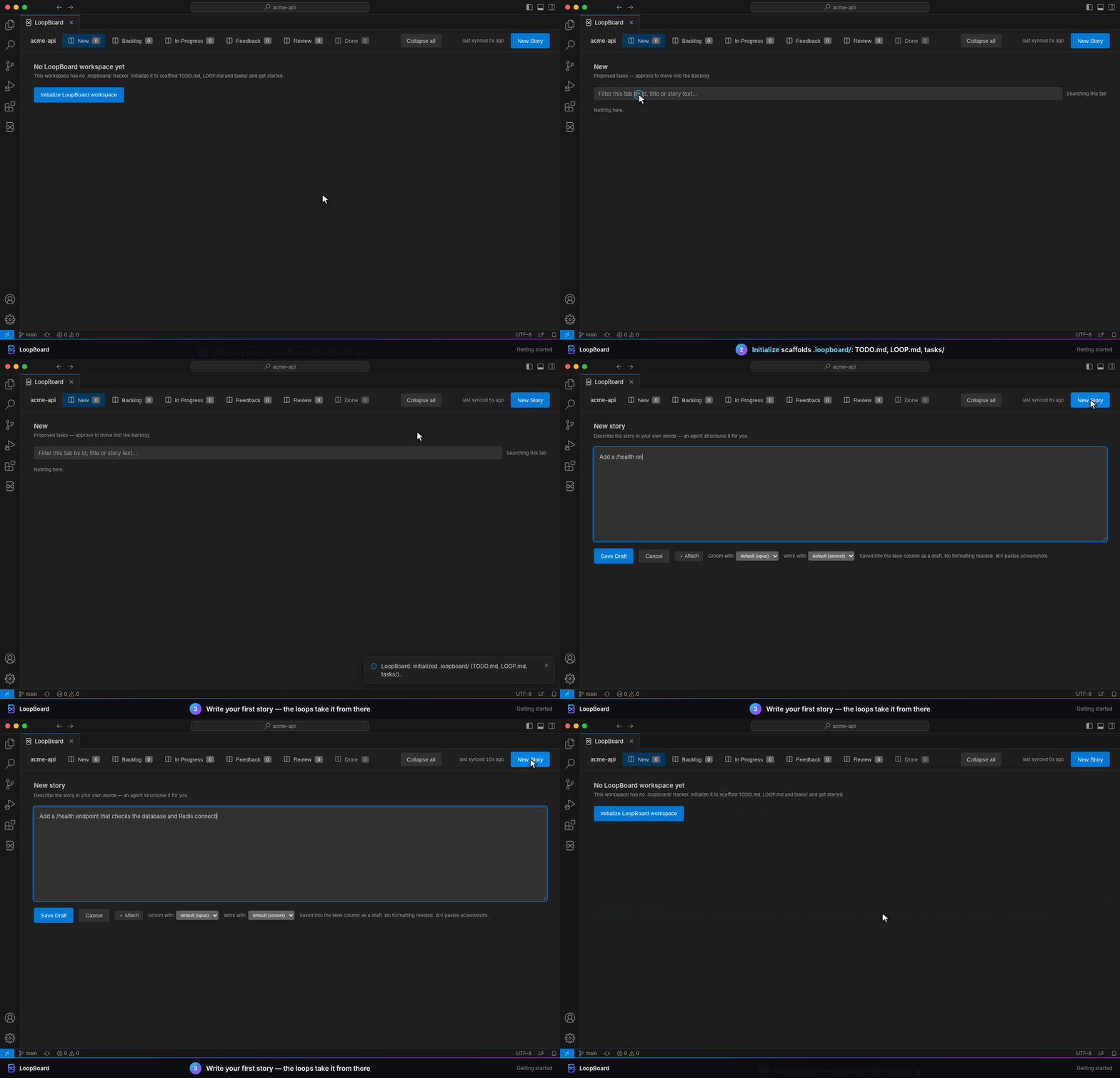
1 · Getting started
One click creates .loopboard/.
|
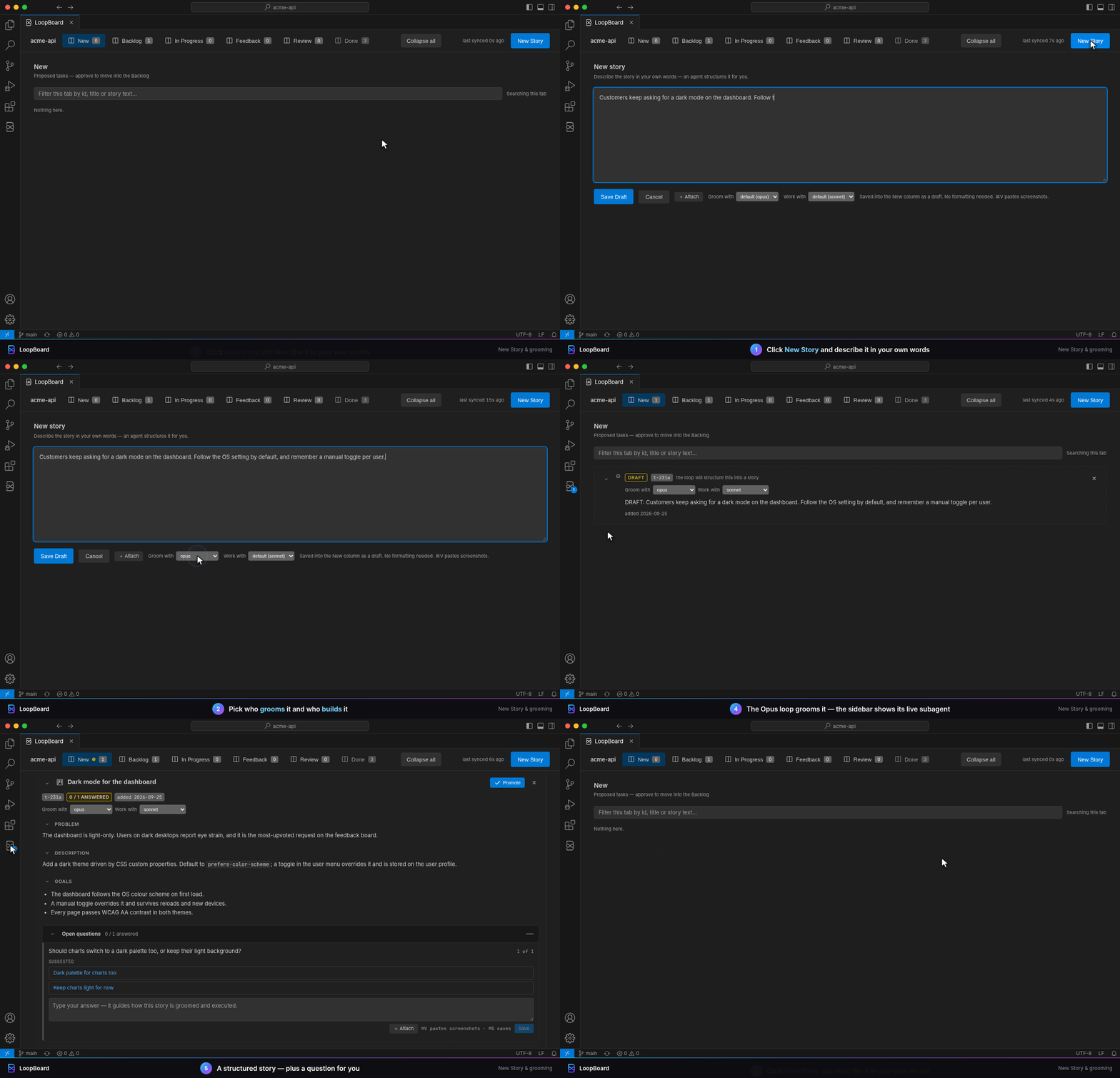
2 · Write a story
A loop grooms it into problem, goals, questions.
|
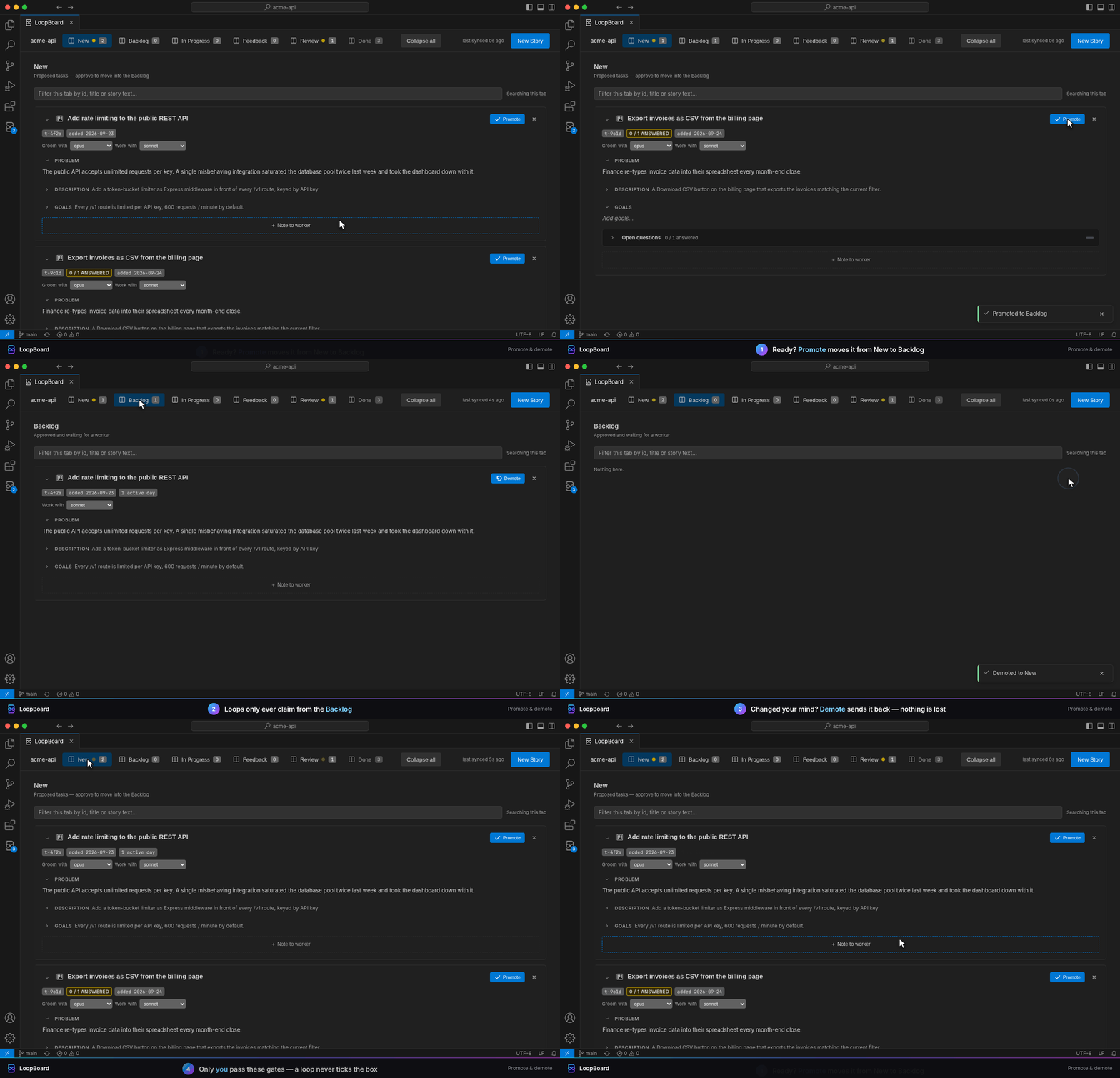
3 · Promote & demote
Loops only take work from the Backlog.
|
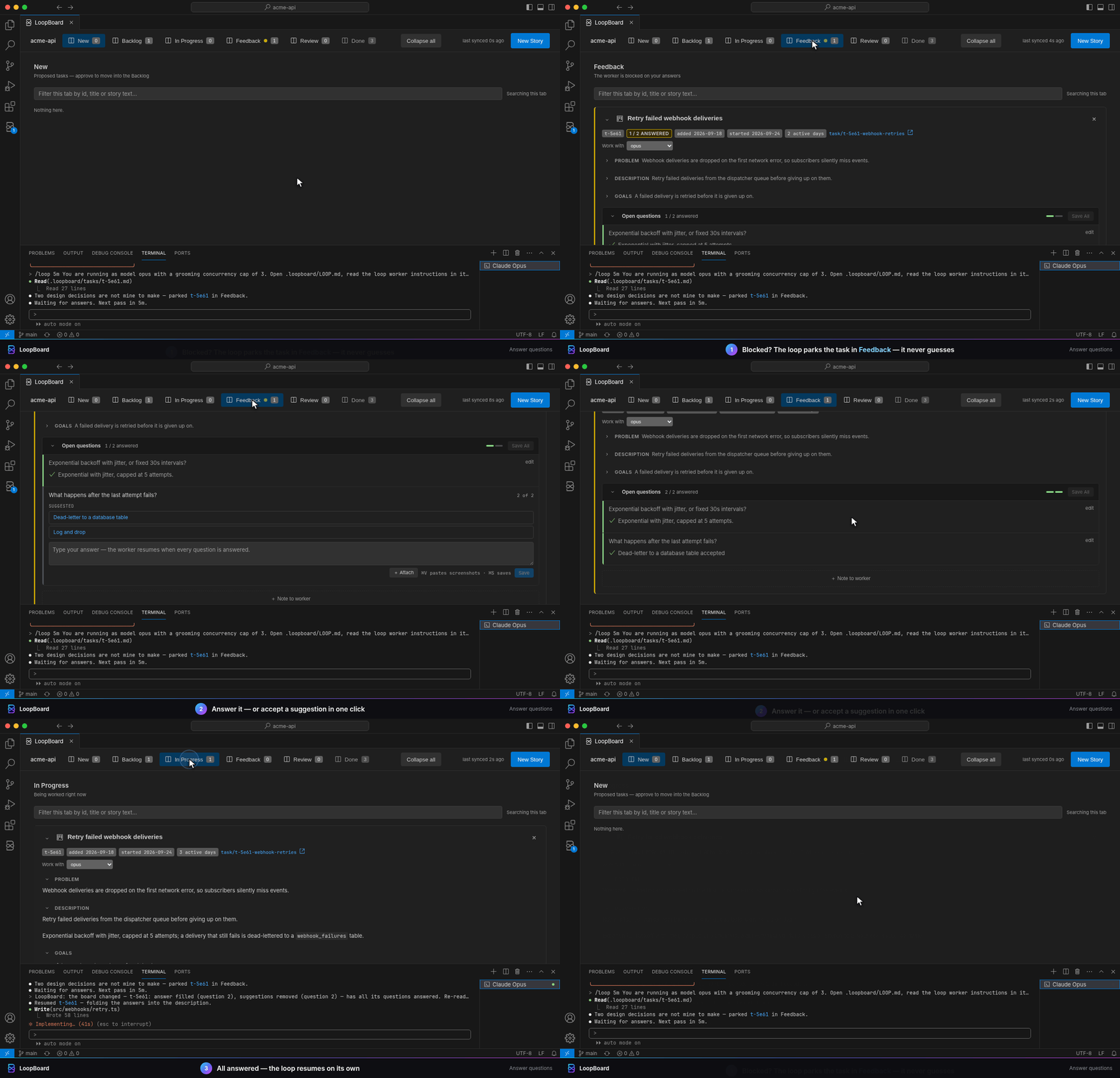
4 · Answer questions
A stuck loop asks instead of guessing.
|
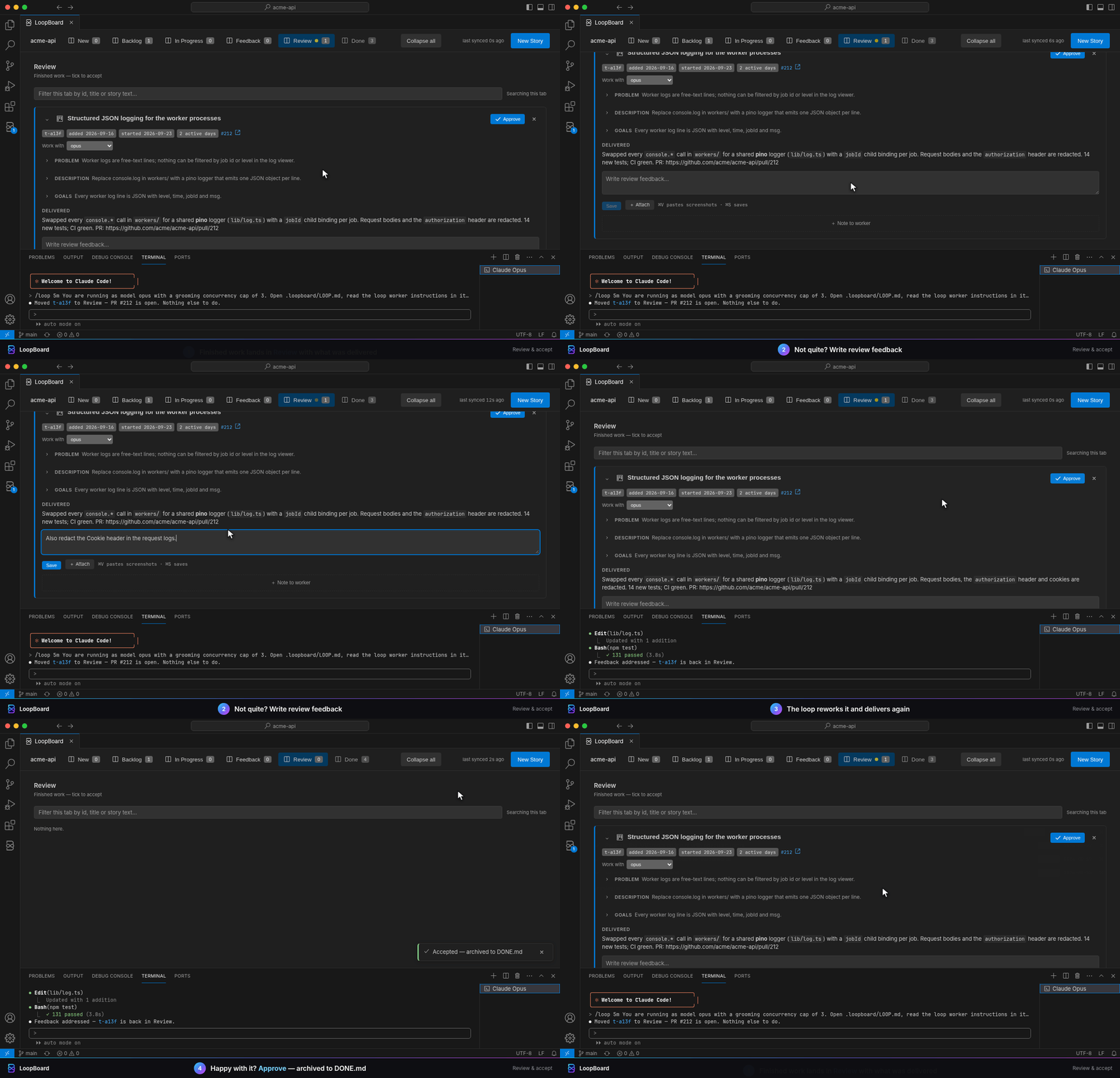
5 · Review or approve
Send it back, or approve into DONE.md.
|
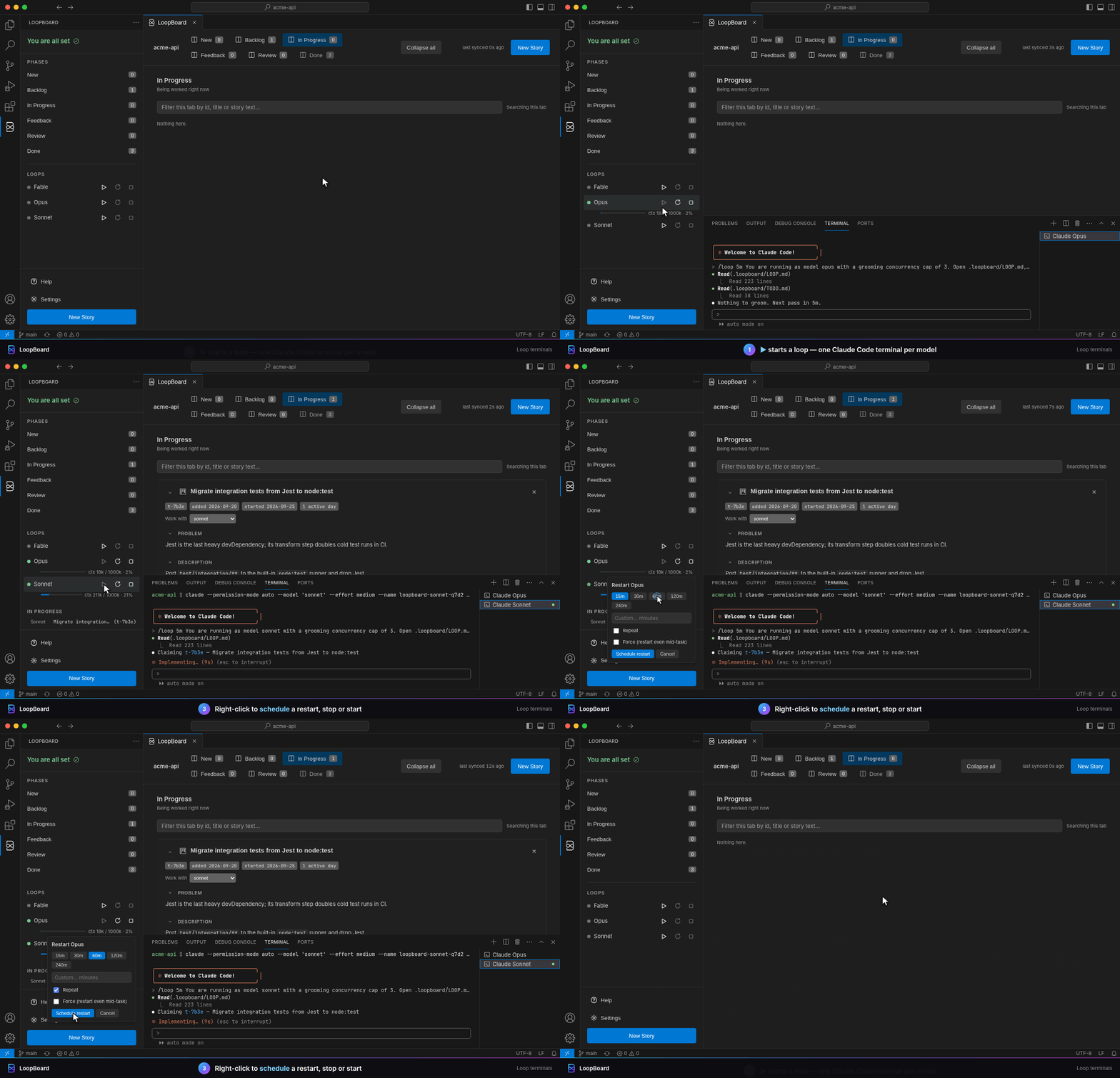
6 · Loop terminals
One Orchestrator terminal, every task on its own model.
|
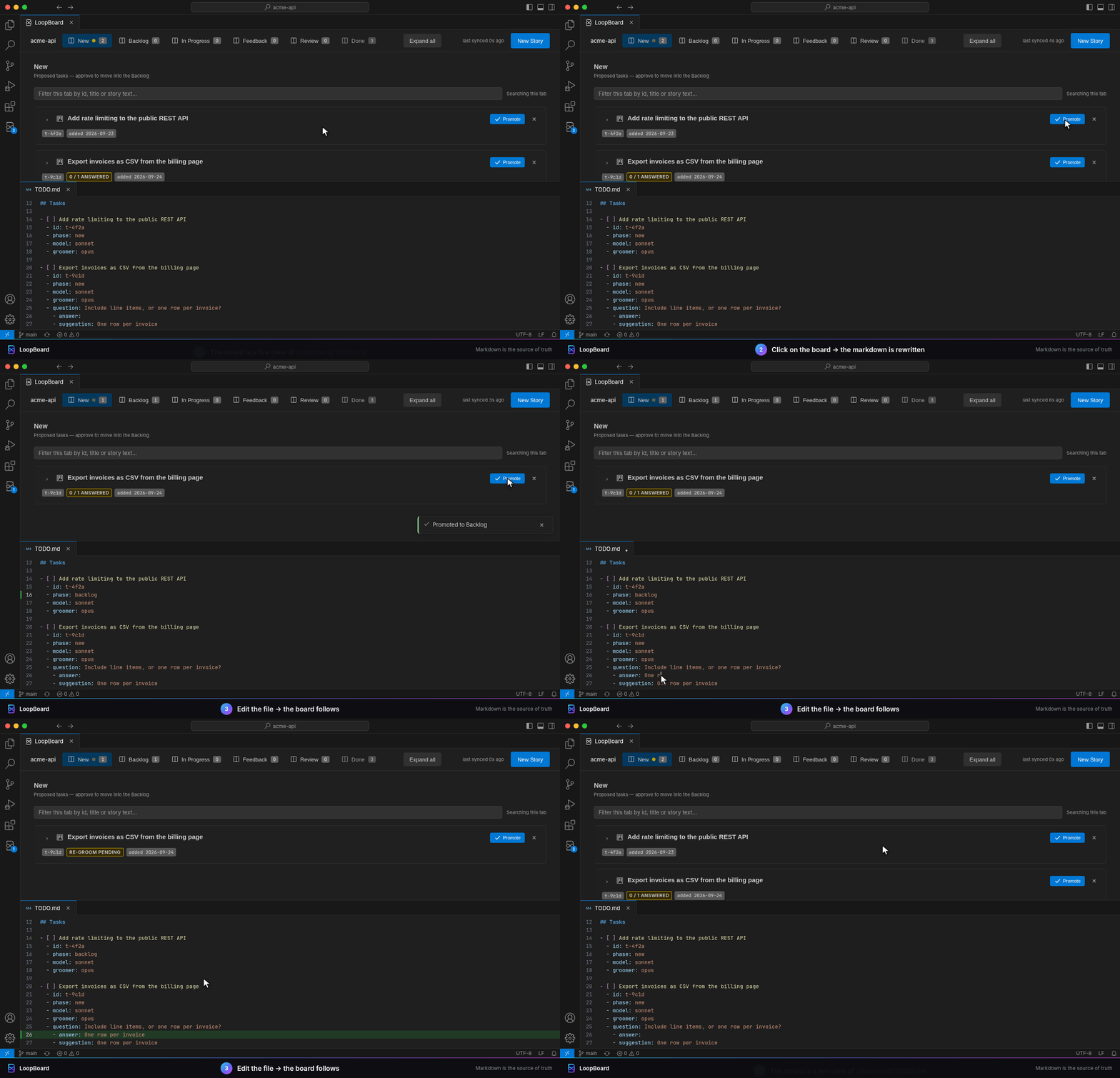
7 · Markdown is the truth
Click → file changes. Edit → board follows.
|
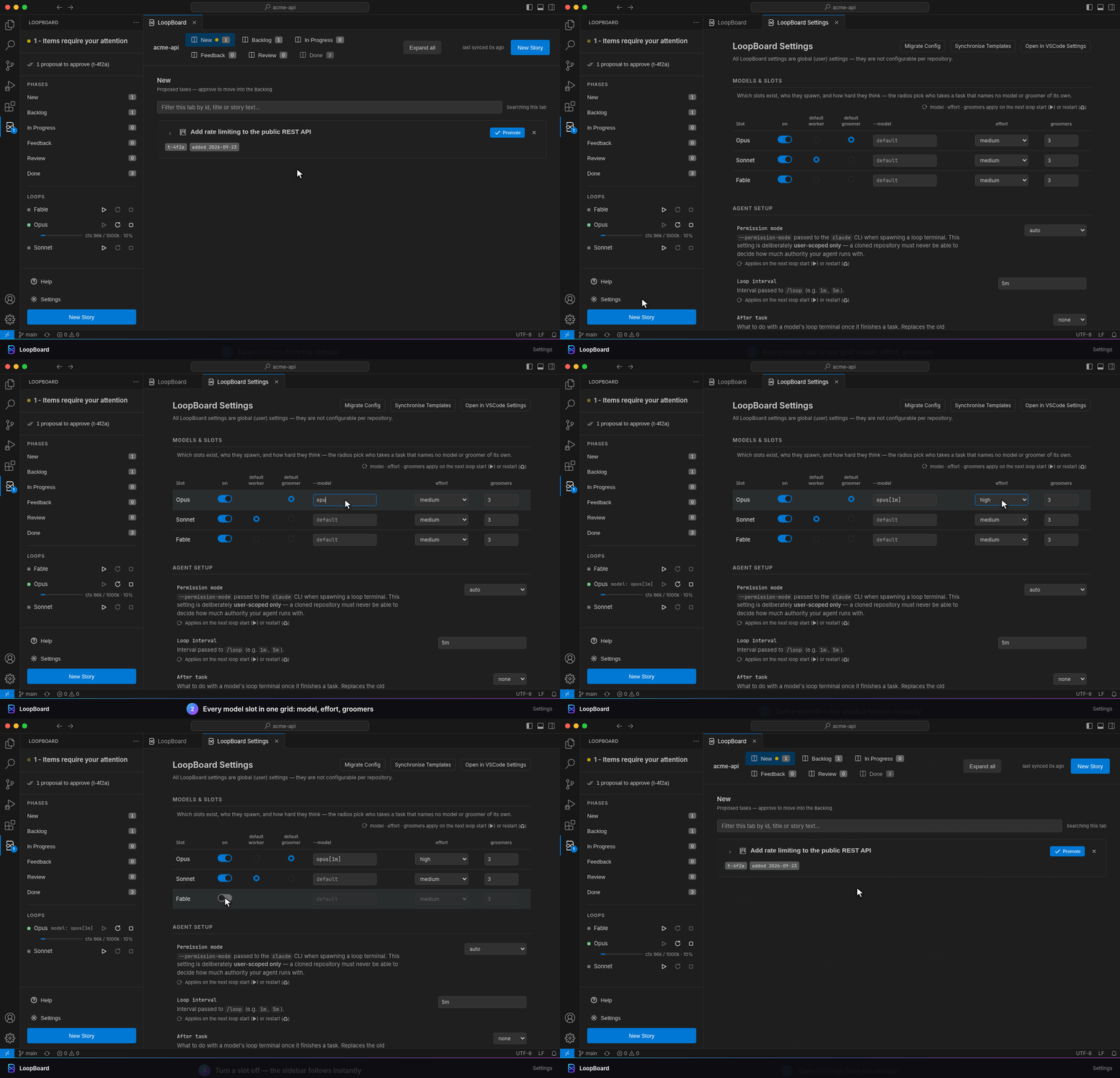
8 · Settings
The Orchestrator and every model in one place.
|
Click any GIF for full size.
Details for each feature below.
|
1 · Getting started
Click Initialize LoopBoard workspace or run LoopBoard: Initialize Workspace. It refuses
if .loopboard/ already exists. What each file holds: File structure.
2 · Write a story in plain words
Click New Story, write it like you'd brief a colleague, and pick who grooms and who
builds it. The groomer loop expands it in a subagent (visible under Agents in the sidebar):
- Problem — why the task exists.
- Description — the groomed story.
- Goals — verifiable outcomes; review judges the delivery against them.
- Questions — decisions that are yours, often with one-click suggested answers.
Paste, drop or + Attach screenshots; they're saved under .loopboard/cache/ and linked from
the story.
3 · Promote & demote
- Promote moves a story from New to Backlog, the only place a loop claims work from.
- Demote moves it back to New, nothing lost — refused once a loop has claimed it.
- Loops never promote or approve, and the board never moves a card before the file says so.
At most one task is In Progress across the board; the sidebar shows which.
4 · Answer questions
A loop that needs your decision parks the task in Feedback and stops. Once every question is
answered, the loop resumes it. LoopBoard also nudges that loop's terminal, so it acts now
instead of on its next pass — without interrupting work in flight.
5 · Review, send back or approve
Delivered work lands in Review with its ## Delivered summary and a link to its PR or branch.
- Not right? Write review feedback. The loop reworks the task and delivers again.
- Right? Click Approve. It moves to
DONE.md; the task file stays in tasks/.
Loops never commit to main and never merge. Merging is your call.
6 · Loop terminals
▶ opens ONE VS Code terminal, Claude Orchestrator, running one command:
claude --permission-mode auto --model 'opus' --effort low --name loopboard-orchestrator-<id> \
  '/loop 5m You are the LoopBoard orchestrator, grooming cap 3. Models: opus low-xhigh, haiku. …'
The Orchestrator never edits code: every groom, implementation and review is a subagent on the
task's own model and effort (Groom with, Work with and Review with on each card), else
the role default; it never picks one for you. The prompt names the defaults and points at the Automation section of
.loopboard/LOOP.md, which the loop re-reads every pass: edit your rules there and it follows.
- Context bar: the session restarts (or
/clears) at the loopBoard.contextLimit.percent mark
(default 35%, 0 = off). It never interrupts a task In Progress or a live subagent; the restart
waits.
- ♻ / ■: restart with a fresh context, or stop. Right-click ▶ ♻ ■ to schedule it.
- Coming from per-model loops? Old
Claude Opus/Sonnet/Fable terminals that survive the
update get one prompt to stop them, and once LOOP.md is synced a leftover one stands down.
These recordings still show the per-model loops LoopBoard ran before the Orchestrator; the Claude
sessions in them are simulated (VS Code can't read a terminal).
7 · Markdown is the source of truth
- Board → file. Each save re-reads the file, changes one field and writes it back atomically
(temp file + rename), so you, the board and several loops can share it safely.
- File → board. A hand edit, a
git pull or a loop's write repaints the board. If your save
collides with a change to the same field, the disk wins and a toast tells you.
.loopboard/ is plain files you own; they outlive the extension.
8 · Settings
The sidebar's Settings link opens LoopBoard's settings page. The Roles table picks, from
dropdowns, the model and effort of the Orchestrator (plus its grooming cap) and the defaults for
the groomer, worker and reviewer (none = no review). Out of the box: Orchestrator on
Opus at effort low, groomer, worker and reviewer on Opus at medium; Opus and Haiku on, Sonnet and
Fable off (turn them on to offer them), Opus capped at xhigh. The Models table turns each
model on or off, can point its alias at a specific model id, and sets its lowest and
highest effort: every spawn on that model is clamped into that range. Other settings follow.
- These are VS Code user settings; a cloned repo can never change how much authority your agent
gets.
- Spawn-time settings (
--model, effort, defaults, interval, permission mode, …) apply on the next
▶ or ♻; the board's selects and new drafts use a changed default at once.
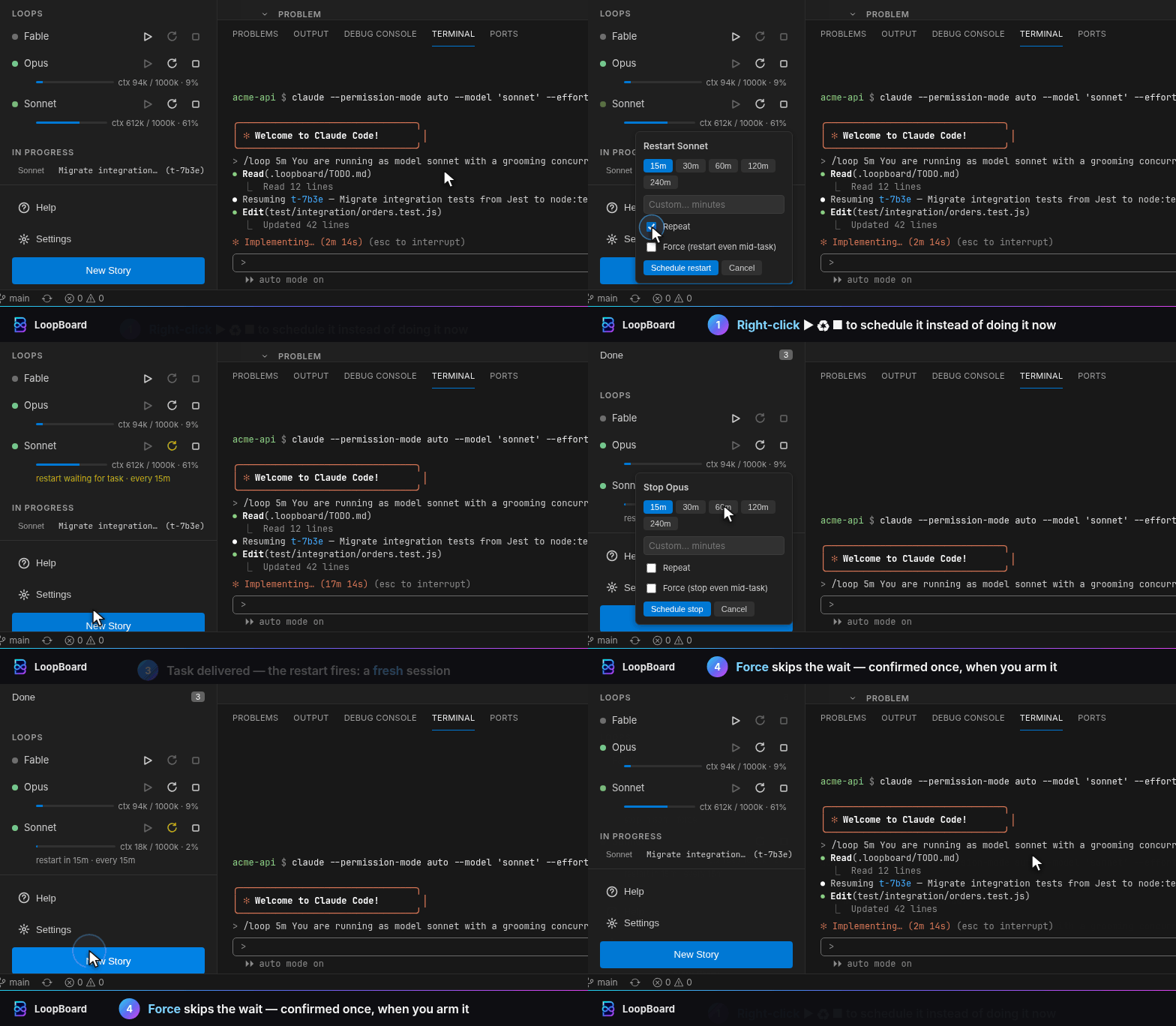
Scheduled loop actions
Right-click ▶ ♻ ■ to do it later.
|
- Right-click ▶, ♻ or ■ to schedule a start, restart or stop: 15 minutes to 4 hours, a custom delay, and Repeat. Left-click still acts immediately.
- One schedule per loop, shown under its row. Arming another replaces it.
- A restart or stop waits while the loop is working on the In Progress task or still has a subagent running, then fires.
- Force skips the wait. A modal asks once, when you arm it: a forced restart or stop leaves the task In Progress with nobody on it until the next loop pass resumes it.
- Schedules last until VS Code reloads.
|
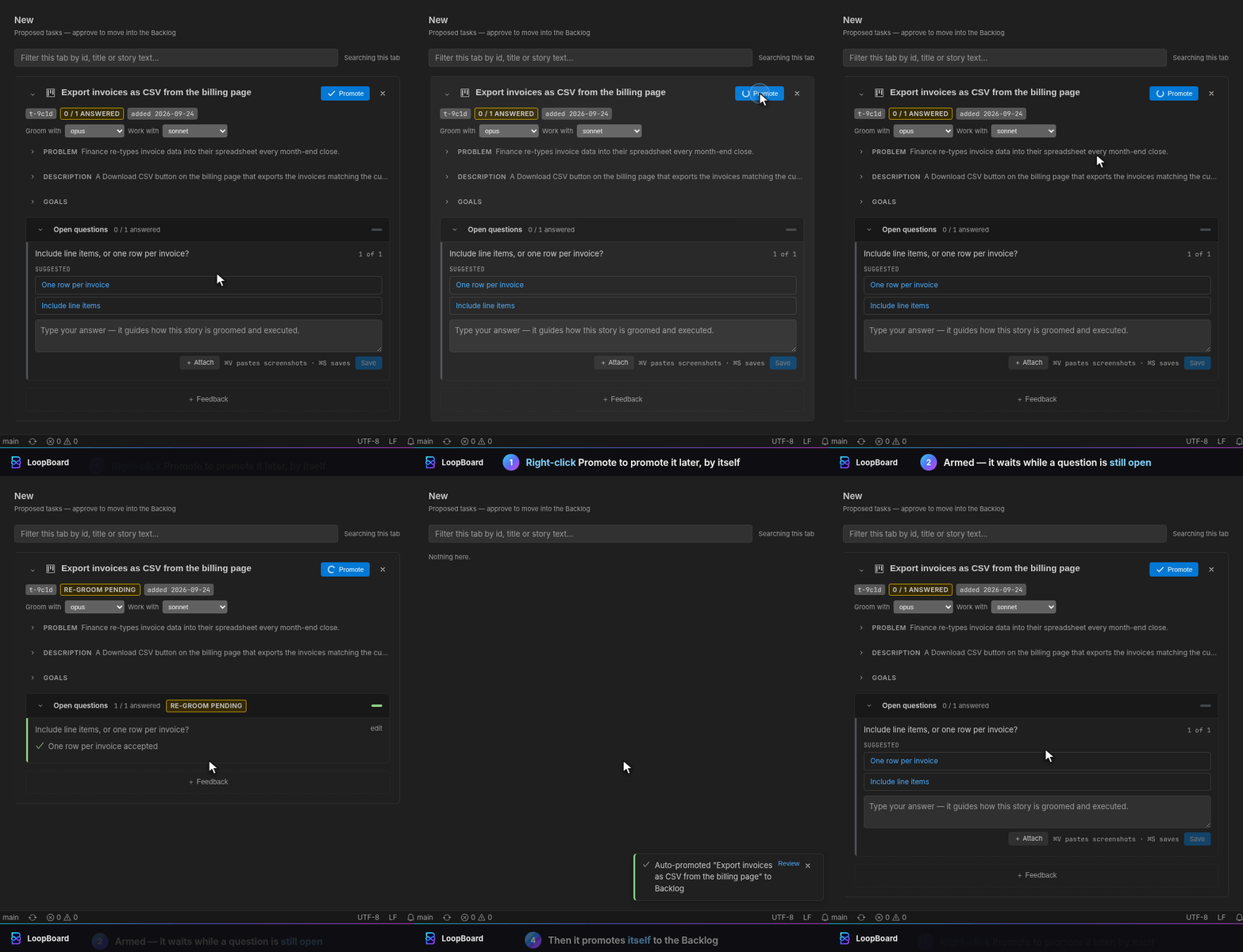
Right-click Promote
Promote it once the questions are folded in.
|
- Right-click Promote on a New story to arm an automatic promote: the check becomes a spinner. Left-click still promotes immediately.
- The arm waits while a question is open or answered but not yet folded in, or
feedback: is pending. New questions from a re-groom never disarm it.
- Once nothing is left open for 30 seconds, LoopBoard promotes the story to the Backlog and says so in a toast.
- A draft can be armed too: it promotes after its groom once nothing is left open. Right-click again to cancel.
- Arms last until VS Code reloads.
|
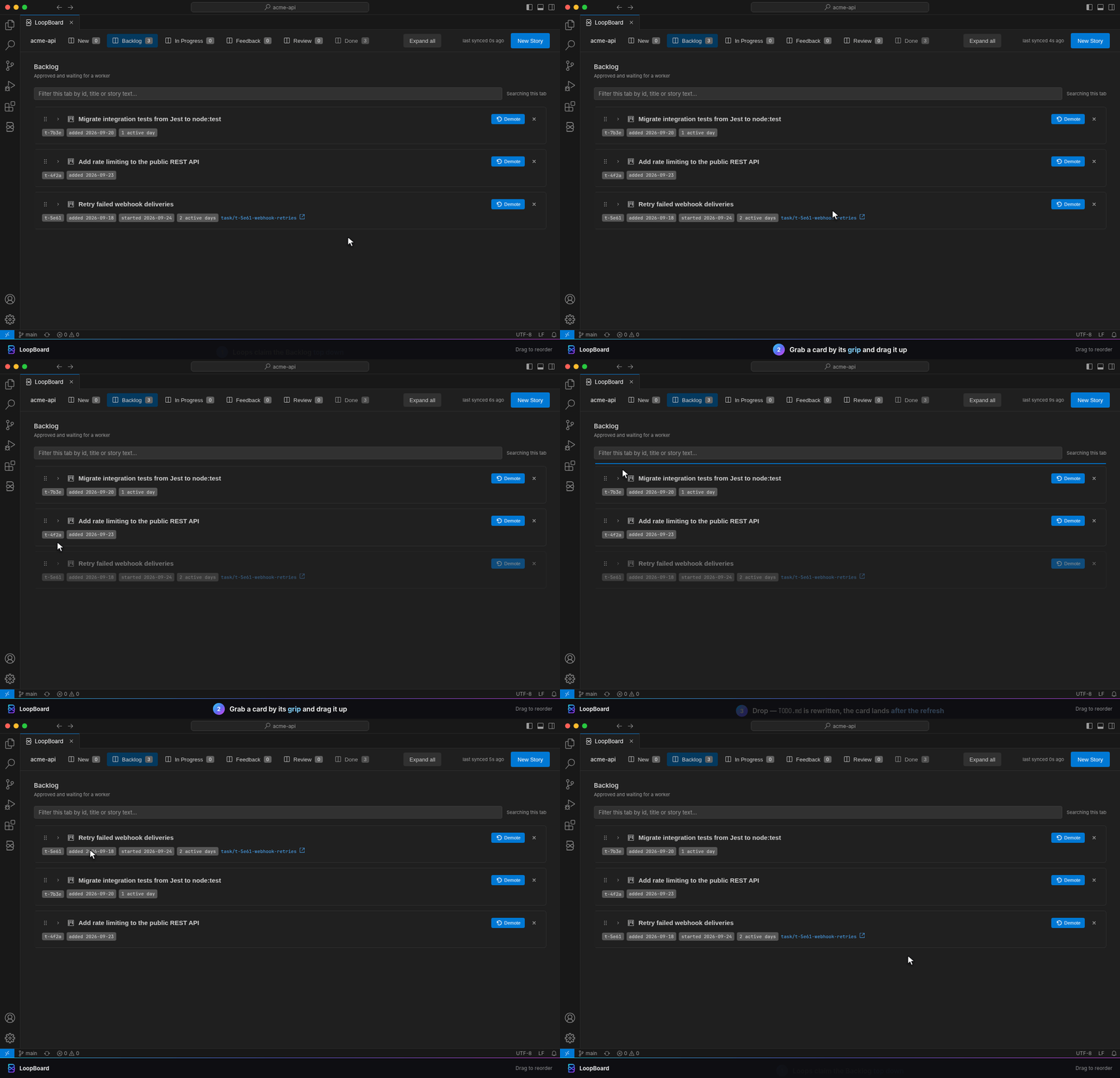
Drag to reorder
Decide which story a loop takes next.
|
- Drag a New or Backlog card by its grip to move it. Loops groom New and claim Backlog top down, so the order is the queue.
- A line marks where the card will land. On drop, LoopBoard moves the entry in
TODO.md and the card lands after the refresh.
- No grip while a search filters the tab or the tab holds one card.
|
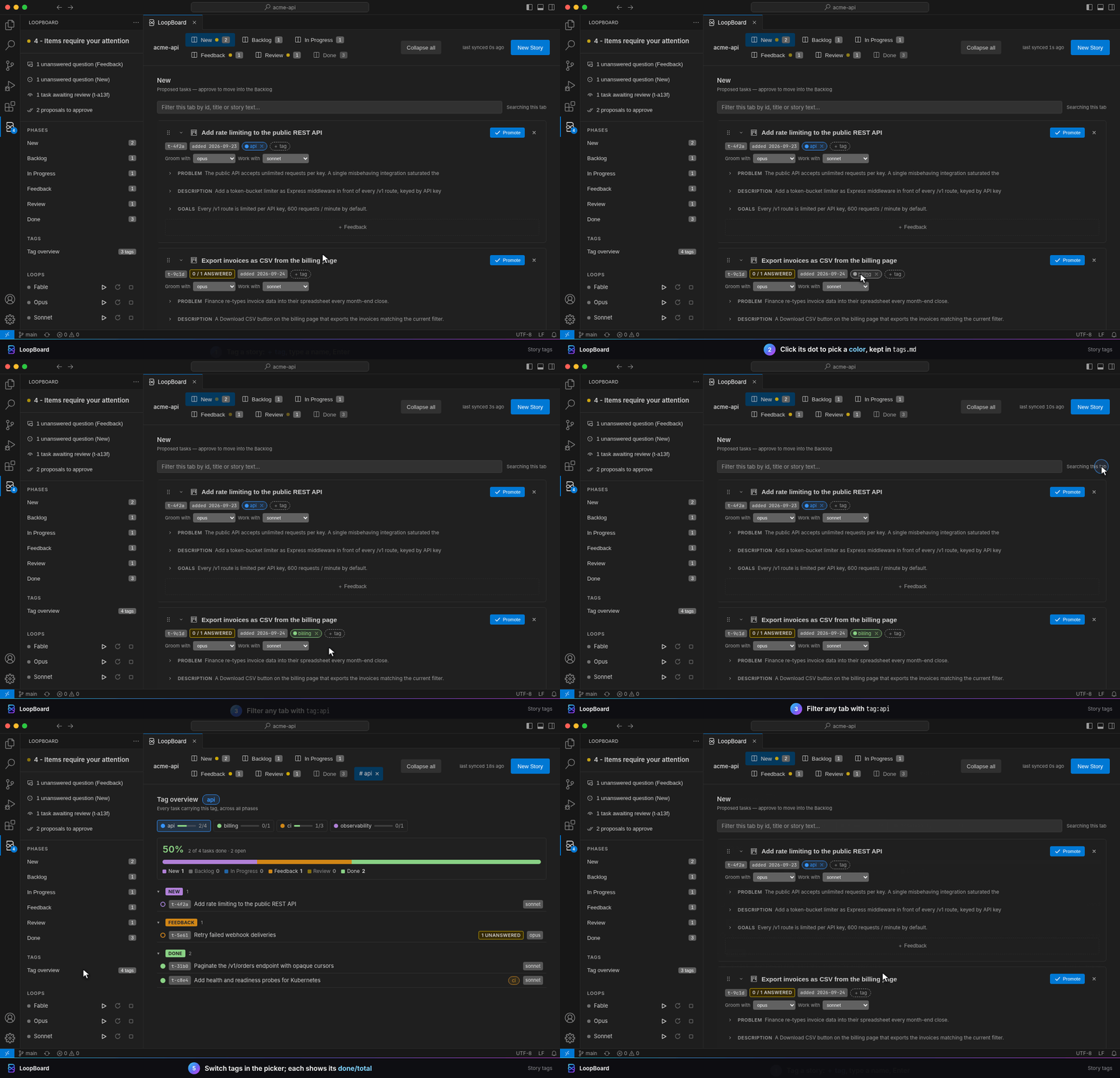
Story tags
Group stories across phases and track them.
|
- Click + tag on a card or draft and type a name; it lands in the task file's Meta as
- tags:. × removes it.
- Click a chip's dot to give the tag a color. Colors are shared by every story and kept in
.loopboard/tags.md.
- Type
tag:<name> in a tab's filter to keep only the stories carrying it.
- The sidebar's Tags entry, or a chip's name, opens the tag overview: every tagged story grouped by phase, with a done/total progress bar.
|
Get started
- Install LoopBoard. You need VS Code 1.90+ and a logged-in Claude Code CLI 2.1.292+.
- Run LoopBoard: Initialize Workspace.
- Add
.loopboard/ to your .gitignore (recommended — LoopBoard doesn't add it):
echo '.loopboard/' >> .gitignore
- Write a story, then press ▶ on the Orchestrator row in the sidebar.
Commands:
- LoopBoard: Initialize Workspace — create
.loopboard/ (refuses if it exists).
- LoopBoard: Open Board — open the board.
- LoopBoard: Refresh — re-read
.loopboard/ after an edit made outside VS Code.
- LoopBoard: Start Loop: start the Orchestrator loop terminal, like ▶ in the sidebar.
- LoopBoard: What's New — open the release notes for the version you're running, like
What's new? in the sidebar.
- LoopBoard: Show Some Love — show the sidebar's thank-you card with links to star LoopBoard on
GitHub, rate it on the Marketplace or say hi on r/LoopBoard. The card also appears once by itself
after your 10th accepted task.
Loop terminal closes the moment it starts? Check claude --version: older CLIs reject the --name
flag, and VS Code can't show why. Loop terminals close with the window; ▶ brings them back, since
all state lives in .loopboard/.
File structure
.loopboard/
  TODO.md          task index: one entry per active task (id, phase, model/effort/groomer/reviewer, Q&A)
  DONE.md          approved tasks, newest first (created on the first approval)
  LOOP.md          workflow rules + the loop instructions, re-read every pass
  tasks/<id>.md    per task: meta, problem, description, goals, worklog, delivered
  cache/<id>/      attached images (created on the first attach)
  debug.log        trace, only while loopBoard.debug is on (capped at 10 MB)
- Field-level, atomic saves. Every save re-reads the file, patches one field and writes the
whole file back (temp file + rename). On approval the index entry moves to
DONE.md; the task
file stays in tasks/.
- Images. Drop, paste or + Attach them on a card, an answer or the New Story composer.
They're stored under
.loopboard/cache/<id>/, linked from the task, and deleted on approval.
- Gitignore it (recommended). LoopBoard never edits your
.gitignore, so add .loopboard/
yourself: debug.log records values verbatim and attached images land in cache/.
Workspace custom rules
Add standing instructions for this workspace in .loopboard/LOOP.md — free markdown, no
setting. New workspaces ship the empty section; in older ones, add it:
<!-- loopboard:custom:begin -->
## Custom rules (workspace)

Standing instructions for THIS workspace — add yours here as free text, edited directly in this
file; where they contradict a Rule above, they win in this workspace. Sync never rewrites this
section.

1. Open a PR before moving a task to Review.
<!-- loopboard:custom:end -->
- Live. Loops re-read
LOOP.md every pass; no restart needed. LoopBoard never reads or edits
the section.
- Survives template sync. Sync (on activation while
loopBoard.autoSyncTemplates is on, or
Synchronise Templates on the settings page) rewrites only loopboard:sync: blocks.
Exception: a LOOP.md with no loopboard:sync: markers at all is replaced whole, after a backup
to .loopboard/LOOP.md.bkp.
- Custom wins. Where a custom rule contradicts a built-in Rule, loops follow yours.
Subagent model and effort
ONE Orchestrator loop does all the work through subagents: every groom, implementation and review
is a subagent with its own model and effort, passed per spawn, which needs Claude Code
2.1.292+ (an older CLI most likely drops the effort silently). The Orchestrator never edits code.
- Per task.
Groom with, Work with and Review with on each card (and in the composer) pick
the subagent models: Opus, Sonnet, Fable, Haiku, or none for grooming (on hold) and review (no
review). An effort select sits beside Groom with and Work with (low…xhigh). Unset
fields use the role defaults on the settings page. LoopBoard never picks a model or effort for you.
- Effort range per model. A model's lowest and highest effort (settings page) clamp every spawn
on it, whether the effort came from the task or a default.
- Complexity. The groomer and the implementer each record the task's complexity in its task file
(
complexity-groomer: / complexity-worker:, e.g. high (D)), for calibration only.
- Review.
Review with (default opus; none = no review) runs a review subagent at the task's
worker effort.
- Sidebar names. Agents rows read
<groom|work|review> <model>-<effort>-<task id>: <title>, and
so does each subagent's name in Claude Code.
- Check effort in the transcript, never by asking. A subagent asked for its effort makes one
up; the
"effort" field in its JSONL under ~/.claude/projects/ is the truth.
Cheat sheet
| You |
The loops |
| Write a story in plain words |
Groom it into problem, description, goals, questions |
| Promote New → Backlog |
Claim the top Backlog task (one In Progress, board-wide) |
| Answer questions |
Resume the parked task |
| Write review feedback |
Rework and deliver again |
Approve Review → DONE.md |
Nothing — it's done |
| Demote Backlog → New |
Leave it alone until promoted again |
About these recordings
No mock-ups. Each GIF runs the extension's real webview code (media/board.js,
media/sidebar.js, media/settings.js) in headless Chromium, answered by the same pure modules
the extension ships — so every click rewrites the markdown exactly as the extension would.
Scripted time makes them reproducible:
make showcase                 # every scene → docs/showcase/gifs/*.gif, then refresh README.md
make showcase SCENES="01 07"  # only the scenes named
make readme                   # README.md only: copy this page's showcase in, regenerate settings
Everything runs in Docker (docs/showcase/studio/Dockerfile) with no network access; scenes live
in docs/showcase/studio/scenes/.
Small on purpose
- Markdown is the source of truth. The board is a live view of
.loopboard/, never a second
database.
- Four human actions: promote, accept, demote, reorder — the Promote, Approve and
Demote buttons, and dragging a New or Backlog card by its handle.
TODO.md order is the
loops' pick order: they take the top task and never reorder. Everything else is a field the
loops read on their next pass.
- Zero runtime dependencies. Vanilla HTML/CSS/JS webviews with a CSP nonce on every script.
- Native VS Code only. A webview, an activity-bar view and plain terminals. No hooks, no files
outside
.loopboard/. Uninstall it and only .loopboard/ remains.
Security model
Treat .loopboard/ as trusted input. A loop is an autonomous claude session that follows
.loopboard/LOOP.md with your loopBoard.permissionMode — possibly bypassPermissions. Whatever
LOOP.md or a task file says, the agent may run on your machine.
- A
.loopboard/ you didn't write (a cloned repo, a shared workspace) is a prompt-injection
vector. Read .loopboard/LOOP.md before pressing ▶ in a repo you didn't author.
- Set
loopBoard.permissionMode no higher than you'd run unattended.
- Repos can't raise it. Every
loopBoard.* key is "scope": "application": user settings
only. A repo's .vscode/settings.json or .devcontainer/devcontainer.json cannot set them.
- VS Code Workspace Trust gates activation — but trusting a repo is not vetting its
LOOP.md.
Usage volume
Pro and Max limits assume "ordinary, individual usage of Claude Code and the Agent SDK." Several
loops running around the clock (default interval 5m) can exceed that and get the account
rate-limited. LoopBoard drives your own Claude Code CLI and breaks no terms — just watch the
volume.
Questions, ideas, bug reports and show-and-tell live on r/LoopBoard (bugs with a reproduction also welcome as a GitHub issue), where new features and releases are announced too.
Build & contribute (Docker only)
Everything runs in Docker; the host needs only Docker, make, git and VS Code. make check must
pass before every commit; F5 launches an Extension Development Host on this repo's own
.loopboard/.
make install    # npm install (typescript + @types/vscode only) in node:22
make build      # tsc -> out/
make test       # compile the pure modules + run the node --test suites
make check      # build + test — the gate before every commit
make package    # build a .vsix via @vscode/vsce
make readme     # rebuild this README's generated parts (showcase + settings tables)
make showcase   # re-record the showcase GIFs, then make readme
Parts of this README are generated: the showcase from
docs/showcase/README.md,
the settings tables from package.json. Edit those, run make readme; make check fails while
either is stale.
Settings
The sidebar's Settings link opens LoopBoard's settings page: the Orchestrator and the task
models as one block, a reset per setting, Synchronise Templates, and Open in VSCode Settings
(@ext:SinnConsulting.loopboard-todo) for search and JSON. They're ordinary user settings; see
Security model for why they're user-only. Questions like "can tasks run on
Haiku?" are answered in FAQ.md.
Orchestrator and models
loopBoard.orchestrator.model: the Orchestrator's claude --model, one of the enabled models
(default opus).loopBoard.orchestrator.effort: claude --effort for the loop session itself (low…max,
default low); subagents get theirs per spawn (see
Subagent model and effort).loopBoard.orchestrator.groomConcurrency: grooming subagents per pass (default 3, minimum
1). Extra tasks wait for a later pass.loopBoard.models.<model>.enabled: offer Opus, Sonnet, Fable or Haiku on the board and in the
Orchestrator's prompt. A model a role uses cannot be turned off.loopBoard.models.<model>.modelId: the model id the alias resolves to for the Orchestrator and
every subagent on it (sent as ANTHROPIC_DEFAULT_<MODEL>_MODEL); anything outside
[A-Za-z0-9._\[\]-] is ignored. minEffort / maxEffort: the range every spawn on it is clamped
into.loopBoard.defaultGroomerModel / defaultWorkerModel / defaultReviewerModel and
defaultGroomerEffort / defaultWorkerEffort: what a task gets when it names none of its own.
All of these ride the spawn command, like loopBoard.loopInterval: the Orchestrator picks a change
up on its next ▶ or ♻. The board's selects and new drafts use a changed default at once.
Migration notes
- One Orchestrator loop replaces the per-model loops (breaking). ▶ now opens one
Claude Orchestrator terminal that delegates every groom, implementation and review to a subagent on the
task's model. Existing model:/groomer: fields keep their meaning (now the subagent model),
absent fields use the defaults, and model: haiku lines that used to show as unparsed are valid.
LOOP.md gets the new rules through Sync; a custom rule that talks about per-model loops needs a
hand edit. Old Claude Opus/Sonnet/Fable terminals get one prompt to stop them.
- Settings moved.
loopBoard.models.opus.effort|groomConcurrency become
loopBoard.orchestrator.*; each slot's loopBoard.models.<model>.model string becomes
loopBoard.models.<model>.modelId; the other slot keys and loopBoard.delegateWork are dropped
(delegation is always on); loopBoard.delegateReview: true becomes
loopBoard.defaultReviewerModel: opus (false becomes none). New defaults: the Orchestrator runs
on Opus at effort low, the groomer, worker and reviewer on Opus at medium; Sonnet and Fable are off
(a task that already names one keeps running on it; turn it on to offer it again) and Opus is
capped at xhigh.
- After task removed.
loopBoard.afterTask and its deprecated pair loopBoard.autoRecycle /
loopBoard.clearSessionAfterTask are gone: nothing recycles or clears the Orchestrator because a
task left In Progress. ♻, the context limit, the idle stop and schedules stay. Migrate Config
removes the old keys. With loopBoard.autoMigrateSettings on (the default), each activation
applies the bulk moves and removals automatically; a conflict (old and new key both set) or a
blind removal of an unreadable key still waits in the Migrate Config panel for your click. Turn
the setting off to migrate only by hand: the panel offers every move, and until you apply it the
old keys still take effect.
- Workspace settings are ignored. A
loopBoard.* value in .vscode/settings.json or a
.code-workspace file no longer applies; move it to your user settings. Repos can no longer
ship team defaults — deliberately.
- New defaults: delegation on, review off, context limit 35%.
loopBoard.delegateWork is now
true, loopBoard.delegateReview false and loopBoard.contextLimit.percent 35, and both
delegation keys moved from Beta to Agent Setup under the same ids. Only unset keys change —
an explicit value (even false or 0) is kept. On the defaults, a loop started or restarted
after the update hands implementation to an implementer subagent with no review subagent, and
loops recycle at 35% context — never while they own the In Progress task. Set the old values
(false, true, 0) to keep the old behaviour.
loopBoard.delegateWork.review → loopBoard.delegateReview. The old key never took effect
(VS Code can't give a boolean setting a child key); set the new one and delete the old line.claudeTodo.* → loopBoard.* (from "Claude TODO Board" ≤ 0.1.1), no fallback: re-enter
custom values under the new keys.
All settings
Generated from contributes.configuration in package.json, in the order the settings pages
show them.
LoopBoard: Orchestrator & Models
| Setting |
Default |
Description |
loopBoard.orchestrator.model |
opus |
The model the one Orchestrator loop session runs on (claude --model). It only routes the board: every groom, implementation and review is a subagent on the task's own model and effort, else the role default below. To point the alias at a specific model id (e.g. a 1M-context build), set that model's loopBoard.models.<model>.modelId. Applies on the next loop start (▶) or restart (♻): a running loop keeps what it was spawned with. |
loopBoard.orchestrator.effort |
low |
Reasoning effort the Orchestrator loop session is started with, passed as claude --effort. It sets the loop session itself only; subagents get their effort per spawn, from the task's effort: / groomer-effort:, else the role default (Claude Code 2.1.292+). max is not recommended: at max effort a session tends to over-split review work into many subagents and time out. Applies on the next loop start (▶) or restart (♻): a running loop keeps what it was spawned with. |
loopBoard.orchestrator.groomConcurrency |
3 |
Cap on how many grooming subagents the Orchestrator may run in parallel during one pass (Rule 14 in LOOP.md). Eligible tasks over the cap are left in place, taken in index order top down, and picked up on a later pass: nothing is queued or dropped. Applies on the next loop start (▶) or restart (♻): a running loop keeps what it was spawned with. |
loopBoard.defaultGroomerModel |
opus |
The model that grooms tasks and drafts with no groomer: field of their own. LoopBoard never picks a model for you: a spawn runs on the task's field, else this. The board's selects and new drafts use a change at once. Applies on the next loop start (▶) or restart (♻): a running loop keeps what it was spawned with. |
loopBoard.defaultGroomerEffort |
medium |
Reasoning effort for grooming tasks and drafts with no groomer-effort: field, clamped into the groomer model's lowest and highest effort. The board's selects and new drafts use a change at once. Applies on the next loop start (▶) or restart (♻): a running loop keeps what it was spawned with. |
loopBoard.defaultWorkerModel |
opus |
The model the implementer subagent runs on for tasks with no model: field of their own. LoopBoard never picks a model for you: a spawn runs on the task's field, else this. The board's selects and new drafts use a change at once. Applies on the next loop start (▶) or restart (♻): a running loop keeps what it was spawned with. |
loopBoard.defaultWorkerEffort |
medium |
Reasoning effort for implementing tasks with no effort: field, clamped into the worker model's lowest and highest effort. A review runs at the same effort. The board's selects and new drafts use a change at once. Applies on the next loop start (▶) or restart (♻): a running loop keeps what it was spawned with. |
loopBoard.defaultReviewerModel |
opus |
The model the review subagent runs on for tasks with no reviewer: field. none: no review subagent, the implementer's PR goes to Review directly. Any model (default opus): the review runs on it, at the task's worker effort (clamped into the reviewer model's range). A pass takes the task to Review with its PR still open; a fail is handed back to the implementer once, then parks the task in Feedback with the findings as questions. The loop never merges a PR. Replaces loopBoard.delegateReview (true became opus, false became none). The board's selects and new drafts use a change at once. Applies on the next loop start (▶) or restart (♻): a running loop keeps what it was spawned with. |
loopBoard.models.opus.enabled |
true |
Opus. Offer this task model in the board's selects, the settings page's role selects and the Orchestrator's bootstrap prompt. A model that is the Orchestrator's or a default groomer, worker or reviewer cannot be turned off. The board's selects and new drafts use a change at once. Applies on the next loop start (▶) or restart (♻): a running loop keeps what it was spawned with. |
loopBoard.models.opus.modelId |
"" |
Opus. The model id the opus alias resolves to, for the Orchestrator session and every subagent spawned on opus (e.g. a pinned or 1M-context build such as claude-opus-5-5[1m]). Passed as the ANTHROPIC_DEFAULT_OPUS_MODEL environment variable of the Orchestrator's terminal. Empty (default): the Claude Code CLI's own alias. Invalid ids are ignored. Applies on the next loop start (▶) or restart (♻): a running loop keeps what it was spawned with. |
loopBoard.models.opus.minEffort |
low |
Opus. The lowest effort any subagent on Opus runs at: a lower task or default effort is raised to it. A floor above loopBoard.models.opus.maxEffort is ignored (no clamping). Applies on the next loop start (▶) or restart (♻): a running loop keeps what it was spawned with. |
loopBoard.models.opus.maxEffort |
xhigh |
Opus. Default xhigh. The highest effort any subagent on Opus runs at: a higher task or default effort is lowered to it. Applies on the next loop start (▶) or restart (♻): a running loop keeps what it was spawned with. |
loopBoard.models.sonnet.enabled |
false |
Sonnet. Off by default. Offer this task model in the board's selects, the settings page's role selects and the Orchestrator's bootstrap prompt. A model that is the Orchestrator's or a default groomer, worker or reviewer cannot be turned off. The board's selects and new drafts use a change at once. Applies on the next loop start (▶) or restart (♻): a running loop keeps what it was spawned with. |
loopBoard.models.sonnet.modelId |
"" |
Sonnet. The model id the sonnet alias resolves to, for the Orchestrator session and every subagent spawned on sonnet (e.g. a pinned or 1M-context build such as claude-sonnet-5-5[1m]). Passed as the ANTHROPIC_DEFAULT_SONNET_MODEL environment variable of the Orchestrator's terminal. Empty (default): the Claude Code CLI's own alias. Invalid ids are ignored. Applies on the next loop start (▶) or restart (♻): a running loop keeps what it was spawned with. |
loopBoard.models.sonnet.minEffort |
low |
Sonnet. The lowest effort any subagent on Sonnet runs at: a lower task or default effort is raised to it. A floor above loopBoard.models.sonnet.maxEffort is ignored (no clamping). Applies on the next loop start (▶) or restart (♻): a running loop keeps what it was spawned with. |
loopBoard.models.sonnet.maxEffort |
max |
Sonnet. The highest effort any subagent on Sonnet runs at: a higher task or default effort is lowered to it. Applies on the next loop start (▶) or restart (♻): a running loop keeps what it was spawned with. |
loopBoard.models.fable.enabled |
false |
Fable. Off by default. Offer this task model in the board's selects, the settings page's role selects and the Orchestrator's bootstrap prompt. A model that is the Orchestrator's or a default groomer, worker or reviewer cannot be turned off. The board's selects and new drafts use a change at once. Applies on the next loop start (▶) or restart (♻): a running loop keeps what it was spawned with. |
loopBoard.models.fable.modelId |
"" |
Fable. The model id the fable alias resolves to, for the Orchestrator session and every subagent spawned on fable (e.g. a pinned or 1M-context build such as claude-fable-5-5[1m]). Passed as the ANTHROPIC_DEFAULT_FABLE_MODEL environment variable of the Orchestrator's terminal. Empty (default): the Claude Code CLI's own alias. Invalid ids are ignored. Applies on the next loop start (▶) or restart (♻): a running loop keeps what it was spawned with. |
loopBoard.models.fable.minEffort |
low |
Fable. The lowest effort any subagent on Fable runs at: a lower task or default effort is raised to it. A floor above loopBoard.models.fable.maxEffort is ignored (no clamping). Applies on the next loop start (▶) or restart (♻): a running loop keeps what it was spawned with. |
loopBoard.models.fable.maxEffort |
max |
Fable. The highest effort any subagent on Fable runs at: a higher task or default effort is lowered to it. Applies on the next loop start (▶) or restart (♻): a running loop keeps what it was spawned with. |
loopBoard.models.haiku.enabled |
true |
Haiku. Offer this task model in the board's selects, the settings page's role selects and the Orchestrator's bootstrap prompt. A model that is the Orchestrator's or a default groomer, worker or reviewer cannot be turned off. The board's selects and new drafts use a change at once. Applies on the next loop start (▶) or restart (♻): a running loop keeps what it was spawned with. |
loopBoard.models.haiku.modelId |
"" |
Haiku. The model id the haiku alias resolves to, for the Orchestrator session and every subagent spawned on haiku (e.g. a pinned or 1M-context build such as claude-haiku-5-5[1m]). Passed as the ANTHROPIC_DEFAULT_HAIKU_MODEL environment variable of the Orchestrator's terminal. Empty (default): the Claude Code CLI's own alias. Invalid ids are ignored. Applies on the next loop start (▶) or restart (♻): a running loop keeps what it was spawned with. |
loopBoard.models.haiku.minEffort |
low |
Haiku. The lowest effort any subagent on Haiku runs at: a lower task or default effort is raised to it. A floor above loopBoard.models.haiku.maxEffort is ignored (no clamping). Applies on the next loop start (▶) or restart (♻): a running loop keeps what it was spawned with. |
loopBoard.models.haiku.maxEffort |
max |
Haiku. The highest effort any subagent on Haiku runs at: a higher task or default effort is lowered to it. Applies on the next loop start (▶) or restart (♻): a running loop keeps what it was spawned with. |
LoopBoard: Agent Setup
| Setting |
Default |
Description |
loopBoard.permissionMode |
auto |
--permission-mode passed to the claude CLI when spawning a loop terminal. This setting is deliberately user-scoped only — a cloned repository must never be able to decide how much authority your agent runs with. Applies on the next loop start (▶) or restart (♻): a running loop keeps what it was spawned with. |
loopBoard.loopInterval |
5 |
Minutes between the loop's passes, passed to /loop; 5 (default). An invalid value falls back to 1. Applies on the next loop start (▶) or restart (♻): a running loop keeps what it was spawned with. |
loopBoard.contextLimit.percent |
35 |
Automatically restart the loop once its Claude session fills this percentage of its context window. 35 (default) restarts it at 35%; 0 turns the feature off, so the loop is never restarted for its context size; the usage bar under the running loop row still shows either way. The window is taken from the model that actually ran, as recorded in the session transcript (the 5-series models are 1,000,000 tokens natively; a [1m] suffix also means 1,000,000; anything unrecognised falls back to 200,000), so 35 on a 1M window is the 350k mark and on a 200k fallback window the 70k mark. A loop with a task In Progress or a live subagent is never interrupted: the restart waits for it to go idle. |
loopBoard.contextLimit.action |
recycle |
What to do with a loop terminal when loopBoard.contextLimit.percent trips. |
loopBoard.nudgeLoops |
true |
When a board change gives the loop something to do (feedback on any card, a story whose questions are now FULLY answered, a task promoted to Backlog), paste a line naming that task into the Orchestrator's running loop terminal, so it acts on the change now instead of on its next scheduled pass. The text only seeds the REPL input, so it never interrupts work in flight, and it only ever supplements the loop's own board re-read. No running terminal: the nudge is held for its next start. Off disables the nudges entirely; loops keep working exactly as before. |
loopBoard.idleStop.enabled |
false |
Off (default): a loop runs until you stop it. On: stop a loop that has been idle for loopBoard.idleStop.minutes — idle meaning it owns no In Progress task and its session has no live subagent, the same busy test the context-limit restart waits on. A warning counts down the 30 seconds before the stop; its Cancel button keeps the loop running (restarts the idle clock), and with no click the stop goes ahead. The warning closes itself once the loop stops, turns busy or is stopped or restarted by hand. The stop is exactly the ■ button: the terminal closes and any scheduled start/restart/stop for that loop is cancelled. A busy loop is never stopped, and a loop that turns busy during the 30 seconds keeps running. Start it again with ▶. |
loopBoard.idleStop.minutes |
60 |
Only applies while loopBoard.idleStop.enabled is on. How many minutes a loop must be idle before it is stopped; 60 (default). The warning appears 30 seconds before that mark, and the stop behaves exactly like the ■ button. An invalid value falls back to 60. |
LoopBoard: Board & Workspace
| Setting |
Default |
Description |
loopBoard.maxAttachmentSizeMB |
10 |
Maximum size (MB) for an image attached to a task (drag-drop, paste, or the picker). Attachments are staged under .loopboard/cache/ and cleaned up on acceptance. |
loopBoard.autoSyncTemplates |
true |
Sync .loopboard/ TODO.md and LOOP.md to the templates this extension ships, automatically, once when the window loads or the extension updates. It updates the extension-owned loopboard:sync: blocks and recreates missing files, and does a one-time legacy replacement of an unmarked LOOP.md (the old file is kept as .loopboard/LOOP.md.bkp) or an unmarked TODO.md intro. The loopboard:custom section and every task entry are never touched. Each auto-sync that writes shows a popup naming what changed. Off: nothing syncs by itself — use Synchronise Templates at the top of the LoopBoard settings page. |
loopBoard.sidebarMarquee |
false |
Scroll long In Progress task titles and subagent labels in the sidebar back and forth so the whole text passes by. Off (default) holds them still and truncates them with … instead; hover a row for the full text. The OS-level reduced-motion setting is honoured either way. |
loopBoard.cardsStartCollapsed |
true |
Start board cards collapsed in every phase tab (New, Backlog, In Progress, Feedback, Review). On (default) starts them collapsed; off starts them expanded. A tab you set with Collapse all / Expand all keeps its state until this setting changes; changing it resets every tab to the new value. Story sections stay folded either way. |
loopBoard.debug |
off |
Opt-in verbose trace. With info/verbose, LoopBoard appends timestamped lines to .loopboard/debug.log. Field values are logged verbatim (no eliding), so keep .loopboard/ in your .gitignore (recommended — LoopBoard does not add it) and the log is never committed. The log is tail-capped at 10 MB (oldest lines dropped); there is no separate command to open it. |
loopBoard.showWhatsNew |
true |
After LoopBoard updates, open a What's New tab once, on the first window load with a LoopBoard workspace. It names the version you updated to and links to its release notes on GitHub (the releases list when you skipped versions); LoopBoard fetches nothing. A first install or a downgrade opens nothing. The tab's Don't show this again tick turns this setting off. |
loopBoard.autoMigrateSettings |
true |
Migrate renamed and deprecated loopBoard.* keys in your user settings automatically, once when the window loads or the extension updates. It applies exactly what Apply in Migrate Config would: each old value moves to its new key and the old key is removed. A conflict (old and new key both set by you) and a blind removal of a key VSCode cannot read are never touched; they stay in Migrate Config for you to decide. A pass that changes something shows a popup with the count. Off: nothing migrates by itself; Migrate Config at the top of the LoopBoard settings page still shows and applies the plan. |
Less prompting. No babysitting. More building.
MIT License
| |