
Canopy — Multi-Repo Worktree ManagerSwitch-first dashboard for multi-repo workspaces. One canonical feature in focus, the rest hibernating in worktrees — every PR, preflight, and draft reply one click away. Installation Launch VS Code Quick Open ( Ctrl+P), paste the following command, and press enter.Copied to clipboard |

Canopy — Multi-Repo Worktree ManagerA switch-first dashboard for multi-repo workspaces. One canonical feature in focus, the rest hibernating in worktrees, every PR / preflight / draft reply one click away. Canopy coordinates real Git branches and worktrees across multiple repositories — no proprietary abstractions, no virtual branches. This extension is a VSCode-native surface on top of the
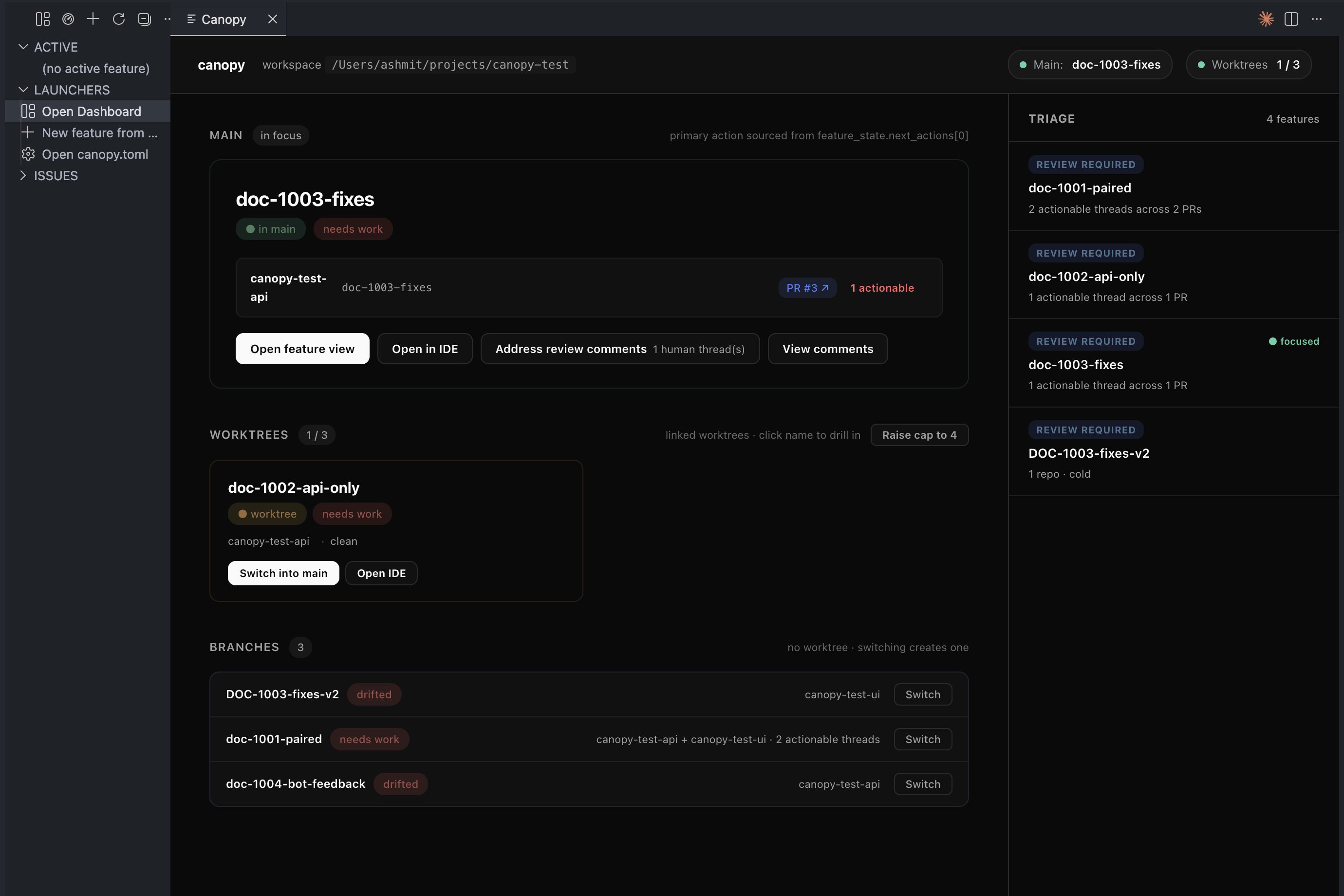
What it doesOne panel, two modes — global and per-featureGlobal mode is the focus board. Three vertical lanes mirror Canopy's canonical-slot model: the canonical feature (what's currently in your main checkout), warm features (linked worktrees, instantly switchable), and cold features (branch-only, switching creates a worktree on demand). A right-hand triage rail surfaces the priority list across every PR — changes-requested, bot reviews, review-required, approved.
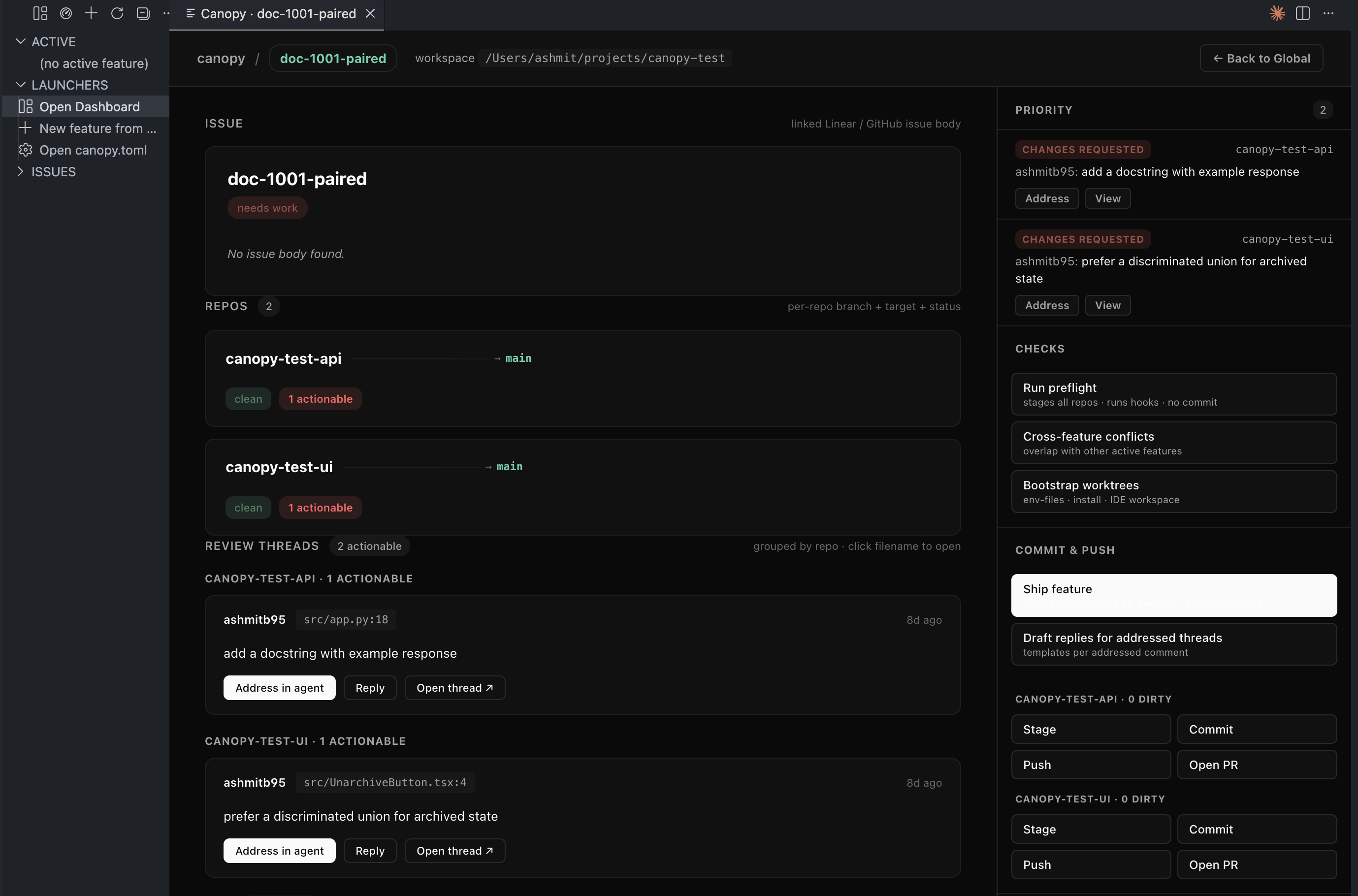
Click any feature to drill in. The feature view stacks: linked Linear/GitHub issue body → per-repo cards with branch + target + dirty + PR + actionable threads + CI chips → temporally classified review threads grouped by repo (each with Address in agent / Reply / Mark addressed for bot threads) → unified-diff stack with click-to-open in VSCode's native diff viewer. The right rail is the action drawer: Priority list of actionable threads, Checks (preflight + cross-feature conflicts + worktree bootstrap), Commit & push (per-repo Stage / Commit / Push / Open PR + the Ship feature capstone + draft-replies generator), State (stash / pop / back to global), Open (IDE / issue / PRs).
|
| Setting | Default | What it does |
|---|---|---|
canopy.cliPath |
canopy |
Path to the canopy CLI used by the dashboard. Set absolute if auto-detection fails. |
canopy.canopyMcpPath |
canopy-mcp |
Path to the canopy-mcp executable used by the sidebar + status bar. |
canopy.dashboard.theme |
minimal |
minimal (near-monochrome dark, default), pastel (soft blue-grey cream surfaces), navy (legacy). Live-updates on change. |
canopy.refreshIntervalSeconds |
30 |
How often to poll Canopy for updated sidebar state. 0 disables periodic refresh. |
canopy.pythonPath |
(empty) | Optional Python 3.10+ binary used by Install Backend. Leave empty to auto-detect. |
Commands (palette via Cmd-Shift-P)
| Command | What it does |
|---|---|
Canopy: Open Dashboard |
Opens the new pastel dashboard. The activity-bar tree's title bar has the same shortcut. |
Canopy: Switch to Feature |
Quick-pick feature → promote to canonical slot. |
Canopy: Run Preflight |
Stages all repos in the canonical feature + runs hooks (no commit). |
Canopy: Sync All Repos |
git pull --rebase per repo. |
Canopy: Spin up a new feature from Linear |
Picks an open Linear / GH issue → creates branches + worktrees. |
Canopy: Mark Feature Done |
Archives a feature: removes worktrees, deletes branches. |
Canopy: Open Feature Worktrees in New Window |
One VSCode window per repo worktree for the chosen feature. |
Canopy: Run Doctor |
17-category diagnostic + --fix for auto-repairable. |
Canopy: Force Reinit Workspace |
Rescan repos + regenerate canopy.toml. |
Canopy: Connect Linear |
Drops a Linear MCP entry into .canopy/mcps.json. |
The action drawer in feature view exposes: Run preflight, Cross-feature conflicts, Bootstrap worktrees (env files + install_cmd + .code-workspace), per-repo Stage / Commit / Push / Open PR, Ship feature (commits + push + opens/updates one PR per repo with cross-repo body links), Draft replies for addressed threads, Stash / Pop, Back to global.
Links
- canopy-cli on PyPI — the Python backend the extension shells out to
- ashmitb95/canopy — CLI + MCP server source, full architecture docs
- Changelog
- Report a bug — extension bugs (CLI/MCP bugs → the canopy repo)
MIT licensed.