Sindarin for VSCodeExtension for Sindarin, a program for crystal diffraction calculations Installation Launch VS Code Quick Open ( Ctrl+P), paste the following command, and press enter.Copied to clipboard |

sindarin-lang
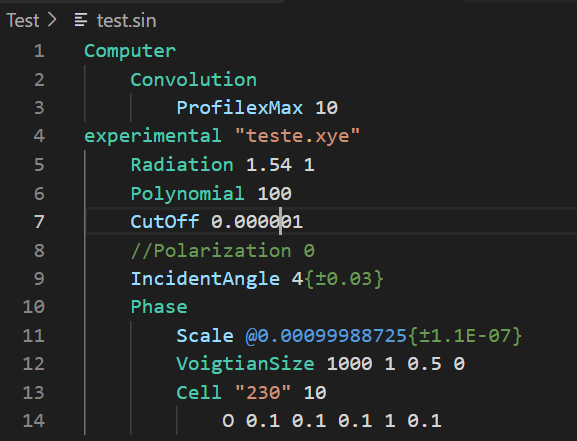
Sindarin for Visual Studio Code is an extension that includes some features to make the Sindarin program easier to use with this powerful text editor. Sindarin is a crystal diffraction calculation program that uses a dedicated input script for modeling theoretical diffraction patterns. The script is designed to be simple, flexible and enables a range of possibilities for the calcules. This extension is still a beta version Features of Sindarin for VS CodeThe extension enables Sindarin code highlighting. Sindarin "language" is automatically enabled by the extension when the file with the ".sin" extension is opened in the editor or it can be enabled manually by selecting the "language mode selector" in the status bar.
Some commands are enable in VS Code:
These commands can be acessed by Command Pallete, short cut or dedicated icons in editor title.
The icons are automatically enabled with the Sindarin language signed text Also, the Chart.js Preview extension is installed together with the sindarin extension. You can view in VS Code the diffractograms of the .chart.json5 file generated after the interpret or walk commands
RequirementsYou need the Sindarin program installed on your computer. The extension locates it in the following order:
To set a custom path, open VS Code Settings, search for Sindarin, and fill in Sindarin: Executable Path — or add to your
macOS — .NET runtimeOn macOS, Sindarin requires the .NET runtime to be installed. The extension automatically checks whether the correct version is available the first time you run a command. If it is not installed, a notification will appear with two options:
Download SindarinDownload the package for your platform (these links always point to the latest release): Unzip the downloaded file into the default folder (or into the folder you configured in After the first install, the extension's Update command keeps Sindarin up to date automatically, so you normally only need to download manually once. About Sindarin LibrarySindarin is a computer library for crystal diffraction calculations. It can be run by some command lines by the "Sindarin" executable. Sindarin for VSCode is an extension of this text editor that allows the same features without typing any command line, besides facilitating the editing of the sindarin file (.sin) and showing the diffractograms resulting from the calculation in the editor itself. The Sindarin file is a plain text file written with a simple and flexible syntax that is used as input to diffraction model information. The text is "interpreted" by the algorithm, and then objects representing the diffraction experiment are created in the memory and the theoretical diffractogram is calculated. The optimization algorithm nonlinear least squares (NLS) with Marquart or dumping stabilization is used to fit the parameters. A dedicated code editor with various diffraction and syntax tools will be available soon. Some Features
At the moment Sindarin calcule X-Ray Powder Diffraction Pattern More information about Sindarin can be found in site: https://nimloth.app/sindarin/ Have a Good Work! |