
SideChannel
The developer town square, inside your editor.
Chat with other developers in public channels — without leaving VS Code.
What is this?
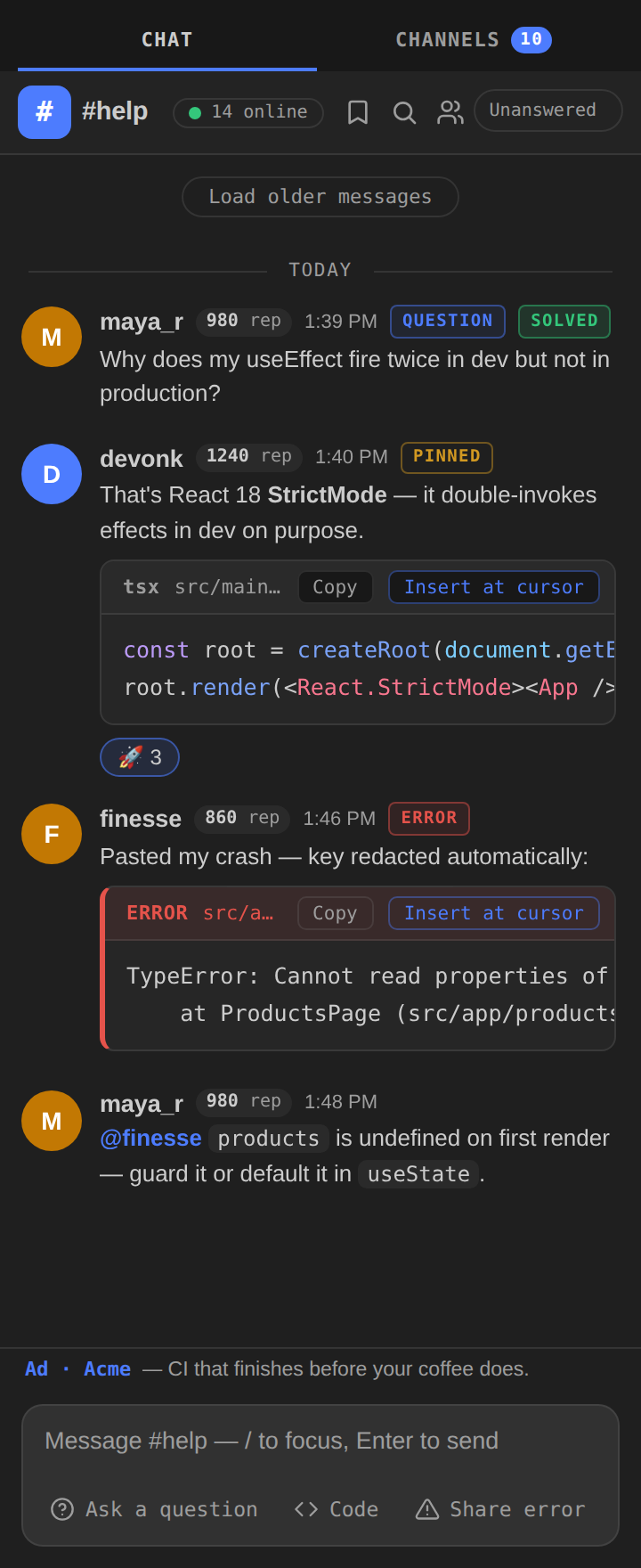
SideChannel is one public network of developers, living in your VS Code sidebar. Channels by stack and topic, direct messages, and a help channel that runs on solved answers instead of likes.
Sign in with GitHub (no new account, no password), see who's online and what they're building, and get unstuck by people — not just autocomplete.
Highlights
- 13 launch channels —
#general, #help, #javascript-typescript, #python, #rust, #go, #web-dev, #show-your-work, #jobs, and more, plus community-created public channels and DMs
- Share My Error — one command posts your error with file, line, and diagnostics as a proper error card. API keys, tokens, and personal paths are redacted on your machine before anything is sent, and you preview before it posts
- Insert at cursor — a fix someone sends you is one click from being in your code, where your cursor already is
- Solved + reputation — mark the reply that fixed your problem; the solver earns rep that's shown next to their name everywhere
- Live presence — who's online, in which channel, working in what stack
- Threads, reactions, pins, search, leaderboard — the full toolkit, not a demo of one
- Real code rendering — syntax-highlighted code blocks in 16 languages, themed to your editor
- Ask, get solved — #help has a question mode and an Unanswered queue, so no question scrolls away unanswered
- Activity inbox — every mention, reply, and DM in one sidebar list; click to jump straight to it
- Safe by design — report any message, block any user, manage blocks any time
- Quiet by default — notifications only for mentions and DMs, with a quiet mode for deep work
Getting started
- Install SideChannel.
- Click the SideChannel icon in the activity bar.
- Sign in with GitHub (VS Code's built-in sign-in — we never see a password).
- Say hello in
#general, ask something in #help.
Commands
| Command |
What it does |
SideChannel: Open Chat |
Open the chat panel |
SideChannel: Share My Error |
Post your current file's errors (redacted, previewed) |
SideChannel: Share Selection / Share File |
Send code as a formatted snippet |
SideChannel: Insert Last Code at Cursor |
Insert the newest code message in this channel |
SideChannel: Search Messages |
Full-text search across channels |
SideChannel: Show Leaderboard |
Top solvers by rep |
SideChannel: Set Status |
Set your presence line ("what I'm working on") |
SideChannel: Toggle Quiet Mode |
Silence notifications |
Settings
| Setting |
Default |
Description |
sidechannel.serverUrl |
production |
SideChannel server to connect to (self-hosters) |
sidechannel.notifications |
mentions |
mentions, all, or off |
sidechannel.quietMode |
false |
Suppress all notifications |
sidechannel.shareStack |
true |
Show your workspace stack in presence |
sidechannel.showSponsor |
true |
Show the one-line sponsor message |
SideChannel is free, forever. It is supported by one small text advertisement at the bottom of the chat panel — one line, clearly labeled Ad ·, no images, no tracking. It's how the server pays for itself without charging you or selling data. Turn it off any time with sidechannel.showSponsor.
Privacy
- Identity is your GitHub account; session tokens are stored hashed server-side and expire in 30 days.
- Redaction runs locally before any error or snippet leaves your machine.
- We store messages, usernames, avatars, and reputation points. That's the list.
License
Proprietary — © 2026 SideChannel. All rights reserved.
| |

