Q Log Session Viewer (Unofficial)
A VS Code extension that reads and displays Amazon Q chat session logs generated by the Amazon Q for VS Code extension. It parses local log files and chat history into a browsable, filterable UI — making it easy to inspect requests, responses, tool calls, and errors from your Amazon Q sessions.
Disclaimer
This is an independent, community-built tool. It is not affiliated with, endorsed by, or sponsored by Amazon Web Services (AWS).
"Amazon", "Amazon Q", "AWS", and related names are trademarks of Amazon.com, Inc. or its affiliates. This extension uses these names solely to describe the log files it reads (nominative fair use).
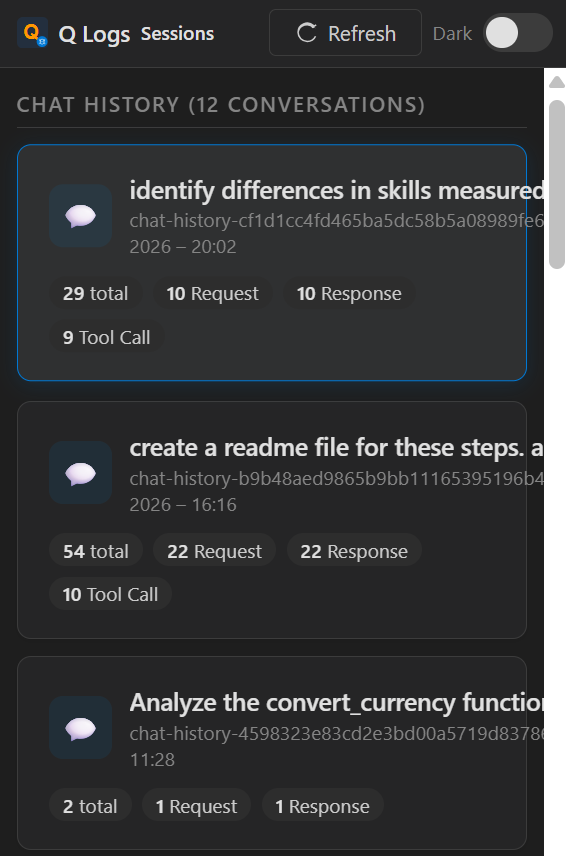
Screenshots
Sessions Overview
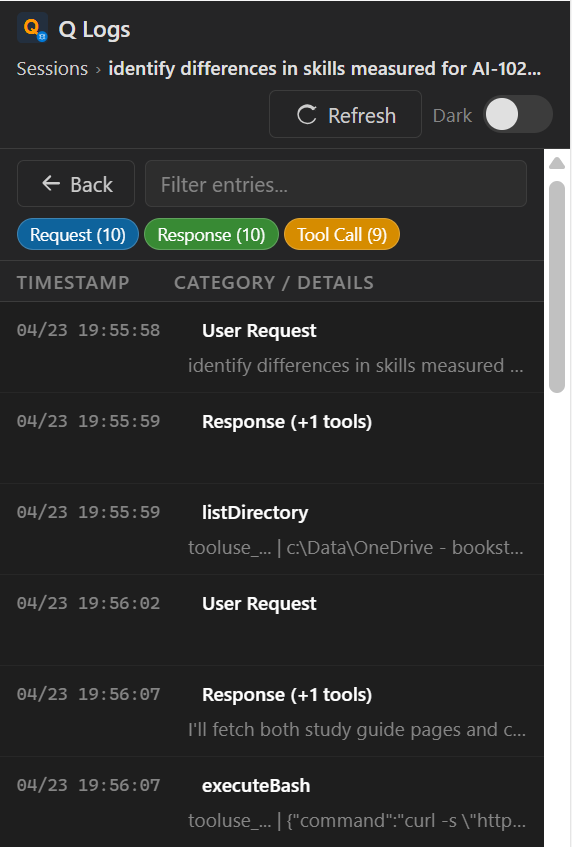
Entry Details
What It Displays
- Chat history sessions — reads
chat-history-*.json files from ~/.aws/amazonq/history/
- VS Code extension logs — reads
Amazon Q Logs.log from VS Code's extension host log directory
- Parsed entry categories: User Request, Response, Tool Call, LLM Call, MCP, Slash Command, Rules, Error
Features
- Browse detected log and chat sessions in a card-based overview
- Search sessions by name or source directly from the sessions list
- Filter entries by category badges and free-text search
- View full request/response/tool-call details in a popup panel
- Export any session as Markdown (
.md) or HTML (.html) using the ↓ MD / ↓ HTML buttons
- Copy JSON and detail blocks to clipboard
- Sidebar view (activity bar) and full editor panel view
- Light and dark theme toggle
- Virtual scrolling for large log files
- Cross-platform: Windows, macOS, and Linux
Data and Privacy
This extension reads files from your local machine only.
It does not collect, transmit, or send any data to external services.
Log file locations scanned:
| OS |
Extension Logs |
Chat History |
| Windows |
%APPDATA%\Code\logs\...\Amazon Q Logs.log |
~\.aws\amazonq\history\ |
| macOS |
~/Library/Application Support/Code/logs/... |
~/.aws/amazonq/history/ |
| Linux |
~/.config/Code/logs/... |
~/.aws/amazonq/history/ |
Commands
| Command |
Description |
Q Log Session Viewer: Open |
Open the log viewer in a full editor panel |
Q Log Session Viewer: Refresh |
Reload log files and chat history |
Requirements
- VS Code 1.85 or later
- Amazon Q for VS Code extension installed with at least one chat session (to generate the logs this viewer reads)
No Logs Found?
If the extension shows "No Log Sessions Found", check that:
- The Amazon Q for VS Code extension is installed
- You have had at least one chat conversation in Amazon Q
- Chat history files exist at
~/.aws/amazonq/history/
- Click Refresh after verifying the above
Known Behavior
- Activity bar icons in VS Code are rendered as theme-tinted monochrome by design.
- Very large logs use virtualized row rendering for performance.
Release Notes
0.1.2
- Session search: Filter the sessions list by typing in the search box on the sessions overview page
- Export to Markdown: Export any session as a
.md file (all entries with timestamps, categories, and message bodies)
- Export to HTML: Export any session as a self-contained
.html file with styled, readable layout
0.1.1
- Fixed marketplace icon (PNG format)
- Fixed screenshot display on marketplace
- Added gallery banner theme
0.1.0
- Initial release
- Sidebar and full editor panel views
- Parses Amazon Q extension logs and chat history JSON files
- Category-colored badges for entry types
- Filter by category and text search
- Detail popup with metadata, message body, and tool uses
- Copy JSON to clipboard
- Light/dark theme toggle
- Cross-platform path detection (Windows, macOS, Linux)
Author
Created by Siddhesh Prabhugankar
Microsoft Certified Trainer & AI Consultant
License
MIT
| |


