LogicSpec for VS Code
Diagnostics and live Mermaid previews for LogicSpec feature
specifications.
Fully self-contained: the entire LogicSpec core is bundled into the
extension — no npm install, no CLI, no generated files required. Everything
renders live in panels; writing Markdown to disk (logicspec render/export)
stays optional, for committed GitHub docs.
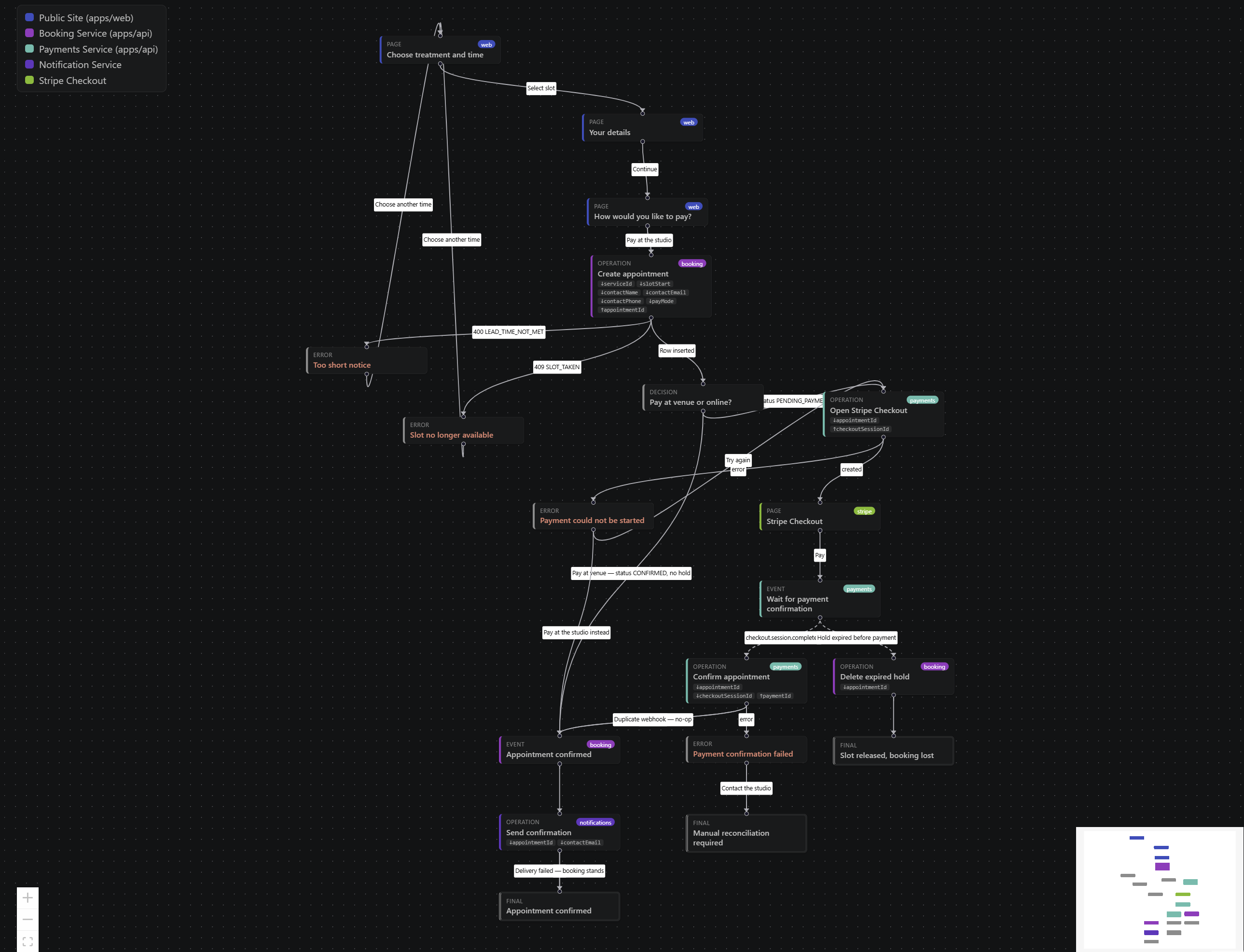
A real booking flow on the interactive canvas — per-actor colors with legend,
↓requires/↑produces chips, hover relation-tracing, minimap.
Features
- Diagnostics as you type for
*.feature.yaml, services.yaml,
events.yaml and logicspec.config.yaml (300 ms debounce). Full LogicSpec
validation — schema, structure, references against the surrounding
workspace's catalogs, graph analysis — with LS### codes, precise ranges
and "did you mean" suggestions.
- Interactive canvas (default view) — a React Flow board: drag nodes freely (edges follow), zoom/pan with minimap and controls, hover a step to spotlight it and its direct relations (everything unrelated fades), stable per-actor colors with a hover-aware legend, and requires/produces context chips on each node. Positions are view-only — never saved.
- Live preview — the editor-title button on feature files, right-click in
the Explorer/editor, or
Ctrl+Shift+V (Cmd+Shift+V): renders the feature
as a Mermaid diagram beside the editor and re-renders on every change. An
invalid spec never replaces the last good diagram — a banner appears
instead. A view switcher inside the panel flips between flow,
swimlane, sequence and event-model without touching settings
(logicspec.preview.view sets the default).
- Workspace graph (
LogicSpec: Preview Workspace Graph, or the
editor-title button on logicspec.config.yaml): a live dependency graph of
every feature — subflow edges and event publish/wait edges — refreshed on
each save. Rendered virtually; nothing written to disk.
LogicSpec: Validate Workspace: validates every feature file in the
workspace and reports a summary.
Development
npm install && npm run build   # from the repo root, once — builds dist/server/public
cd integrations/vscode
npm install
npm run build        # bundles dist/extension.cjs + copies mermaid and the dashboard client into media/
Open this folder in VS Code and press F5 (launch config included) to start
an Extension Development Host. Use npm run watch for rebuild-on-save; reload
the dev host window to pick up changes.
npm run typecheck    # tsc --noEmit
npm test             # vitest (pure modules: mapping, debounce)
The extension bundles the LogicSpec core from source (../../src) via an
esbuild alias, but its "Start Dashboard" command serves the built dashboard
client (dist/server/public, copied into media/dashboard/ at build time) —
so a root build is required before npm run build here.
Packaging
npx @vscode/vsce package
produces a .vsix you can install via Extensions: Install from VSIX….
Notes
- The Mermaid browser bundle is copied from the
mermaid npm package into
media/mermaid.min.js at build time and rendered inside a CSP-restricted
webview (securityLevel: "strict").
- Config file diagnostics reflect the saved on-disk state.

