Agent Radar
See every AI coding agent on your machine — Claude Code sessions and subagents, Codex, Copilot, Cursor, Grok — in your status bar and a live dashboard. Fully local, no server, nothing leaves your machine.
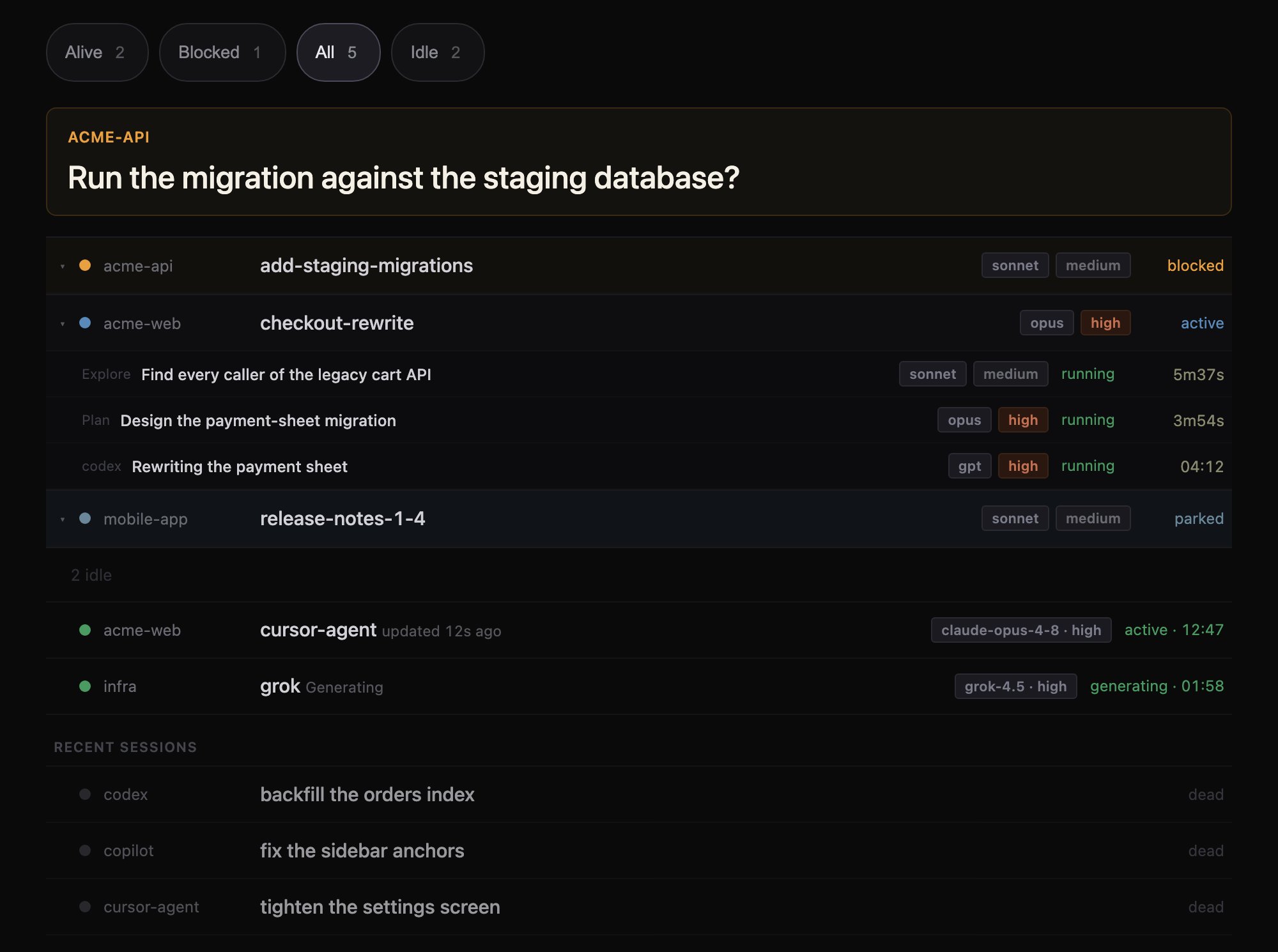
Real render of the dashboard; project and session names are placeholders.
What it shows
If you run agent CLIs in terminals — Claude Code, Codex, GitHub Copilot CLI, Cursor Agent, Grok — your editor has no idea they exist. Agent Radar scans the whole machine, not just sessions your editor launched:
Every Claude Code session, with its full subagent tree (dev-team seats, Explore/Plan workers, and nested workflow agents), each showing model and effort.
Blocked-first ordering: sessions waiting on you float to the top, then working sessions, then parked ones.
Other CLIs inline: Codex, GitHub Copilot CLI, Cursor Agent, and Grok processes appear in the same session table alongside Claude Code, with whatever status/model detail can be read for each. Codex spawned by a Claude session nests under the session that spawned it.
A recent sessions group: dead Codex, Grok, Copilot, and Cursor sessions stay visible for a bounded window after they end, separate from the live fleet, and never count as active or blocked.
A status bar item, always visible, click to open the dashboard:
3 working · 1 waiting on you · 2 parked · 4 subagents
All three buckets are always shown, because a zero is information. The subagent count
is appended only when something is actually running. When nothing is live it reads
fleet idle · 6 recent.
Click on a session and land in it
Clicking a row that's already running in a terminal in this window reveals that exact tab: no copy, no second writer, no new process. A Claude session started in a terminal has no daemon job behind it, so the usual claude attach can't reach it — Radar instead walks up from the session's own process to find the shell hosting it, and matches that against the terminals open in the window.
When the terminal isn't somewhere Radar can see — another window, or outside the editor entirely — the click offers explicit choices instead of a dead end: open alongside (both terminals on one transcript) or fork a copy. Dead Claude, Codex, Grok, Copilot, and Cursor sessions resume with each runtime's own resume verb; live-looking Codex and Grok rows fork by design, to avoid a second writer.
Blocked means waiting on you
A session is blocked when it has asked a question, is sitting at a permission prompt, is stuck on a stale job status or an unrecovered error, or otherwise needs a decision from you — not only when it has errored. A session only shows idle once its turn is genuinely complete and nothing is owed.
A session that ended while still mid-question shows as ended (asked you) — distinguishing a dead session that wanted your input from one that finished cleanly. It's never toasted and never counted, but it stays visible.
A tool call that is merely slow — a build, a test suite, an install — is not mistaken for a permission prompt. Agent Radar checks whether the command is genuinely executing before deciding a session is waiting on you.
Why it exists
Running several agent CLIs at once across terminals and editor panes makes it easy to lose track of which one is actually waiting on you. Agent Radar answers that at a glance without switching windows, and lets you jump straight to the session that needs you.
How it works
Everything is read from files already on your machine:
- Claude Code sessions and subagents come from
~/.claude/projects/<slug>/<session>.jsonl transcripts (including nested subagents/** trees) plus the daemon's own session registry (claude agents --json), used as ground truth for liveness and for sessions that haven't written a transcript yet.
- Other CLIs (Codex, Copilot, Cursor Agent, Grok, Gemini) are detected via a local process scan, with status/model enrichment read from each CLI's own logs or transcripts where available.
- Click-to-open matches a session's process to a terminal by walking the process tree up to the shell hosting it, then matching that shell against the terminals open in the window.
There is no server, no network access, and no telemetry. Nothing leaves your machine. There is nothing to configure to get started.
Install
VS Code: install "Agent Radar" from the VS Code Marketplace, or run:
ext install Shivansh2703.agent-radar
Cursor: Cursor does not use the VS Code Marketplace — it resolves extensions through Open VSX. Install from Open VSX: search "Agent Radar" in the Cursor extensions panel, or install directly from open-vsx.org.
Once installed, the status bar item appears automatically. Command palette: Agent Radar: Open Dashboard opens the live dashboard panel.
Settings
| Setting |
Default |
What it does |
agentRadar.windowHours |
24 |
How many hours back to include Claude Code sessions, by transcript modification time. |
agentRadar.pollSeconds |
3 |
How often Agent Radar rescans. |
agentRadar.claudePath |
"" |
Explicit path to the claude executable, for installations it cannot discover on its own. |
agentRadar.notifications |
blocked-only |
off — never toast; blocked-only — only owner-actionable blocks (decision, question, job, or error, not permission); all — every block, including permission flaps. |
agentRadar.notificationCooldownMinutes |
10 |
Minimum minutes between blocked toasts for the same session (0 disables the cooldown). |
agentRadar.externalUriHandler |
false |
Let other apps open a session in a terminal via vscode://Shivansh2703.agent-radar/attach?session=<id> (and /fork). Off by default: URI links can be triggered by any web page. When on, a request is still refused unless the id names a session already running on this machine. |
Requirements
- macOS (Linux likely works; Windows not yet verified)
- VS Code 1.80+ or Cursor
Known limitations
- Agent CLIs change their process shapes and on-disk formats between releases; detection can silently miss a CLI after it updates.
- Gemini CLI is detected as a running process only — no status/model enrichment yet.
- If the numbers look wrong, it's most likely a CLI version Agent Radar hasn't been taught to read yet.
- Cursor Agent processes are captured with their correct working directory and project, but they never nest under a spawner — the CLI re-execs itself, which breaks the match.
- Commands run indirectly (e.g., through a wrapper script) remain flat because Agent Radar cannot match them to spawning processes.
- The optional external URI handler (
agentRadar.externalUriHandler, off by default) is unreliable — roughly two opens in five silently do nothing. Radar's own row clicks do not use this path.
License
MIT — see the LICENSE file included in this extension. Source and issues: github.com/Shivansh2703/agent-radar.

