Skip to content
| Marketplace
Sign in
Visual Studio Code>Visualization>Claude Usage MeterNew to Visual Studio Code? Get it now.
Claude Usage Meter

Claude Usage Meter

SKKokkula

|
2 installs
| (0) | Free
Unofficial status bar meter showing your Claude session, weekly and Fable 5 usage percentages, read live from Anthropic's usage API.
Installation
Launch VS Code Quick Open (Ctrl+P), paste the following command, and press enter.
Copied to clipboard
More Info

Claude Usage Meter

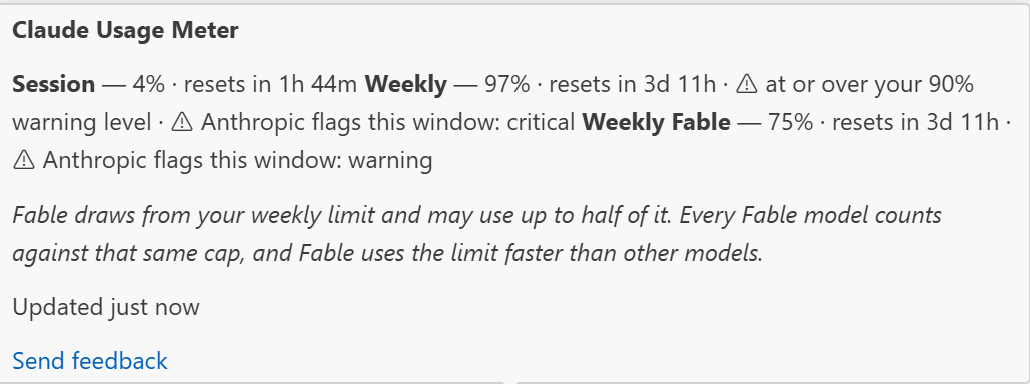
A VS Code status bar meter showing your real Claude usage percentages.

⟳ 5h 21% · 7d 24% · Fable 12%

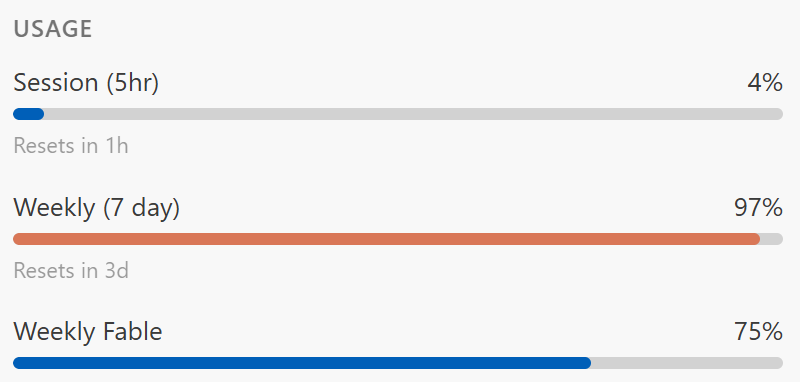
Three segments: the rolling 5-hour session window, the rolling 7-day window, and Fable 5.

Unofficial. This is an independent, community-built extension. It is not made by, endorsed by, or affiliated with Anthropic. "Claude" is Anthropic's trademark and is used here only to describe what the extension reads.

Where the numbers come from

Anthropic exposes the account's real rate-limit utilisation at GET https://api.anthropic.com/api/oauth/usage, authenticated with the same OAuth token Claude Code already stores locally. The response carries five_hour.utilization, seven_day.utilization and their resets_at timestamps.

The figures are therefore read from the server, not estimated locally — the same numbers the usage page shows. Percentages are passed through in the server's own units with no rescaling.

An earlier version of this extension computed token counts from transcript files and disclaimed that it could not show a percentage, because the denominator is server-side. That was true of the transcripts, but wrong about the account: the usage endpoint publishes the percentage directly. The transcript path has been replaced.

Fable 5

On Max plans Fable 5 is included, and draws from your weekly limit — you can spend up to half of it on Fable. It also draws down usage faster than other models. So Fable is a sub-cap on the weekly pool, not a separate allowance; a low Fable figure is not headroom that exists independently of the weekly bar.

The Fable figure arrives in the response's limits array — a list of windows, each carrying its own percent, resets_at and, for per-model rows, a scope.model.display_name:

{ "kind": "weekly_scoped", "group": "weekly", "percent": 37,
  "resets_at": "2026-08-05T20:00:00Z", "is_active": true,
  "scope": { "model": { "id": null, "display_name": "Fable" } } }

It is not under a flat seven_day_fable-style key; no response has ever carried one. The extension:

  • reports the window whose display_name names Fable, labelling it with that server-supplied name rather than a hardcoded one, or
  • renders Fable — if no such window is present, and says so in the tooltip.

A model_scoped array — the shape Claude Code's own Account & Usage panel reads — and the flat legacy keys are both still accepted as fallbacks, so an account or server version that sends either keeps working.

It never derives a Fable percentage from an assumed denominator. A number invented from a guessed limit would look exactly like a real reading, which is the one thing this extension will not do.

Opus and Sonnet windows are ignored even when the API returns them.

Absence is rendered as absence

If the token is missing, the request fails, or the response is malformed, the meter shows ⃠ Claude usage — dimmed, and the tooltip says why. It does not show 0%, because a zero looks like a successful reading of an untouched quota. A failed refresh replaces the previous state rather than leaving a stale percentage on screen dressed as current.

There is no demo mode and no simulated data.

The one exception: a throttled endpoint

HTTP 429 is the single failure treated differently, because it means ask later, not there is no data. Blanking a valid percentage because the server asked us to slow down is the mirror-image of showing stale data as live — both misreport freshness.

So on a 429 the meter keeps the last real reading and states its true age in the status bar itself:

🕘 5h 4% · 7d 26% · Fable 37% · 12m old

The rules that keep this honest:

  • the age comes from the receivedAt stamped when that response arrived, not from the request and not from a guess;
  • it is shown in the bar, not hidden in the tooltip, so it cannot read as current to anyone who does not hover;
  • the live $(pulse) icon is swapped for $(history);
  • past 30 minutes the reading is dropped entirely and the meter returns to —, because by then it says more about when we last got through than about current usage;
  • only a 429 earns this. A network error or an auth failure blanks the meter, since those can mean the machine or the account changed underneath us.

Behind that, the poll backs off exponentially (capped at 30 minutes) and honours the server's Retry-After whenever it asks for longer than our own backoff — never for shorter, or a cooperative server could be talked into a tighter loop than you configured. A manual Refresh Now clears the backoff.

Install

Search for Claude Usage Meter in the Extensions view, or:

code --install-extension shivakrishnakokkula.claude-usage-meter

To build from source instead:

npm ci
npm test
npx @vscode/vsce package
code --install-extension claude-usage-meter-*.vsix

Then reload the VS Code window. Or press F5 for an Extension Development Host.

Keeping it up to date

A marketplace install updates itself; nothing below is needed. The rest of this section covers the parallel GitHub Release channel, which exists for machines that install the .vsix directly.

push to main → CI tests → version bump → Marketplace + GitHub Release (.vsix)
                                              ↓
                        scheduled task installs it → reload VS Code

The pipeline. .github/workflows/release.yml runs on every push to main. It tests, resolves the version (bumping the patch number if the current one is already tagged, so nothing needs tagging by hand), packages, tags, attaches the .vsix to a GitHub Release, and publishes to the marketplaces. Everything after the test step is gated on a green suite, so a broken commit never becomes a release.

The GitHub Release needs only the automatic GITHUB_TOKEN. Marketplace publishing needs VSCE_PAT (Visual Studio Marketplace) and OVSX_PAT (Open VSX) as repository secrets; each publish step is skipped when its secret is absent, so a fork without tokens still releases.

The installer. scripts/update.ps1 compares the installed version against the latest release and installs the release artifact when they differ:

./scripts/update.ps1          # install if a newer release exists
./scripts/update.ps1 -Force   # reinstall regardless

It installs the exact artifact CI built and tested rather than rebuilding locally, so no build toolchain is needed on the target machine — only gh (for auth) and code. It exits silently when already current, which makes it safe to run on a schedule.

One residual manual step VS Code imposes: an updated extension only takes effect after the window reloads.

To run it on a schedule:

Run this from the repository root. A scheduled task needs an absolute path, so the path is resolved rather than written out, which keeps the snippet correct on any machine:

$script  = (Resolve-Path .\scripts\update.ps1).Path
$action  = New-ScheduledTaskAction -Execute 'powershell.exe' `
  -Argument "-NoProfile -ExecutionPolicy Bypass -File `"$script`""
$trigger = New-ScheduledTaskTrigger -Daily -At 9am
Register-ScheduledTask -TaskName 'claude-usage-meter-update' -Action $action -Trigger $trigger

Remove it with Unregister-ScheduledTask -TaskName 'claude-usage-meter-update'.

update.ps1 is not shipped inside the VSIX — it is a repository script for bootstrapping a machine that installs releases directly. An extension installed from a marketplace has no use for it.

Preview without VS Code

Renders exactly what the status bar and tooltip would show, and lists the field names the API returned. Your token is never printed.

npm run preview

Settings

Setting Default Meaning
claudeUsageMeter.refreshIntervalSeconds 600 How often to re-query the endpoint (minimum 60). Short intervals cause HTTP 429, not fresher numbers — see below.
claudeUsageMeter.showSession true Show the 5-hour percentage.
claudeUsageMeter.showWeekly true Show the 7-day percentage.
claudeUsageMeter.showFable true Show Fable 5 utilisation.
claudeUsageMeter.warnAtPercent 90 Highlight the item at this percentage.
claudeUsageMeter.alignment "right" Status bar side.
claudeUsageMeter.priority 100 Status bar ordering.

Why the interval is 10 minutes

The endpoint rate limits hard, and every open VS Code window runs its own poller — three windows at the old 60-second default meant three requests a minute, roughly 4,300 a day, against windows measured in 5 hours and 7 days. The precision was imaginary and the cost was a permanently throttled endpoint: during development, 12 consecutive probes over 15 minutes were all refused.

Lowering this below a minute is not possible, and lowering it at all mostly buys — instead of numbers.

Commands

  • Claude Usage Meter: Show Details — full breakdown plus the API field names, in an output channel (also the click action on the status bar item)
  • Claude Usage Meter: Refresh Now
  • Claude Usage Meter: Open Official Usage Page

Authentication, and what leaves your machine

This extension reads the OAuth token Claude Code has already stored for you. Since that is a credential, here is exactly what it does with it.

Where the token is read from, in order:

  1. CLAUDE_CODE_OAUTH_TOKEN, if set.
  2. ~/.claude/.credentials.json — the file Claude Code writes on Windows and Linux.
  3. On macOS only, the login keychain item Claude Code-credentials, read via security find-generic-password. Claude Code stores the credentials there rather than on disk, so without this the meter would be blank on every Mac. The first read may raise the system keychain prompt; declining it leaves the meter blank and changes nothing else.

Where it is sent: as a Bearer header to https://api.anthropic.com/api/oauth/usage, and nowhere else. The extension makes no other network request — no telemetry, no analytics, no update check of its own.

What is never done with it: the token is never logged, never written to the output channel, never included in an error message, and never persisted anywhere by this extension. Failure messages name which store failed, never its contents. There is a unit test asserting that no failure reason can echo the credential blob.

The extension only ever reads your credentials; it never writes or refreshes them. If the token expires, re-authenticate in Claude Code.

Development

npm test        # compile + unit tests, no VS Code and no network required
npm run watch

src/core/usage.ts is pure and offline, so the whole response-schema contract is unit-testable without a token. The vscode dependency is confined to src/vscode/, and network access to src/core/client.ts.

Prior art

Claudemeter is a far more featureful take on the same idea and is where the usage endpoint came from. Use it if you want plan detection, context tracking and per-model breakdowns.

Licence

MIT.

  • Contact us
  • Jobs
  • Privacy
  • Manage cookies
  • Terms of use
  • Trademarks
© 2026 Microsoft