Diagram Forge — AI Architecture Diagrams ⚡
Open any GitHub repo in VS Code → Claude analyzes the codebase → interactive architecture diagram in your browser. Pay per use via Lightning Network. First analysis free.
See your codebase as a living diagram in under 60 seconds.
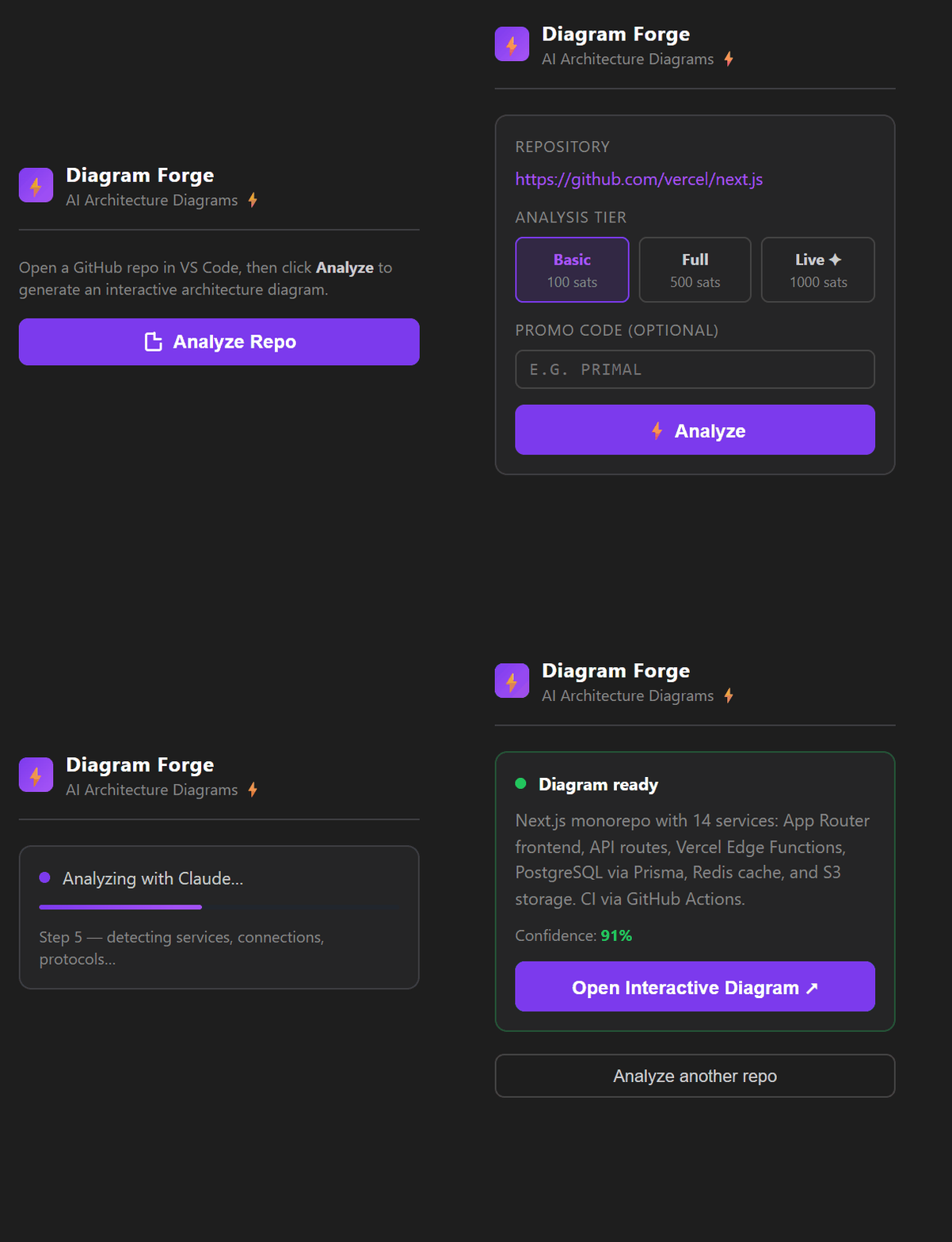
Open the panel · pick a tier · Claude explores your code · diagram ready
The output: an interactive diagram your whole team can navigate.
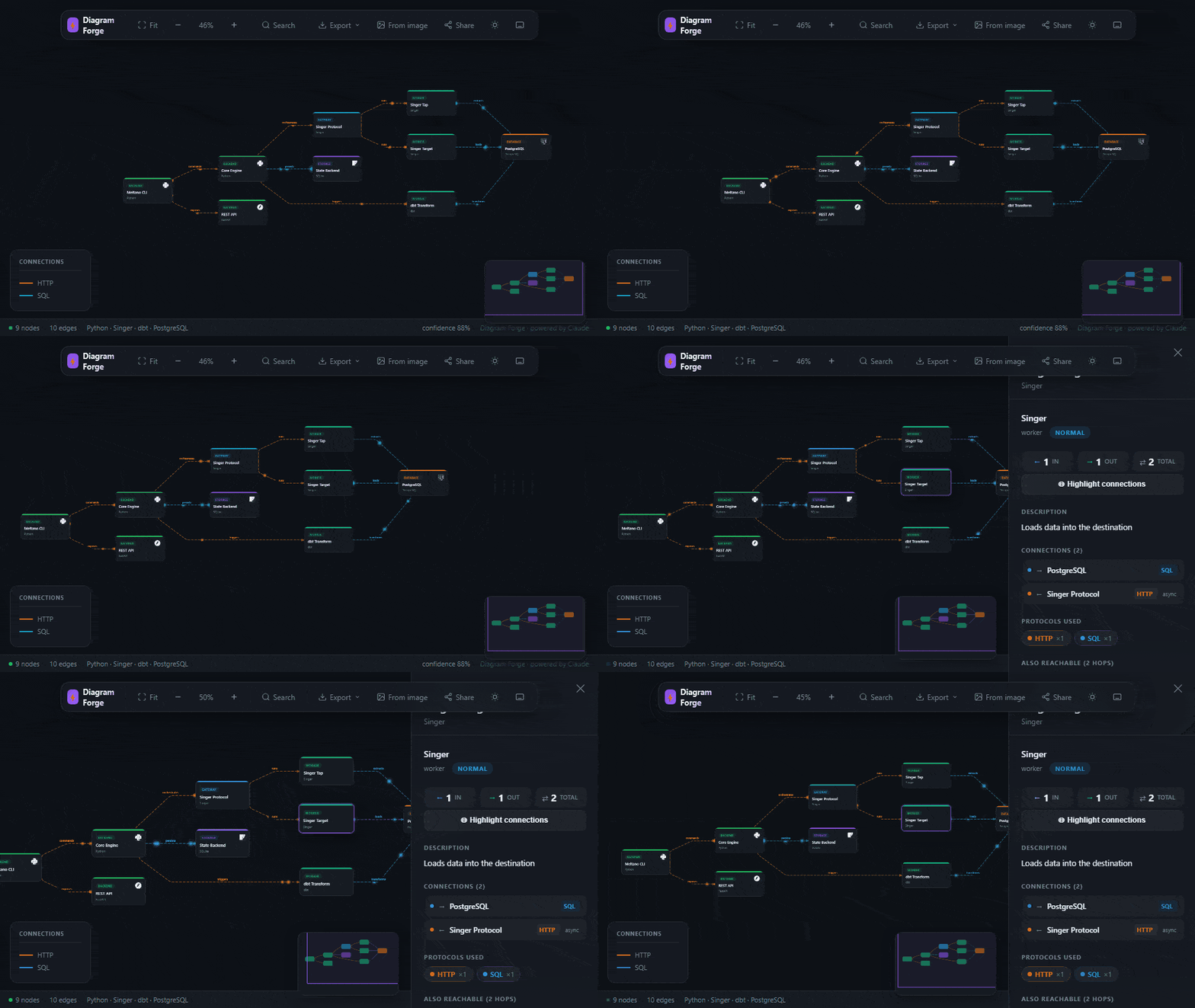
Pan · zoom · click any node · export SVG/PNG · share link
Quick Start
- Install the extension from the VS Code Marketplace
- Open any project with a GitHub remote
- Click the Diagram Forge icon in the Activity Bar (left sidebar)
- Click "Analyze Repo" — the first request is free, no wallet needed
- Choose your tier and optionally enter a promo code
- Wait ~30–60 s on first run — the server wakes from sleep on free tier
- Click "Open Interactive Diagram" when the panel shows "Diagram ready"
Tip — Lightning users: if you have Alby installed, WebLN triggers automatically — no copy-paste needed.
Analysis Tiers
| Tier |
Price |
Claude depth |
| Basic |
2,000 sats (~$2) |
8 iterations — top files, main services, key connections |
| Full |
10,000 sats (~$10) |
12 iterations — full repo, monorepos, all protocols |
| Live ✦ |
25,000 sats (~$25) |
Deep agentic exploration — maximum breadth and confidence |
No subscription, no account. Pay once per analysis. Share the diagram forever via /g/:id link.
Free tier
Every IP gets one free analysis per day — no promo code, no wallet required. Just click Analyze.
Promo code? Enter it in the field before clicking Analyze — runs fully free.
Paying with Lightning & L402
Diagram Forge uses the L402 protocol — the server issues a Lightning invoice + macaroon, your client pays and sends the preimage back, analysis proceeds. No OAuth, no cookies, no accounts.
Have Alby? WebLN fires automatically — the invoice resolves without leaving VS Code.
Other wallets: Wallet of Satoshi · Phoenix · Muun — any BOLT11-compatible wallet works. Paste or scan the invoice from the extension panel.
Self-hosted / advanced: The backend is open source. Run your own instance with your own LND/CLN node — see GitHub.
Features
- Agentic analysis — Claude autonomously explores your codebase with filesystem tools. No config files, no annotations needed.
- 80+ tech logos — auto-detected from your code using Simple Icons
- Animated diagram — particles flow along edges in real time, colored by protocol (HTTP, SQL, gRPC, WebSocket…)
- Interactive viewer — pan, zoom, click nodes, inspect connections, minimap
- Export — SVG, PNG, Markdown, Draw.io, Excalidraw
- Share links —
/g/:id shareable URLs, permanent
- Architecture Benchmark — 6-dimension quality score (scalability, security, observability…)
- Diff engine — compare two diagram snapshots over time
- MCP integration — use Diagram Forge as a tool inside Claude Desktop or Cursor
Supported Languages & Stacks
TypeScript · JavaScript · Python · Java · Go · Rust · Ruby · Scala · Jupyter · dbt · Terraform · Kubernetes · Docker Compose · Airflow · Monorepos · and more
Privacy & Security
| What happens |
Detail |
| Code access |
Your repo is cloned over HTTPS from GitHub into an isolated server process. No SSH keys or credentials are ever requested. |
| Retention |
The cloned repo is deleted immediately after analysis completes — typically within 1–2 minutes. |
| What is stored |
Only the graph JSON (node names, edge types, summary text) is persisted — no source code, no file contents. |
| Where |
Backend runs on Render (US region). Graph data stored on Supabase (US region). Both are SOC 2 Type II certified providers. |
| Private repos |
Not supported — the backend clones via public GitHub URL only. Do not analyze private repositories. |
| LGPD / GDPR |
No personal data is collected. No account, no email, no IP stored beyond standard server logs (7-day retention). |
Corporate use: This extension sends your public repository URL to a third-party server for analysis. Review with your security team before using on proprietary codebases. For on-premise needs, self-host the open-source backend.
Troubleshooting
Analysis takes 30–60 seconds to start — The server sleeps after 15 minutes of inactivity (Render free tier). Cold start is normal. The progress bar begins moving once the server responds. A 3-minute timeout is in place.
"Access blocked" or "Forbidden" error — Your corporate proxy is blocking the analysis server (diagram-forge.onrender.com). Try on a personal network or mobile hotspot — this cannot be bypassed from within the extension.
"Free daily limit reached" — One free analysis per IP per day. Use a Lightning payment to continue, or wait until midnight UTC.
"Promo code is invalid or expired" — Check spelling. Leave the field blank to use the standard free trial instead.
Repo not detected — No GitHub remote found. The extension prompts you to paste a public GitHub URL manually. Private repos are not supported.
Large repos timeout — Repos with >1,000 files can take 2–3 minutes on the Full tier. The progress bar advances every ~15 seconds.
Links
Built with Claude · Paid via Lightning L402 ⚡

