Tesseract: Codebase WorkflowSee any repository as an interactive end-to-end workflow, from UI screens to API endpoints to services and datastores. Runs entirely on your machine. Installation Launch VS Code Quick Open ( Ctrl+P), paste the following command, and press enter.Copied to clipboard |

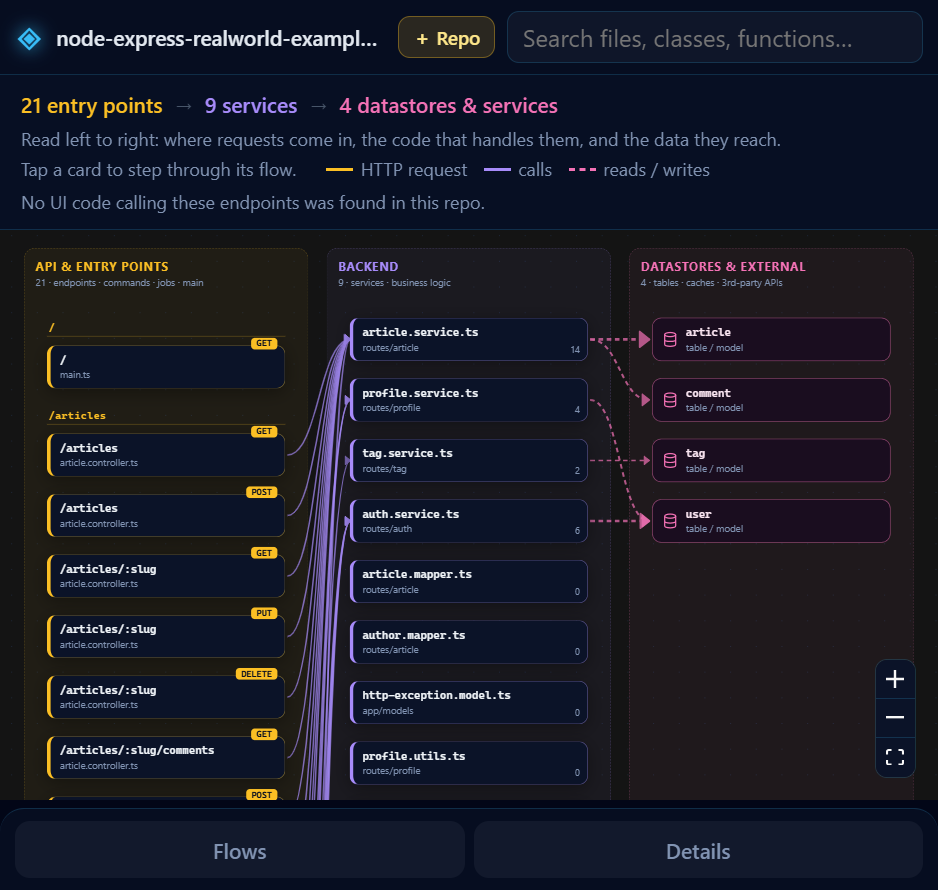
Tesseract: Codebase WorkflowSee the repository you have open as an interactive end-to-end workflow: UI screens → API endpoints → services → datastores and external services. Hover a card to trace its path, click it to step through the flow, and jump straight to the code.
Everything runs locally. Your code is parsed on your machine and never uploaded, so it works on private repositories. Use
What it understandsStatic analysis with tree-sitter for JavaScript, TypeScript, Python, Go, Java, Kotlin, Scala, Rust, Ruby, PHP, C#, C, C++, Objective-C, Swift, Elixir, OCaml, Solidity and Bash. It recognizes routes and HTTP calls in common frameworks (Express, Koa, NestJS, Next.js, FastAPI, Flask, Django, Rails, Laravel, Spring, ASP.NET, Gin and more), links frontend requests to the backend endpoints they hit, and detects databases, ORMs, caches and third-party APIs. Behavior wired up only at runtime (string-based dispatch, dependency-injection containers, reflection) can show up as gaps in a flow. Settings
Public repositories can also be explored in the browser at repo-analyser-two.vercel.app. Source and issues: github.com/sharad272/RepoAnalyser. |