
C ThroughRelational function call tree and reference visualizer for C/C++ code Installation Launch VS Code Quick Open ( Ctrl+P), paste the following command, and press enter.Copied to clipboard |

C Through
C Through brings Source Insight-style code intelligence into VS Code — built specifically for C and C++ developers who need more than what a standard editor provides. Large C codebases are hard to navigate. Functions call other functions across dozens of files. Global variables get written in one place and read in five others. You spend more time chasing references than writing code. Source Insight solved this for decades with its Relational Window — but it's a separate, aging tool that lives outside your modern workflow. C Through closes that gap. It runs entirely inside VS Code, requires zero configuration, no compiler, no build system — just open a file and your code structure appears instantly.
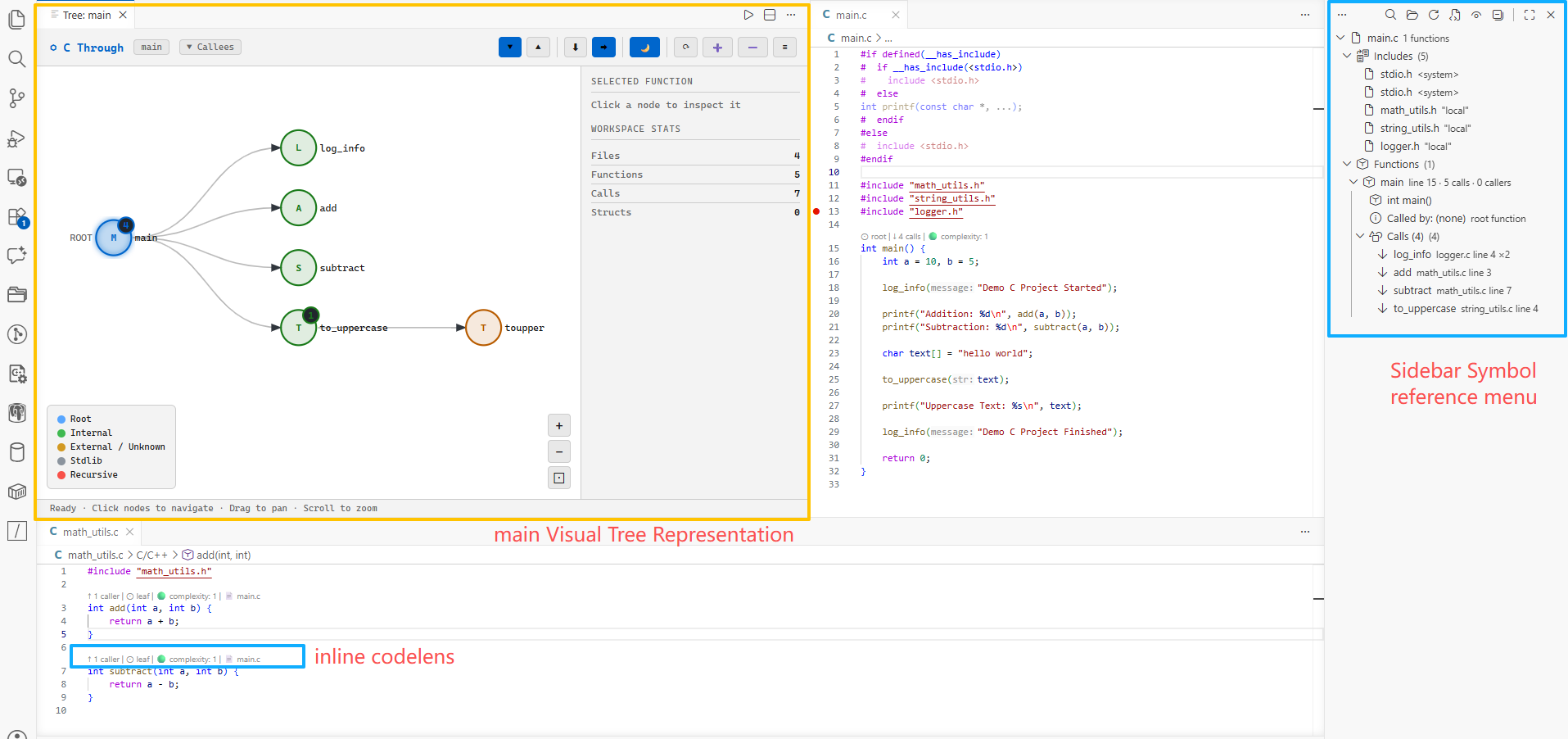
Features🌳 Sidebar Tree ViewA live, structured breakdown of every C/C++ file — organized into collapsible sections:
Click any item to jump directly to its definition in the source file. 🔍 Interactive Call GraphA fully interactive visual graph of function call relationships.
Node colors:
◇ Data Symbols in the GraphThe graph isn't limited to callers and callees. Toggle the ◇ toolbar button to see the globals, macros, and structs each function actually touches, drawn as diamond nodes attached to it.
💡 CodeLens Inline MetricsClickable annotations appear directly above every function definition — no panel switching required.
Complexity thresholds:
📂 Flexible Scan Scope
Cross-file caller/callee relationships are fully resolved after any multi-file scan. 🔍 Search & FilterSidebar Search & Filter: The C Through: Search & Filter panel sits above the sidebar tree with an embedded search box and category checkboxes.
Call Graph Search: Search inside the visual call graph to find nodes quickly.
Cursor Sync: Keep the sidebar in step with where you are in the code.
☠ Dead Code ReportA dedicated report panel showing all dead and unused code across your entire workspace. Open via Detects:
Panel features:
Severity levels:
🔗 Indirect References — Commands, Threads & CallbacksNot every function is called directly. In embedded and CLI codebases, functions are registered in command tables, handed to task-creation APIs, or wired up as callbacks — so a naive "who calls this?" says nobody. C Through finds those registration sites:
⚡ Auto-Refresh on SaveSave a file and only that file is re-parsed — the sidebar, CodeLens, and indexes update in place, with no full workspace rescan.
🔎 Global Variable Reference TrackerExpand any global variable in the sidebar to see its complete usage across all files:
Writes are detected beyond plain
Every entry is clickable and jumps to the exact source line. CodeLens above every global declaration shows: InstallationFrom VS Code Marketplace
From VSIXUsageQuick Start
Commands (
|
| Command | Description |
|---|---|
C Through: Analyze Current File |
Parse the active C/C++ file |
C Through: Analyze Entire Workspace |
Scan all C/C++ files in workspace |
C Through: Analyze This Directory |
Pick a folder to scan |
C Through: Re-scan Last Scope |
Repeat the previous scan |
C Through: Show Relational Tree |
Open call graph for symbol at cursor |
C Through: Show Functions Called By This |
Open callees tree |
C Through: Show Functions Calling This |
Open callers tree |
C Through: Toggle CodeLens |
Show/hide inline CodeLens |
C Through: Search Sidebar |
Reveal & focus the Search & Filter box (Ctrl+Alt+S) |
C Through: Configure Keyboard Shortcuts |
Open Keyboard Shortcuts filtered to C Through commands |
C Through: Show Dead Code Report |
Open the dead code analysis report panel |
Context Menus
- Editor — right-click inside any C/C++ file for tree commands
- Explorer — right-click any folder for Analyze This Directory
Settings
| Setting | Default | Description |
|---|---|---|
cThrough.maxDepth |
5 |
Maximum call tree traversal depth |
cThrough.showStdLib |
false |
Include stdlib calls in tree |
cThrough.autoRefresh |
true |
Re-parse file on save |
cThrough.enableCodeLens |
true |
Show inline CodeLens |
cThrough.syncCursor |
true |
Select the symbol at the editor cursor in the sidebar |
cThrough.includeGlob |
**/*.{c,h,cpp,hpp} |
File pattern for scan |
cThrough.excludeGlob |
**/node_modules/** |
Paths to exclude from scan |
Example — scan only src/, skip build/ and vendor/:
{
  "cThrough.includeGlob": "src/**/*.{c,h}",
  "cThrough.excludeGlob": "{**/build/**,**/vendor/**,**/third_party/**}"
}
How It Works
C Through uses regex-based static analysis — no compiler, no language server, no build system required. It indexes code that would otherwise need a working compile_commands.json, which makes it useful on vendor SDKs and embedded trees that never build cleanly inside an IDE.
The parser:
- Strips comments and string/char literal contents (line positions preserved)
- Extracts
#include,#define,struct/typedefdefinitions - Identifies function definitions by signature pattern matching
- Extracts all call sites inside each function body
- Classifies global variable access per function — read / write / address-taken
- Collects macro and struct/type usage per function
- Finds indirect references (function names used as values, not calls)
- Calculates cyclomatic complexity per function
- Builds a cross-file caller/callee index across all scanned files
Speed — measured on a real embedded C tree (81 files, 28.5k lines):
| Operation | Time |
|---|---|
| Analyze workspace (28.5k lines) | ~430 ms |
| Analyze workspace (286k lines) | ~3.5 s |
| Sidebar load | ~2 ms |
| Call graph (2,000 nodes) | ~9 ms |
| Re-parse on save (4,700-line file) | ~75 ms |
Known Limitations
C Through trades compiler-grade accuracy for zero setup and speed. Where that shows:
- No preprocessor evaluation — code inside
#if/#ifdefbranches is parsed regardless of whether it would actually compile - Function-pointer call targets are not resolved —
fp()is recorded as a call tofp, not to whatever it points at. (Where a function is registered — command tables, thread entries, callbacks — is detected; see Indirect References) - Macro-generated signatures are not expanded — when a macro builds the whole declaration (
DEFINE_HANDLER(alpha) { … }), the real function name is never seen, and the macro name can surface as a symbol instead. Macro-prefixed signatures (PAM_EXTERN int f(),ULONG f(),BOOL f()) parse correctly - Macro and struct usage links to the definition, not to each use site — they are matched by name against the macro/struct tables, so there is no per-use line number
- C++ support is minimal — the parser targets C. Templates and class member functions are not indexed;
.cpp/.hppfiles are scanned for C-style constructs only - Analysis is in-memory — there is no on-disk symbol database, so a workspace scan is repeated after a VS Code restart
For compiler-accurate go-to-definition and find-all-references, pair C Through with clangd or C/C++ IntelliSense — C Through is for seeing the shape of the code, especially where those tools cannot be configured.
License
MIT © 2026