SQLitePad — SQLite Editor & Manager for VS Code
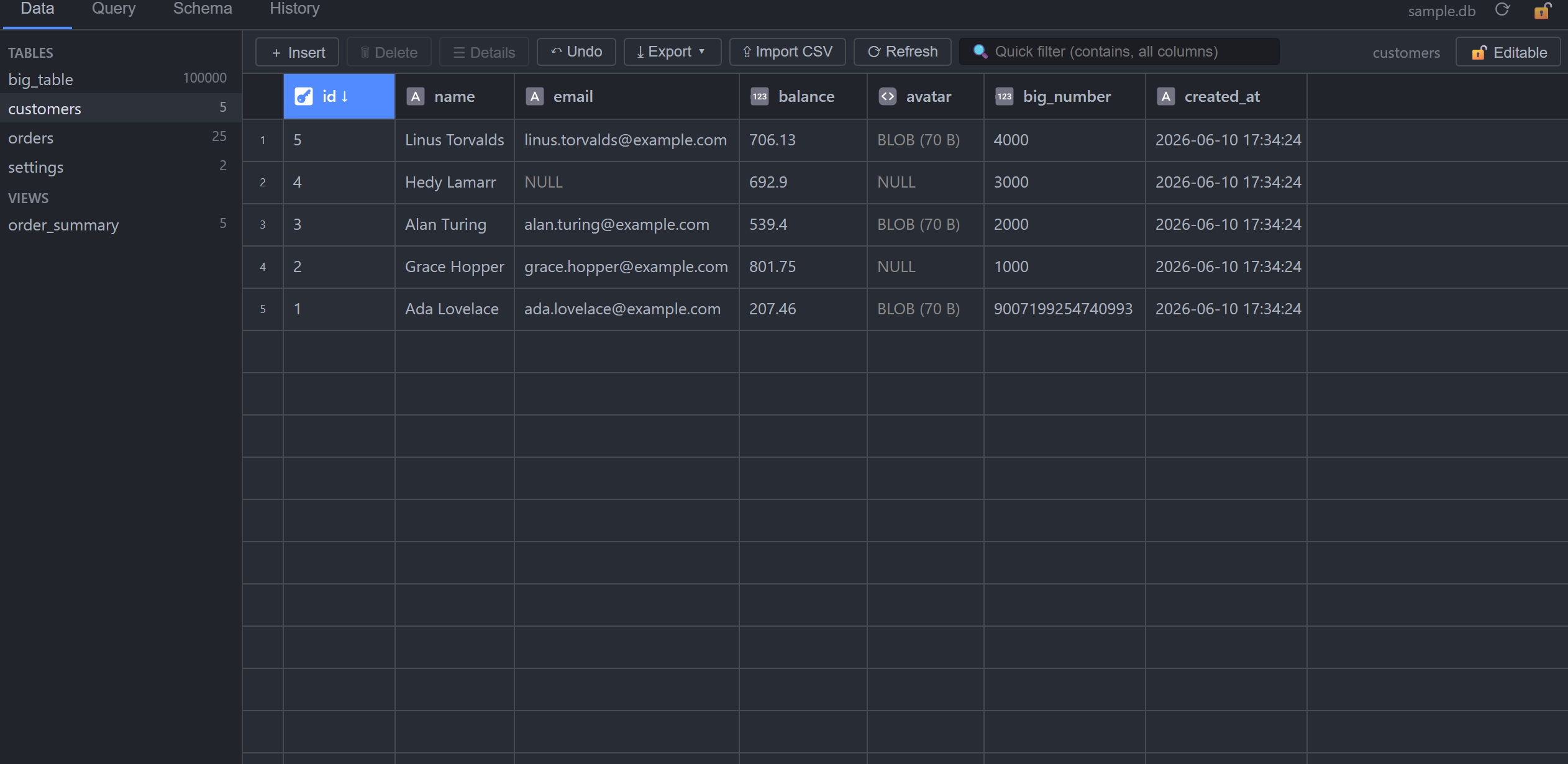
A full-featured SQLite editor inside VS Code. Click any .db / .sqlite file and get a fast, themed GUI — browse, edit, query, and export, like a phpMyAdmin for SQLite. All of it free.
Why SQLitePad?
- It just works — SQLite runs as WebAssembly with file I/O through a Node VFS. No native binaries, nothing to compile, no "module failed to load" errors; identical behavior on Windows, macOS, and Linux. Writes go straight to your
.db file page by page — large databases are never loaded fully into memory.
- A true editor, not just a viewer — inline cell editing, row insert/delete/duplicate, CSV import, a SQL runner, and undo. Every editing feature is included, free.
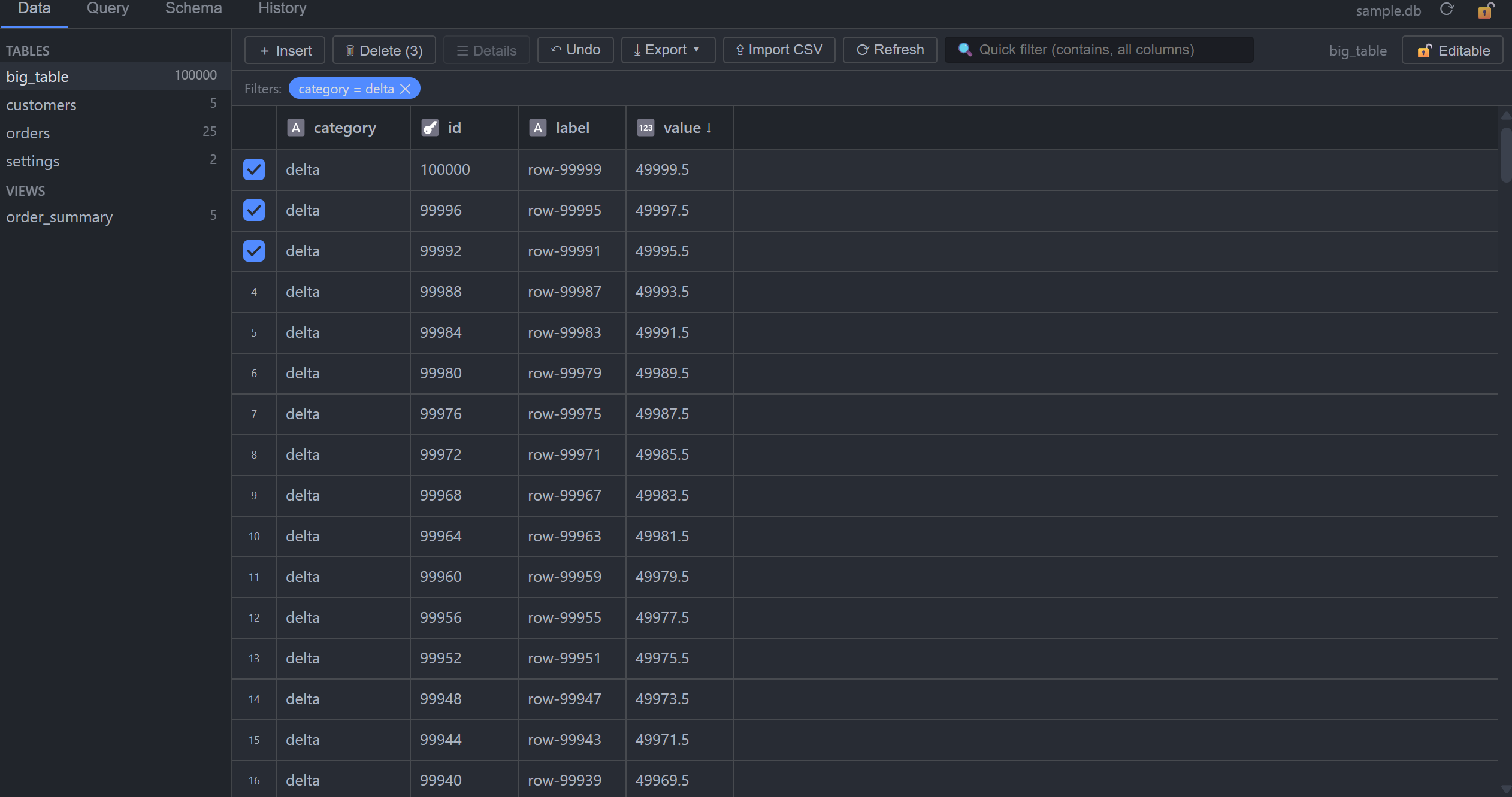
- Fast — a canvas-rendered grid that smoothly handles 100k+ row tables with virtualized scrolling, sorting, and paging.
- AI-ready — copy a whole schema as Markdown or export any table as a SQL dump, ready to paste into your favorite assistant.
- Private by design — no telemetry, no tracking, no network calls. Your databases never leave your machine.
Features
- 🖱️ Open by clicking —
.sqlite, .sqlite3, .db, .db3, .s3db files open directly in the editor; no command-palette dance
- ✏️ Full editing — inline cell editing with type-affinity-aware coercion, insert rows via a form panel, delete rows, set NULL with Del; every change is committed to the file immediately and transactionally
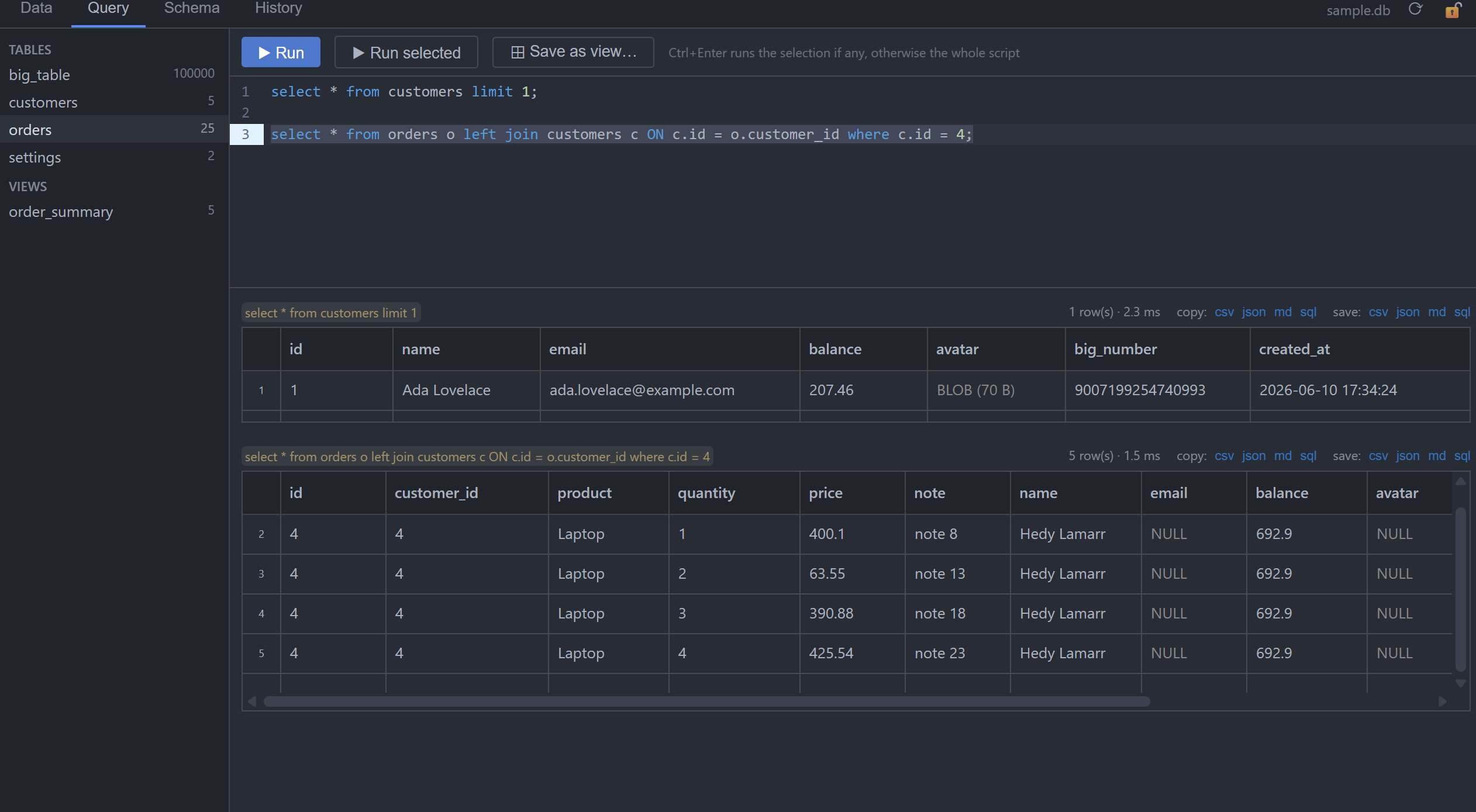
- 🧪 SQL query runner — CodeMirror editor with theme-aware SQLite syntax highlighting and schema autocompletion; run multi-statement scripts (Ctrl+Enter, or just the selection); per-statement results, timings, and rows-affected (results show up to 10,000 rows — export for the full set); DDL like
ALTER TABLE updates the sidebar instantly; save a SELECT as a database view with one click
- 🔍 Filters & quick search — per-column filters from header menus (
=, contains, ranges, NULL/empty checks), right-click a cell for instant filter/exclude, plus a debounced quick-filter box searching every column
- 🔗 Foreign-key superpowers — filter an FK column by searching the referenced table by its human-readable columns (pick "Gaming Mice", get
group_id = 3); name-like columns are auto-detected and you can choose your own preview columns (remembered per database); right-click an FK cell to jump to the referenced row; FK value autocompletion in insert forms
- 📦 Import & export — import CSV files into tables (header matching, preview, single transaction); export tables or query results to CSV / JSON / Markdown / SQL dump (
CREATE TABLE + INSERTs) — to a file or straight to the clipboard
- ↩️ Undo & history — session audit log showing row and old → new value for every change; undo with Ctrl+Z or from the History tab (updates, inserts, and deletes are fully reversible)
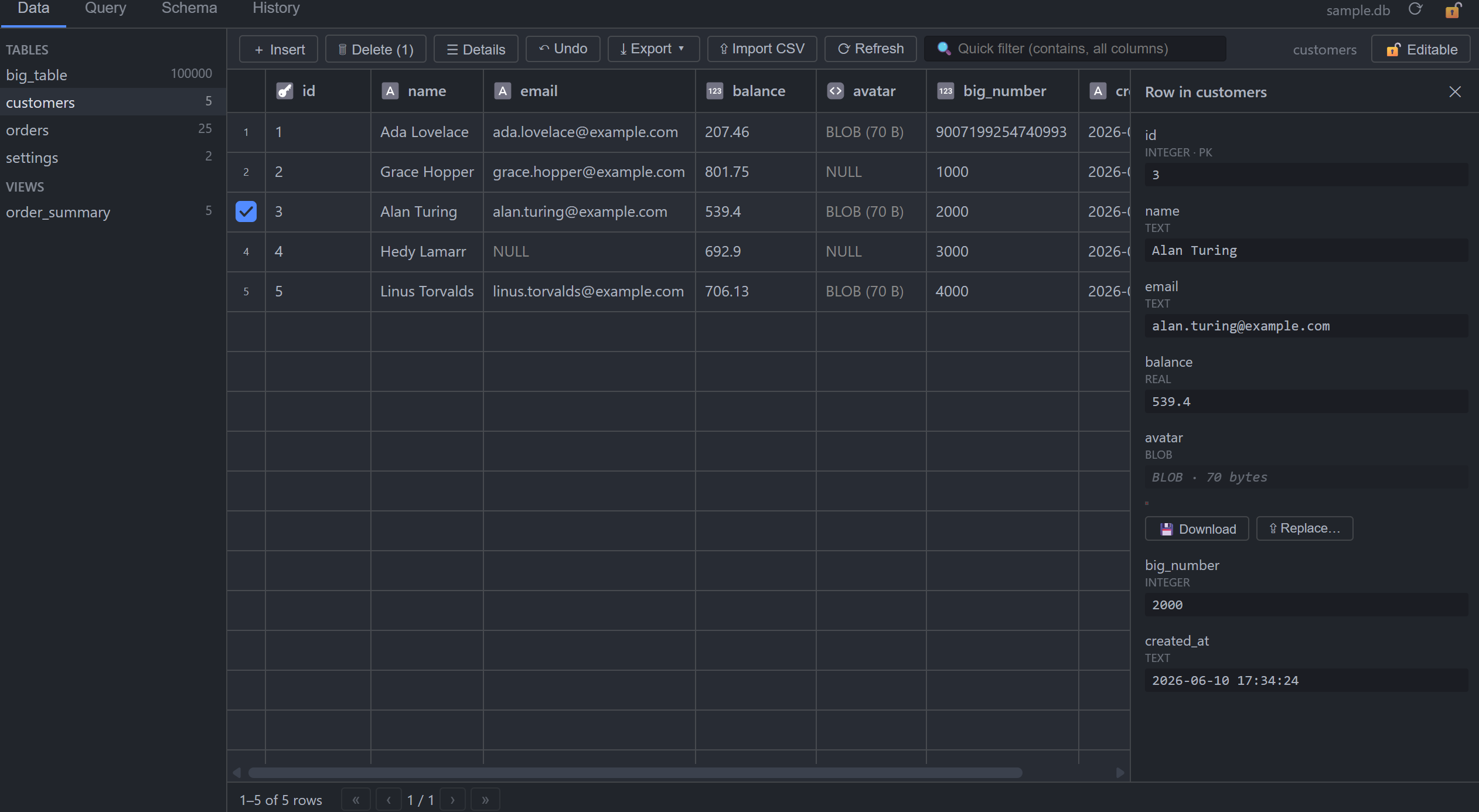
- 📋 Row details — vertical field view for wide rows, JSON pretty-printing, BLOB hex preview with automatic image detection (PNG/JPEG/GIF/WebP) plus download/replace, and inline foreign-key previews with one-click navigation
- 🗂️ Schema view — columns, primary keys, foreign keys, indexes, and pretty DDL; copy the whole schema as Markdown
- 🔒 Safe with shared databases — a database another program may be writing (WAL journal mode, or one with a
-wal/-shm/-journal sibling) opens read-only and stays locked, so SQLitePad never corrupts a file a live process is updating; a genuine read-only toggle, confirmation before deletes (single-row confirmation can be turned off), and external-change detection with a refresh banner round it out
- 🧠 Remembers your layout — column widths, pinned columns, and FK preview choices persist per database
Usage
| Action |
How |
| Open a database |
Click the file in the Explorer |
| Sort |
Click a column header (asc → desc → off) |
| Edit a cell |
Double-click it, type, Enter |
| Set NULL |
Select cell(s), press Del |
| Set empty string |
Clear an existing text and confirm (a NULL cell closed without typing stays NULL; use the Query tab for '' there) |
| Insert a row |
Toolbar + Insert |
| Delete rows |
Select rows via the row markers, press Del or toolbar 🗑 Delete (asks first; undo from History) |
| Run SQL |
Query tab, Ctrl+Enter |
| Refresh · Export · Toggle read-only · New query |
Editor title-bar icons, or Command Palette › SQLitePad |
| Save query as view |
Query tab, ⊞ Save as view… |
| Filter via a foreign key |
FK column header ▾ → search the referenced table |
| Lock the file |
Toolbar 🔒 Read-only toggle |
Settings
| Setting |
Default |
Effect |
sqlitepad.pageSize |
200 |
Rows per grid page (50–5000); applies when a database is opened |
sqlitepad.defaultReadOnly |
false |
Open databases with editing locked; unlock per file with the toggle |
sqlitepad.confirmSingleRowDelete |
true |
Ask before deleting one row (several rows always ask) |
Notes & limitations
- A database that looks in use by another program — WAL journal mode, or one with a
-wal/-shm/-journal sibling file — opens read-only and cannot be unlocked, so the editor never writes a file a live process (e.g. a server or scraper) is updating. Close it in the other program to edit it here. (The WASM SQLite engine coordinates locks differently from native SQLite, so sharing write access with another process is not safe.)
- Editing requires a row identity: rowid tables and
WITHOUT ROWID tables with a primary key are editable; views, and tables that have neither a primary key nor a free rowid alias (columns named rowid, _rowid_ and oid), are read-only.
- BLOB values are viewed and replaced through the row detail panel (not inline in the grid). A NULL in a BLOB column is likewise filled only from there (Replace…), so a keystroke or paste cannot turn a binary column into text; text already stored in a BLOB column stays editable inline.
- Text values containing a NUL byte (
\0) are cut at the NUL by the WebAssembly SQLite binding, in the grid and in exports alike; the bytes on disk are untouched.
- Not yet available in VS Code for Web.
Support & feedback
The source is private, but bug reports and feature requests are very welcome and tracked publicly on GitHub:
You can also reach me at serdarvural94@gmail.com.
License
Free to install and use, for personal and commercial purposes. The code is proprietary — see the LICENSE file. Bundled open-source components are listed in THIRD-PARTY-NOTICES.md.
| |

