SeedBase: Synthetic Test Data Generator
Generate realistic, foreign-key-consistent test data from your database schema, right inside VS Code (and Cursor, VSCodium, Windsurf). Point it at a SQL dump, Django models.py, a Prisma schema, or a live Postgres/MySQL connection, and get a full dataset where every foreign key resolves and the data actually looks real, not "Premium Widget 1" and lorem ipsum.
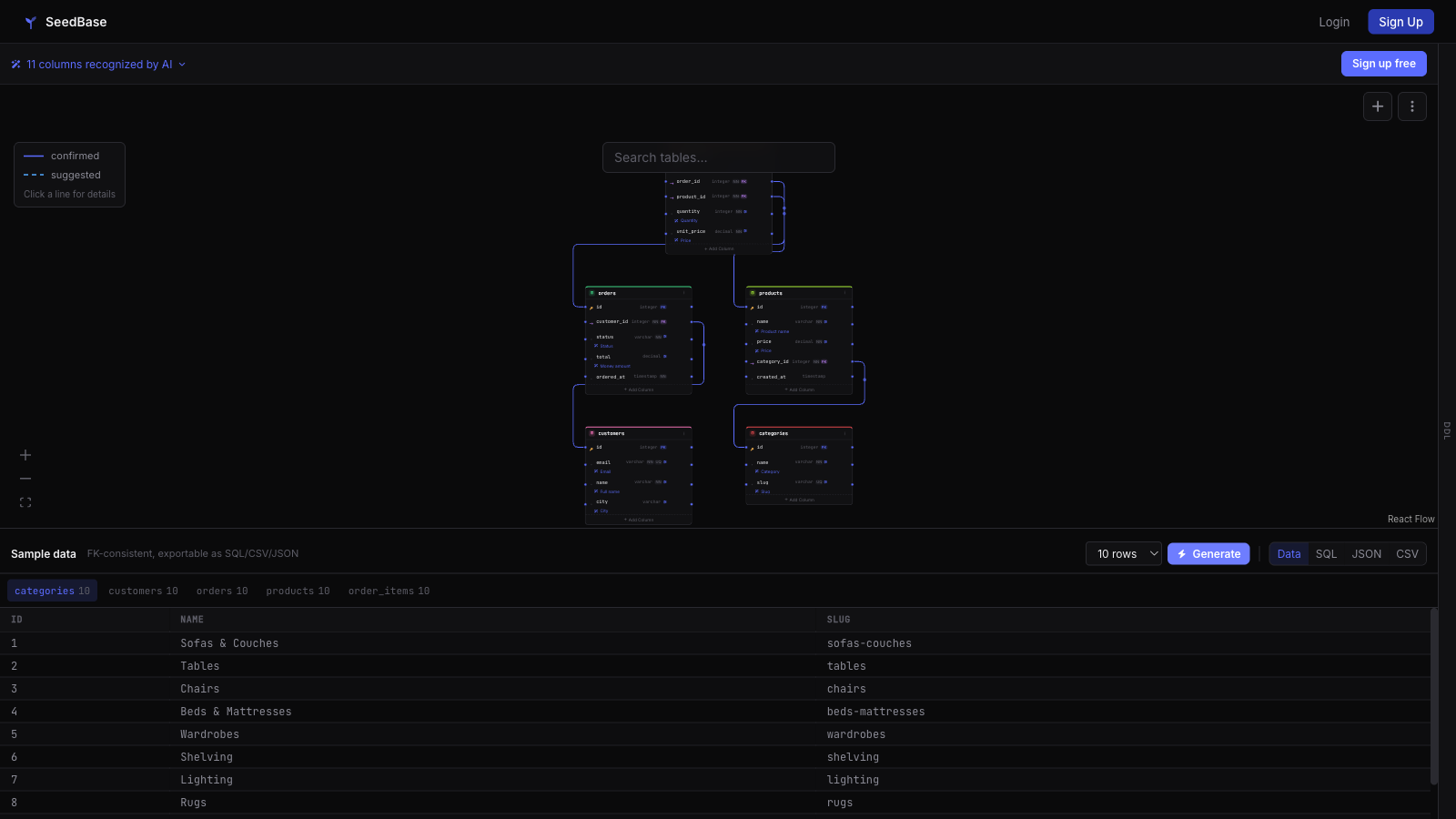
Want to see the output first? Try the login-free sandbox in your browser: seedba.se/playground.
Getting started
- Create a free account at seedba.se/register, no credit card.
- Run SeedBase: Login from the Command Palette (or click Login in the SeedBase view) and authorize in your browser.
- Push a schema file or open a project, hit Generate Data, and pull it straight into your workspace or local database.
The free tier generates full, foreign-key-consistent datasets for your schema. More about the extension: seedba.se/vscode.
Features
- SeedBase view in the Activity Bar: all your projects with their generations (status and date) at a glance.
- Generate Data: start a generation for a project from the tree or the Command Palette and get notified when it completes.
- Pull SQL into Workspace: download a generation as SQL, save it as
seedbase-<id>.sql in your workspace root (or via save dialog) and open it in the editor.
- Load into Database / Reset & Reseed: run a generation straight into your local database. Reset & Reseed truncates the project's tables first and reloads fresh data in one step (confirmation required).
- Workspace DB auto-detect: the connection string is suggested automatically from
.env / .env.local (DATABASE_URL), docker-compose.yml (postgres/mysql service) or prisma/schema.prisma — you only confirm or edit it.
- Preview Data: open a generation as a read-only table in an editor tab (row limit configurable via
seedbase.previewRows, default 100) — no leaving the editor.
- Create Project / Push Schema: turn a workspace schema file (
.sql, .prisma, Django models.py) into a new SeedBase project, or push schema changes to an existing project from the tree. The database type is detected automatically, you pick which tables to send, and large SQL dumps are streamed (only the DDL is read).
- Insert Test Data at Caret: drop FK-consistent sample rows into the open file, formatted for the file type (SQL
INSERTs, PHP/Python arrays or JSON).
- Mock API: serve a project's data as a live read-only REST API — open the built-in Swagger Explorer, copy the base URL, rebuild the data or disable it.
- Upload OpenAPI: bring your own OpenAPI/Swagger file and SeedBase serves exactly your endpoints with FK-consistent, realistic data.
- Delete Generation: remove a generation from the tree (with confirmation).
- Seed Test Data: generate and load fresh data into your database in one command — handy before a test run.
- Open in Browser: jump to the project's schema page on seedba.se.
- Status bar entry: a SeedBase item in the status bar opens your projects when signed in, or starts the login when you're not.
Installation
- Cursor, VSCodium, Gitpod, Windsurf and other Open VSX editors: search "SeedBase" in the Extensions panel, or run
cursor --install-extension seedbase.seedbase. Also available at open-vsx.org/extension/seedbase/seedbase.
- Plain VS Code (Microsoft build): download the
.vsix from seedba.se/seedbase-vscode.vsix, then Extensions panel → ⋯ → Install from VSIX… (or code --install-extension seedbase-vscode.vsix).
Getting started
- Open the SeedBase view in the Activity Bar (or click SeedBase in the status bar).
- Click Login to SeedBase (or run
SeedBase: Login from the Command Palette).
- Your browser opens with a one-time authorization code. Confirm it while the extension waits.
- Once authorized, the access token is stored securely in VS Code's Secret Storage (backed by your OS keychain) — never in settings or plaintext files.
Use SeedBase: Logout to remove the stored token.
Commands
| Command |
Description |
SeedBase: Login |
Authorize the extension via your browser |
SeedBase: Logout |
Remove the stored token |
SeedBase: Refresh |
Reload projects and generations |
SeedBase: Generate Data |
Start a generation (tree item or project picker) |
SeedBase: Pull Data into Workspace |
Download a generation as SQL/CSV/JSON (tree item) |
SeedBase: Load into Database… |
Run a generation into your database (tree item) |
SeedBase: Reset & Reseed Database |
Truncate the project's tables and reload fresh data (tree item) |
SeedBase: Preview Data |
Show a generation as a read-only table (tree item) |
SeedBase: Set Database Connection… |
Store a database connection (auto-detected from the workspace) |
SeedBase: Create SeedBase Project from Schema… |
Create a project from a .sql / .prisma / models.py file |
SeedBase: Push Schema Changes to SeedBase… |
Update an existing project from a schema file (tree item) |
SeedBase: Seed Test Data (generate + load) |
Generate and load fresh data in one step |
SeedBase: Open in Browser |
Open the project on seedba.se (tree item) |
Seeding before a test run
There is no dedicated tasks.json task: VS Code's shell task type cannot invoke an
extension command, so a generated task would be misleading. Instead, hang
SeedBase: Seed Test Data (generate + load) onto your own pre-test hook — for
example an npm pretest script that runs your seed SQL, or run the command from
the Command Palette before launching your test suite.
Configuration
The extension talks to https://seedba.se and stores your auth token in VS Code's
SecretStorage. There is no API-URL setting (a workspace settings.json from a cloned
repo could otherwise silently redirect your token). For local development against a
self-hosted instance, set the SEEDBASE_API_URL environment variable before launching
VS Code — an explicit, per-shell override that cannot be injected by a repository.
About SeedBase
SeedBase generates realistic, privacy-safe synthetic test data from your schema. Learn more at seedba.se.
License
MIT

