ScieMD Markdown Editor for VS Code
ScieMD is a WYSIWYG Markdown editor and reader for scientific writing, hybrid LLM
drafting, direct document comments, Markdown commenting, visual writing styles,
LaTeX math, and Mermaid diagrams.
Markdown is the source of truth. Humans can write and read in visual mode, while
external LLMs can work with the same plain .md file in source mode, including
document notes, variables, and text-version markers.
Screenshots
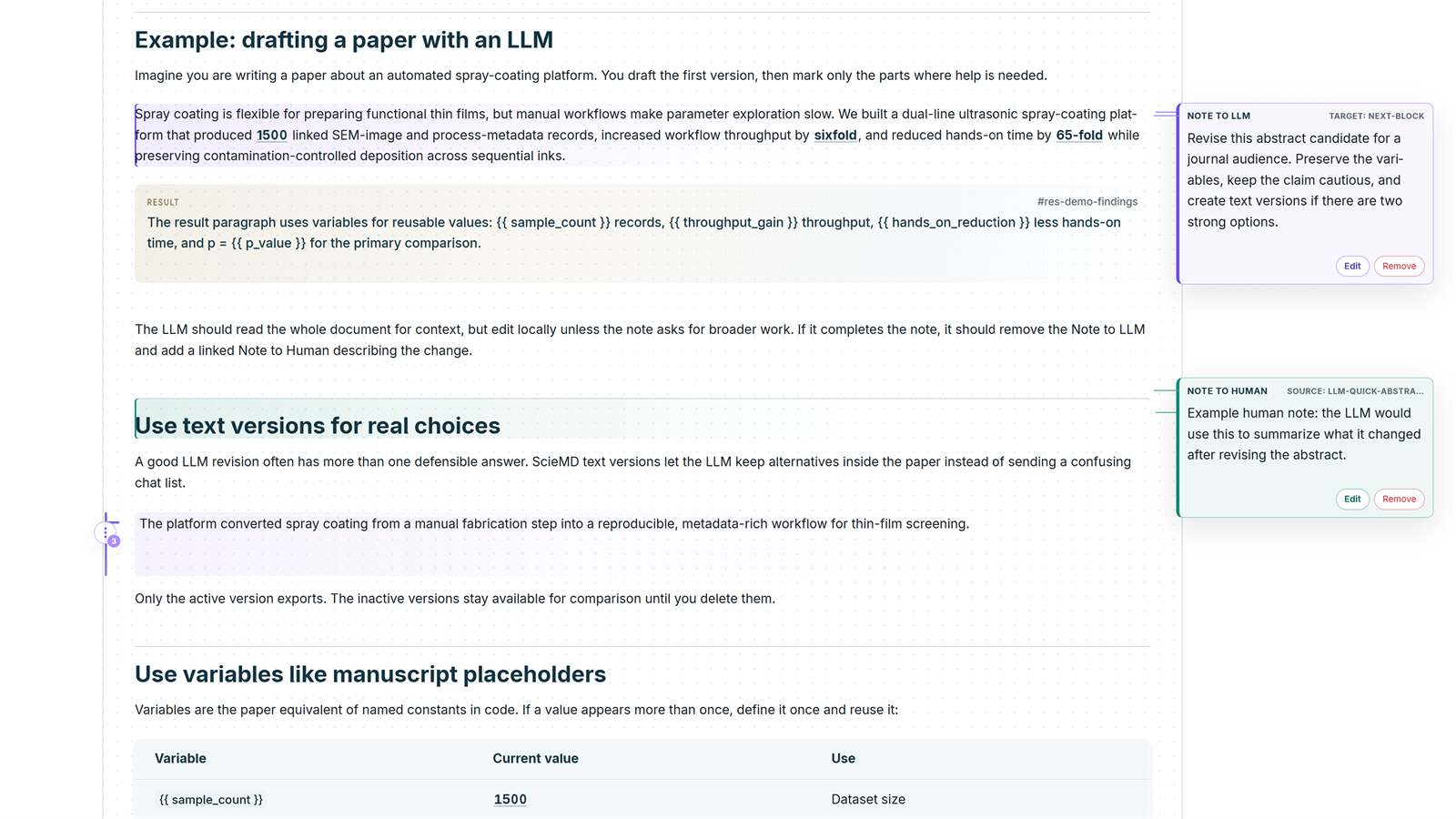
Human visual editing in a light manuscript-style view:
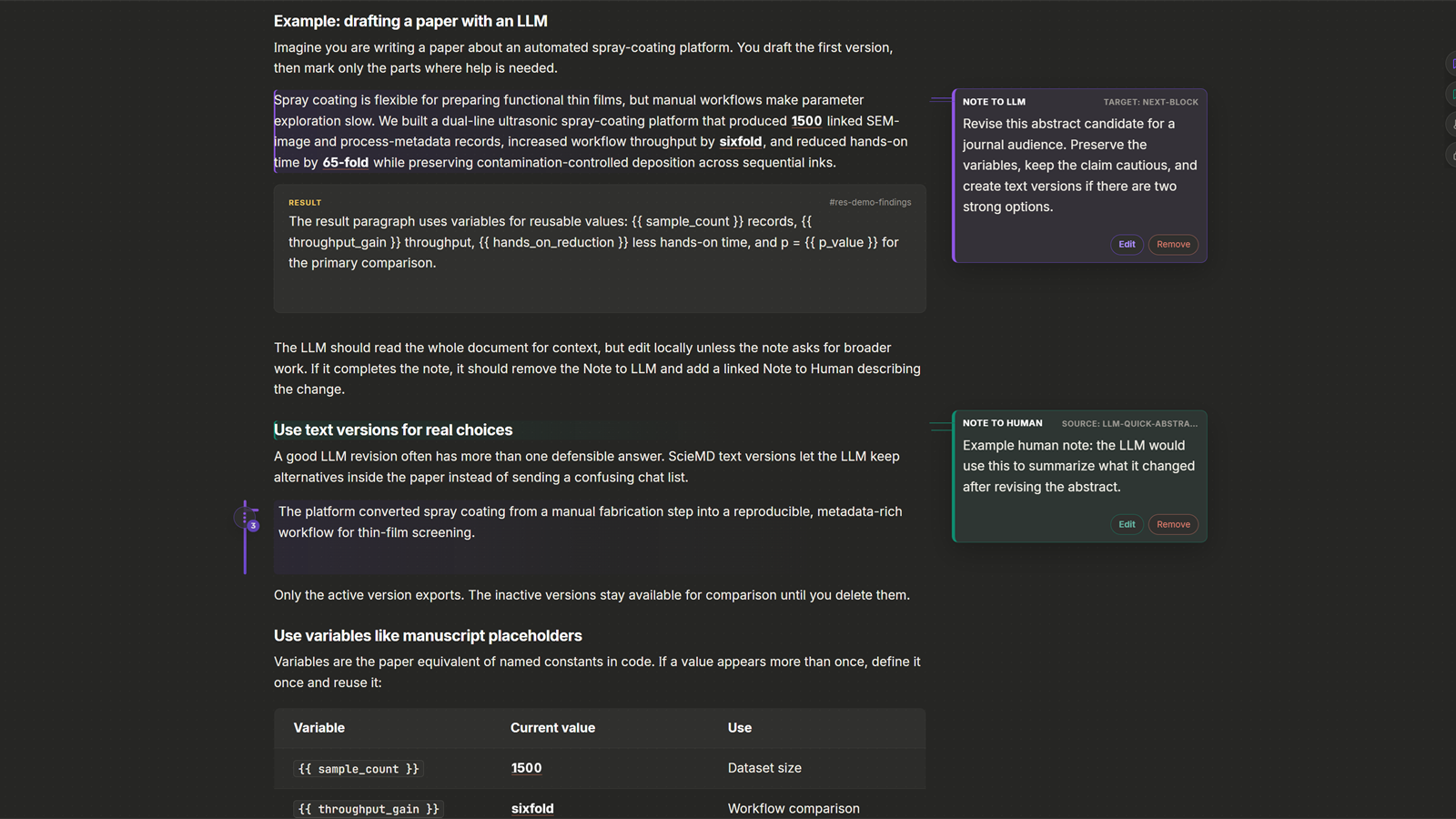
Human visual editing in a dark writing style:
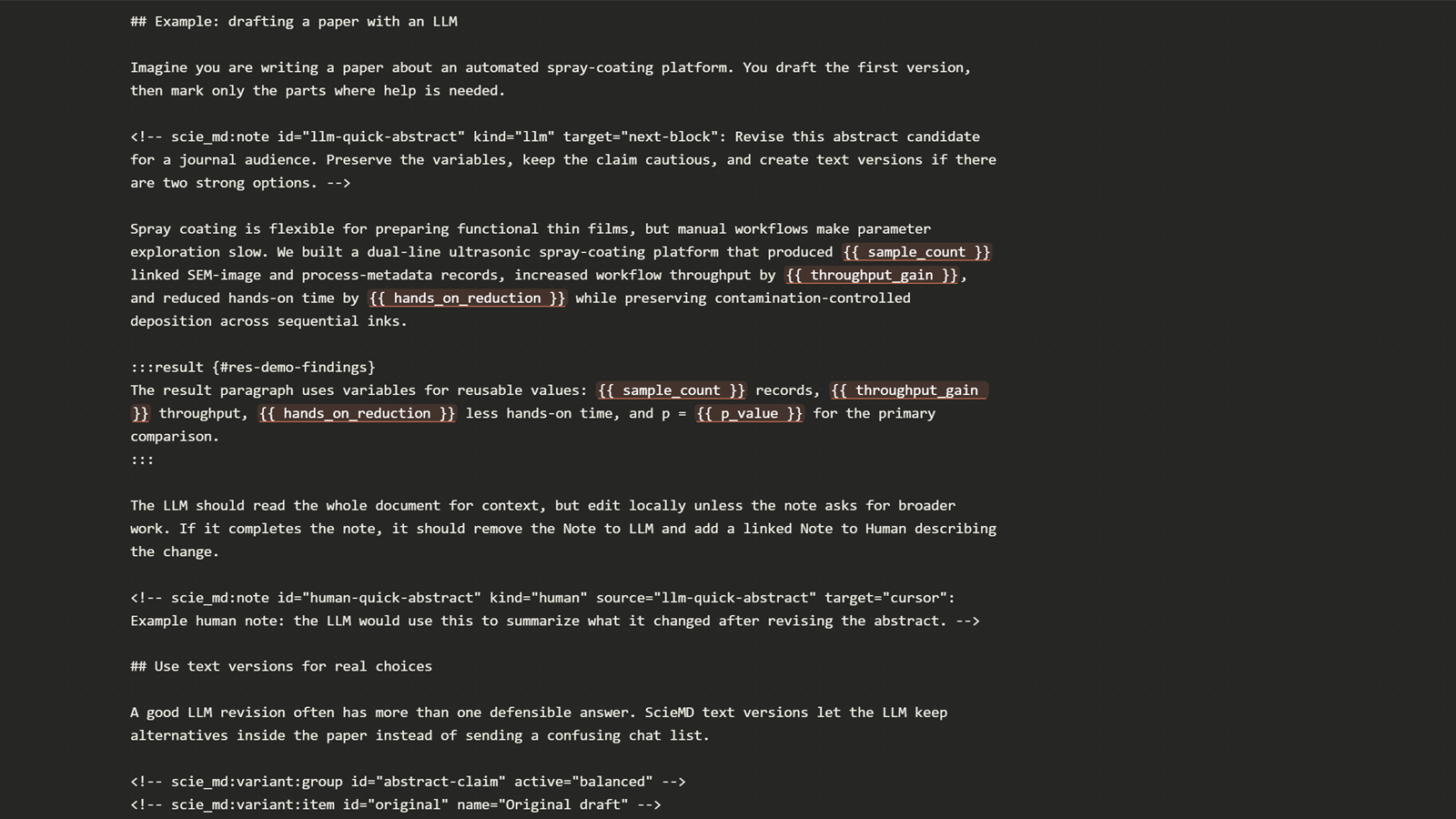
Source mode shows the same document as plain Markdown, including the comments,
variables, and text-version markers an external LLM can read and edit:
This VS Code extension brings the ScieMD visual editor into VS Code. The full
ScieMD product is primarily a Rust/Tauri desktop application from Scienfy Inc.,
with installable Windows and macOS builds published on GitHub:
Use the desktop app when you want the complete local-first ScieMD experience,
including desktop packaging and export workflows. Use this VS Code extension when
your writing project already lives in VS Code and you want to open .md files in a
scientific visual editor without leaving your workspace.
Scientific Markdown
ScieMD keeps Markdown as the source of truth. Your file remains readable plain text,
but the editor gives you a document-like writing surface for scientific work.
It supports:
.md, .scie.md, and .sciemd.md documents.- Visual editing and source editing in the same custom editor.
- LaTeX-style math rendering through KaTeX.
- Mermaid diagrams.
- Tables, task lists, code blocks, links, images, blockquotes, and common Markdown
structures.
- Rich copy from visual mode, including headings, emphasis, links, bullets, and
numbered-list structure when pasting into rich-text applications.
- Scientific ScieMD blocks such as notes, results, figures, callouts, tips,
important notes, and warnings when used in ScieMD Markdown.
- Variable insertion and variable expansion for reusable manuscript values.
Markdown is a strong format for hybrid human and LLM writing because it is portable,
transparent, easy to diff, and easy for external LLMs to read without a proprietary
document parser.
How ScieMD Compares
| Feature |
ScieMD |
Markdown All in One |
Markdown Preview Enhanced |
| WYSIWYG visual editing |
Yes |
No |
No |
| Plain Markdown source of truth |
Yes |
Yes |
Yes |
| Scientific blocks for figures, results, and notes |
Yes |
No |
Partial |
| Multiple manuscript visual styles |
Yes |
No |
No |
| Text versions inside the document |
Yes |
No |
No |
| LLM-aware notes stored in Markdown |
Yes |
No |
No |
| LaTeX-style math preview |
Yes |
No |
Yes |
| Mermaid diagrams |
Yes |
No |
Yes |
Hybrid Writing With LLMs
ScieMD does not send your writing to an LLM by itself. Instead, it helps you prepare
clean, explicit instructions for an external LLM while keeping control in your hands.
Useful commands:
- Insert note inside the editor to leave a direct instruction beside the
paragraph, section, or selected sentence that needs revision.
- Copy ScieMD LLM Skill to copy guidance that teaches an LLM how to preserve
ScieMD Markdown markers.
- Generate ScieMD_LLM_skill.md Beside Document to create a reusable instruction
file next to your manuscript.
A practical workflow:
- Write normally in Markdown or visual mode.
- Add notes where you want help, for example "tighten this
abstract", "keep the claim cautious", or "suggest two shorter title versions".
- Copy the relevant Markdown and the ScieMD LLM skill into your preferred LLM.
- Paste the revised Markdown back into VS Code.
- Review the change before saving.
This keeps the LLM workflow visible in the document instead of hidden in a chat log.
Visual Reading And Writing Styles
ScieMD can show the same Markdown document in different visual styles so you can
quickly evaluate how the writing feels in different contexts.
Included style modes:
- Cursor
- Lab Notebook
- Codex
- Scienfy
- Science-inspired
- Nature-inspired
- Claude-inspired
This is useful when a manuscript needs to move between rough notes, lab records,
preprint drafts, review-style reading, and journal-like presentation.
Text Versions
Scientific writing often needs several candidate phrasings before one is selected.
ScieMD supports text versions stored in Markdown comments, so you can keep alternate
abstracts, titles, claims, or paragraph revisions in the same file and switch the
active version visually.
Use text versions for:
- Abstract variants.
- Short and long titles.
- Alternative interpretations of a result.
- Reviewer-response wording.
- Human draft versus LLM-assisted revision.
How To Use The Extension
After installing the extension, opening a .md, .markdown, .scie.md, or
.sciemd.md file in VS Code opens it in the ScieMD visual editor by default.
If you previously changed your VS Code editor association for Markdown files, or
if another extension has already claimed Markdown as its default editor, use one
of these fallback workflows.
Explorer fallback:
- In the VS Code Explorer, find your
.md, .markdown, .scie.md, or .sciemd.md file.
- Right-click the file.
- Select Open With ScieMD.
If the Markdown file is already open in another editor:
- Right-click in the editor title area or use the editor context menu.
- Select Open With ScieMD.
Command Palette workflow:
- Open a Markdown file.
- Press
Ctrl+Shift+P on Windows/Linux or Cmd+Shift+P on macOS.
- Search for Open With ScieMD.
- Run the command.
VS Code's built-in Reopen Editor With... command may also show ScieMD
Markdown Editor as an available editor for Markdown files.
Once the file is open in ScieMD:
- Use visual mode when you want to write and read like a document.
- Switch to source mode when you want direct Markdown control.
- Use the style selector to move between scientific, journal, lab notebook, and
other visual modes.
- Add notes when a specific passage needs external LLM help.
- Open the Data panel when you want to inspect variables or insert a new variable.
- Create text versions when you want to compare alternate titles, abstracts, or
paragraph revisions.
- Use the bottom status bar for live word/line counts and document zoom from 30%
to 200%.
- Save normally with VS Code.
The Markdown file remains the source of truth. Edits made in the ScieMD webview are
written back to the VS Code text document, so normal save, dirty state, undo/redo,
and external document change behavior still follow VS Code's editor model.
Install The Desktop App
Many users should start with the desktop app rather than the extension.
- Open https://github.com/scienfy/scie-md/releases/latest
- Expand Assets.
- Download the installer for your operating system:
- Windows:
ScieMD_*_x64-setup.exe
- macOS Apple Silicon:
ScieMD_*_aarch64.dmg
- macOS Intel or mixed environments:
ScieMD_*_universal.dmg
- Linux:
ScieMD_*_amd64.AppImage or ScieMD_*_amd64.deb
- Install and open ScieMD.
The GitHub Code button is for source code. Regular users should use release
assets.
Install This VS Code Extension
From the Marketplace, choose Install.
If you downloaded a .vsix file manually:
- Open VS Code.
- Go to Extensions.
- Choose Install from VSIX... from the Extensions menu.
- Select
sciemd-vscode-*.vsix.
- Open a Markdown file. VS Code opens it with ScieMD by default.
Command-line installation:
code --install-extension sciemd-vscode-2.0.0.vsix --force
Who This Is For
ScieMD is designed for:
- Researchers writing papers, preprints, reports, and review notes.
- Graduate students writing theses and dissertation chapters.
- Labs keeping Markdown-based notebooks and reproducibility records.
- Technical writers who need math, diagrams, citations, and structured notes.
- Writers who use external LLMs but want the document file to remain transparent.
It is not meant to replace every Markdown extension. It is focused on scientific and
academic writing where visual structure, Markdown portability, and LLM-readable
source files matter.
Current Extension Scope
Implemented in this VS Code extension:
- Custom editor for
.md, .scie.md, and .sciemd.md.
- Command-based structured previews for JSON, JSONL/NDJSON, YAML, TOML, and XML
without replacing VS Code's default structured-data editors.
- Real ScieMD visual editor using Milkdown/ProseMirror.
- Source mode using CodeMirror.
- Cursor, Lab Notebook, Codex, Scienfy, Science-inspired, Nature-inspired, and
Claude-inspired visual styles.
- Bundled Google Sans Flex for Cursor, updated Scie Sans/Scie Sans Text families,
and a VS Code-host-font source stack with IBM Plex Mono fallback.
- VS Code-aware light and dark theme handling, with manual theme overrides.
- Persistent 30%-200% document zoom with live word and line counts.
- Rich visual-mode clipboard serialization for formatted text and lists.
- Variable expansion, with variable insertion available from the Data panel.
- Note insertion for external LLM review.
- Text version insertion.
- Save and writeback through VS Code documents.
- External document change detection with a review path.
- Retained custom-editor contexts for low-latency returns to open ScieMD tabs.
Desktop-only features, including Tauri-native dialogs, exports, multi-document
workspace/recovery ownership, and the native source-preserving YAML/TOML/XML visual
mutation planners, remain in the ScieMD desktop app. The extension deliberately
keeps structured previews read-only and leaves freeform structured source editing
to VS Code, so it never emulates a second native writer.
Open Source And License
ScieMD is open source software with dual licensing:
- Open-source license: GNU Affero General Public License v3.0 or later
(
AGPL-3.0-or-later).
- Commercial license: available from Scienfy Inc. for proprietary, closed-source,
embedded, hosted, white-label, enterprise, or other AGPL-incompatible use.
Commercial licensing inquiries: info@scienfy.com
Contributing
The extension source is part of the ScieMD repository:
https://github.com/scienfy/scie-md
Bug reports and feature requests are welcome through GitHub Issues.
Developer Notes
This section is for contributors working on the extension internals.
src/extension is the VS Code adapter. It registers the custom editor, applies
edits through WorkspaceEdit, handles save/dirty state, watches document changes,
and owns clipboard/file-system commands.src/webview is the VS Code webview host for the ScieMD editor.src/scie-md is the copied ScieMD app/editor core used by the webview.src/shared keeps shared Markdown and LLM utilities used by the extension host
and tests.
Build and test:
npm install
npm run test
npm run build
npm run package
The package command creates sciemd-vscode-2.0.0.vsix in this folder.

