Short Circuit
LogicFlow language support and an interactive digital-logic studio, right inside VS Code.
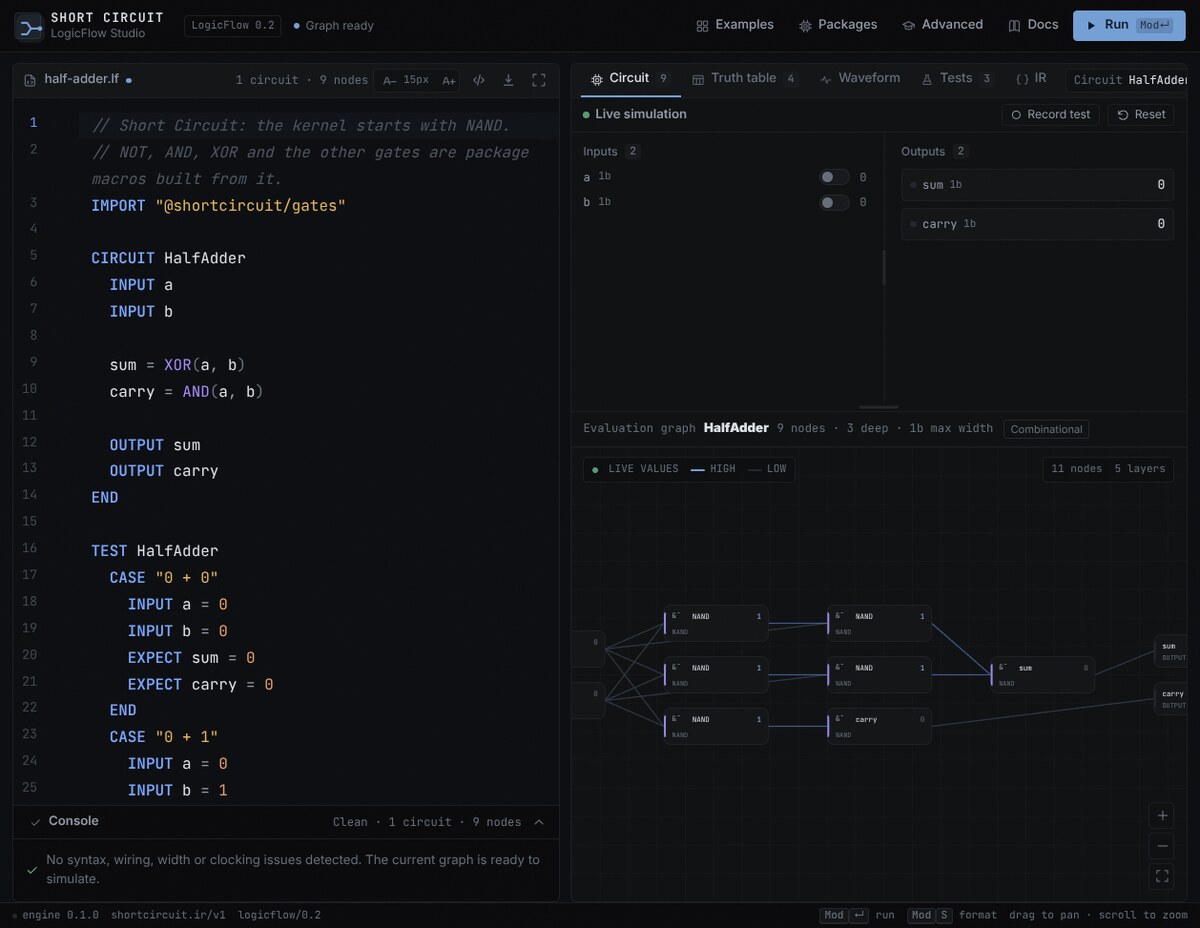
Describe circuits as graphs of named signals, validate them statically, simulate them with live inputs, and inspect waveforms, truth tables, and test results without leaving the editor.
Features
- LogicFlow language support — syntax highlighting, diagnostics, completions, hovers, and formatting for
.lf files.
- Interactive studio — edit code and inspect the live dependency graph side by side.
- Live simulation — toggle inputs and watch signal values update through the circuit.
- Waveforms — inspect signal transitions over time.
- Truth tables — enumerate outputs for combinational circuits.
- In-source tests — run
TEST and CASE blocks from the editor and see pass/fail results.
- Package-aware — resolves imports such as
@shortcircuit/gates from the package registry or a local link.
- Editor integration — commands, keybindings, and a dedicated Short Circuit activity-bar view.
Quick start
- Install the extension.
- Open a
.lf file, or create one with the example below.
- Run Short Circuit: Open Interactive Studio from the Command Palette
(
Ctrl+Shift+P / Cmd+Shift+P), or click the Short Circuit icon in the
Activity Bar.
- Edit the circuit and use the studio to simulate, plot, and test it.
IMPORT "@shortcircuit/gates"

CIRCUIT HalfAdder
  INPUT a
  INPUT b

  sum = XOR(a, b)
  carry = AND(a, b)

  OUTPUT sum
  OUTPUT carry
END
Commands
| Command |
Shortcut |
| Short Circuit: Open Interactive Studio |
Ctrl+Shift+S / Cmd+Shift+S |
| Short Circuit: Open Waveform Preview |
Ctrl+Shift+W / Cmd+Shift+W |
| Short Circuit: Open Truth Table Preview |
Ctrl+Shift+T / Cmd+Shift+T |
| Short Circuit: Format Document |
Shift+Alt+F / Shift+Option+F |
| Short Circuit: Run Test |
Command Palette or editor context menu |
| Short Circuit: Run All Tests in File |
Command Palette or editor context menu |
Settings
| Setting |
Default |
Description |
shortcircuit.enablePreview |
true |
Enable waveform and truth-table previews. |
shortcircuit.test.autoRun |
false |
Run tests automatically when the document is saved. |
shortcircuit.registryUrl |
Short Circuit registry |
Registry used to resolve package imports. |
Packages
Short Circuit is package-aware. Import gates, arithmetic, selection, and other packages from the registry:
IMPORT "@shortcircuit/gates"
IMPORT "@shortcircuit/arithmetic"

CIRCUIT Add8Demo
  INPUT a[8]
  INPUT b[8]
  sum[8] = ADD8(a, b)
  OUTPUT sum
END
Packages can also be linked from a local directory. See the
package authoring guide.
Learn more
Requirements
- VS Code 1.85 or newer.
- A
.lf source file to open in the studio.
License
MIT

