NodeForge ⚡
Stop writing boilerplate. Start building products.
NodeForge is the ultimate productivity companion for backend developers. It transforms hours of repetitive setup into seconds of automated generation. Whether you are bootstrapping a fresh project or scaling an existing one, NodeForge builds high-quality, professional-grade Node.js/Express layers tailored to your specific architecture.
With a powerful Interactive Sidebar, NodeForge puts the power of complex scaffolding directly at your fingertips. Choose your language, your database, and your architectural patterns with a single click.
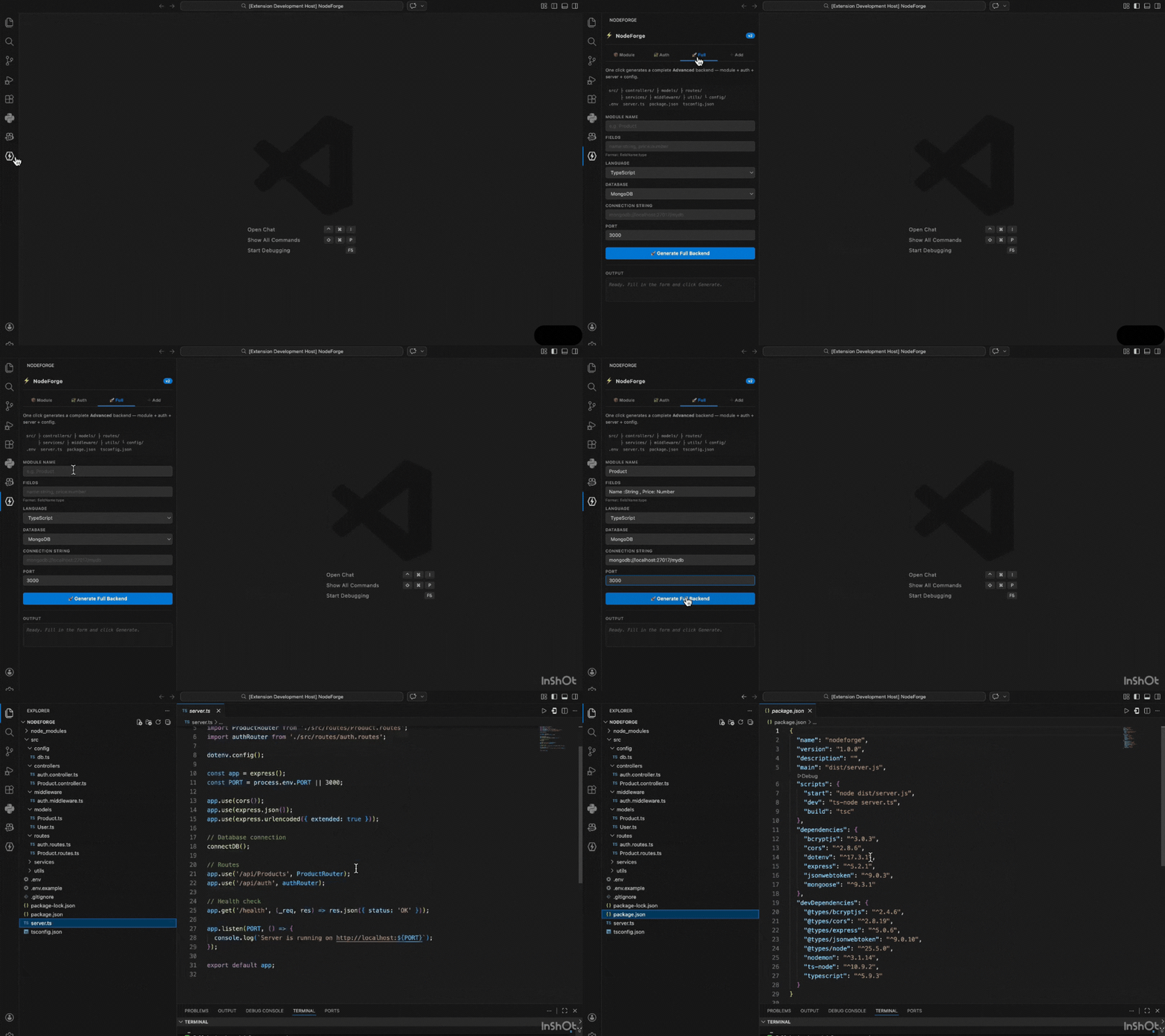
What Makes NodeForge Different
| Feature |
NodeForge |
Basic snippet tools |
| Full project scaffold |
✅ |
❌ |
| JWT Auth generation |
✅ |
❌ |
| Multi-DB support (Mongo, MySQL, Postgres) |
✅ |
❌ |
| JS + TypeScript |
✅ |
Partial |
| Auto-detects existing project & patches server |
✅ |
❌ |
| 3 folder architecture presets |
✅ |
❌ |
| Interactive sidebar UI |
✅ |
❌ |
🚀 Core Features
- Full Managed Scaffolding: Generate an entire production-ready backend in seconds.
- Multi-Database Support: Seamless integration for MongoDB (Mongoose), MySQL (mysql2), and Postgres (pg).
- Bilingual Base: Native support for both JavaScript and TypeScript (including automatic type definition installs).
- JWT Authentication: One-click generation of Secure Auth modules (User Model, Controllers, Middleware, and Route protection).
- Smart "Add Module" Logic: Already have a project? NodeForge auto-detects your existing language, database, and folder structure to inject new CRUD modules and update your
server.ts or server.js automatically.
- Custom Environments: Configure Ports, Connection Strings, and 3 different Folder Architecture layouts.
1. Module Section (New Projects)
Perfect for starting a specific entity from scratch. This section allows you to define the DNA of your new project.
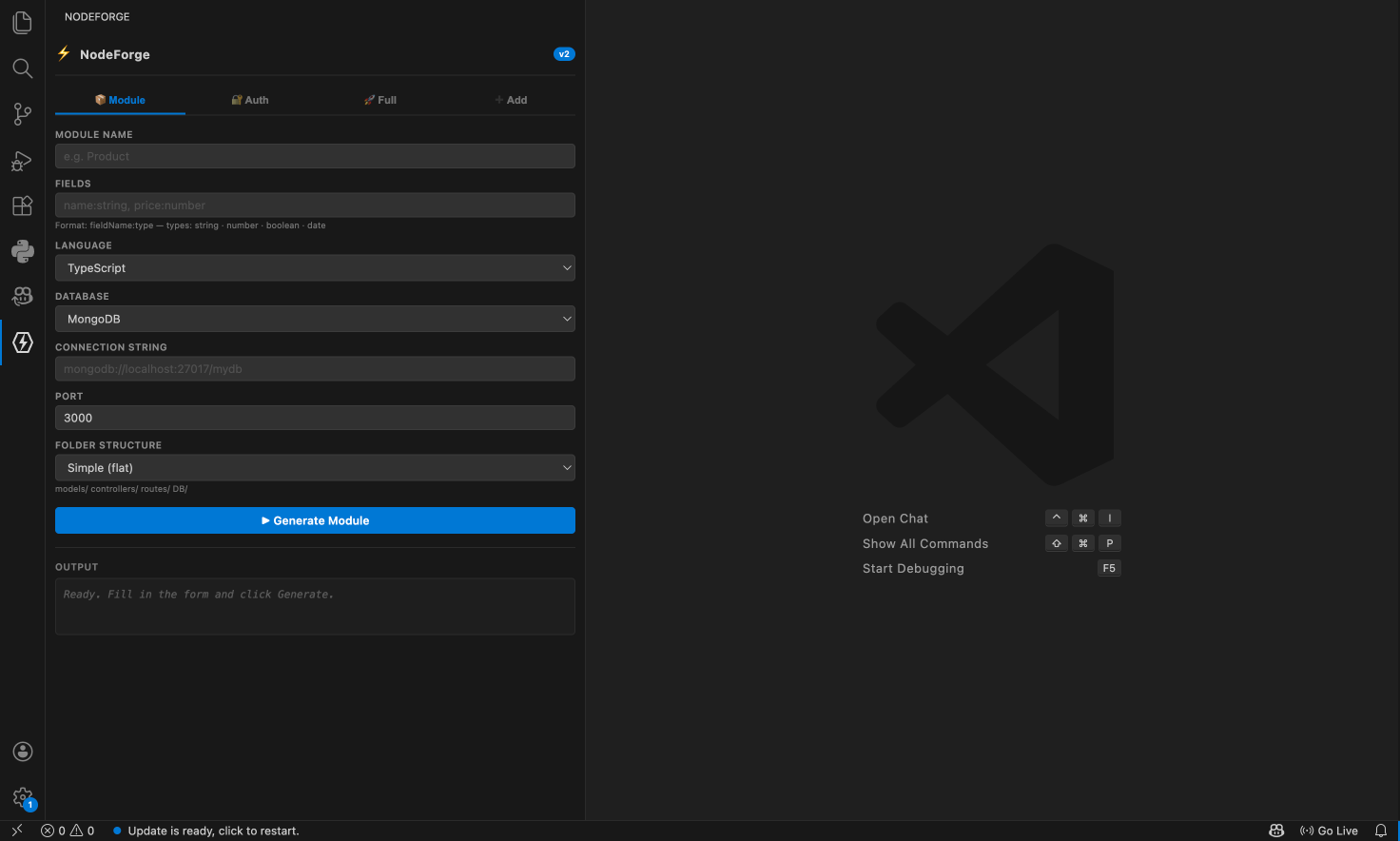
- Module Name: Name your entity (e.g.,
Product, Order).
- Fields: Define your schema in a simple string (
name:string, price:number).
- Language: Select between
JavaScript or TypeScript.
- Connection URI: Input your DB string (e.g.,
mongodb://localhost:27017/mydb).
- Port: Define your server's resting port.
- Folder Structure: Choose how your code is organized:
- Simple: Flat structure for small APIs.
- Advanced: Clean
src/ layout with separated concerns.
- Clean Architecture: Enterprise-ready separation of Presentation, Domain, and Data.
2. Auth Section (Secure your App)
Easily add a security layer to any existing project.
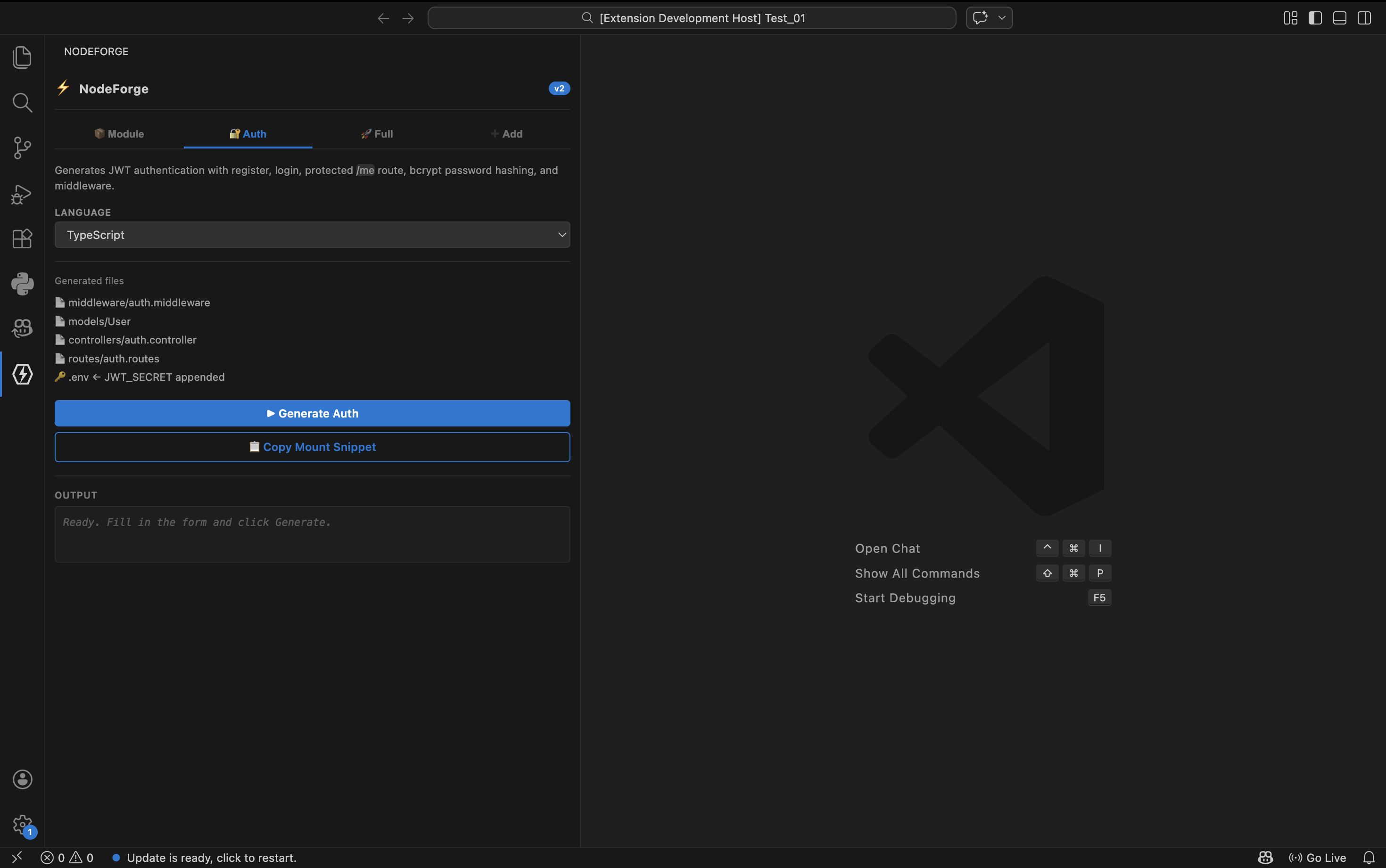
- Language Selection: Just pick your project's language, and NodeForge will write the
bcrypt and jsonwebtoken logic for you, including specialized middleware and .env configuration.
3. Full Backend Section (The Powerhouse)
Need a complete API with security out of the box? This generates the "Gold Standard" advanced backend.
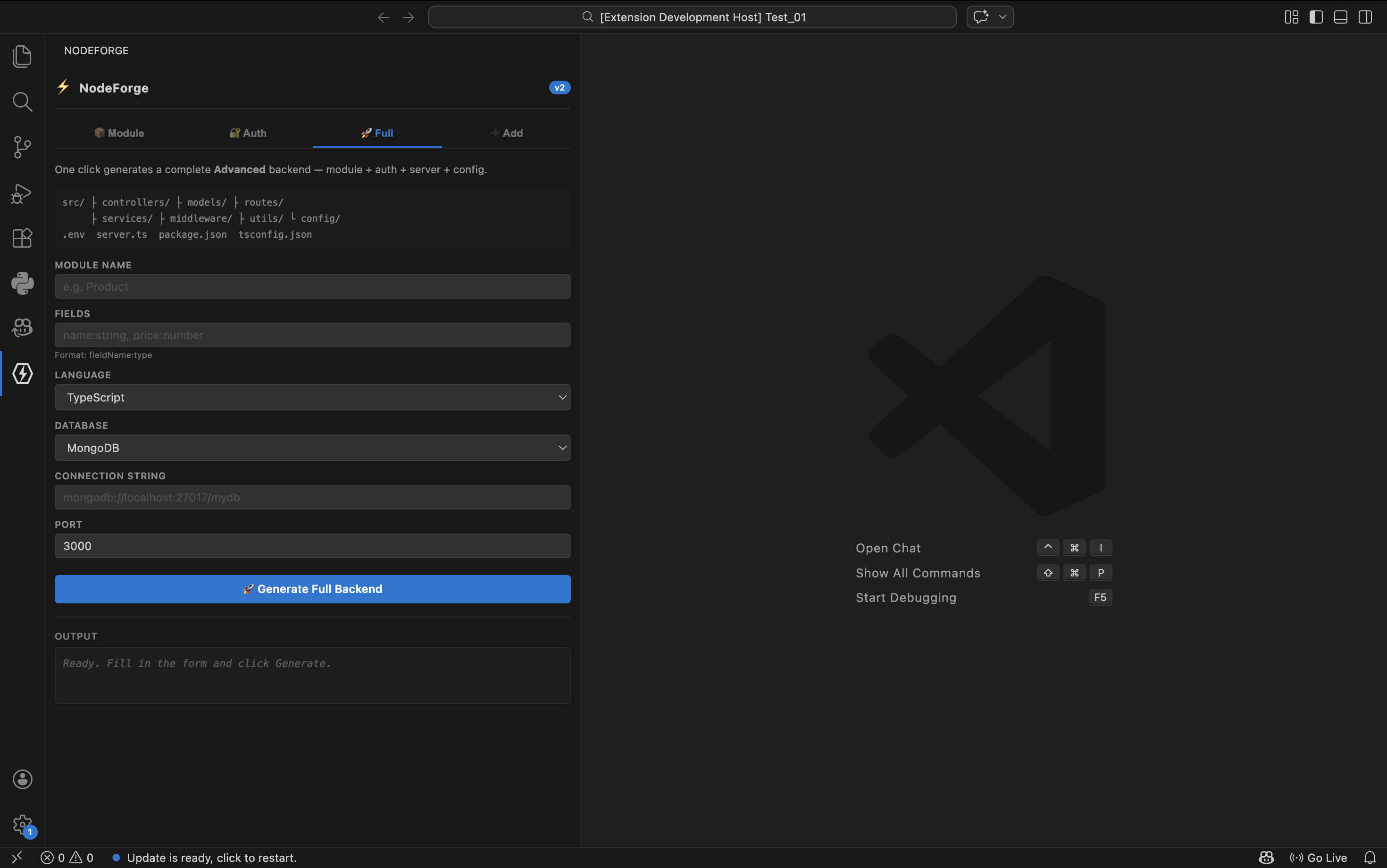
- Module Name & Fields: Set up your primary entity.
- Database Choice: Pick your engine.
- Result: Generates the Module + User Auth + JWT protection + Server Auto-configuration in an Advanced (/src) layout.
The smartest feature in NodeForge. It reads your current workspace to understand how you code.
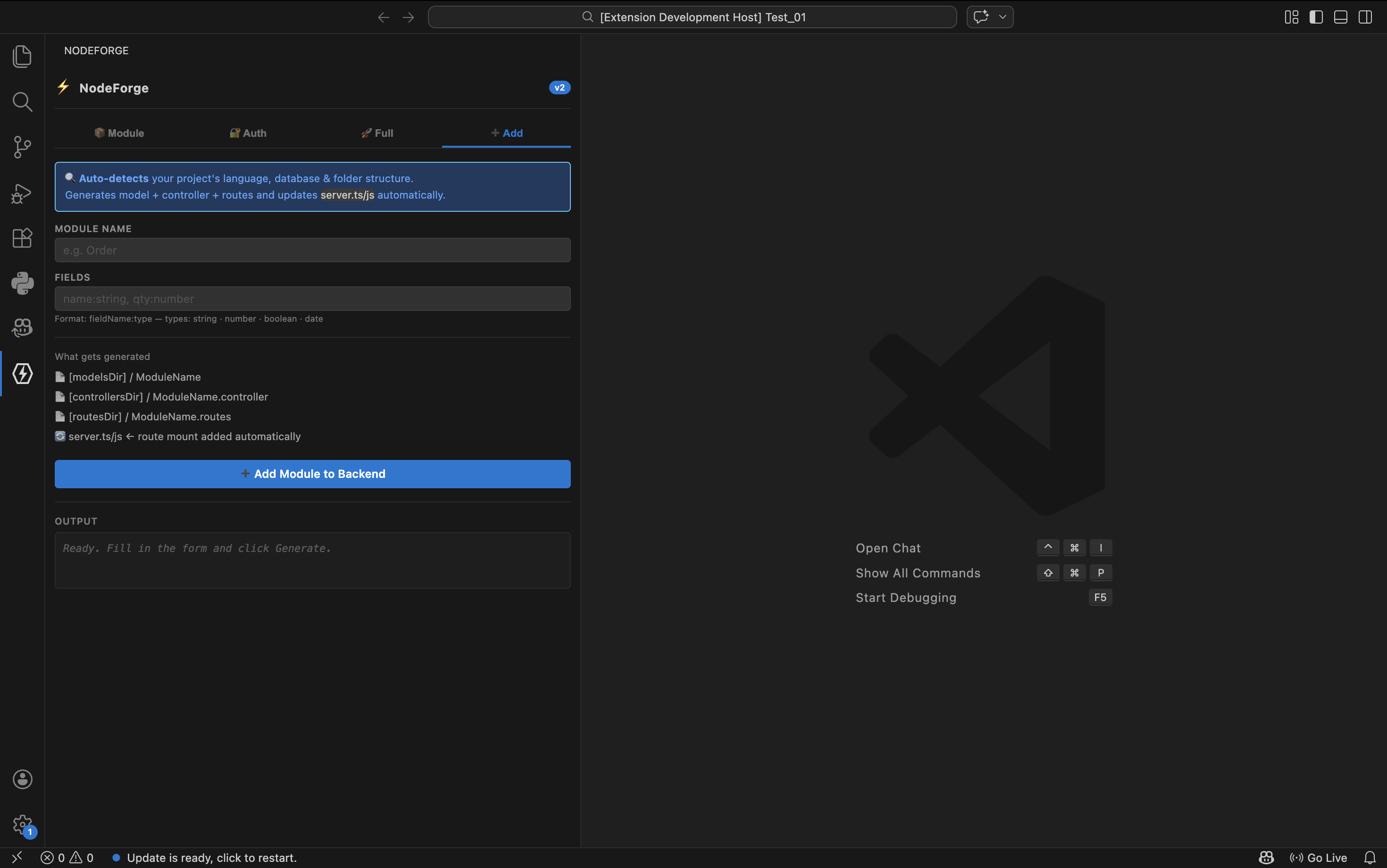
- Auto-Detection: It figures out if you are using TypeScript or JS, which database driver is installed, and where your folders are.
- Zero-Config Update: It generates the files and patches your server file so the new routes are immediately live.
How to Use
- Open the NodeForge icon in the Activity Bar.
- Choose your generation mode (Module, Auth, Full, or Add).
- Fill in your details and hit Generate.
- Run
npm install and npm run dev in the terminal that pops up!
What Gets Generated (Example: Full Backend, TypeScript, MongoDB, Advanced)
├── src/
│   ├── config/
│   │   └── db.ts               ← Mongoose connection
│   ├── models/
│   │   ├── Product.ts          ← Your entity model
│   │   └── User.ts             ← Auth user model (bcrypt)
│   ├── controllers/
│   │   ├── product.controller.ts
│   │   └── auth.controller.ts  ← register / login / getMe
│   ├── routes/
│   │   ├── product.routes.ts
│   │   └── auth.routes.ts
│   ├── middleware/
│   │   └── auth.middleware.ts  ← JWT verification
│   └── utils/
├── server.ts                   ← Fully wired entry point
├── .env                        ← PORT, DB_URI, JWT_SECRET
└── tsconfig.json
Requirements
- VS Code 1.75 or later
- Node.js 16 or later
- npm installed and accessible on your
PATH
Known Limitations
- The Add module feature requires a workspace folder to be open.
Full Backend always uses the Advanced (src/) folder layout.- Field types are limited to
string, number, boolean, and date.
Release Notes
1.0.0
- Initial release with Module, Auth, Full Backend, and Add Module generation.
- Support for MongoDB (Mongoose), MySQL, and PostgreSQL.
- JavaScript and TypeScript output.
- Smart project auto-detection for the Add tab.
🙌 Contributing & Feedback
Found a bug or have a feature request? Open an issue on GitHub.
If NodeForge saves you time, please consider leaving a ⭐ review on the Marketplace — it helps other developers find the extension.
Happy Coding! 🚀
| |

