Skip to content
| Marketplace
Sign in
Visual Studio Code>Other>Markdown Review PaneNew to Visual Studio Code? Get it now.
Markdown Review Pane

Markdown Review Pane

Sabhahith Works

|
1 install
| (1) | Free
Comment on markdown documents and hand your review to any AI agent.
Installation
Launch VS Code Quick Open (Ctrl+P), paste the following command, and press enter.
Copied to clipboard
More Info

Markdown Review

Comment on any markdown file — a PRD, an ADR, a README, a design doc — and hand the review to any agent. Claude Code, Copilot, Cursor, Gemini, Codex. No integration, no plugin on their side, no setup beyond installing this.

Select a passage in a review pane, leave a comment the way you would in Google Docs. When you have said your piece, copy a prompt and paste it at whichever agent you already use. It edits the prose; the extension works out which comments got addressed by watching the file change.

Other tools have artifact commenting, but only for artifacts their own agent generated, inside their own product. This works on files you already have.

The loop

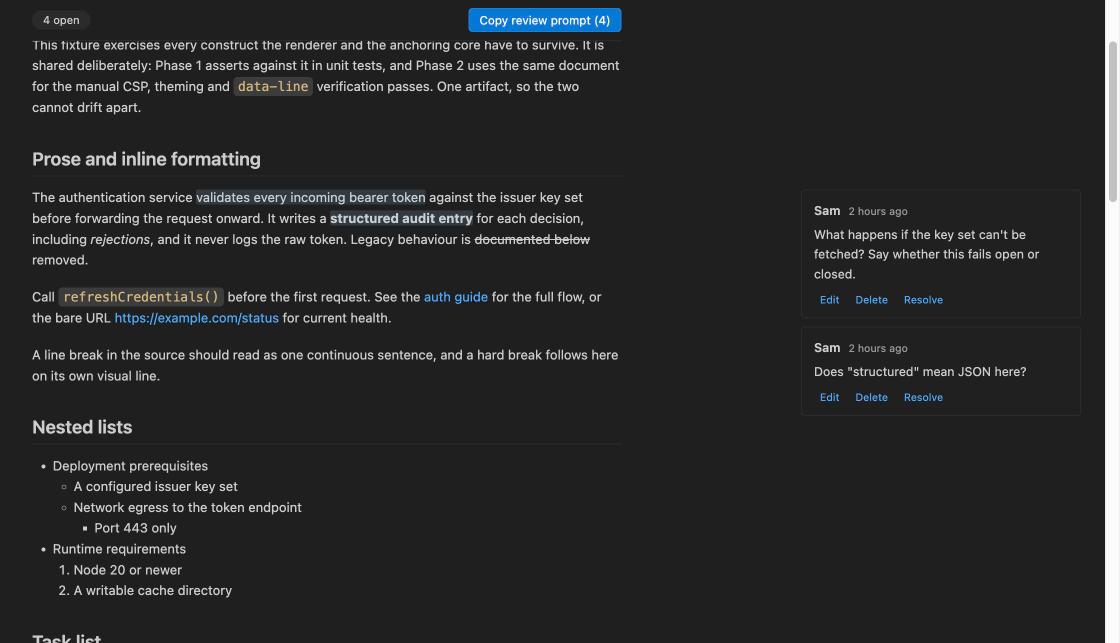
Comments in the review pane, aligned to the passages they are anchored to

  1. Open the review pane. Markdown Review: Open Review Pane, or the button in the editor title bar of any Markdown file.

  2. Comment. Select rendered text, click Comment, type, Cmd/Ctrl+Enter. Comments live in the margin, aligned to the passage they are anchored to.

  3. Copy the prompt and paste it at your agent, @-mentioning the file. You get plain prose:

    I've left review comments on `docs/auth.md`. Please revise the document to address them.
    
    Edit the file directly. Don't add annotations, comments, or replies — just make the changes.
    If you disagree with a comment or need clarification, tell me instead of guessing.
    
    1. On: "retries failed requests up to three times"
       > Three is arbitrary here. Is it configurable? If not, say so explicitly.
    
    2. On the section "## Error handling"
       > This doesn't cover timeouts at all.
    
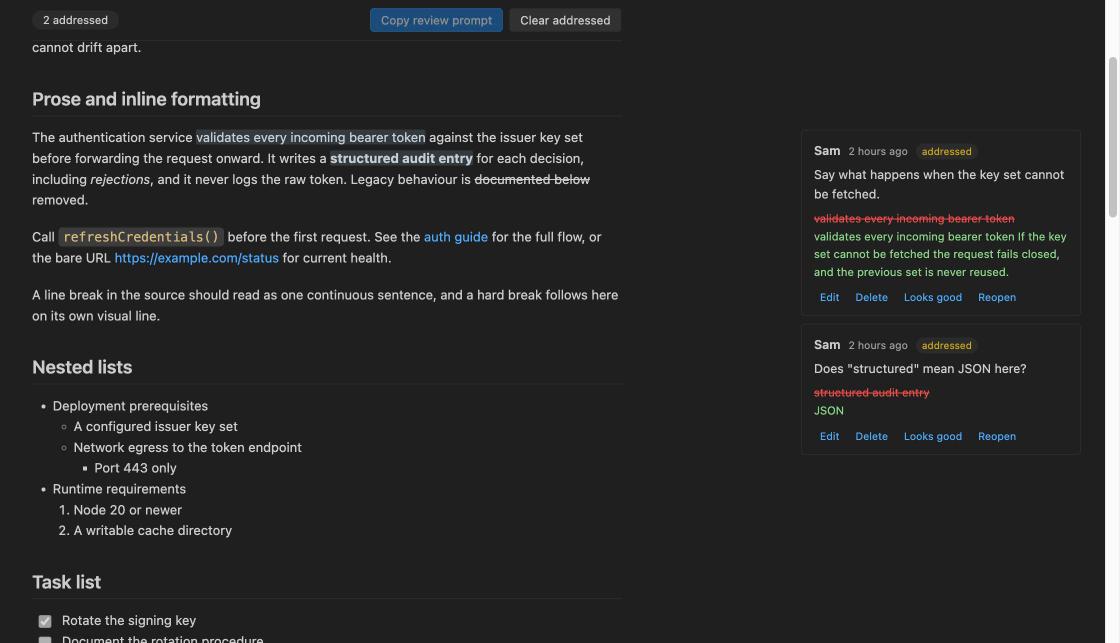
  4. Confirm. As the agent edits, cards flip to addressed and show you the before and after. Looks good resolves one; Reopen puts it back.

An addressed comment showing the previous text struck through and the agent's replacement below it, with Looks good and Reopen actions

The agent is never asked to write structured data, follow a schema, or preserve annotations — only to edit prose. All the bookkeeping is this extension's job. That is the whole reason it works with any agent at all.

How detection works — and what it does not promise

addressed is inferred, by comparing the text an anchor points at against a snapshot taken when you copied the prompt. It is a suggestion, not a verdict. You confirm it.

That means it is sometimes wrong in both directions: an agent can rewrite a sentence without addressing the point, and it can address the point somewhere else entirely. Two consequences the design takes seriously:

  • Nothing is ever deleted automatically. No comment, no sidecar, ever, for any reason. Comments you clear are backed up first.
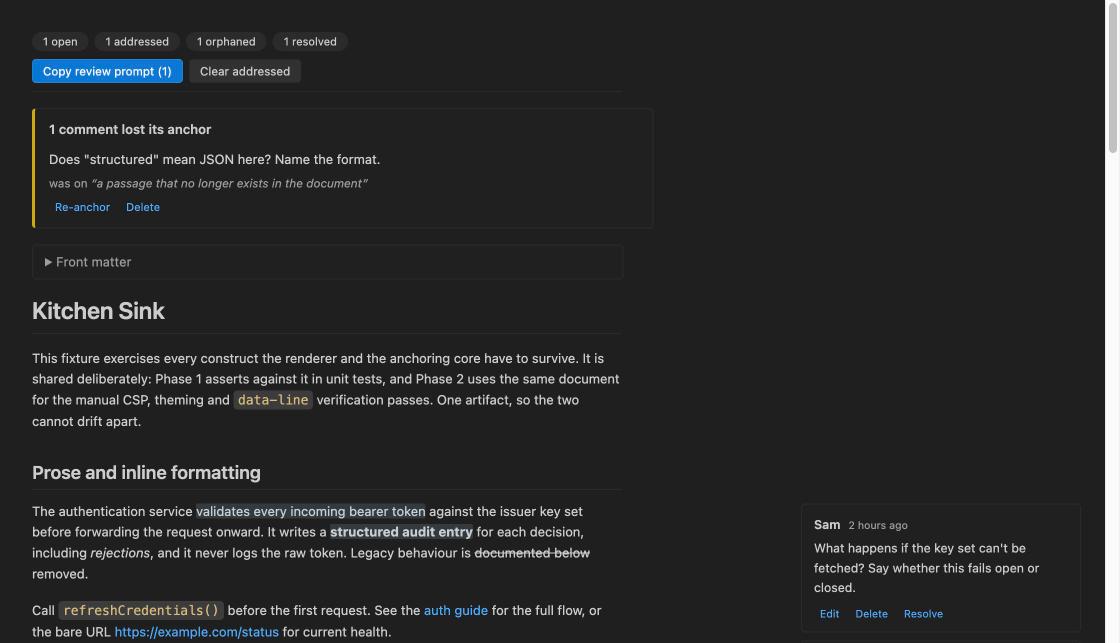
  • A comment that can no longer be found becomes orphaned, not resolved. It moves to a triage section showing the text it used to point at, and you can re-anchor it to a new passage by hand.

If the whole document is replaced, every comment orphans, a banner appears, and you can diff the snapshot against what is there now. Turn inference off entirely with markdownReview.autoDetectResolution if you would rather resolve everything by hand.

The header bar showing counts for open, addressed, orphaned and resolved, above an orphaned comment awaiting triage

Every status is a filter chip in the header, so you can narrow the pane to just what still needs you.

Settings

Setting Default What it does
markdownReview.author system username Name attached to your comments. Defaults to your system username.
markdownReview.storageLocation workspace workspace writes to .reviews/ (shareable via git). global keeps comments private to your machine.
markdownReview.autoDetectResolution true Mark comments as addressed when their anchored text changes.

Where your comments live

One JSON file per reviewed document, under .reviews/ in your workspace, named after the document with / flattened to __:

docs/specs/auth.md  →  .reviews/docs__specs__auth.md.json

Human-readable and versioned, so it diffs and merges like anything else in the repo — commit it and your review travels with the branch, or add .reviews/ to .gitignore and keep it to yourself. If a sidecar is ever corrupt, it is backed up to .json.bak and you are told, rather than silently discarded.

Set storageLocation to global to keep sidecars out of the repo entirely.

Privacy

No telemetry, no network requests, no analytics. Ever. Not opt-out — absent. The only thing that ever leaves your machine is the prompt you copy, to the agent you chose to paste it into.

This is checked rather than promised: scripts/check-bundles.mjs fails the build if either shipped bundle so much as contains fetch(, XMLHttpRequest, WebSocket, sendBeacon, EventSource or a Node networking require.

Not in v1

No comment threads or replies (one comment per anchor), no multi-user identity beyond a display name, no real-time collaboration, no reactions, no editing markdown in the preview, and no MCP server — that last one is a good v2 and is deliberately out of scope now.

Requirements

VS Code 1.90 or later.

License

MIT.

  • Contact us
  • Jobs
  • Privacy
  • Manage cookies
  • Terms of use
  • Trademarks
© 2026 Microsoft