AL Structure ExplorerExplore Business Central AL object structures and navigate to source code in .app packages. Installation Launch VS Code Quick Open ( Ctrl+P), paste the following command, and press enter.Copied to clipboard |

AL Structure ExplorerExplore Business Central AL objects in local .app packages and jump from their structure to the corresponding AL source. AL Structure Explorer is developed by SAN Business Solutions as a free Visual Studio Code extension. It works locally with its own .NET worker and a separately installed compatible Microsoft AL backend. No Business Central server, AI service or database is required. Version 1.0.2 · Free for personal and commercial use · Windows x64 What you can explore
Supported declarations:
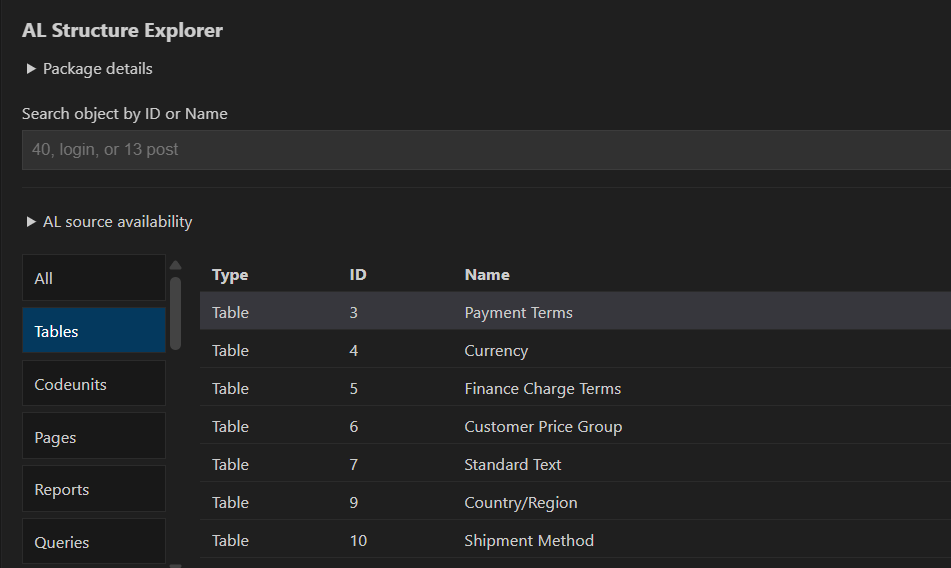
Depending on object type, the tree includes fields, keys, field groups, controls, actions, data items, columns, filters, request pages, rendering layouts, properties, procedures, triggers and events. Codeunit methods are grouped by category, with local/global visibility where applicable. Watch the full demo on YouTube ScreenshotsObject catalogBrowse package metadata and find AL objects by type, ID and name.
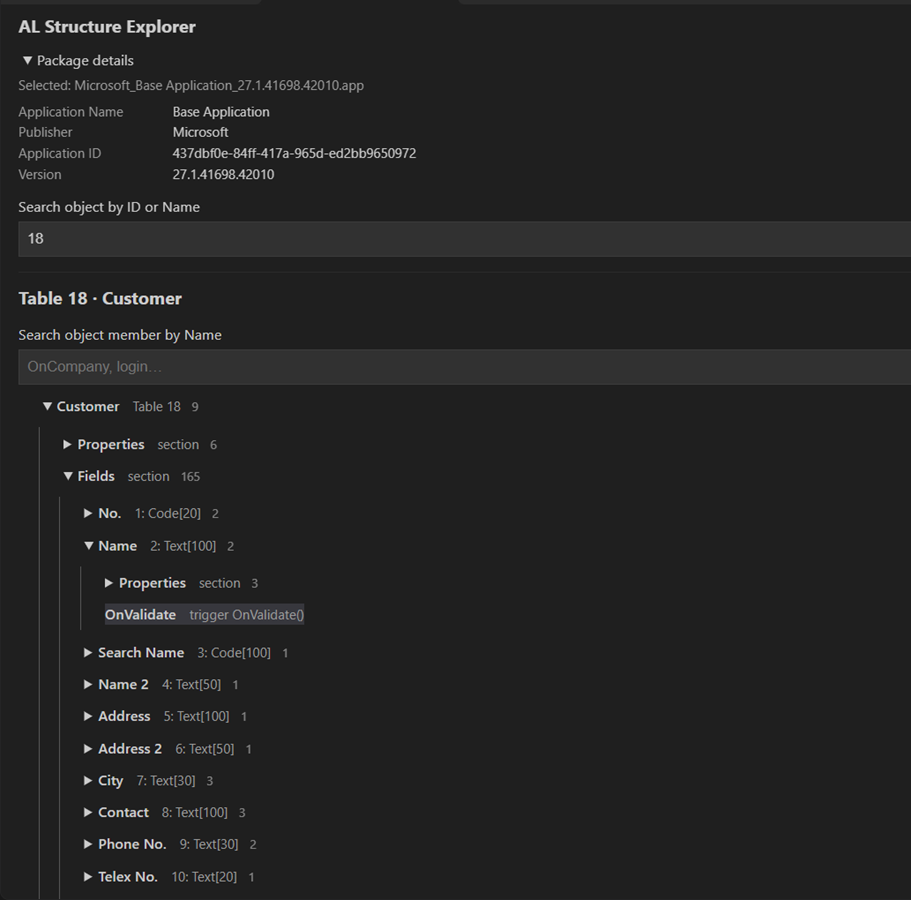
Structure treeExplore nested fields, properties and triggers in Table 18 Customer.
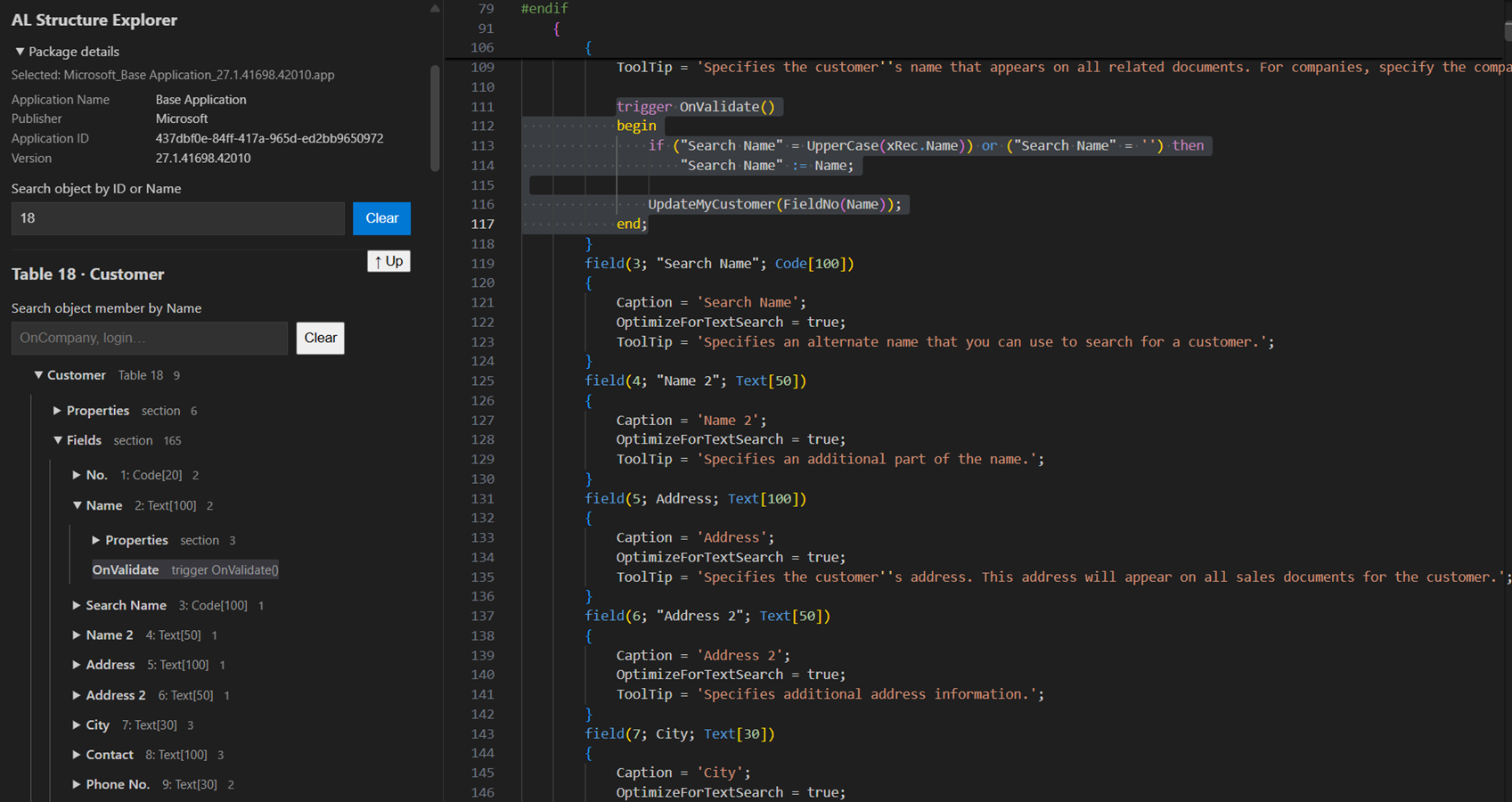
Navigate to AL sourceSelect a declaration to view and highlight its AL source on the right.
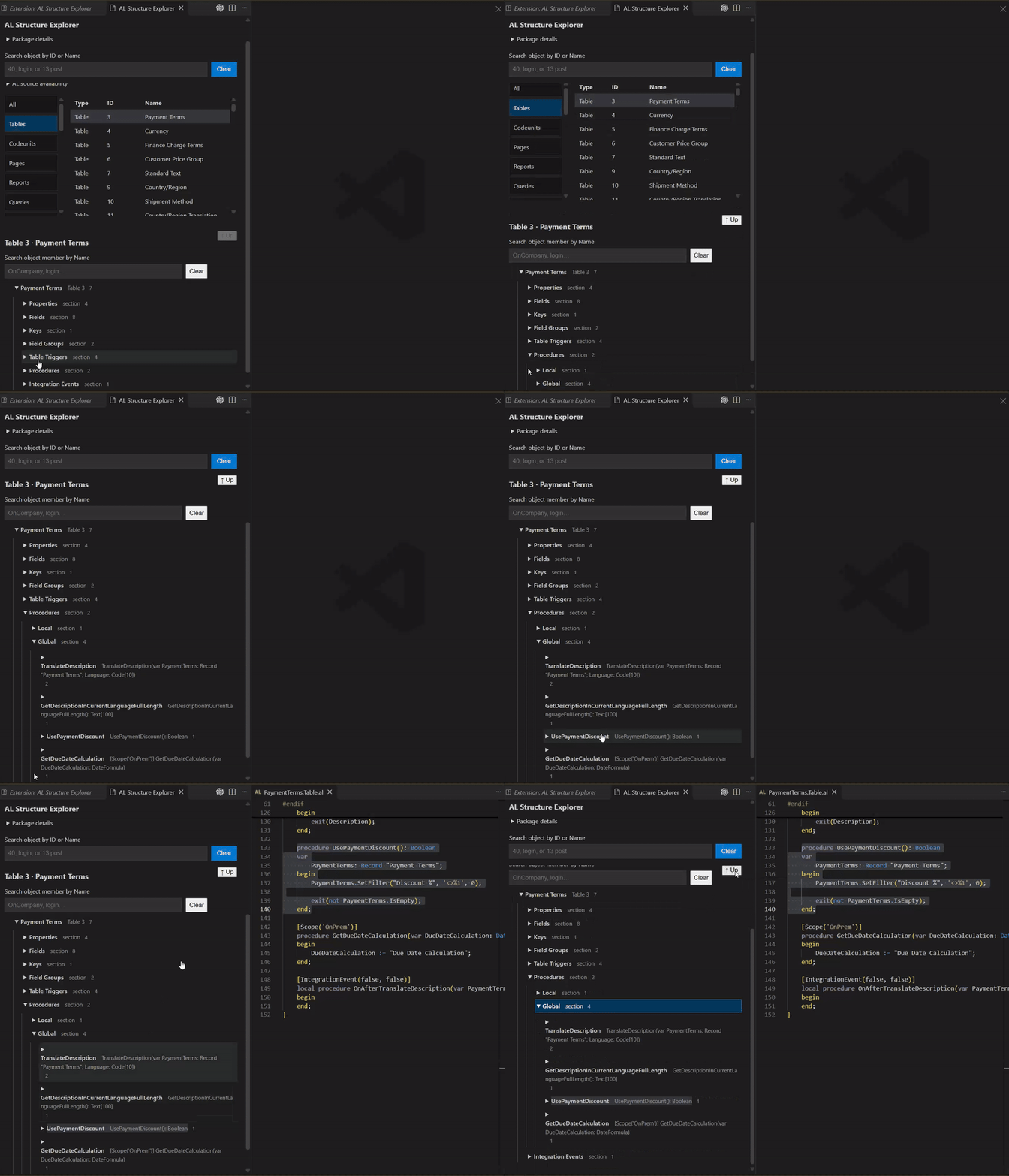
Examples show Microsoft Base Application 27.1.41698.42010. Displayed source and product names retain their respective ownership; these images do not imply Microsoft endorsement. Video demoThe following animated GIFs play without sound. Use the YouTube link above Screenshots for the full demonstration. Table procedure navigation
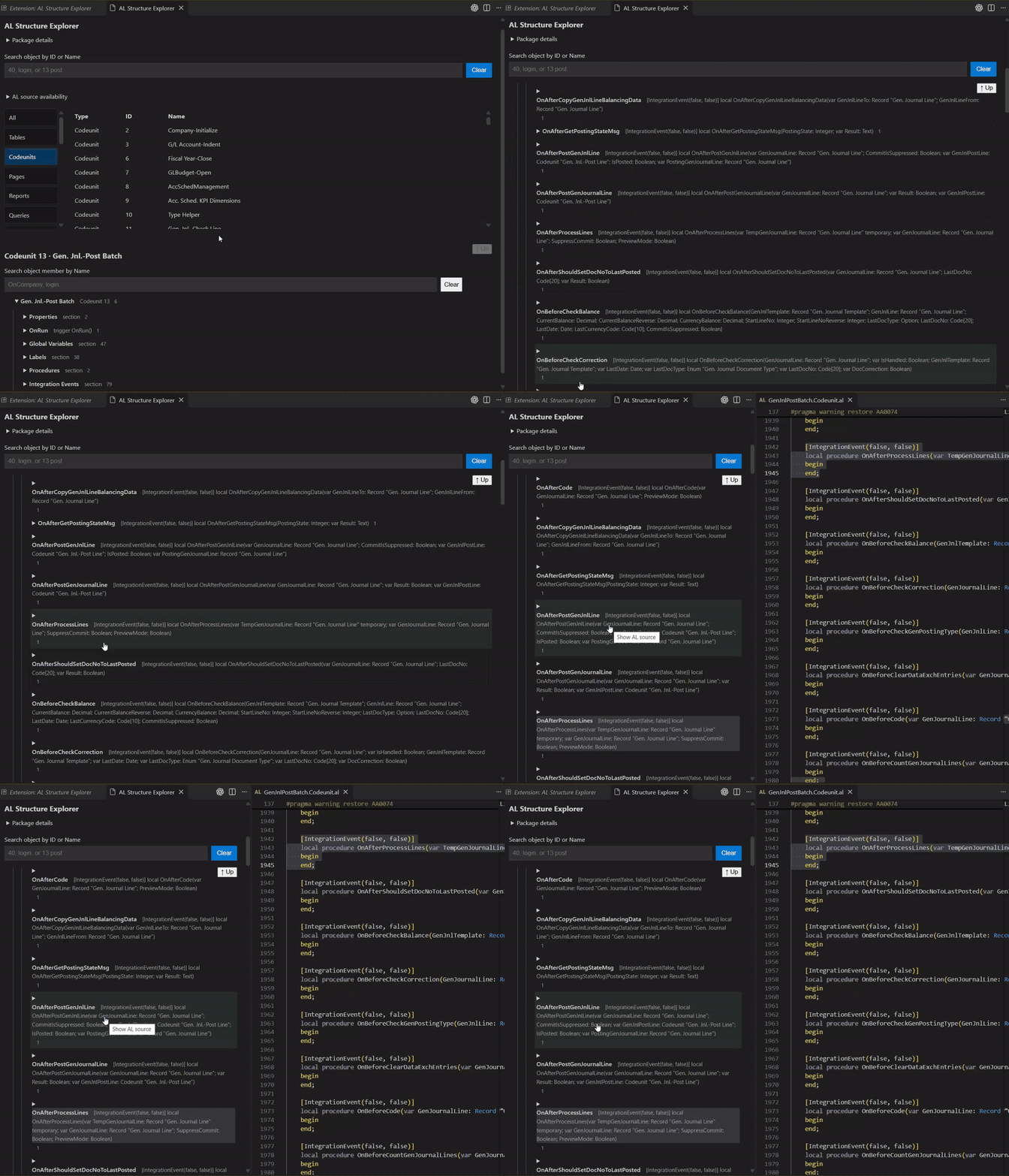
Codeunit integration events
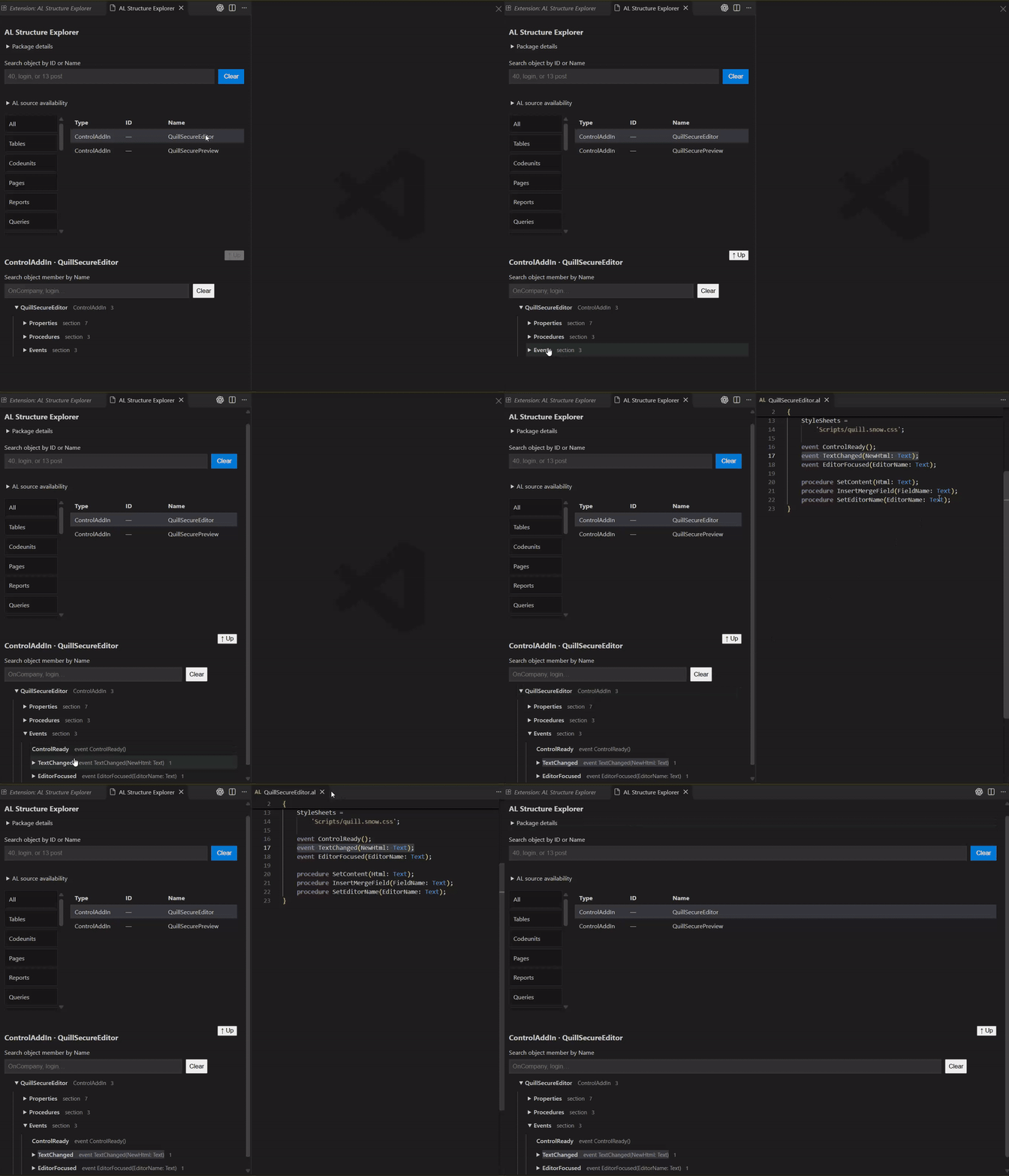
Control add-in events
Requirements
Other backend versions are not currently supported. Microsoft DLLs and the .NET runtime are not included, downloaded or copied by the extension. First-time setupAlternative extension installationYou can also install the extension from a PowerShell terminal: This installs the latest available version from Visual Studio Marketplace. Visual Studio Code must already be installed and the 1. Install .NET 8Install the Windows x64 .NET Runtime 8.0.x from Microsoft's .NET 8 download page. Select .NET Runtime under Run apps and use the latest available 8.0 servicing release. If .NET 8 is already installed through the SDK or Desktop Runtime, a separate runtime installation may not be necessary. 2. Obtain the compatible backendDownload these exact packages from their official NuGet Gallery pages using Download package. Review each package's license terms. Backend setup is required once before opening your first package.
A .nupkg is a ZIP archive. Open it with an archive utility, or make a copy with a .zip extension and extract that copy. Enable file-name extensions in File Explorer when renaming. Extract each package into its own folder so files from different packages do not overwrite one another. Create a separate backend directory outside the extension installation, for example C:\ALTools\ALStructureExplorer\17.0.34.45391. Copy the three DLLs from the exact paths above directly into that directory. Keep the downloaded packages and their license notices for reference. Leave the DLL file names unchanged. The directory must contain these files directly:
The net7.0 Roslyn assemblies run under our .NET 8 worker. Selecting those files does not require installing .NET 7. Use the net7.0 files to match the tested configuration. Optional SHA256 checks:
In PowerShell, run Get-FileHash -Algorithm SHA256 with the full path to a DLL to compare its hash. 3. Configure the extension
The corresponding settings are alStructureExplorer.compilerDirectory and alStructureExplorer.dotnetPath. They accept absolute paths without surrounding shell quotes or command arguments. Select the actual directory or executable through the commands above; environment-variable expressions are not expanded in these settings. The extension loads the files from the selected external directory. The package-specific Microsoft and Roslyn license terms apply to those components. Browse a package
Selecting another object or successfully opening another package clears the extension's AL preview; ordinary editor tabs remain open. Opening progress appears after 500 ms, without percentages. Package opening has a 120-second timeout and supports cancellation. A canceled or failed opening preserves the previous catalog. Source availability and limitationsOnly AL source actually contained in the package can be explored. Symbols-only or dependency packages may contain no AL source. Manifest diagnostics do not prevent viewing otherwise available AL source. A source file may contain several objects. Conditional compilation follows the parser's active configuration; inactive declarations may be omitted. This may differ from the configuration used to build the original package. System fields may have no explicit AL declaration. References to such fields are identified accordingly. This is a structural navigator, not a full compiler or semantic validator. Cross-package reference resolution and execution of AL code, report layouts, control add-ins or DotNet declarations are outside its scope. Browser-based VS Code, virtual and untrusted workspaces, and non-Windows use are not supported in version 1.0.2. Other Windows architectures have not been validated. Package parsing runs locally. A Microsoft tooling installation or VS Code may have its own data and privacy terms. Troubleshooting and support
For diagnostics, open View → Output → AL Structure Explorer. See support information for the information to include in a report and release notes for the release summary. LicensingSAN Business Solutions' own extension and worker are supplied under the AL Structure Explorer Freeware License 1.0. Personal and commercial use is free. Modification and external distribution require prior written permission from SAN, subject to mandatory applicable law. Review the license before installing. On first use, read the full license in the confirmation dialog and select Accept to continue or Decline to stop. Acceptance is stored locally for this license edition and text. Microsoft components remain subject to their own applicable terms. Obtain and use the external backend under those terms. SAN's Freeware License covers SAN's own extension, worker and documentation. The extension does not distribute Microsoft DLLs. Support informationAL Structure Explorer 1.0.2 is developed by SAN Business Solutions. The supported baseline is Windows x64, VS Code 1.145.2 or later and .NET Runtime 8. Backend versions are specified in the README. ContactFor support enquiries, visit https://www.sanbs.nl/. For license questions and written permission to modify or externally distribute the Software, contact ed.sanosian@outlook.com. Support is subject to the AL Structure Explorer Freeware License 1.0. Except where applicable law requires otherwise, SAN has no obligation to provide technical support, updates or compatibility with future tooling versions. No response-time commitment or service-level agreement is offered. Before reporting an issue
For catalog or navigation issues, include the package name/version and object Type, ID and Name. State whether the issue affects one package or several, and whether canceling or reopening changes the behavior. Information to shareUse this report format:
Share only material you have permission to disclose. Remove credentials, tokens, personal paths and confidential source or business information. A small synthetic AL example is preferable to a full proprietary package when it reproduces the issue. Do not send Microsoft DLLs with a report. We do not need backend binaries to identify their reported versions. ScopeSupport concerns structural navigation, package diagnostics, source positions and external-backend setup. AL compilation errors, Business Central server issues and Microsoft account or licensing decisions may require the relevant Microsoft support channel. A successful setup check or parsing result is a technical result; it is not a licensing determination. Release notes1.0.2 — prepared update
1.0.1 — 8 November 2026
1.0.0 — 8 November 2026First stable release: navigation across 20 AL declaration types, source-position highlights, package diagnostics, member search, external-backend setup and cancelable package opening. Full license textSAN Business Solutions — AL Structure Explorer Freeware LicenseLicense edition 1.0 — approved 7 November 2026 Approved by the Licensor on 7 November 2026. Effective for the covered Software upon its official release.
1. Parties and scope“SAN” means the Licensor identified above. “Software” means SAN's own AL Structure Explorer extension, its accompanying .NET worker and documentation supplied with this license. “You” means the individual using the Software, or the legal entity on whose behalf an authorized person accepts this license. The Software is licensed, not sold. This is a proprietary freeware license, not an open-source license. Microsoft components, third-party software and AL source or packages inspected using the Software are not licensed under this agreement. Their respective terms and ownership continue to apply. Before using the Software, review this license. By selecting Accept in the Software's license prompt, you agree to its terms. If you do not agree, select Decline and do not use the Software. If you accept on behalf of an organization, you confirm that you are authorized to bind that organization. 2. Free personal and commercial useSubject to this license, SAN grants you a non-exclusive, royalty-free license to install and use unmodified copies of the Software for:
You may install the Software on devices used by you and, if you are an organization, by your employees and contractors acting on your behalf and under your responsibility. Contractors receive no independent distribution or reuse rights under your organization's license. You may make reasonable backup copies and internally deploy unmodified copies within the same legal entity for the authorized users above. Preserve this license and all applicable ownership notices with those copies. No per-user, per-device or commercial-use fee is payable under this license. You may charge for your own development or consulting services that use the Software, but not sell or sublicense the Software itself. This license does not transfer rights in the AL source you inspect or in your own work product. SAN does not acquire ownership of your source code or work product merely because you use the Software. 3. Modification and external distributionExcept as expressly allowed by this license or by mandatory applicable law, SAN's prior written permission is required to:
External distribution includes supplying a VSIX or its contents through a public or private repository, download site, customer delivery or another extension package. A customer or affiliated company that is a separate legal entity is a third party for this purpose. You may freely share links to SAN's official distribution page. Recipients may obtain the Software from that source under the applicable license. Normal configuration through supported settings, selecting an external backend, and inspecting AL source are permitted use, not modification of the Software. Nothing in this license limits rights that applicable law makes non-waivable, including applicable rights concerning backup, observation, study, testing or interoperability. Restrictions in this license apply only to the extent legally enforceable. 4. Ownership and noticesSAN and its applicable licensors retain their intellectual property rights in the Software. All rights not expressly granted are reserved. Do not remove or alter copyright, license or other ownership notices. No permission is granted to use SAN's names, logos or trademarks to brand another product or imply SAN's endorsement. Accurate identification of the Software and attribution to SAN are permitted. The availability of readable JavaScript or other code in a distribution does not grant permission to reuse, modify or redistribute it beyond this license. 5. Microsoft and other dependenciesThe Software may require separately installed Microsoft AL tooling and a .NET runtime. These components are not supplied or sublicensed under this license. You must obtain and use dependencies under their applicable terms. This license does not grant rights to Microsoft software, authorize its redistribution or establish that a particular integration is permitted by Microsoft. The Software is a SAN product. This license does not represent Microsoft approval, sponsorship or a commitment of Microsoft support. 6. Versions, duration and supportThe rights granted for a release supplied under this license continue unless terminated under Section 9. A later license change does not retroactively impose fees or different restrictions on a previously supplied release. Except to the extent required by applicable law, SAN is not obliged to provide updates, new features, continued availability of downloads, technical support or compatibility with future versions of Microsoft tooling or VS Code. New releases may be subject to separately stated terms. Support enquiries may be directed to https://www.sanbs.nl/. 7. WarrantyTo the fullest extent permitted by applicable law, the Software is provided “as is” and “as available”, without warranties of merchantability, fitness for a particular purpose, accuracy or uninterrupted operation. Structural results and source navigation are development aids. You remain responsible for reviewing results and for decisions made using them. Nothing in this section excludes a warranty or remedy that cannot lawfully be excluded. 8. LiabilityTo the fullest extent permitted by applicable law, SAN is not liable for indirect or consequential loss, loss of profit or business opportunity, or loss of data arising from use of or inability to use the Software. Nothing in this license excludes or limits liability where prohibited by law, including liability for fraud, intentional misconduct, gross negligence, or death or personal injury to the extent it cannot lawfully be excluded or limited. This license does not set a general monetary cap on liability. The exclusions and limitations above apply only to the extent permitted by applicable law. 9. TerminationSAN may terminate your license by written notice if you materially breach its terms and fail to remedy a remediable breach within 30 days after receiving notice identifying it. For a material breach that cannot be remedied, SAN may terminate this license with immediate effect by written notice describing the breach and explaining why it cannot be remedied, but only to the extent permitted by applicable law. The 30-day remedy period above continues to apply to remediable material breaches. On termination, stop using the Software and delete copies under your control, except copies that applicable law requires you to retain. Retained copies may not be used under the terminated license. Sections concerning ownership, third-party rights, warranty, liability and interpretation survive termination to the extent applicable. 10. Written permission and interpretationPermission to modify or externally distribute the Software must come from Eduard Sanosian, or another representative duly authorized by SAN, and expressly identify its scope. Written permission may be provided by email through ed.sanosian@outlook.com. A particular permission does not grant rights outside its stated scope. If a provision is unenforceable, the remaining provisions continue to apply to the extent permitted by law. This license is governed by the laws of the Netherlands. This choice does not deprive users of mandatory rights or protections that apply despite that choice, including mandatory consumer protections. The courts having jurisdiction under applicable law shall have jurisdiction over disputes arising out of or in connection with this license. Nothing in this license limits any mandatory rights concerning jurisdiction or access to courts. This license is issued in English. No Russian translation forms part of this release. Mandatory applicable requirements concerning language and information provided to users remain unaffected. |